Most affiliate programs don’t fail because the commission rates are wrong. They fail because new partners sign up, get a generic welcome email, and never make their first promotion. The gap between approval and activation is where most programs lose momentum, and it almost always comes down to a broken process for affiliate onboarding in WordPress that leaves partners guessing instead of promoting.
If your affiliate program isn’t generating sales within the first two weeks of a partner joining, the onboarding process is the first thing to fix. Ultimate Affiliate Pro is built specifically for this workflow, giving WordPress and WooCommerce store owners a self-hosted setup that takes new partners from registration to active promotion without requiring manual intervention at every step. Check out the pricing options to see which plan fits your program.
Set Up the Core Program Before Inviting Affiliates
Getting the foundation right before you recruit a single affiliate saves significant rework later. Your commission rules, cookie settings, and plugin integrations should all be locked in before the first registration form goes live.
Choose a Self-Hosted Affiliate Plugin That Fits Your Stack
Your first decision is whether to use a self-hosted affiliate plugin or a third-party network. For WordPress and WooCommerce store owners, a self-hosted solution keeps data inside your site, eliminates per-transaction fees, and gives you direct control over commission rules and affiliate data.
Ultimate Affiliate Pro is a strong fit here. It handles tracking, commission management, multi-level marketing support, and payout processing from a single WordPress dashboard. Competitors like AffiliateWP and Post Affiliate Pro also exist in this space, but they lack some of the built-in MLM and tiered commission features that come standard with Ultimate Affiliate Pro.
When evaluating any affiliate management plugin, check for:
WooCommerce, Easy Digital Downloads, or LMS integration
Custom commission rules per product, category, or user role
Payout integrations with Stripe and PayPal
Affiliate portal with real-time reporting
Connect WooCommerce, Forms, Memberships, or LMS Tools
A plugin that only tracks simple WooCommerce product sales will limit you fast. If you sell subscriptions, memberships, or digital courses, you need an affiliate software solution that connects to those systems and attributes recurring revenue correctly.
Ultimate Affiliate Pro integrates with WooCommerce Subscriptions, Ultimate Membership Pro, WPForms, and popular LMS plugins, which means a WooCommerce affiliate who refers a subscription customer can earn commissions on renewals, not just the initial sale.
Define Default Commission Rules and Cookie Settings
Set your default commission structure before going live. Decide between percentage-based and fixed commissions, and set cookie duration based on your typical sales cycle. A 30-day cookie works for impulse purchases; a 60 to 90-day window makes more sense for high-consideration products.
Also decide upfront whether you want to offer lifetime commissions for specific products or affiliate tiers. Changing these rules after affiliates have started promoting creates trust problems and support headaches.
Build a Friction-Free Sign-Up and Approval Flow
Successful affiliate onboarding in WordPress starts with a registration experience that sets the tone for the entire partnership. A confusing or overly long sign-up process will reduce the quality and quantity of applicants before you’ve even had a chance to review them.
Create an Affiliate Registration Form That Filters Low-Quality Applicants
Your affiliate registration form should collect enough information to make a clear approval decision without being so long that it discourages serious applicants. As noted in this affiliate onboarding flow guide, the form itself is often where drop-off begins.
At minimum, ask for:
Name and email address
Website URL or social media profile
How they plan to promote your products
Estimated monthly traffic or audience size (optional but useful)
Avoid asking for tax information at the sign-up stage. Collect that during the payout setup process instead.
Decide Between Automatic Approval and Manual Review
Automatic approval works well if you’re running a low-risk program with publicly available products. Manual review makes sense if you’re in a regulated industry, offering high commission rates, or want to vet the quality of affiliate traffic before it hits your store.
Ultimate Affiliate Pro supports both workflows. You can auto-approve affiliates who meet specific criteria and flag others for manual review, which gives you a middle ground between full automation and reviewing every application by hand.
Map the Affiliate Onboarding Process From Application to First Promotion
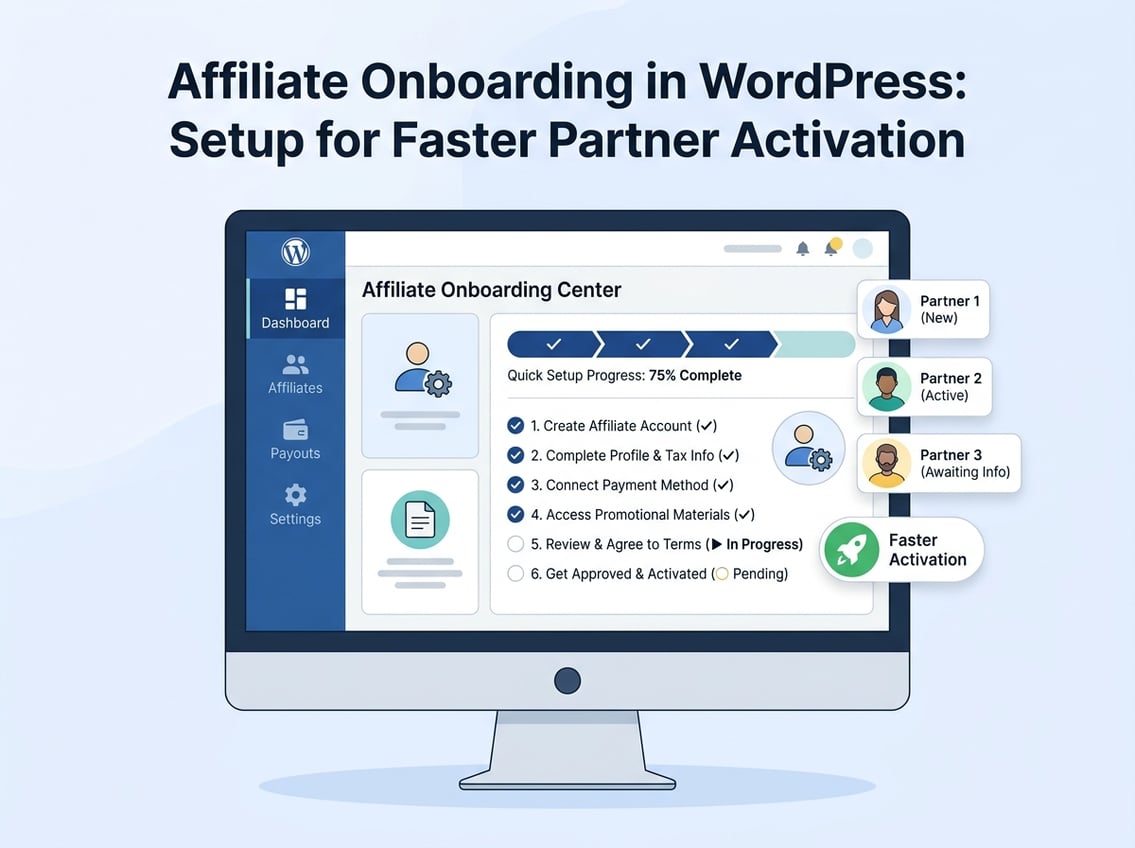
Think of the affiliate onboarding in WordPress as a short funnel with defined steps:
Affiliate submits registration form
Approval email sent (automatic or manual)
Welcome email with login credentials and first-steps checklist
Affiliate logs into dashboard, grabs referral link
Affiliate makes first promotion within 7 days
Every step should be mapped and automated where possible. Manual handoffs between steps are where activation drops off. If the affiliate has to wait two days for a response email and then figure out where to find their links on their own, many of them won’t bother.
Create an Affiliate Portal That Helps New Partners Take Action
The affiliate portal is where new partners either get oriented quickly or get confused and go quiet. A well-structured dashboard removes the most common activation barriers on day one. Every element in the portal should point the affiliate toward their first promotional action.
What to Include in the Affiliate Dashboard on Day One
When an affiliate logs in for the first time, the dashboard should immediately show them what they need to start promoting. That means no empty states, no placeholder data, and no vague instructions.
The core dashboard elements that drive activation:
Unique referral link, pre-generated and ready to copy
Earnings summary, even if it’s zero, with a clear label
Commission rate, spelled out plainly
Quick-start guide or video, ideally three minutes or less
Payout threshold, so affiliates know what they’re working toward
Give Affiliates Ready-to-Use Links, Coupons, and Landing Pages
Don’t make new affiliates figure out how to create their own promotional assets. Pre-build them. Ultimate Affiliate Pro lets you generate custom affiliate links, assign unique coupon codes, and create affiliate landing pages that are tied directly to individual accounts.
Affiliate coupons are especially useful for content creators and social media influencers who prefer sharing a discount code over a raw URL. A 10% coupon code is easier to mention in a YouTube video or Instagram story than a long tracking link.
Use Email Notifications to Guide the First Week
Automated email notifications are one of the most effective tools for pushing affiliates from registration to their first sale. Set up a short sequence:
Day 0: Welcome email with login link and quick-start checklist
Day 2: Reminder with their referral link and coupon code
Day 5: Tip on how to create effective promotional content
Day 7: Check-in with a link to the affiliate dashboard
This sequence works best when emails are short, direct, and include a clear single action in each one. Keep the copy focused on what the affiliate should do next, not on general information about your brand.
Automate Tracking, Reporting, and Payout Readiness
Manual tracking and delayed payout setup are two of the fastest ways to lose affiliate trust. Automating these pieces early removes friction for both the affiliate and the program administrator.
Track Referrals Accurately Across WooCommerce Orders
Referral tracking in a WooCommerce store involves more than counting clicks. You need to track the full conversion path, attribute orders to the correct affiliate, and handle edge cases like:
Customers who browse on mobile and purchase on desktop
Orders placed with a coupon code but no referral link click
Subscription renewals triggered weeks after the initial referral
Refunds and chargebacks that should reverse commissions
Ultimate Affiliate Pro handles these scenarios through its integration with WooCommerce, including support for subscription-based products via WooCommerce Subscriptions. Cookie-based tracking covers the standard browse-to-purchase path, while coupon tracking catches referrals that happen through discount codes alone.
Use Real-Time Reporting to Spot Activation Problems Early
Real-time reporting isn’t just useful for affiliates. It’s useful for you as a program manager. If you can see which affiliates have clicked but not converted, or which ones haven’t logged in since they registered, you can send targeted re-engagement emails before those partners go cold.
Look for these signals in your reporting dashboard:
Registered but never logged in: These affiliates need a direct prompt with their login link
Logged in but no clicks: They need promotional asset help or content ideas
Clicks but no conversions: Possible landing page or offer issue worth investigating
Prepare Integrated Payouts and Payment Details Up Front
Payout delays are a fast way to demotivate active affiliates. Set up your payment integrations with Stripe or PayPal before you start approving affiliates, and communicate the payout schedule clearly in the onboarding email.
Ultimate Affiliate Pro supports 1-click mass payouts and direct deposit options, which makes paying a large affiliate base at once straightforward. Require affiliates to submit their payment details during registration or immediately after approval so there are no delays when the first payout period arrives.
Improve Early Affiliate Performance Without Adding Admin Work
The goal after activation is to get affiliates to their first sale as quickly as possible, with minimal back-and-forth from your side. Smart program setup does most of this automatically.
Set Simple First-Sale Goals and Promotional Rules
New affiliates perform better when they have a clear, specific target rather than a vague instruction to “start promoting.” A first-sale goal is simple: make one sale within the first 30 days.
You can reinforce this with a small bonus commission on the first sale, which costs little but creates a concrete reason to act quickly. Keep promotional rules simple at launch. Prohibit self-referrals, PPC bidding on branded keywords, and coupon sharing on deal sites, and communicate these rules clearly in the onboarding email.
Use Tiers, Lifetime Commissions, and Coupons Carefully
Tiered commissions and lifetime commission structures work well as incentives for established affiliates, but they can confuse new partners who are still learning the program basics.
Introduce tiers after an affiliate makes their first three to five sales. At that point, they understand the program well enough to understand what the next level requires and why it’s worth working toward.
Affiliate coupons, on the other hand, are useful from day one. Assign a unique coupon to every approved affiliate automatically. It gives them an immediate promotional tool and makes coupon-based referrals trackable without relying on the affiliate to share their link correctly.
Fix Common Onboarding Drop-Offs Before They Hurt Growth
The most common affiliate onboarding drop-offs happen at predictable points. As outlined in this practical onboarding activation guide, affiliates who don’t receive clear promotional materials and a defined next step within 48 hours of approval are significantly less likely to ever make their first promotion.
Audit your own program for these friction points:
Registration form too long: Reduce to five fields maximum
Approval delay over 24 hours: Set up auto-approval or check applications daily
Dashboard with no pre-built assets: Add default links and coupons on approval
No follow-up email after day one: Set up a minimum three-email onboarding sequence
Unclear payout threshold: State the minimum payout amount in the welcome email
Fixing these points before you launch a recruitment push is far more efficient than trying to re-engage cold affiliates after the fact.
Frequently Asked Questions
What details should your affiliate onboarding in WordPress email include so new partners can start promoting within 24 hours?
The welcome email should include the affiliate’s login link, their unique referral link, their assigned coupon code if applicable, the commission rate, and the payout schedule. Add a single clear action item, such as “log in and copy your referral link,” so the affiliate knows exactly what to do next.
Which WordPress or WooCommerce affiliate plugin is the best fit if you need payouts, coupon tracking, and approval workflows?
Ultimate Affiliate Pro covers all three in a single self-hosted plugin, including Stripe and PayPal payout integrations, coupon-based referral tracking, and both automatic and manual approval options. Other plugins like AffiliateWP handle basic tracking well but require add-ons for features that come standard in Ultimate Affiliate Pro.
How do you set commission rates and rules (percentage vs fixed) without killing your margins?
Start by calculating your customer acquisition cost and maximum allowable commission based on your product margin. Percentage commissions work well for variable-price products; fixed commissions are easier to predict for subscriptions or flat-rate services. Set a conservative default rate and adjust for high-performing affiliates using tiered rules rather than raising the baseline.
What’s the fastest way to generate unique referral links, coupons, and creatives for each affiliate inside your WordPress dashboard?
With Ultimate Affiliate Pro, referral links are generated automatically on affiliate approval. Coupon codes can be assigned individually or in bulk from the admin panel. To keep creative delivery fast, build a shared asset folder with banners, product images, and sample copy that affiliates can access directly from their dashboard on day one.
How do you prevent affiliate fraud on a WooCommerce store (self-referrals, coupon abuse, fake leads) without annoying legit partners?
Block self-referrals by excluding purchases made from the affiliate’s own account or IP address. For coupon abuse, set single-use rules at the coupon level in WooCommerce and monitor for bulk coupon sharing on deal sites. Flag unusually high conversion rates from a single affiliate for manual review before approving those commissions.
How do you automate affiliate payouts from WooCommerce (PayPal/Stripe) and handle refunds, chargebacks, and reversals cleanly?
Set a minimum payout threshold and a defined payment cycle, then use Ultimate Affiliate Pro’s mass payout feature to process all eligible affiliates in one action via PayPal or Stripe. For refunds, configure commission reversal rules so that commissions are automatically voided when a WooCommerce order is refunded within a set window, typically 14 to 30 days.