Pretty affiliate links put the tracking code in the path of the URL, as in yourstore.com/ref/emma.collins, instead of a query string such as ?ref=emma.collins. Custom slugs go one step further: each affiliate picks a word of their own, such as emmasdeals, to use instead of their username. Both are modules you turn on in Ultimate Affiliate Pro.
Short, branded links are easier to read aloud, print and share on social media, and they hide the affiliate’s WordPress username. They track exactly like standard affiliate referral links, and the links your affiliates already shared keep working.
Before you start
- Ultimate Affiliate Pro installed, with your license active.
- Pretty permalinks in WordPress: any structure other than Plain, in Settings›Permalinks.
- Affiliate Link Format set to Username (the default), in Ultimate Affiliate Pro›Settings›General Settings. With the Affiliate ID format, also turn on Search URL for Both Formats.
Link formats compared #
ref, campaign parameter cmp- Standard link
- yourstore.com/shop/?ref=emma.collins
- Pretty link
- yourstore.com/shop/ref/emma.collins
- Standard link with custom slug
- yourstore.com/shop/?ref=emmasdeals
- Pretty link with custom slug
- yourstore.com/shop/ref/emmasdeals
- Pretty link with a campaign
- yourstore.com/shop/ref/emmasdeals/cmp/instagram
When a visitor opens a pretty link, Ultimate Affiliate Pro records the visit, saves the tracking cookie and redirects to the clean page URL, here yourstore.com/shop/. The path segment uses the same word as your URL Parameter Name, so if you renamed ref to partner, the link becomes /partner/emmasdeals.
Turn on Pretty Affiliate Links #
Go to Ultimate Affiliate Pro›Modules and open Pretty Affiliate Links.

- Turn on Activate/Hold Pretty Affiliate Links, then click Save Changes at the bottom of the box.
- Go to Settings›Permalinks and click Save Changes without changing anything. This clears cached rewrite rules, a good precaution whenever you change link formats.
Creatives in the Affiliate Portal now use the pretty format. The Default Affiliate Link stays in the standard format, and affiliates choose the format for each link they build in the link generator (step 4).
Turn on Custom Affiliate Slug #
Go to Ultimate Affiliate Pro›Modules and open Custom Affiliate Slug.
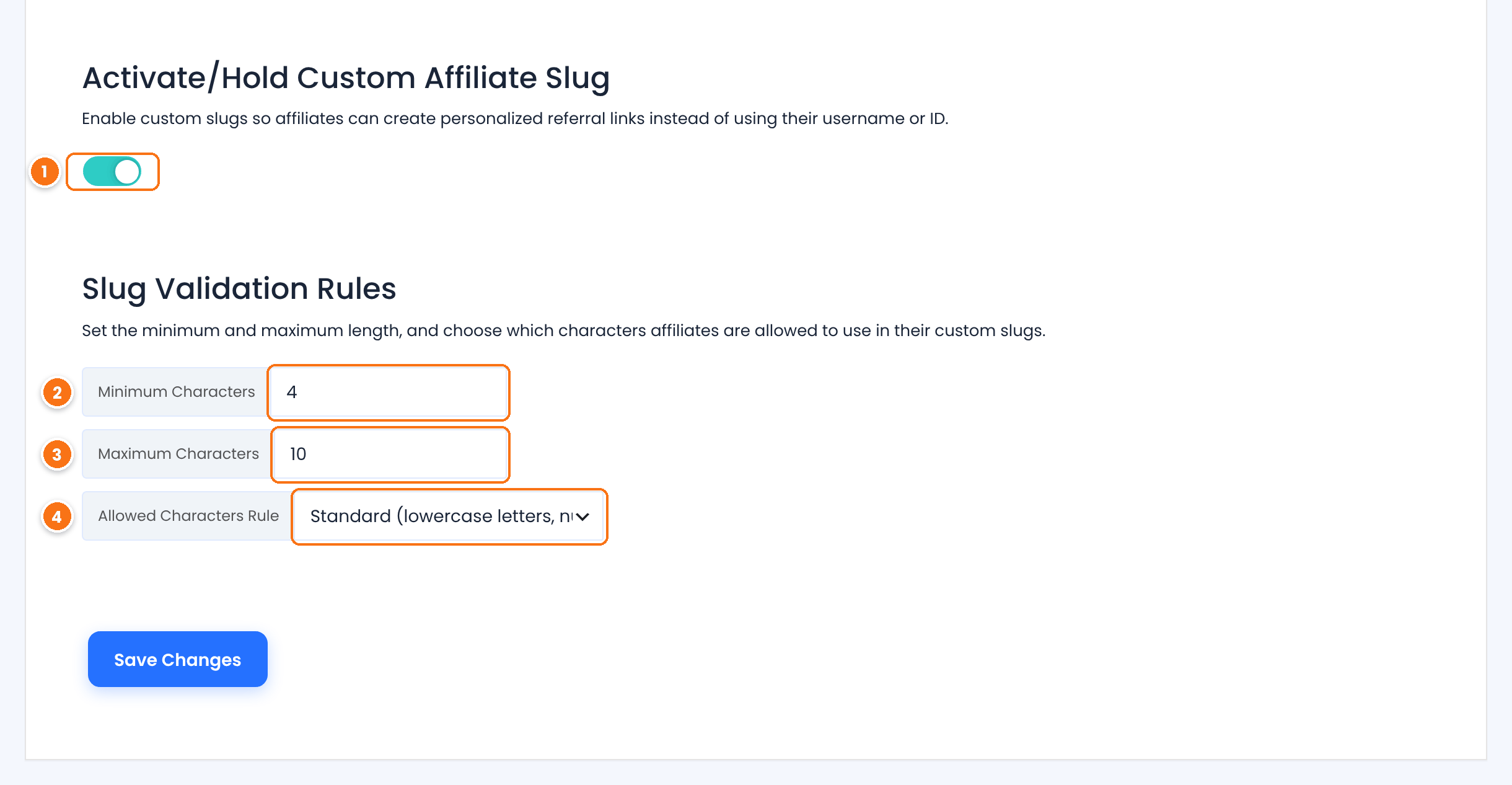
Turns the module on and adds the Your Affiliate Slug tab to the Affiliate Portal, under Profile.
The shortest slug an affiliate can save.
Default: 4
The longest slug an affiliate can save.
Default: 10
How strict the slug must be.
- Standard (the first option): letters and numbers, for example
emmasdeals. - Characters and digits: at least one lowercase letter and one digit, for example
emma2026. - Characters, digits, minimum one uppercase letter: at least one lowercase letter, one digit and one uppercase letter, for example
Emma2026.
Default: Standard
Click Save Changes. Every slug must be unique: it cannot match another affiliate’s slug or any existing WordPress username. Spaces and symbols are not accepted.
Assign a slug to an affiliate #
Affiliates set their own slug in the Affiliate Portal, under Profile›Your Affiliate Slug. You can also set or change it for them, in the Assign Custom Affiliate Slug box on the same module page.
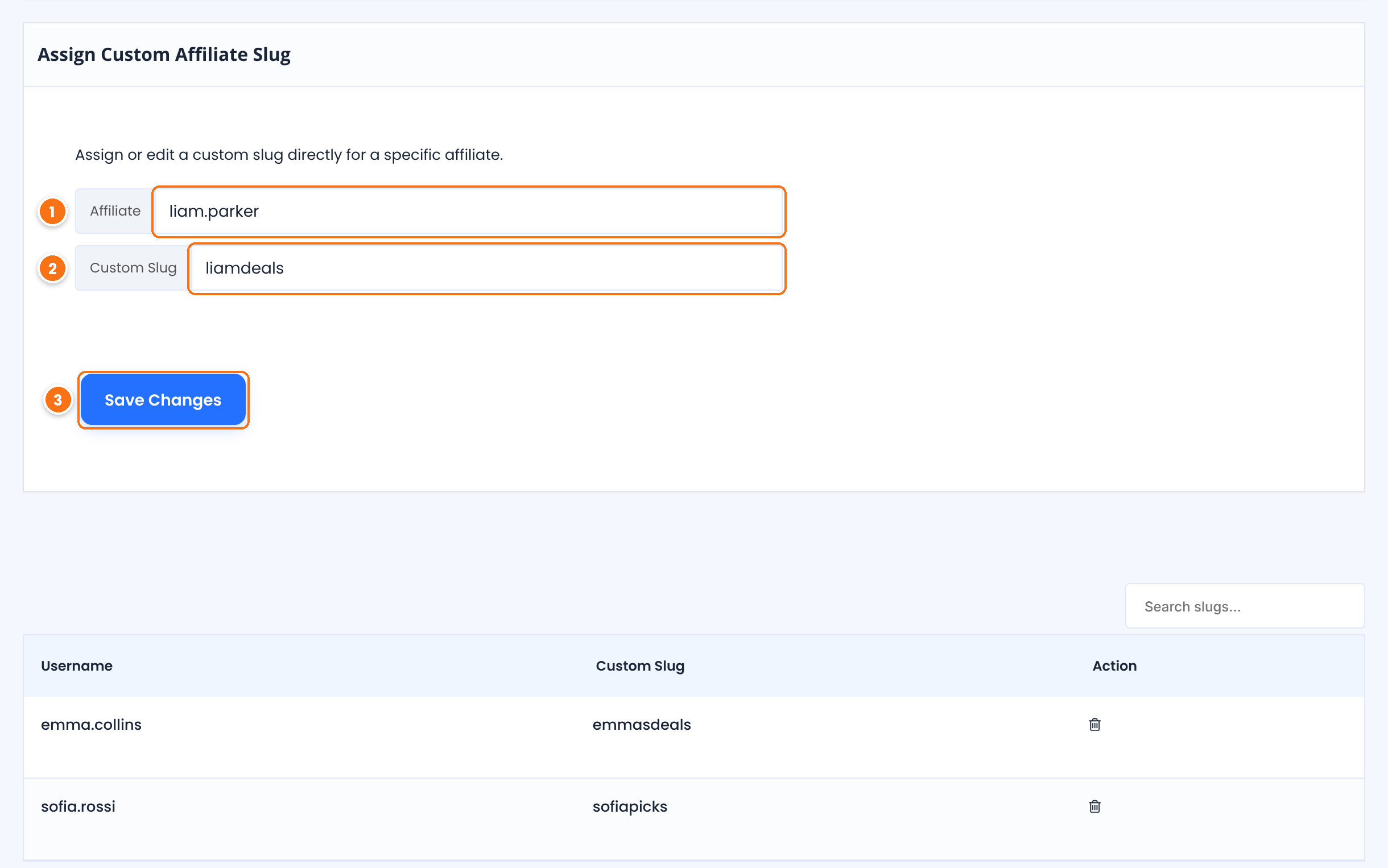
- In Affiliate, start typing the affiliate’s username and pick them from the list.
- In Custom Slug, type the slug, for example
liamdeals. - Click Save Changes. The slug appears in the list below, where you can search slugs or remove one with the trash icon.
You can also fill in the Affiliate Custom Slug field when you edit an affiliate in Ultimate Affiliate Pro›Affiliates. To give affiliates a random code instead of a word, see the Random Affiliate ID add-on.
Build pretty links in the Affiliate Portal #
Affiliates build links in Marketing›Affiliate Links. With a custom slug, the page also shows an Alternative Slug Link to your homepage, next to the Default Affiliate Link.
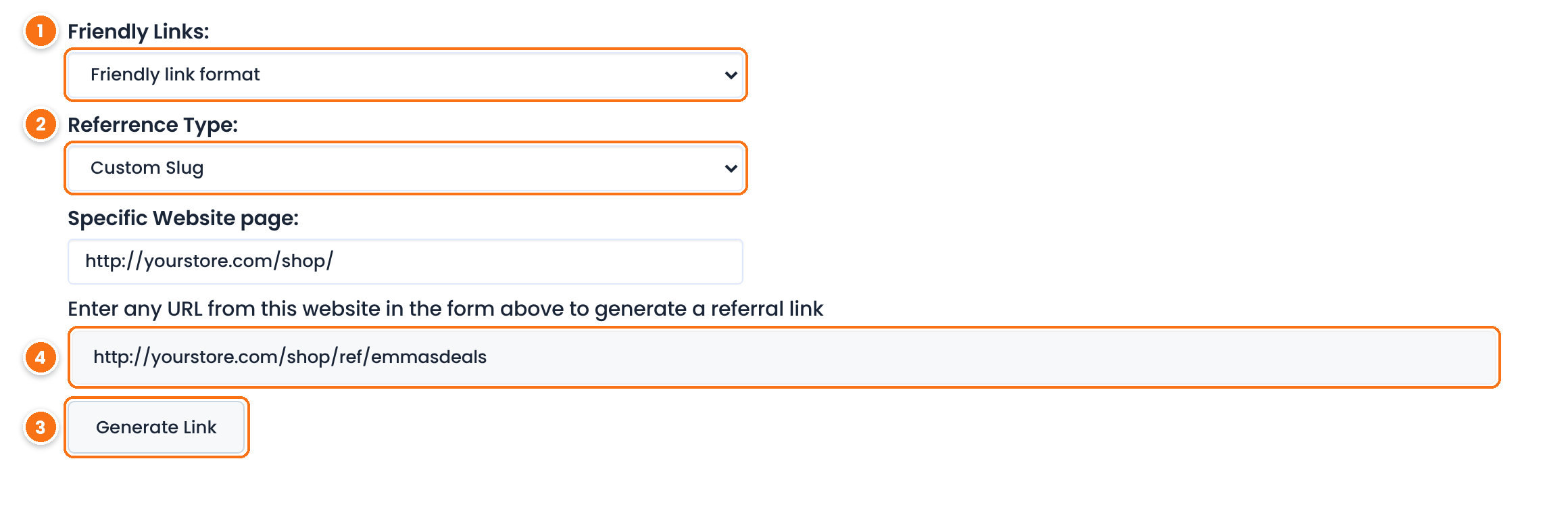
- In Friendly Links, the affiliate picks Friendly link format. Default link format builds a standard
?ref=link. - In Referrence Type, they pick Custom Slug to use their slug, or Tracking Code to use their username.
- They paste a page URL from your site in Specific Website page and click Generate Link.
- The new link appears above the button, ready to copy, and is saved in the Generated Affiliate Links list.
Test it #
- Open a pretty link, such as
yourstore.com/shop/ref/emmasdeals, in a private browser window. - Check that the page opens and the address bar changes to
yourstore.com/shop/. - Go to Ultimate Affiliate Pro›Clicks and check that the visit is credited to the right affiliate.
Tip
If a pretty link opens a 404 page, resave your WordPress permalinks and clear your site cache. See affiliate link opens a 404 page.
Frequently asked questions #
Do standard links keep working after I turn on pretty links?
Yes. Ultimate Affiliate Pro recognizes both formats at the same time, so links your affiliates already shared keep tracking.
Can an affiliate use their username and their custom slug at the same time?
Yes. Links with the username and links with the slug both credit the same affiliate. The slug is an extra way to link, not a replacement.
Can two affiliates use the same slug?
No. Each slug is unique and cannot match another affiliate’s slug or an existing WordPress username.
I use the Affiliate ID format. Can I use custom slugs?
Yes. Turn on Search URL for Both Formats in the Affiliate Links section of General Settings, so links with a slug or a username are recognized next to links with the affiliate ID.
The pretty link opens a 404 page. What do I do?
Go to Settings, Permalinks in WordPress and click Save Changes to refresh the rewrite rules. Then clear any page cache and try the link again.


