An affiliate referral link is any page URL from your site with the affiliate’s tracking code added to it, for example yourstore.com/?ref=emma.collins. Ultimate Affiliate Pro creates a default link for every affiliate and lets affiliates build links to any page from the Affiliate Portal. You choose how the links look in the settings.
When a visitor opens a referral link, Ultimate Affiliate Pro records the click and saves the affiliate in a cookie, so the affiliate is credited for the sale even if the visitor browses other pages first. To see how this works across your site, read how affiliate tracking works, or the overview of the affiliate tracking features.
Before you start
- Ultimate Affiliate Pro installed, with your license active.
- An Affiliate Portal page where affiliates log in. See Affiliate Portal settings.
- At least one approved affiliate, so you can test a link.
How an affiliate referral link is built #
Every referral link has the same three parts: a page from your website, the URL parameter and the affiliate’s tracking code. The example below uses the default settings.
ref, format Username- Page from your website
- yourstore.com/shop/
- URL parameter
- ref
- Tracking code (username)
- emma.collins
- Referral link
- yourstore.com/shop/?ref=emma.collins
- Same link, Affiliate ID format
- yourstore.com/shop/?ref=1
Choose the link format #
Go to Ultimate Affiliate Pro›Settings›General Settings and scroll to the Affiliate Links section.
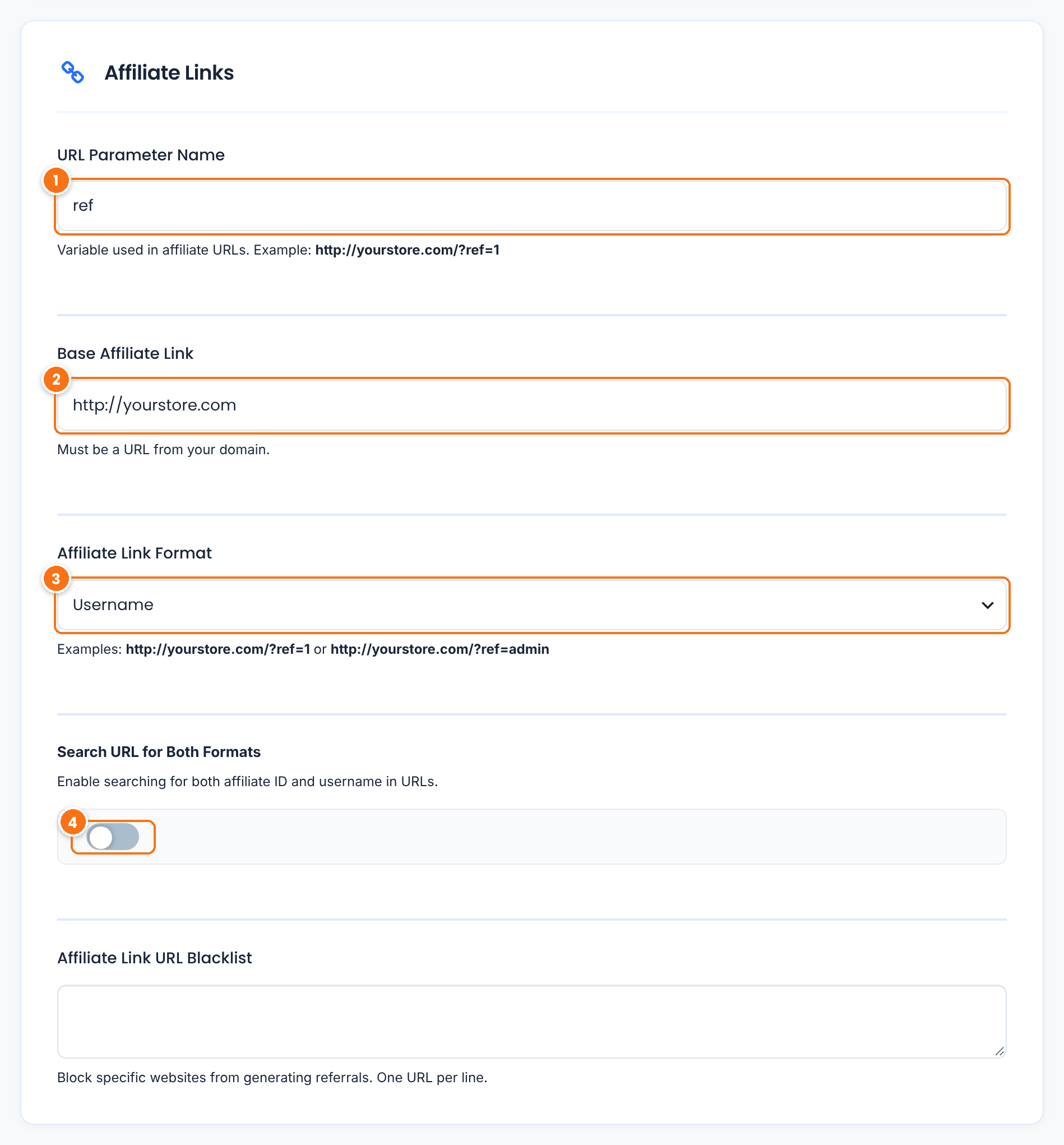
The name that comes before the tracking code in every link, as in ?ref=. Use a short word with letters only, such as ref, aff or partner.
Default: ref
The page each affiliate’s Default Affiliate Link opens. Use your homepage, or a page that converts better, such as your pricing or shop page. It must be a URL from your own domain.
Default: your homepage
What the tracking code shows in the link.
- Username: the affiliate’s WordPress username, for example
?ref=emma.collins. Easy to read and remember. - Affiliate ID: the affiliate’s numeric ID, for example
?ref=1. Keeps usernames out of public links.
Default: Username
When this is on, Ultimate Affiliate Pro recognizes a link whether it carries the username or the affiliate ID. Turn it on before you switch from Username to Affiliate ID, so links your affiliates already shared keep tracking.
Default: Off
Referring websites that should not generate referrals, one URL per line, written as the full address, for example https://example.com/. When a visitor arrives from one of these URLs, the visit is not tracked.
Click Save Changes at the bottom of the page.
Tip
Pick the URL parameter and the format before affiliates start sharing links. On the same screen, Redirect Same Page Without URL Parameters (in Redirect Settings, on by default) removes ?ref=… from the address bar after the visit is tracked, so visitors see a clean URL.
Share links from the Affiliate Portal #
Affiliates get their affiliate referral links in the Affiliate Portal, under Marketing›Affiliate Links.
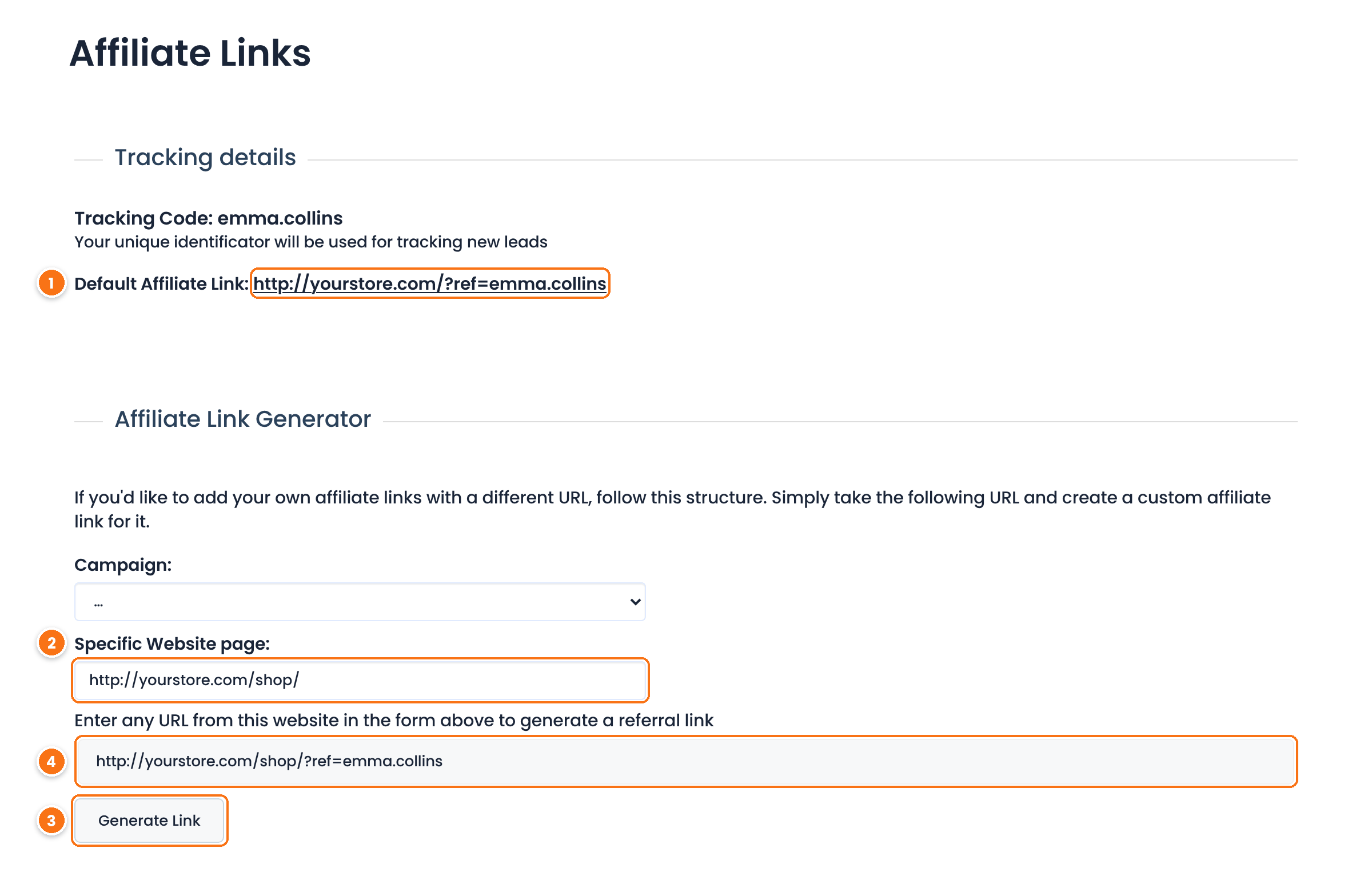
- Default Affiliate Link is ready to share. It opens the Base Affiliate Link you set in step 1.
- To link to another page, the affiliate pastes the page URL in Specific Website page, in the Affiliate Link Generator box, for example a product or a blog post from your site.
- They click Generate Link.
- The referral link for that page appears above the button, ready to copy.
If the affiliate has created campaigns in Marketing›Campaigns, they can pick one in the Campaign dropdown to add it to the link and compare results by channel. See Campaigns. Affiliates can also add the tracking code to any URL from your site themselves: ?ref=emma.collins at the end, or &ref=emma.collins when the URL already has a ?.
Share links in other formats #
Each option below is a module you turn on in Ultimate Affiliate Pro›Modules.
Path-style links such as yourstore.com/ref/emma.collins, with the Pretty Affiliate Links module. See Friendly affiliate links.
With the Custom Affiliate Slug module, affiliates pick a word of their own, such as ?ref=emmasdeals, instead of their username. See Custom affiliate slug.
Show each link as a downloadable QR code, or add social share buttons to the Affiliate Portal.
For more ways to build branded affiliate links in WordPress, see custom affiliate links for WordPress.
Test it #
- Copy a referral link from the Affiliate Portal of a test affiliate.
- Open it in a private browser window, where you are not logged in.
- Go to Ultimate Affiliate Pro›Clicks and check that the visit appears for that affiliate.
- Place a test order in the same window, for example in WooCommerce. Check that it appears in Referrals, credited to the affiliate.
Prefer a link with a # instead of a parameter, such as yourstore.com#emma.collins? See Anchor Link.
To let affiliates pick a product and copy its link in one click, turn on Product Links. With the Affiliate Bar, affiliates get a link to any page of your site while they browse it.
Frequently asked questions #
Can affiliates link to any page of my site?
Yes. Any page from your domain works, including products, posts and landing pages. The tracking code is read on whichever page the visitor lands on.
Should I use the username or the affiliate ID?
Usernames make links easier to read and remember. Affiliate IDs keep WordPress usernames out of public links. If you want readable links without usernames, turn on the Custom Affiliate Slug module. With the Affiliate ID format, also turn on Search URL for Both Formats so slug links are recognized.
How long does a referral link keep crediting the affiliate?
As long as the tracking cookie lasts: 360 days by default. Change it in Cookie Expiration (Days), in the Cookie Settings section of General Settings.
I changed the URL parameter. What happens to links already shared?
New links use the new parameter right away. Ask affiliates to replace the links they already shared, or keep the original parameter name.
The referral link opens a 404 page. What do I do?
This usually happens with friendly links. Resave your WordPress permalinks in Settings›Permalinks, then see Affiliate link opens a 404 page.


