Skip to content
  • Try Now
  • Features
    • MLM Affiliate Program
    • Smart Affiliate Tracking
    • Advanced Commission Rules
    • Simplified Affiliate Payouts
    • Ultimate Affiliate Pro vs AffiliateWP vs EasyAffiliate
    • See all Features
  • Integrations
    • WooCommerce
    • Easy Digital Downloads
    • WPForms
    • Ninja Forms
    • See all Integrations
  • Pricing
  • Support
    • Documentation
    • Open a Ticket
  • AddOns
    • Standard Add-Ons
    • Pro Add-Ons
  • Demo
  • Blog
Login
Ultimate Affiliate Pro
  • Try Now
  • Features
    • MLM Affiliate Program
    • Smart Affiliate Tracking
    • Advanced Commission Rules
    • Simplified Affiliate Payouts
    • Ultimate Affiliate Pro vs AffiliateWP vs EasyAffiliate
    • See all Features
  • Integrations
    • WooCommerce
    • Easy Digital Downloads
    • WPForms
    • Ninja Forms
    • See all Integrations
  • Pricing
  • Support
    • Documentation
    • Open a Ticket
  • AddOns
    • Standard Add-Ons
    • Pro Add-Ons
  • Demo
  • Blog
Login
Buy Now
Ultimate Affiliate Pro

Getting Started

12
  • Update Ultimate Affiliate Pro
  • Translate Ultimate Affiliate Pro (WPML, Polylang)
  • Install and activate Ultimate Affiliate Pro
  • How Ultimate Affiliate Pro works
  • Test your affiliate program
  • Requirements and compatibility
  • Manage your license: move, revoke and migrate
  • Affiliate marketing glossary
  • Quick start: launch your affiliate program
  • Settings overview
  • Migrate from AffiliateWP, SliceWP and other affiliate plugins
  • WordPress Multisite and subdomains

Affiliates & Affiliate Portal

10
  • Change texts, labels and messages
  • Affiliate profile picture (avatar)
  • Set up the Affiliate Account Page
  • Manage affiliates: add, approve and edit
  • Affiliate area in WooCommerce and BuddyPress accounts
  • Redirects and wp-admin access for affiliates
  • Customize templates and styles
  • What affiliates see: stats and earnings
  • Affiliate Bar
  • Delete affiliates and referrals, personal data and GDPR

Registration & Login

9
  • Collect opt-in subscribers (Mailchimp and more)
  • Add reCAPTCHA to affiliate forms
  • Set up the registration, login and password pages
  • Approve affiliates and verify their email
  • Turn existing users and customers into affiliates
  • How password reset works for affiliates
  • Customize the affiliate registration form
  • Charge affiliates to join your program
  • Affiliate program terms and conditions

Tracking & Referral Links

10
  • Affiliate referral links
  • Affiliate coupon tracking
  • Friendly affiliate links and custom slugs
  • Direct link tracking: credit affiliates by their website
  • Visits and source details
  • Landing commissions (pay per action)
  • Campaigns
  • How affiliate tracking works
  • Cookie consent and affiliate tracking
  • Affiliate Landing Pages

Commissions & Referrals

16
  • Ranks: commission tiers for affiliates
  • Signup referrals (pay per lead)
  • Commissions on every future order of a referred customer
  • Recurring commissions for subscriptions
  • Own referrals
  • Manage referrals: status, reassign and limits
  • Fair checkout reward
  • Currencies and multi-currency stores
  • Commission rates per product
  • How commissions are calculated
  • Include or exclude products from commissions
  • Affiliate reports and statistics
  • Pay Per Click (CPC) and CPM commissions
  • Refunds and cancelled orders: what happens to referrals
  • Referral and payout statuses explained
  • Prevent affiliate fraud and spam signups

MLM (Multi-Level Marketing)

4
  • Show the MLM tree to affiliates
  • Assign or change an MLM parent
  • Set up an MLM affiliate program
  • MLM structures: unilevel, binary and matrix

Creatives & Promotion

5
  • Social share buttons
  • QR codes for affiliate links
  • Creatives: banners and text links
  • Product Links for affiliates
  • Top Affiliates leaderboard

Payouts

5
  • Store Credit
  • How affiliate payouts work
  • Stripe payouts
  • PayPal payouts
  • Bank transfer and manual payouts

Emails & Notifications

5
  • Email notifications
  • Periodical reports for affiliates
  • Pushover push notifications
  • Contact your affiliates
  • Email template tags reference

Integrations

31
  • Dokan
  • WPForms affiliate tracking
  • Contact Form 7 affiliate tracking
  • Ninja Forms affiliate tracking
  • Bitly affiliate links
  • Zapier
  • myCRED
  • LearnPress affiliate integration
  • LifterLMS affiliate integration
  • Tutor LMS affiliate integration
  • Amelia affiliate integration
  • WP Booking Calendar affiliate integration
  • The Events Calendar affiliate integration
  • Integrations overview
  • WooCommerce
  • Easy Digital Downloads
  • Ultimate Membership Pro
  • Page builders (Elementor, Divi, blocks)
  • MemberPress affiliate integration
  • Paid Memberships Pro affiliate integration
  • Restrict Content Pro affiliate integration
  • MemberMouse affiliate integration
  • Gravity Forms affiliate tracking
  • Fluent Forms affiliate tracking
  • Forminator affiliate tracking
  • LearnDash affiliate integration
  • WooCommerce Subscriptions affiliate tracking
  • Paid Member Subscriptions affiliate integration
  • Formidable Forms affiliate tracking
  • Event Tickets affiliate integration
  • GiveWP affiliate integration

Pro Add-ons

27
  • WooCommerce discounts for referred buyers
  • One Time Reward: one referral per customer
  • Split Commission between affiliates
  • Extended Shortcodes: show content to affiliates and visitors
  • Import referrals via CSV
  • WooCommerce Revenue Sharing
  • Manage Reset Password: a custom reset password page
  • WooCommerce Redirect for affiliates
  • Extension Kit
  • Anchor Link
  • Random Affiliate ID
  • Exchange Rate
  • External Referral Links
  • WooCommerce Product Discounts
  • Remove Dummy Data
  • Payout Request By Affiliate
  • MLM Based On Product Price
  • IP Restrictions
  • Invite Your Friends
  • Fraud Protection
  • Affiliate Own Referrals
  • Pro add-ons: what they are and how to install them
  • Dynamic Coupons: automatic affiliate coupons
  • Rank Achievement – Network Growth
  • Affiliate Manager role
  • Mass Affiliate Conversion
  • Manual Affiliate Order Assignment

Developers

6
  • Import and export data
  • REST API
  • Hooks and filters
  • Shortcodes reference
  • Add a custom tab to the Affiliate Portal
  • Code snippets: ready-to-use examples

Troubleshooting

10
  • Emails are not sent
  • Plugin and theme conflicts
  • PHP errors: 500, parse error, cannot redeclare
  • Referrals or clicks are not recorded
  • Affiliate link opens a 404 page
  • Registration and login problems
  • Referral dates and time zone
  • License activation problems
  • Cache plugins and host caching
  • Before you contact support
  • Home
  • Docs
  • Registration & Login
  • Approve affiliates and verify their email

Approve affiliates and verify their email

4 min read

6 minBeginnerUltimate Affiliate Pro 9.7+

You can approve affiliate applications one by one before new affiliates can log in, or let everyone in right away. Ultimate Affiliate Pro can also ask new affiliates to verify their email address with a link, so only real addresses join your program.

Both checks work on top of the registration form. Use manual approval when you want to review who promotes your brand, and email verification to keep fake sign-ups out. You can use one, both or neither. If you have not set up the form yet, start with Set up the registration, login and password pages.

Before you start

  • Ultimate Affiliate Pro installed, with your license active.
  • A working registration page.
  • Your site can send email. See Email notifications.

How approval works #

Approval is controlled by the WordPress role new affiliates get when they register. WordPress roles decide what a user can do on your site; you can read more about them in the WordPress roles documentation.

Two ways to accept new affiliatesSet in New Affiliate WordPress Role
Automatic
Role Subscriber (default): new affiliates can log in and share links right after they register.
Manual
Role Pending: new affiliates cannot log in until you approve them.
After you approve
The affiliate gets the Role After Approval and the approval email.

Turn on manual approval #

Go to Ultimate Affiliate Pro›Showcases›Registration Form. In the Register Showcase tab, scroll to Additional Settings.
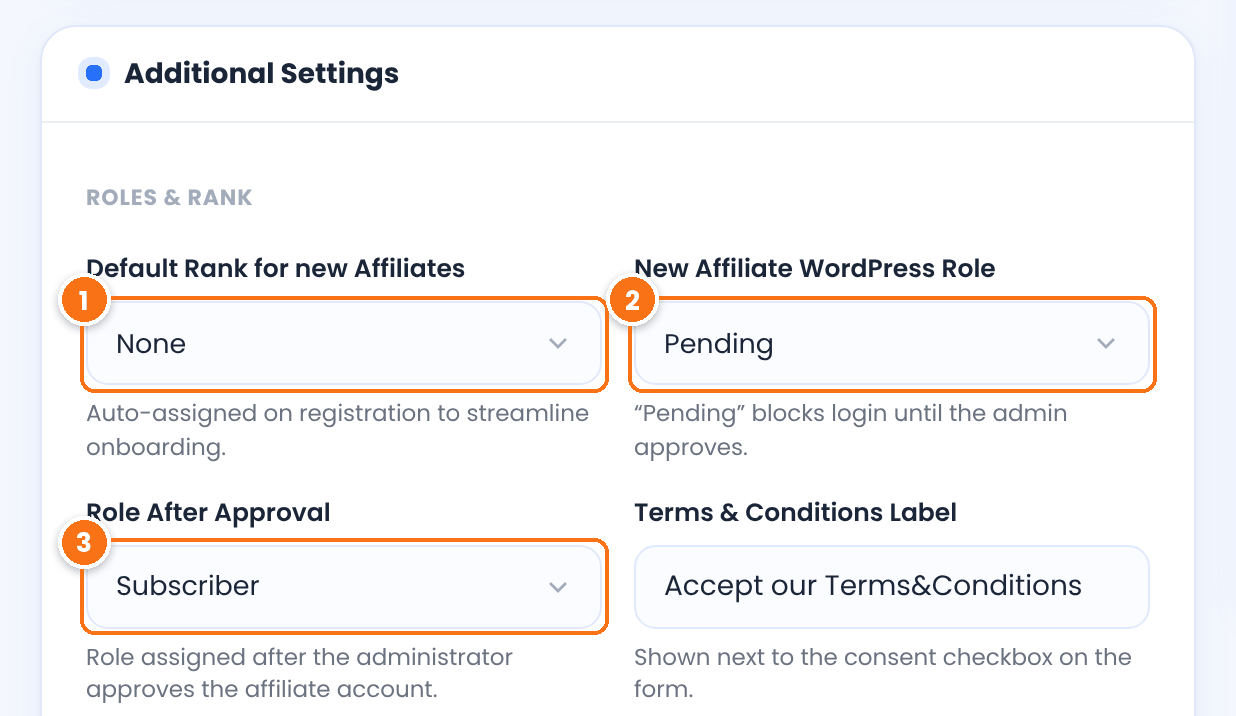
Roles and Rank settings of the affiliate registration form: Default Rank for new Affiliates, New Affiliate WordPress Role set to Pending and Role After Approval
Roles & Rank in the Register Showcase tab, set up for manual approval.
1Default Rank for new Affiliates

The rank, and so the commission rate, every new affiliate starts with. Choose None to assign ranks yourself. See Ranks.

2New Affiliate WordPress Role

Choose Pending to review every application. Pending users cannot log in to your site. If they try, they see the pending message from the login form’s Custom Messages.

Default: Subscriber (no approval)

3Role After Approval

The role the affiliate gets when you approve them. Subscriber suits most sites. Administrator is not in the list, for safety.

Default: Subscriber

Click Save Changes.

Approve affiliate applications #

Go to Ultimate Affiliate Pro›Affiliates. The Pending Approval card at the top shows how many applications are waiting. Open the ⋮ menu at the end of the row.
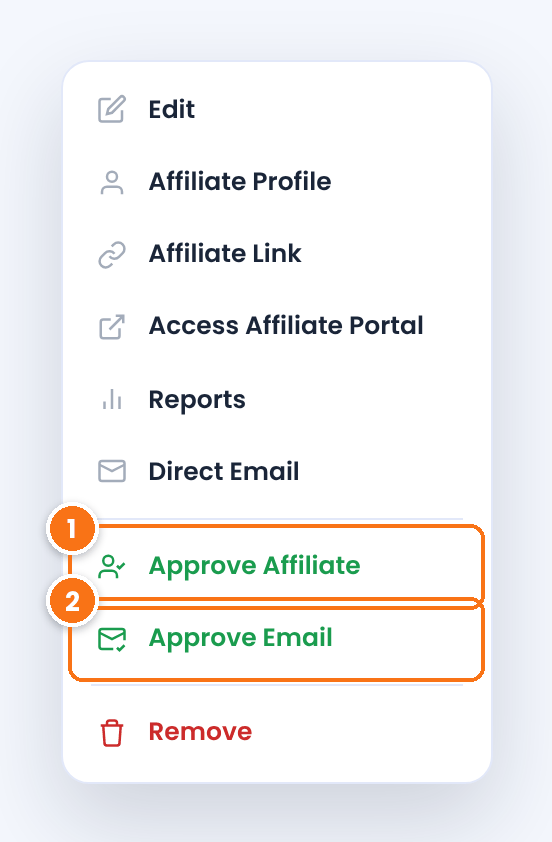
Row actions menu to approve affiliate applications in Ultimate Affiliate Pro, with the Approve Affiliate and Approve Email actions of a pending affiliate
The actions menu of a pending affiliate.
  1. Approve Affiliate gives the affiliate the Role After Approval and sends the approval email. The affiliate can log in right away.
  2. Approve Email appears when email verification is on and the affiliate has not clicked the verification link yet. It marks the address as verified for them.

To review an application first, choose Edit in the same menu: you see every answer from the registration form that has On Admin turned on. To turn an application down, choose Remove.

Set up the approval emails #

Go to Ultimate Affiliate Pro›Email Notifications and check that these notifications exist and are active. Add any that are missing with Add New:

New Affiliate account Registered (administrator)

Tells you that a new application is waiting. It is sent for every new registration while the notification is active.

New Affiliate account Registered (affiliate)

Confirms to the applicant that you received the registration. With manual approval, tell them here that you will review it.

Affiliate Account Approval Notification

Sent to the affiliate when you click Approve Affiliate. Include the login page link so they can start.

Require email verification #

Go to Ultimate Affiliate Pro›Modules and open Email Verification.
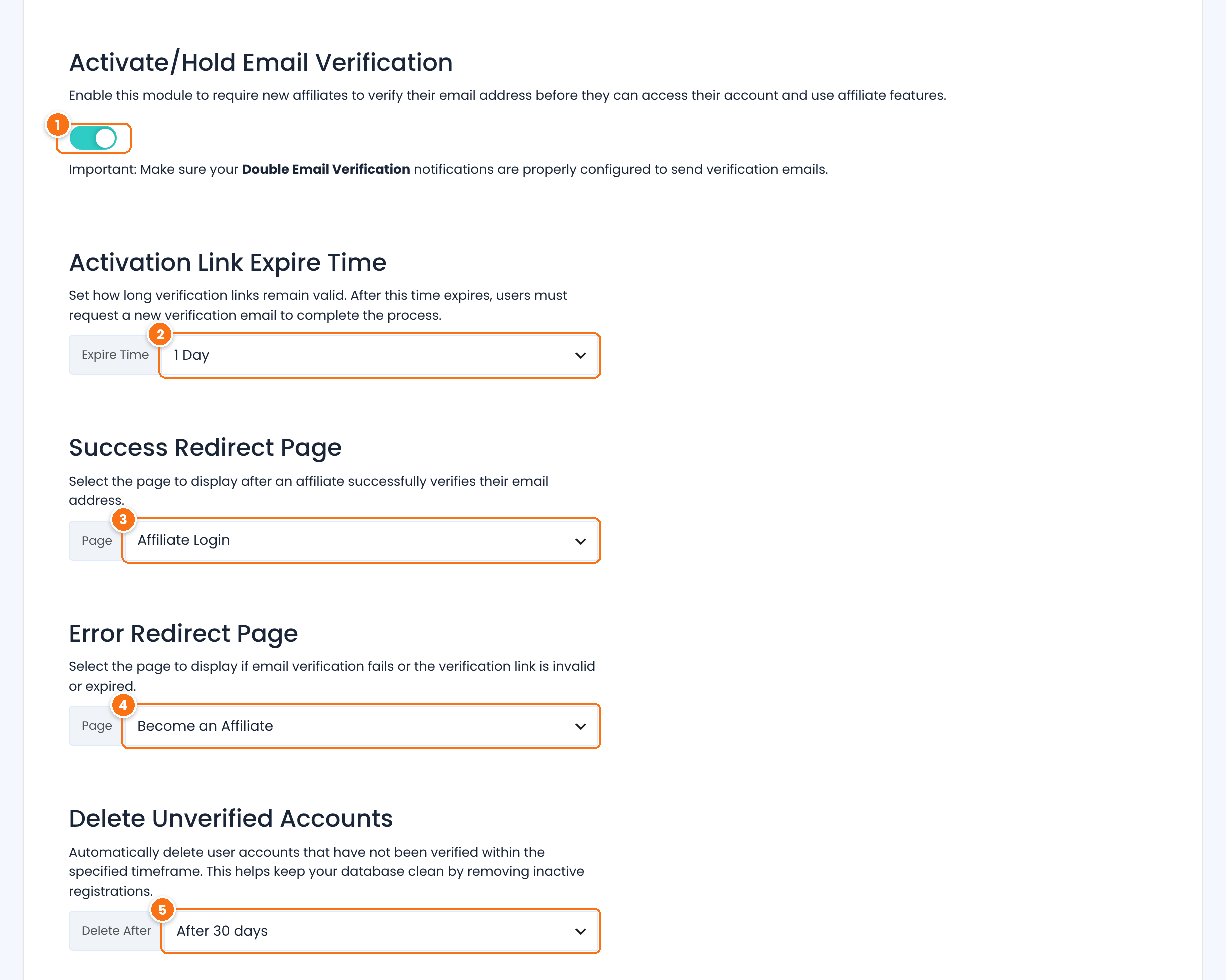
Email Verification module settings in Ultimate Affiliate Pro: activation switch, Activation Link Expire Time, Success Redirect Page, Error Redirect Page and Delete Unverified Accounts
The Email Verification module settings.
1Activate/Hold Email Verification

Turns verification on. Every new affiliate gets an email with a verification link and cannot log in until they click it.

Default: Off

2Activation Link Expire Time

How long the link works, counted from the moment the affiliate registered: Never, 15 Minutes, 1 Hour, 12 Hours or 1 Day.

Default: Never

3Success Redirect Page

The page affiliates see after a successful verification, for example your login page. When no page is set, they go to your homepage.

4Error Redirect Page

The page affiliates see when the link is wrong or has expired. When no page is set, they go to your homepage.

5Delete Unverified Accounts

Deletes affiliates who did not verify their email within 1, 7, 14 or 30 days of registering.

Default: Never

Click Save Changes. Then, in Email Notifications, make sure Double Email Verification Request is active: it is the email that carries the link, through the {verify_email_address_link} tag. You can also add Double Email Verification Completed, which is sent after a successful verification.

Tip

With both checks on, an affiliate needs a verified email and your approval before they can log in. The message they see while the email is not verified is Email Pending, in Showcases›Login Form›Custom Messages. If you collect newsletter subscribers, the address is sent to your email list only after it is verified.

Test it #

  1. Register a test affiliate in a private browser window, with an email address you can read.
  2. Try to log in. You should see the pending message, or the email pending message if verification is on.
  3. Click the link in the verification email, then approve the affiliate in Ultimate Affiliate Pro›Affiliates.
  4. Log in again. The Affiliate Portal should open.

If you add new affiliates to an email list, verification also works as double opt-in: the address is sent to the list after the affiliate confirms it. See Collect opt-in subscribers.

Frequently asked questions #

Can affiliates be approved automatically?

Yes. Keep New Affiliate WordPress Role on Subscriber, or any role other than Pending. New affiliates are active as soon as they register.

How do I find affiliates waiting for approval?

In Ultimate Affiliate Pro, Affiliates, the Pending Approval card shows how many are waiting, and each waiting affiliate has Approve Affiliate in the actions menu of its row.

The verification link expired. What should the affiliate do?

Open the affiliate’s actions menu in the Affiliates list and choose Approve Email to verify the address yourself. To give affiliates more time, choose a longer Activation Link Expire Time or Never.

Does the Automatic Login after Registration option work with approval?

Automatic login applies only when new affiliates are not set to Pending. With manual approval, affiliates log in after you approve them.

Can I change the pending and verification messages?

Yes. Edit Default message for pending users and Email Pending in Showcases, Login Form, Custom Messages, and Account is not approved yet in Showcases, Registration Form, Custom Messages.

What’s next #

Customize the registration formAsk applicants the right questions.Add reCAPTCHABlock spam registrations.Manage affiliatesAdd, edit and organize affiliates.Email notificationsEdit the emails affiliates receive.

What are your feelings

  • Happy
  • Normal
  • Sad
Share This Article :
  • Facebook
  • X
  • LinkedIn
  • Pinterest
Customize the affiliate registration formTurn existing users and customers into affiliates

#1 Affiliate WordPress Plugin

Boost Sales with Ultimate
Affiliate Pro

~100 Built-in Add-Ons included with every plan
30+ Seamless Integrations WooCommerce, EDD, Stripe & more
Multi-tier Commissions
Get Ultimate Affiliate Pro →

Ultimate Affiliate Pro

Build & manage an affiliate program with one easy-to-use & most-favored WordPress affiliate & referral marketing plugin

Company

  • About
  • Features
  • Integrations
  • Envato Portfolio
  • We’re Hiring
  • Hosting Partners
  • Affiliate Program

Resources

  • Documentation
  • Support
  • Ultimate Affiliate Pro Nulled
  • AffiliateWP Alternative
  • Ultimate Affiliate Pro Comparison
  • Pro vs Standard
  • Testimonials
  • ChangeLog

Meet Our Family

  • Ultimate Membership Pro
  • Ultimate Learning Pro
  • Social Share & Locker Pro
  • Privacy Policy
  • Terms and Conditions
  • Refund Policy
  • Ultimate Affiliate Pro Coupon Code

Copyright © 2026 - WPIndeed Net Solutions LLC. All rights reserved