Pay per lead affiliate programs reward affiliates for new signups instead of sales. With the SignUp Referrals (CPL) module, Ultimate Affiliate Pro pays a flat amount each time a visitor who came through an affiliate’s link creates an account on your site.
Cost per lead (CPL) works well for free trials, freemium products, communities and any business where an account is the first step to a sale. You can pay a default amount to everyone, give higher-ranked affiliates more, and keep paying the normal commission when the new user buys later.
Before you start
- Ultimate Affiliate Pro installed, with your license active.
- A registration form on your site: the WordPress registration, WooCommerce My Account or checkout, Ultimate Membership Pro, or another plugin that creates WordPress users.
How signup referrals work #
- A visitor opens Emma’s referral link and later registers on your site.
- Ultimate Affiliate Pro creates a referral for Emma with the signup amount. Its source is User SignUp and the description shows the new user’s name.
- The new user is also linked to Emma. With LifeTime Commissions on, their later purchases are credited to her even without the referral cookie.
Every new WordPress account counts, whichever form creates it, as long as the visitor arrived through an affiliate.
Turn on SignUp Referrals #
Go to Ultimate Affiliate Pro›Modules and open SignUp Referrals (CPL).
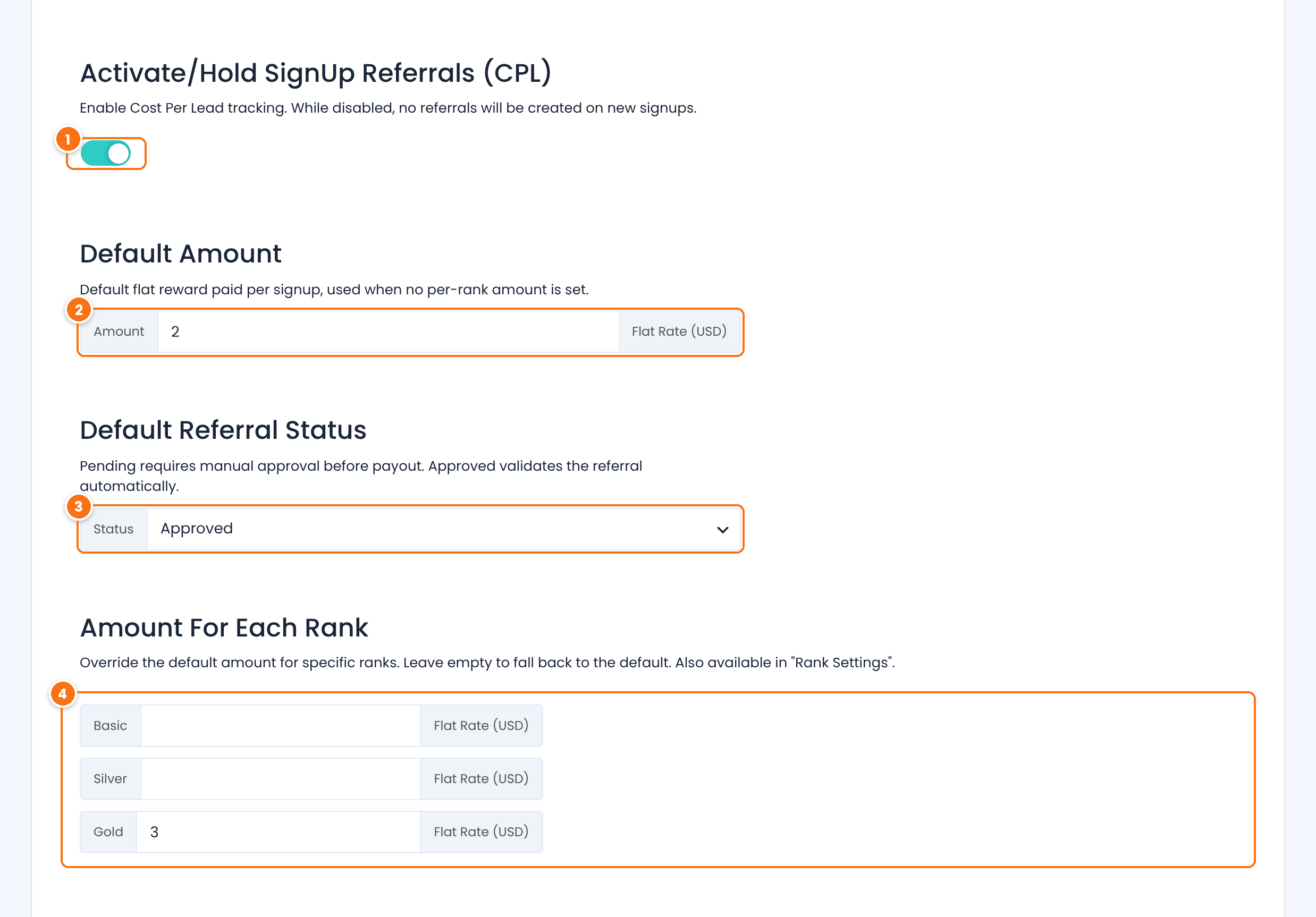
Creates a referral for every new signup that comes through an affiliate.
Default: Off
In Amount, the flat amount paid for each signup, in your currency.
Default: 1
In Status, the status of new signup referrals.
- Approved: counts toward payouts right away.
- Pending: waits for you to check the new account and approve it.
Default: Approved
A different signup amount for each rank. Leave a rank empty to pay the default amount. It is also available in the rank editor.
Click Save Changes.
Tip
If fake accounts are a risk, set Status to Pending and approve signup referrals after you check the accounts. Adding a CAPTCHA to your registration form also helps.
Signups and sales together #
A signup referral is separate from the sales commission. When a referred user registers and buys, the affiliate earns both: the signup amount and the commission on the order, calculated as described in How commissions are calculated. To reward only the first purchase of these customers, combine it with New Customer Commissions Only in Settings›General Settings.
To pay for actions other than an account, such as a form submission or a booking, use Landing Commissions (CPA) or a form tracking add-on.
Test it #
- Open a referral link of a test affiliate in a private browser window.
- Register a new account on your site in the same window.
- Go to Ultimate Affiliate Pro›Referrals: a referral with the source User SignUp and the signup amount appears for the affiliate.
Frequently asked questions #
Which registration forms create a signup referral?
Any form that creates a WordPress user: the WordPress registration page, WooCommerce My Account and checkout, Ultimate Membership Pro and other membership or form plugins that register users.
Can I pay a percentage instead of a flat amount?
No. A signup has no order value, so signup referrals use a flat amount. Set it per rank to pay top affiliates more.
Will the affiliate also earn on the new user’s first order?
Yes. The order creates its own referral with the normal commission. Both referrals appear in the Referrals list.
Do new affiliates count as signups?
Yes, when they register through another affiliate’s link. The referring affiliate earns the signup amount for the new account.
How do I stop paying for spam accounts?
Set the default status to Pending and approve signup referrals only for real accounts. Reject the others in Ultimate Affiliate Pro, Referrals.


