Yes, affiliates can track their earnings. The affiliate earnings dashboard in the Affiliate Portal shows each affiliate their referrals, commissions, clicks, payouts and current balance, updated as new referrals are recorded. This page walks through what affiliates see in each tab, so you can answer their questions and decide which tabs to show.
You choose which tabs appear and what they are called in Showcases›Affiliate Portal. See Affiliate Account Page. To see the same numbers for your whole program, use the admin reports. See affiliate reports and statistics.
Before you start
- The Affiliate Portal page set up and the affiliate approved.
- To check what a given affiliate sees, open Ultimate Affiliate Pro›Affiliates, click the row menu of the affiliate and choose Access Affiliate Portal.
Dashboard: the overview #
The Dashboard tab opens first when an affiliate logs in. It sums up their account at a glance.
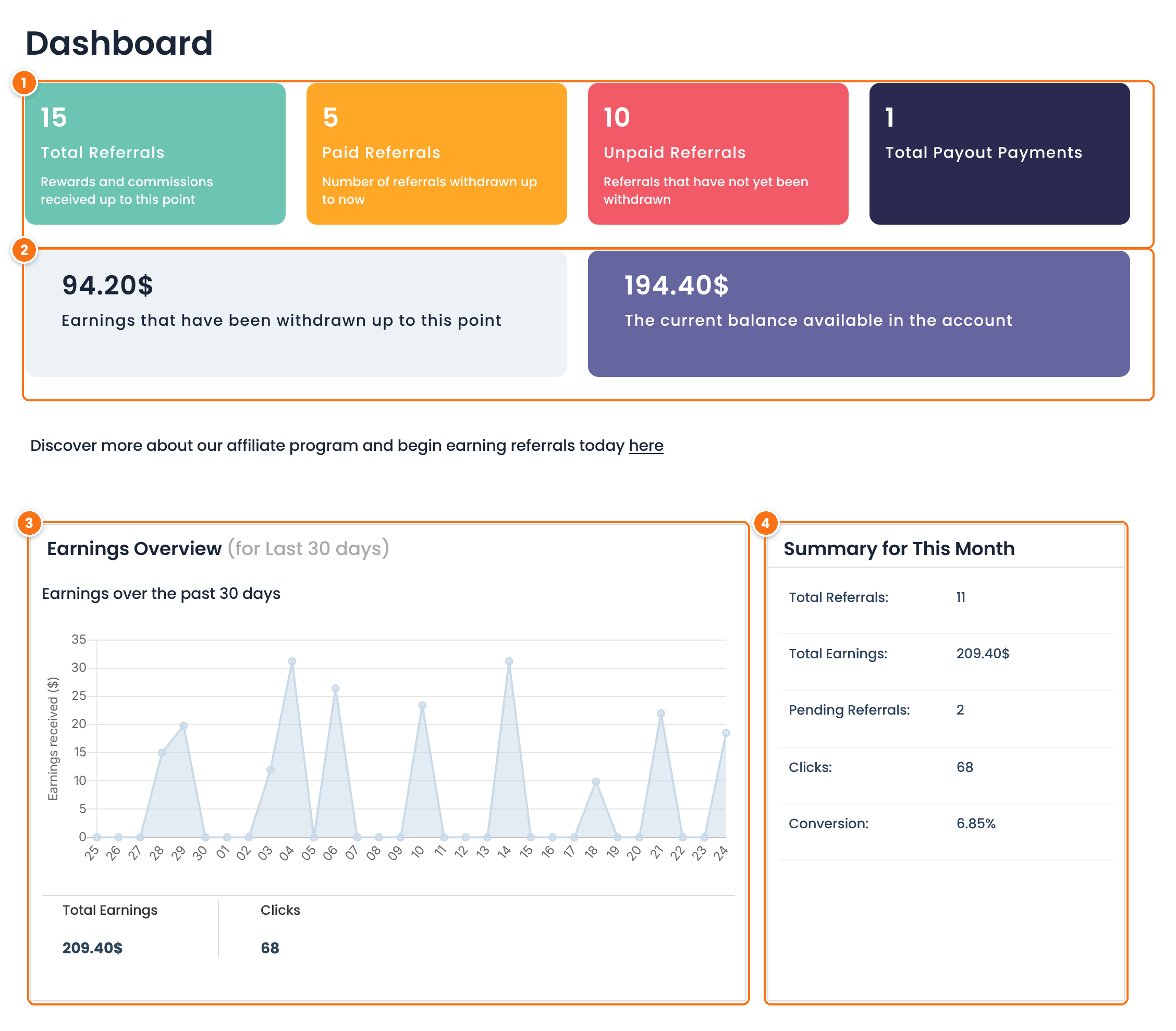
The amount already paid to the affiliate, and the current balance: approved commissions not paid yet. The balance is what the affiliate receives in the next payout.
A chart of approved earnings for each of the last 30 days, with the total earnings and clicks of the period under it.
Referrals, earnings, pending referrals, clicks and conversion rate (the share of clicks that became referrals) for the recent period.
Above the numbers, the top section shows the affiliate’s name, rank, total earnings and referrals, and the progress toward the next rank, if you keep those items on.
Referrals: commissions waiting for payout #
The Referrals tab lists the referrals that have not been paid yet, newest first.
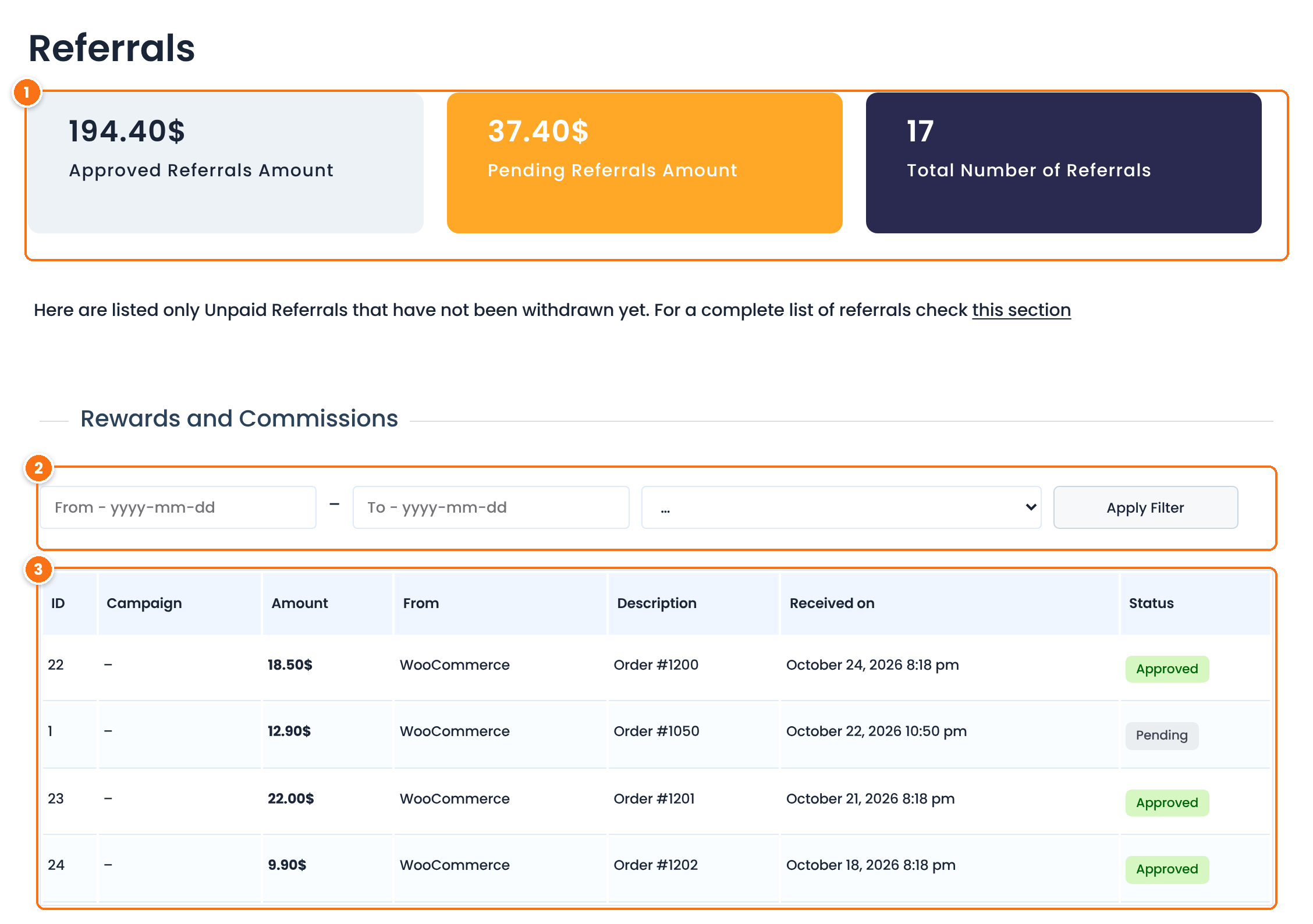
Shows referrals between two dates (format yyyy-mm-dd) and with a status: Rejected, Pending or Approved. Click Apply Filter.
For each referral: the campaign, the commission amount, the source it came from (for example WooCommerce), the description (such as the order number), the date and the status.
Every referral starts as Pending until it is approved, automatically or by you. For a WooCommerce order, approval usually happens when the order status changes to Completed. Only approved referrals are paid. To learn how referrals move between statuses, see manage referrals. The full list, including paid referrals, is in Reports›Referrals History.
Payments: payouts received #
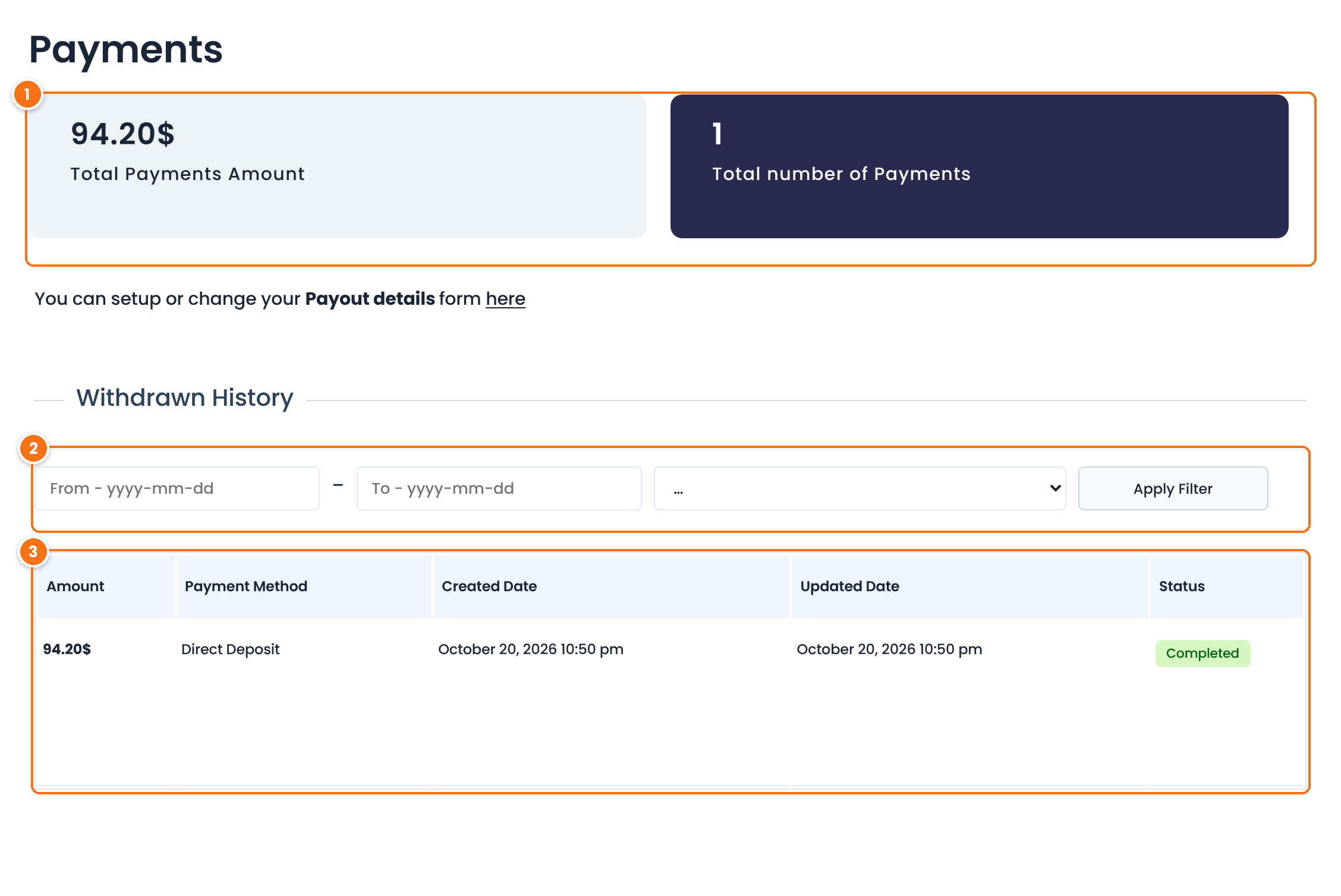
Shows payouts between two dates and with a status.
Each payout with its amount, payment method, the date it was created and updated, and its status, for example Completed.
The link above the history opens Payout Details, where affiliates enter how they want to be paid. See how affiliate payouts work.
The other tabs #
Totals for the whole account: withdrawn earnings, current balance, total clicks, converted clicks and success rate, plus Your Achievements, the history of rank changes.
Every click on the affiliate’s links: landing page, the page the visitor came from, browser, device, date and whether it converted.
Clicks and referrals for each campaign the affiliate created. See Campaigns.
All referrals, paid and unpaid, with their payment status.
Coupons, Store Credit, Multi-Level Marketing, Landing pages and Notifications appear when their module is on.
Test it #
- Record a test referral for a test affiliate. See test your affiliate program.
- Log in as that affiliate and check the new referral in the Referrals tab, with the status Pending or Approved.
- Approve it in Ultimate Affiliate Pro›Referrals and check that the Dashboard balance goes up.
Frequently asked questions #
Can affiliates track their earnings in real time?
Yes. A referral appears in the Affiliate Portal as soon as it is recorded, usually when the order is placed. Its status and the balance change when the referral is approved or paid.
Why does a new referral show as Pending?
Referrals stay Pending until they are approved. For WooCommerce orders this usually happens when the order is completed. You can also approve them by hand in Ultimate Affiliate Pro, Referrals.
What is the current balance?
The total of approved commissions that have not been paid yet. It is what the affiliate receives in the next payout.
Can I hide some stats from affiliates?
Yes. Turn off tabs in Showcases, Affiliate Portal, and turn off items such as Display Earnings or EPC Metrics in the top section.
Do affiliates receive their stats by email?
Yes, if you turn on periodic reports. Affiliates choose daily, weekly or monthly reports in the Notifications tab. See periodic reports for affiliates.


