A pay per click affiliate program pays affiliates for the traffic they send, not only for sales. Ultimate Affiliate Pro has two modules for this: Pay Per Click (CPC) pays a flat amount for each new visitor who arrives through an affiliate link, and CPM Commission pays a flat amount for every 1000 impressions of an affiliate’s banner.
Both modules create referrals, the same records you approve and pay for sales. The amount comes from the affiliate’s rank, so you can pay more per click or per 1000 impressions to your best affiliates. Before you start, it helps to know how affiliate tracking works and how ranks set commission tiers.
Before you start
- Ultimate Affiliate Pro installed, with your license active.
- At least one rank, with your affiliates assigned to it. See Ultimate Affiliate Pro›Ranks.
- For CPM: at least one image creative in Ultimate Affiliate Pro›Creatives. See Creatives: banners and text links.
When to use a pay per click affiliate program or CPM #
| Pay Per Click (CPC) | CPM Commission | |
|---|---|---|
| Pays for | A new visitor who arrives through the affiliate’s link | Every 1000 impressions of the affiliate’s banner |
| Tracked by | The affiliate cookie, set on the first visit | A tracking image in the banner code from the Affiliate Portal |
| Amount | Flat amount per rank (PPC Amount) | Flat amount per rank (CPM Amount) |
| Good for | Product launches, content partners, landing page campaigns | Display banners on blogs and newsletters |
You can turn on one module or both, and keep paying commissions on sales at the same time. A visitor who clicks an affiliate link and later buys earns the affiliate both the click referral and the sale referral.
Turn on Pay Per Click and set the amount per click #
Go to Ultimate Affiliate Pro›Modules. In the Commission Types group, open Pay Per Click (CPC).
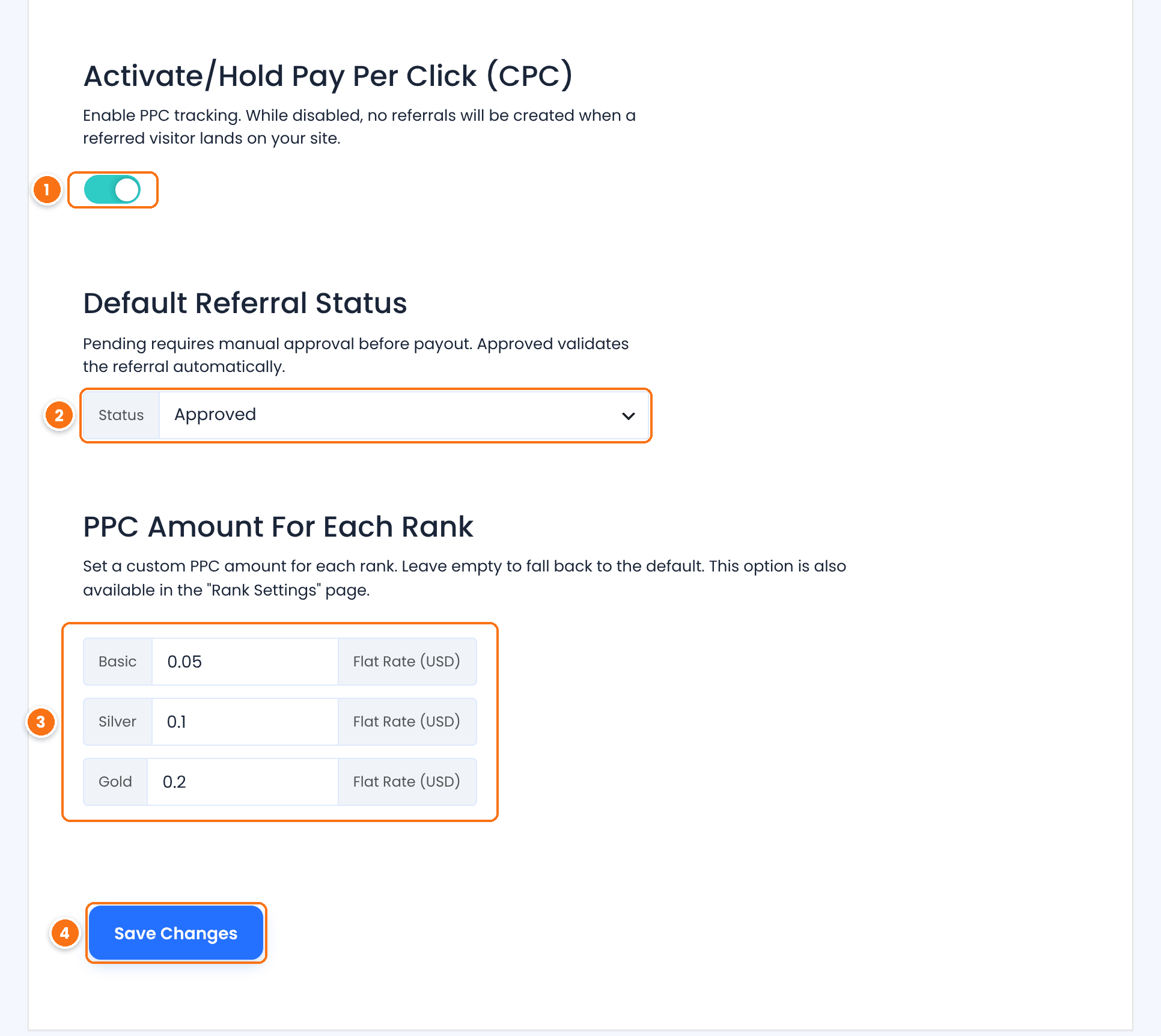
Turns pay per click on. While it is off, visits through affiliate links create no click referrals.
Default: Off
The status of each new click referral. Approved makes it payable right away. Pending lets you review clicks before you pay them.
Default: Approved
The flat amount an affiliate earns per click, in your store currency, for each rank. Enter an amount for every rank.
Saves the settings.
Keep click amounts small
A click is not a sale. Start with a few cents per click and compare the earnings with the sales each affiliate brings. You can review click quality in Ultimate Affiliate Pro›Clicks before you approve and pay.
Understand when a click creates a referral #
Ultimate Affiliate Pro creates a click referral when all of these are true:
- The visitor opens your site through an affiliate link, for example
yourstore.com/?ref=emma.collins. - The affiliate is active.
- The visitor’s browser does not have an affiliate cookie yet. This is the first tracked visit, so the plugin records the click and sets the cookie.
So the plugin pays one click per visitor and browser, not per page view. When the same visitor comes back through the same link while the cookie is valid, no new referral is created. The cookie lasts as many days as Cookie Expiration (Days) in Ultimate Affiliate Pro›Settings›General Settings.
If the visitor already has the cookie of another affiliate, the first affiliate keeps the visitor and no click referral is created. With the Credit Last Affiliate module on, the new affiliate takes over the visitor and earns the click referral.
Turn on the CPM commission #
In Ultimate Affiliate Pro›Modules, open CPM Commission.
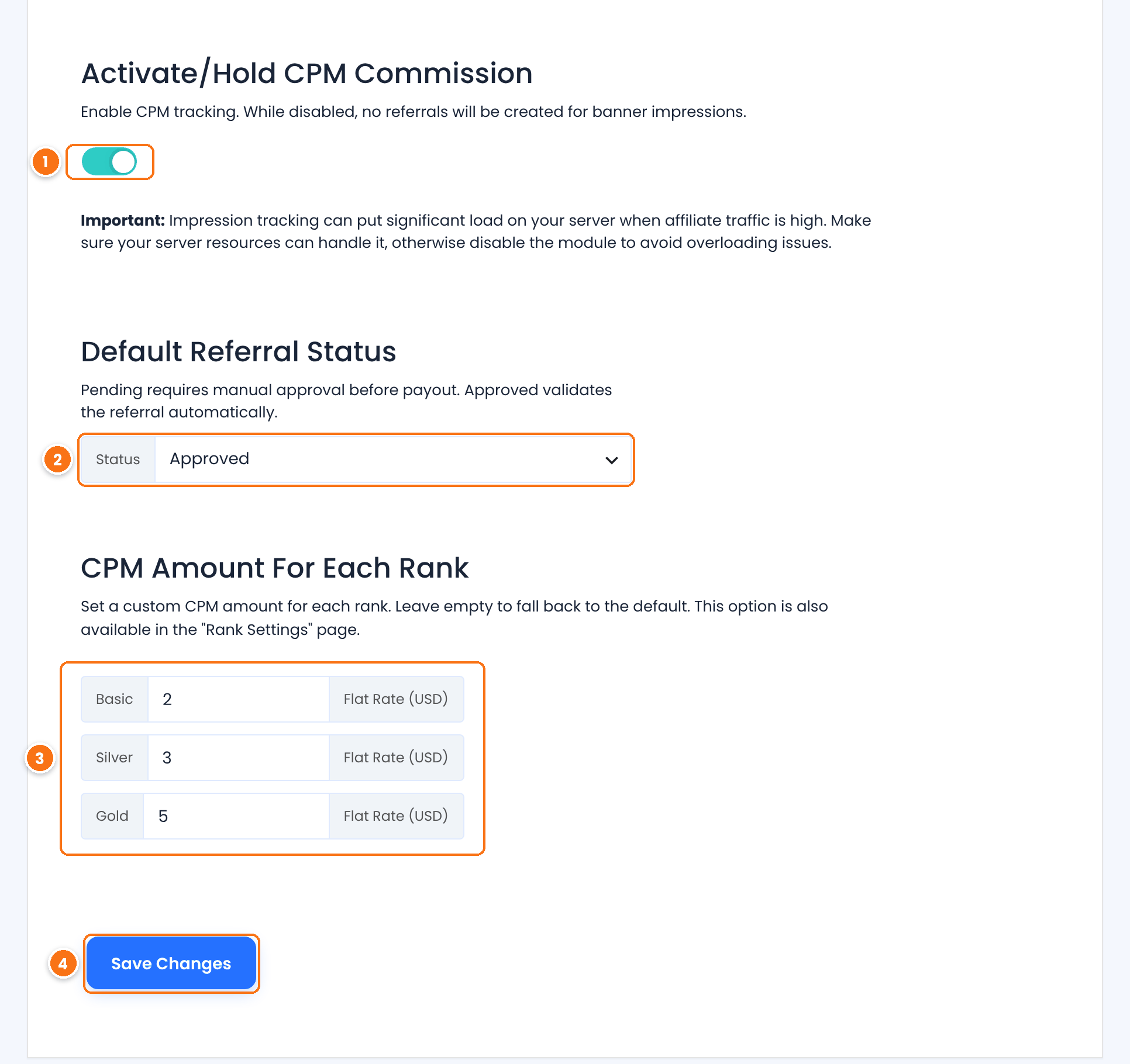
Turns impression tracking on. Each impression is one load of the banner on another site, so a busy page sends many requests to your server. On high-traffic sites, make sure your hosting has enough resources for the extra requests.
Default: Off
The status of each new CPM referral: Approved or Pending.
Default: Approved
The flat amount an affiliate earns for every 1000 impressions, for each rank. Enter an amount for every rank.
Saves the settings.
Check the amounts in the rank editor #
The same amounts are also stored on each rank. Go to Ultimate Affiliate Pro›Ranks and edit a rank. While a module is on, its card appears near the bottom of the rank editor.
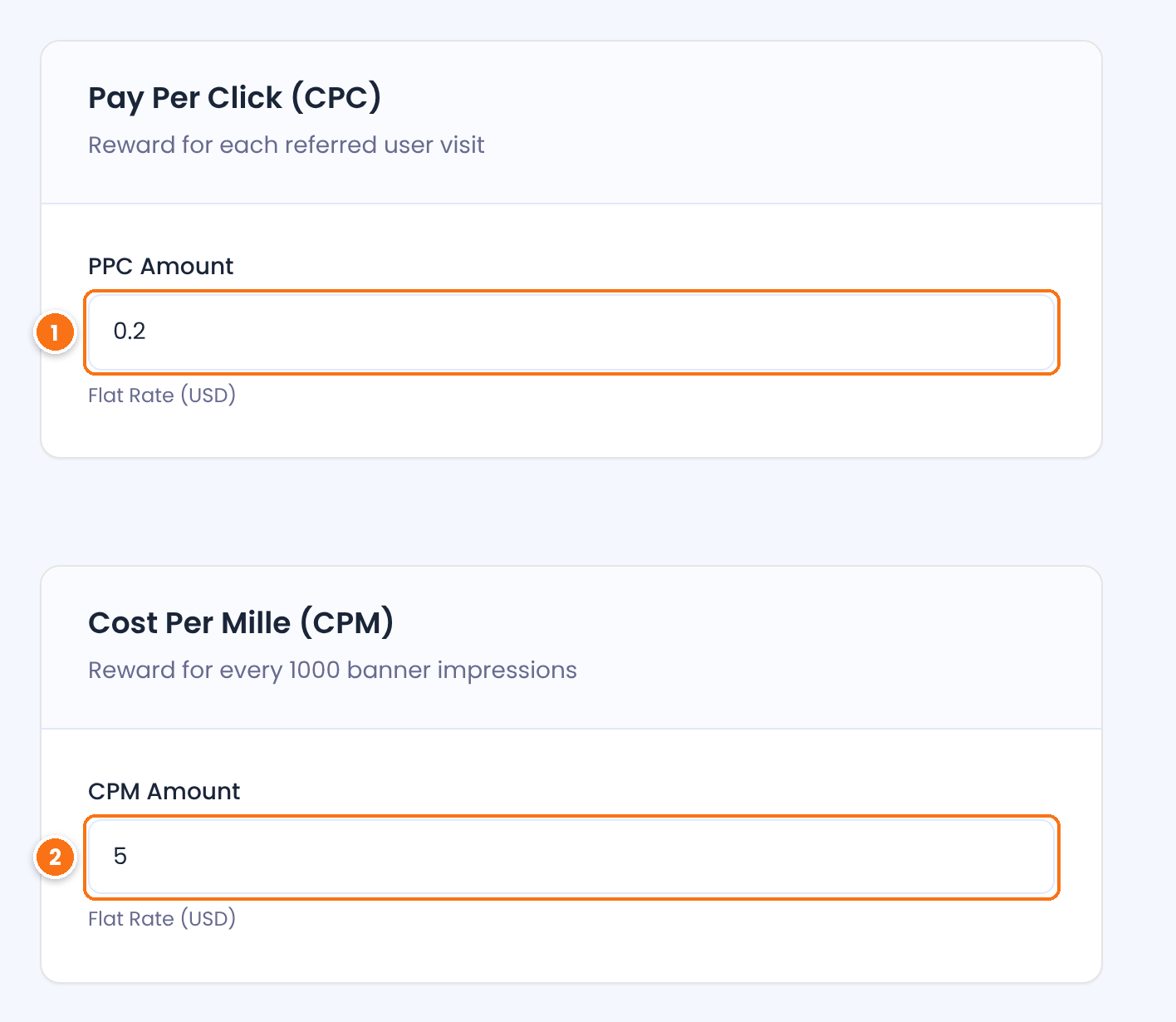
The amount per click for this rank. It is the same value as on the Pay Per Click (CPC) screen, so you can change it in either place.
The amount per 1000 banner impressions for this rank. It is the same value as on the CPM Commission screen.
When an affiliate moves to another rank, new referrals use the amounts of the new rank.
Let affiliates use the banner code with impression tracking #
Affiliates add your banners to their sites from the Affiliate Portal, in Marketing › Creatives. While CPM Commission is on, the HTML Embed Code of each image creative includes a hidden 1×1 tracking image with the affiliate’s ID. Each time the banner loads on their site, the impression is counted.
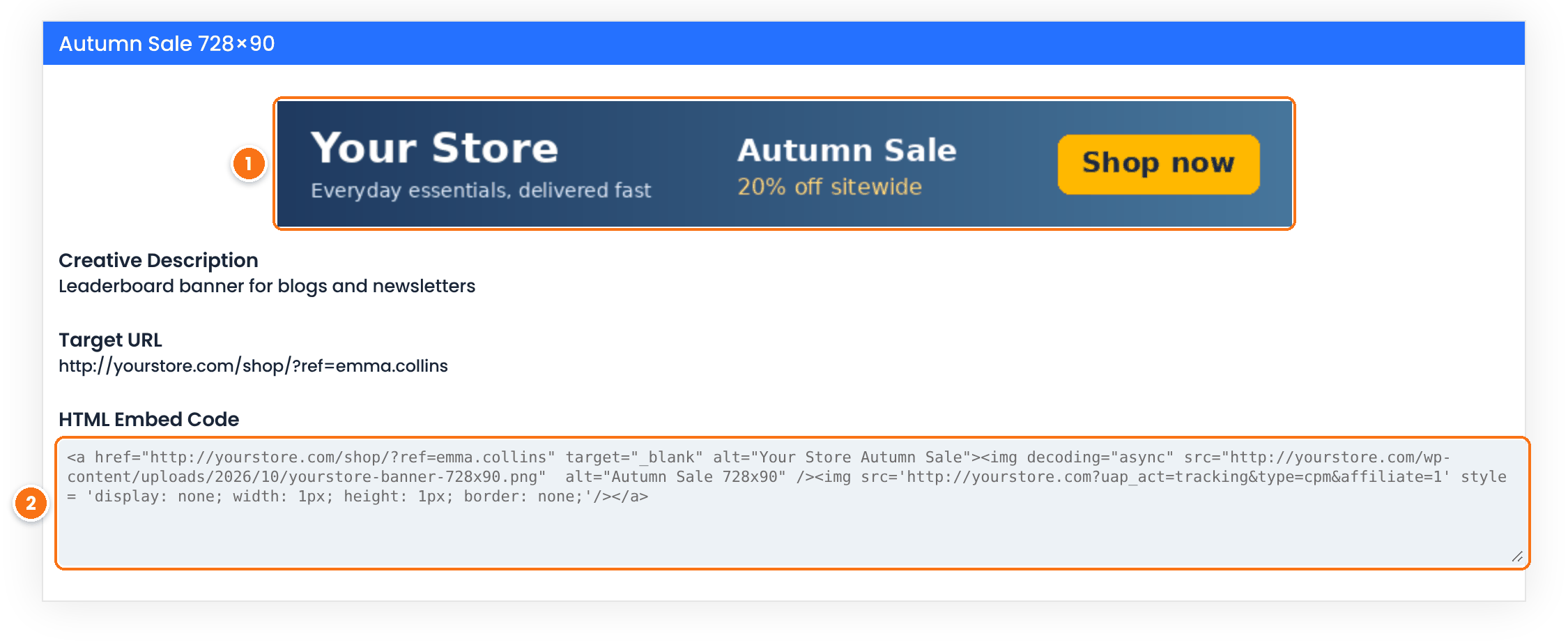
The image creative, linked to the Target URL with the affiliate’s link. Clicks on it count as affiliate visits, so they can also earn pay per click.
The code the affiliate copies to their site. The img tag with uap_act=tracking&type=cpm counts the impressions.
Impressions are counted per affiliate. Every 1000 impressions create a CPM referral with the affiliate’s CPM Amount, and counting starts again from zero. Only image creatives count impressions. Ask affiliates who copied your banner code before you turned on the module to copy it again.
Review click and CPM referrals #
Go to Ultimate Affiliate Pro›Referrals. Click referrals and CPM referrals appear with the other referrals of your affiliates.
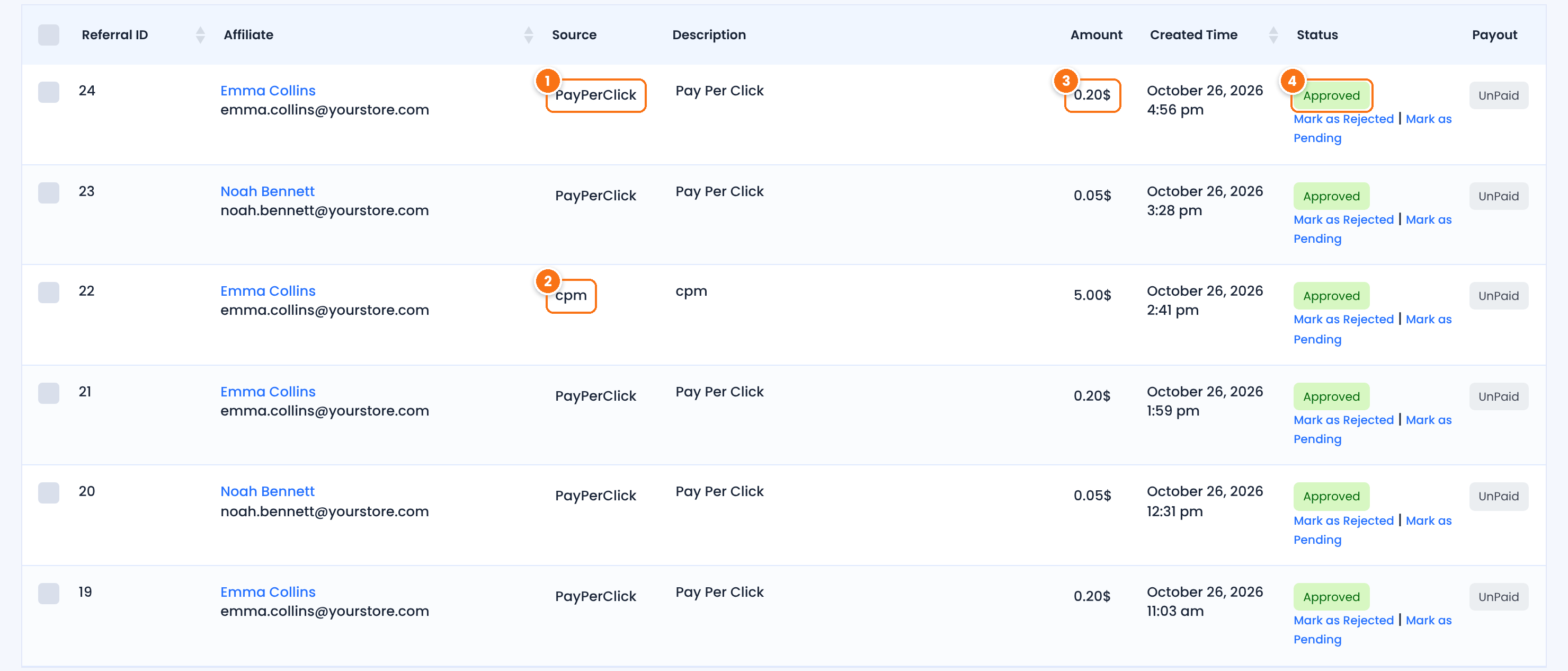
The source of a click referral. Its description is Pay Per Click.
The source of a CPM referral, created for 1000 banner impressions.
The PPC Amount or CPM Amount of the affiliate’s rank when the referral was created.
The default status you chose. Change it with Mark as Approved, Mark as Rejected or Mark as Pending.
Click and CPM referrals work like any other: approved and unpaid ones are included in your next payout, and affiliates see them in the Referrals section of the Affiliate Portal. When a click referral is created with the status Approved, its visit in Ultimate Affiliate Pro›Clicks is linked to it and shows as Converted. For what each status means, see Referral and payout statuses explained.
Pay per click and CPM are common pricing models in online advertising. For the general definitions, see Cost-per-click (CPC) and Cost-per-thousand impressions (CPM) in Google Ads Help.
Test it #
- Turn on Pay Per Click (CPC) with the status Approved and an amount for the rank of a test affiliate.
- Open a private browser window and visit your site through the test affiliate’s link, for example
yourstore.com/?ref=emma.collins. - In Ultimate Affiliate Pro›Referrals, check the new referral with the source PayPerClick and the rank’s amount.
- Open the same link again in the same window. No second referral is created.
- Close the private window, open a new one and visit the link again. A new click referral is created, because the new window has no cookie.
- With CPM Commission on, log in to the Affiliate Portal as the test affiliate and check that Marketing › Creatives shows the embed code with the tracking image.
Frequently asked questions #
What is a pay per click affiliate program?
It pays affiliates a flat amount for each visitor they send to your site, even if the visitor does not buy. In Ultimate Affiliate Pro, the Pay Per Click (CPC) module creates a referral for each new visitor who arrives through an affiliate link.
Does every page view earn a click commission?
No. A click referral is created on the first tracked visit, when the plugin sets the affiliate cookie. Later visits from the same browser do not create new click referrals while the cookie is valid.
How are CPM impressions counted?
Each load of an affiliate banner that uses the HTML Embed Code from the Affiliate Portal counts as one impression. Every 1000 impressions create a CPM referral with the CPM Amount of the affiliate’s rank.
What is a CPM commission?
CPM means cost per mille, or cost per thousand. A CPM commission pays the affiliate a flat amount for every 1000 times their banner is shown, whether or not visitors click it.
Can an affiliate earn a click commission and a sale commission from the same visitor?
Yes. The click referral is created when the visitor arrives, and the sale referral is created when the visitor buys, as long as the order is credited to the same affiliate.
Can I review clicks before paying them?
Yes. Set Default Referral Status to Pending on the Pay Per Click (CPC) screen, then approve or reject the referrals in Referrals.


