An affiliate portal custom tab gives your affiliates a page of their own content inside the Affiliate Portal, next to Dashboard, Referrals and Payments. This tutorial builds a small plugin that adds a Marketing kit tab with its own menu label and icon, and fills it with the affiliate’s link and results, read live from Ultimate Affiliate Pro.
You only need code when the content depends on the affiliate who is logged in, or comes from your own data. For static content, such as instructions or a link to your brand assets, use the no-code way: the Affiliate Area Tabs module, described in Set up the Affiliate Account Page. The code below uses the Ultimate Affiliate Pro hooks listed in Hooks and filters.
Before you start
- Ultimate Affiliate Pro active, with the Affiliate Portal page set up and an approved test affiliate.
- Access to
wp-content/plugins/on a staging copy of your site, through FTP, SSH or your host’s file manager. - Basic PHP knowledge. The plugin follows the standard WordPress plugin structure.
How an affiliate portal custom tab works #
Ultimate Affiliate Pro builds the portal menu from a list of tabs saved in the database. Each custom tab has a slug, a menu label, a tab title, an icon and optional content. A tab appears in the menu when it is turned on in Ultimate Affiliate Pro›Showcases›Affiliate Portal. The tab opens at your portal address with ?uap_aff_subtab= and the slug, for example /affiliate-portal/?uap_aff_subtab=marketing-kit.
When a custom tab opens, the plugin runs the uap_account_page_custom_tab_content filter with two values: the content (empty) and the tab slug. If your code returns HTML, the portal shows it as the tab content. If it returns nothing, the portal shows the title and content saved in the settings.
| Part | What it uses |
|---|---|
| Register the tab | $indeed_db->account_page_save_custom_menu_item() saves the slug, label and icon. $indeed_db->activateApTab() turns the tab on. |
| Remove the tab | $indeed_db->deactivateApTab() and $indeed_db->account_page_menu_delete_custom_item(). |
| Tab content | The uap_account_page_custom_tab_content filter. |
| Affiliate data | get_affiliate_id_by_wpuid(), is_affiliate_active(), get_stats_for_payments() and the uap_create_affiliate_link() function. |
Create the plugin file #
In wp-content/plugins/, create a folder named uap-marketing-kit and, inside it, a file named uap-marketing-kit.php. Start the file with the plugin header and a constant that holds the tab slug:
PHP
<?php
/**
 * Plugin Name: Marketing Kit Tab for Ultimate Affiliate Pro
 * Description: Adds a "Marketing kit" tab to the Affiliate Portal.
 * Version:     1.0.0
 */

defined( 'ABSPATH' ) || exit;

define( 'MYKIT_TAB', 'marketing-kit' );
Use a slug in lowercase, with hyphens and no spaces. It must not be the slug of a built-in tab, such as overview, referrals or payments.
Register the tab on activation #
Add the code that creates the tab. It runs once, when you activate the plugin, so the tab is saved in the database like a tab created in Ultimate Affiliate Pro›Modules›Affiliate Area Tabs. A regular plugin is used instead of a must-use plugin because must-use plugins have no activation step.
PHP
/**
 * 1. Register the tab when the plugin is activated.
 */
register_activation_hook( __FILE__, function () {
	global $indeed_db;
	if ( empty( $indeed_db ) ) {
		return; // Ultimate Affiliate Pro is not active.
	}
	$indeed_db->account_page_save_custom_menu_item( array(
		'slug'      => MYKIT_TAB,
		'label'     => 'Marketing kit',
		'icon_code' => 'f0b1', // Font Awesome 4 "briefcase" icon.
		'url'       => '',
	) );
	$indeed_db->activateApTab( MYKIT_TAB ); // Show it in the portal menu.
} );
| Key | What it sets |
|---|---|
slug | The ID of the tab. It appears in the tab address. |
label | The menu label. It is also saved as the tab title. |
icon_code | The Unicode of a Font Awesome 4 icon, without the backslash. f0b1 is a briefcase. The built-in tabs use the same format, for example f015 for the house of Dashboard. |
url | Leave it empty for a tab with content. A URL makes the menu item open that address instead. |
Read more about these hooks in Activation and deactivation hooks.
Remove the tab on deactivation #
Add the cleanup code. When you deactivate the plugin, the tab leaves the menu and its saved label, title, content, icon and URL are deleted, so you can activate the plugin again later without leftovers.
PHP
/**
 * 2. Remove the tab when the plugin is deactivated.
 */
register_deactivation_hook( __FILE__, function () {
	global $indeed_db;
	if ( empty( $indeed_db ) ) {
		return;
	}
	$indeed_db->deactivateApTab( MYKIT_TAB );
	$indeed_db->account_page_menu_delete_custom_item( MYKIT_TAB );
	foreach ( array( 'title', 'menu_label', 'content', 'icon_code', 'url' ) as $key ) {
		delete_option( 'uap_tab_' . MYKIT_TAB . '_' . $key );
	}
} );
Print the tab content #
Add the filter that builds the content. It does nothing for other tabs, checks that the viewer is an active affiliate, builds the affiliate link with your program settings and reads the affiliate’s results:
PHP
/**
 * 3. Print the content of the tab.
 */
add_filter( 'uap_account_page_custom_tab_content', function ( $content, $tab ) {
	if ( MYKIT_TAB !== $tab ) {
		return $content; // Not our tab.
	}
	global $indeed_db;

	// The affiliate who is viewing the portal (or the one an admin previews).
	$uid          = get_current_user_id();
	$affiliate_id = $uid ? (int) $indeed_db->get_affiliate_id_by_wpuid( $uid ) : 0;
	if ( ! empty( $_GET['aid'] ) && current_user_can( 'administrator' ) ) {
		$affiliate_id = absint( $_GET['aid'] );
		$uid          = (int) $indeed_db->get_uid_by_affiliate_id( $affiliate_id );
	}
	if ( ! $affiliate_id || ! $indeed_db->is_affiliate_active( $affiliate_id ) ) {
		return '<div class="uap-ap-wrap"><p>' . esc_html__( 'This tab is for active affiliates.', 'mykit' ) . '</p></div>';
	}

	// Affiliate link, built with the settings of the program.
	$param = get_option( 'uap_referral_variable' ) ?: 'ref';
	$value = $affiliate_id;
	if ( 'username' === get_option( 'uap_default_ref_format' ) ) {
		$value = urlencode( get_userdata( $uid )->user_login );
	}
	$base = get_option( 'uap_referral_custom_base_link' ) ?: home_url();
	$link = uap_create_affiliate_link( $base, $param, $value );

	// Stats of this affiliate.
	$stats    = $indeed_db->get_stats_for_payments( $affiliate_id );
	$currency = uapCurrency();

	ob_start();
	?>
	<div class="uap-ap-wrap">
		<h3><?php esc_html_e( 'Marketing kit', 'mykit' ); ?></h3>
		<p><?php esc_html_e( 'Everything you need to promote Your Store, in one place.', 'mykit' ); ?></p>

		<h4><?php esc_html_e( 'Your affiliate link', 'mykit' ); ?></h4>
		<input type="text" readonly value="<?php echo esc_attr( $link ); ?>" onclick="this.select();" style="width:100%;max-width:520px;" />

		<h4><?php esc_html_e( 'Your results', 'mykit' ); ?></h4>
		<table class="uap-account-table" style="max-width:520px;">
			<tr><td><?php esc_html_e( 'Clicks', 'mykit' ); ?></td><td><?php echo esc_html( $stats['visits'] ); ?></td></tr>
			<tr><td><?php esc_html_e( 'Approved referrals', 'mykit' ); ?></td><td><?php echo esc_html( $stats['referrals'] ); ?></td></tr>
			<tr><td><?php esc_html_e( 'Unpaid earnings', 'mykit' ); ?></td><td><?php echo esc_html( uap_format_price_and_currency( $currency, $stats['unpaid_payments_value'] ) ); ?></td></tr>
			<tr><td><?php esc_html_e( 'Paid earnings', 'mykit' ); ?></td><td><?php echo esc_html( uap_format_price_and_currency( $currency, $stats['paid_payments_value'] ) ); ?></td></tr>
		</table>

		<h4><?php esc_html_e( 'Brand assets', 'mykit' ); ?></h4>
		<ul>
			<li><a href="<?php echo esc_url( home_url( '/brand/logo.zip' ) ); ?>"><?php esc_html_e( 'Logo pack (PNG and SVG)', 'mykit' ); ?></a></li>
			<li><a href="<?php echo esc_url( home_url( '/brand/guidelines.pdf' ) ); ?>"><?php esc_html_e( 'Brand guidelines', 'mykit' ); ?></a></li>
		</ul>
	</div>
	<?php
	return ob_get_clean();
}, 10, 2 );
Things to note in this code:
- Affiliate check. The content is built for the affiliate linked to the logged-in user. Administrators who open a portal with Access Affiliate Portal (the
aidparameter) see that affiliate’s data. Anyone else gets a short message. - Affiliate link. The link uses the referral variable, the link format (username or ID) and the custom base link from your settings, so it matches the link on the Affiliate Links tab. See Affiliate referral links.
- Results.
get_stats_for_payments()returns, among others,visits,referrals(approved referrals),unpaid_payments_valueandpaid_payments_value.uap_format_price_and_currency()formats amounts with your currency settings. - Escaping. Every value is printed through
esc_html(),esc_attr()oresc_url(). - Brand assets. Replace the two example links with the files you want to share.
Use your own content
Replace the HTML between ob_start() and ob_get_clean() with anything you need: a list of active coupons, a video tutorial, a form, or data from another plugin. Keep the slug check at the top so the code runs only for your tab.
Activate the plugin and check the tab #
Go to Plugins›Installed Plugins and activate Marketing Kit Tab for Ultimate Affiliate Pro. Then log in as an affiliate and open the Affiliate Portal.
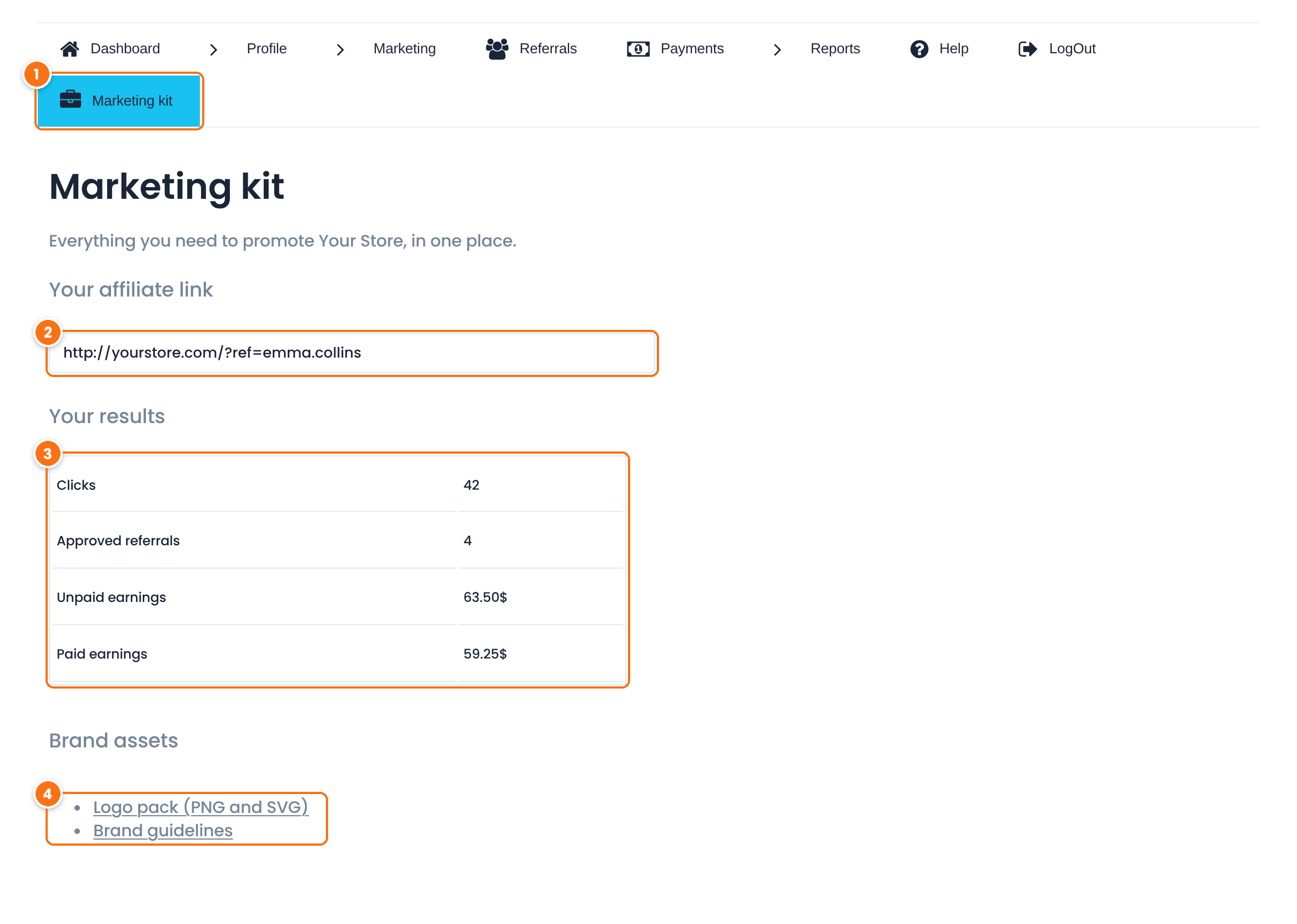
The new tab, with its label and icon. It is added at the end of the menu.
The affiliate’s link. Clicking the field selects it for copying.
Clicks, approved referrals, unpaid and paid earnings of this affiliate.
Static links that are the same for every affiliate.
The tab is now listed in Ultimate Affiliate Pro›Modules›Affiliate Area Tabs and in the Content Section of Ultimate Affiliate Pro›Showcases›Affiliate Portal, like a tab you create there. You can:
- Drag the tab to another position in the tabs table of Affiliate Area Tabs.
- Change its Menu Label, Tab Title or Menu Icon in the Content Section.
- Turn the tab off with its switch, without deactivating the plugin.
The Content field of the tab is not used while your filter returns HTML for it.
Test it #
- Log in as a test affiliate and open the Marketing kit tab. Check that the link matches the one on the Affiliate Links tab.
- Compare the numbers with the affiliate in Ultimate Affiliate Pro›Affiliates.
- As administrator, use Access Affiliate Portal for another affiliate and open the tab. It shows that affiliate’s data.
- Deactivate the plugin. The tab disappears from the menu. Activate it again and the tab comes back.
Frequently asked questions #
Can I add a custom tab to the Affiliate Portal without code?
Yes. Turn on the Affiliate Area Tabs module in Ultimate Affiliate Pro, Modules, create a tab with a slug, label and icon, then turn it on and write its content in Showcases, Affiliate Portal. Use code only when the content must be different for each affiliate or comes from your own data.
Which hook prints the content of a custom tab?
The uap_account_page_custom_tab_content filter. It passes the current content and the tab slug. Return your HTML when the slug is yours, and return the content unchanged for other tabs.
How do I choose the icon of the tab?
Use the Unicode of a Font Awesome 4 icon without the backslash, for example f0b1 for a briefcase. You can also change the icon later in Showcases, Affiliate Portal, with the Menu Icon picker.
Where does the new tab appear in the menu?
At the end of the menu. Drag it to another position in the tabs table of the Affiliate Area Tabs module.
Can the tab open another page instead of showing content?
Yes. Set url to the address of the page when you register the tab. The menu item then opens that address, and no content filter is needed.


