Every referral in Ultimate Affiliate Pro has a referral status, which says whether the commission is confirmed, and a payment status, which says whether you paid it. Payouts have an affiliate payout status too. This page explains every status, what changes it and where you and your affiliates see it.
Most statuses change on their own: an order is completed, a refund is made, a PayPal transfer goes through. You can also change them by hand. For the day-to-day work on referrals, see Manage referrals. For the payout steps, see How affiliate payouts work.
Before you start
- Ultimate Affiliate Pro installed, with your license active.
- At least one referral, so you can see the statuses in Ultimate Affiliate Pro›Referrals.
Statuses at a glance #
| Where | Status | Meaning |
|---|---|---|
| Referral status | Pending | The commission is waiting: the order is not complete yet, or you review referrals by hand. It is not paid in payouts. |
| Referral status | Approved | The commission is confirmed and can be paid. |
| Referral status | Rejected | The commission is cancelled: the order was cancelled, failed or refunded, or you rejected it. It is never paid. |
| Payment status (Payout column) | UnPaid | Not paid yet. Approved and UnPaid referrals are the ones included in your next payout. |
| Payment status (Payout column) | Pending | Included in a payout that is still in progress. |
| Payment status (Payout column) | Paid | The affiliate received the money. |
| Payment | Processing | The payment was created and waits for the money to arrive. |
| Payment | Paid | The money was sent and confirmed. |
| Payment | Failed | The transfer did not go through. Its referrals become UnPaid again. |
| Payout (Mass Payouts) | Processing / Completed | Completed when every payment in the payout is Paid. |
Read the referral status #
Go to Ultimate Affiliate Pro›Referrals. The Status column shows the referral status, and the Payout column shows the payment status.
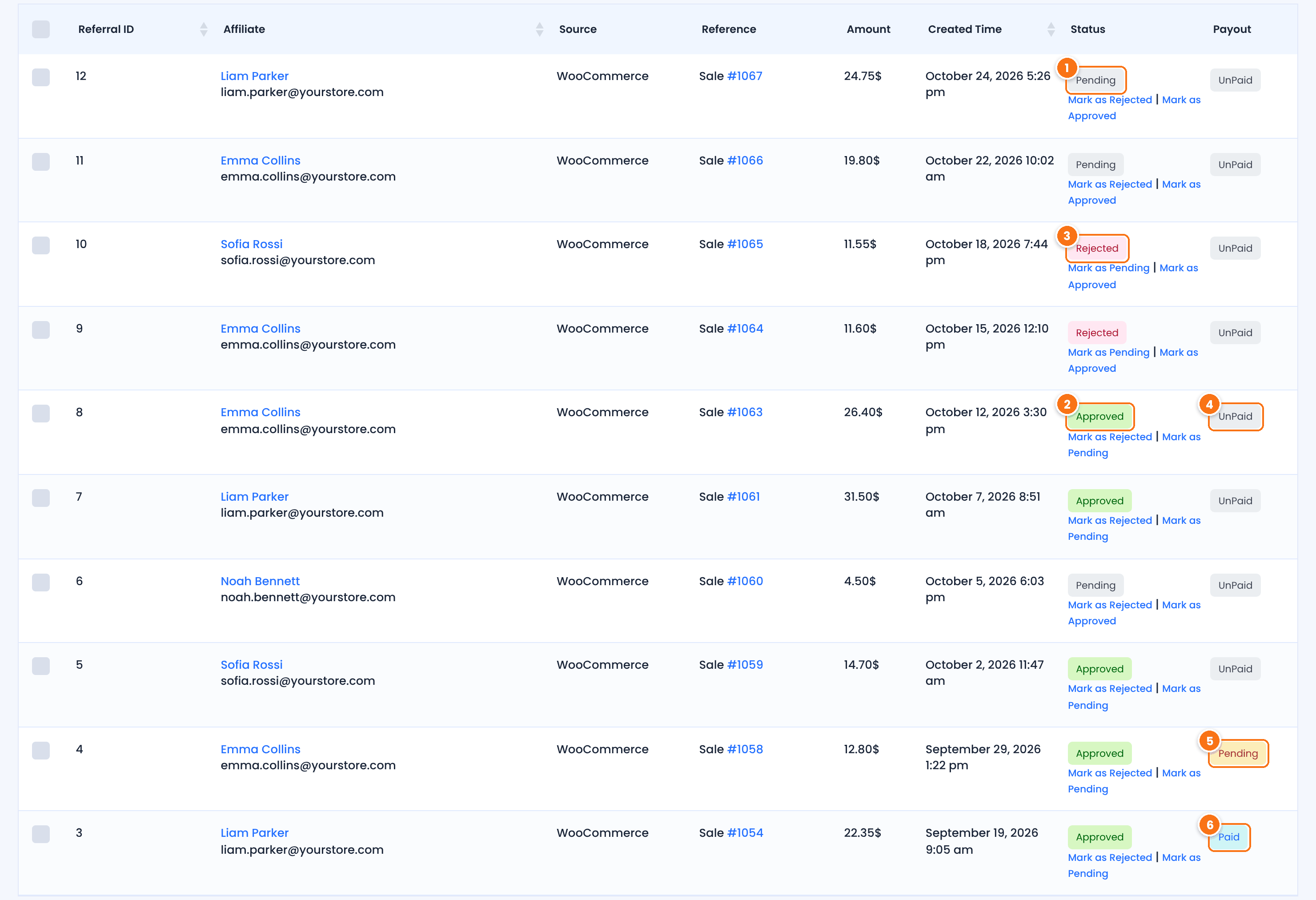
New sale referrals start here. They wait for the order to be completed, or for you to approve them.
Confirmed. The referral counts in the affiliate’s earnings and can be paid.
Cancelled. It stays in the list for your records but is never paid.
Not paid yet. Every new referral starts as UnPaid.
The referral is in a payment that is still Processing. It cannot be added to another payout.
The affiliate was paid for this referral.
Under each status you find links such as Mark as Approved, Mark as Rejected and Mark as Pending, to change it in one click. To change the payment status, hover a referral, click Edit and choose Unpaid, Pending or Paid in Payment. Use Paid only for commissions you paid outside Ultimate Affiliate Pro.
Understand what changes a referral status #
Orders in your store #
Referrals from sales follow the order. For WooCommerce, the status changes when the order status changes:
| WooCommerce order status | Referral status |
|---|---|
| Pending payment, On hold, Processing | Pending |
| Completed | Approved |
| Cancelled, Failed | Rejected |
| Refunded | Rejected, when Reject Commissions on Refund is on |
For the meaning of each order status, see Order statuses in the WooCommerce documentation. Easy Digital Downloads works the same way: a completed payment approves the referral, and a refunded or deleted payment rejects it. Ultimate Membership Pro approves the referral when the order is Completed. Refunds are covered in detail in Refunds and cancelled orders.
Settings that control the status #
- Keep Referral Status as Pending, in Ultimate Affiliate Pro›Settings›Admin Workflow: completed orders no longer approve referrals. Every referral waits for you to approve it. Cancelled, failed and refunded orders still reject referrals.
- Reject Commissions on Refund, in Ultimate Affiliate Pro›Settings›General Settings: on by default. Turn it off to keep referrals Approved when an order is refunded.
- Default Referral Status on module screens: referrals that do not come from an order use the status you pick there, Pending or Approved. This applies to SignUp Referrals (CPL), Pay Per Click (CPC), Ranks Bonus and each Landing Commissions trigger.
With Multi-Level Marketing on, the MLM referrals of the parent affiliates follow the status of the main referral: when you approve or reject the main referral, its MLM referrals change too.
Follow the payout status #
When you create a payout in Ultimate Affiliate Pro›Payouts›Pay Affiliates, the plugin creates one payment per affiliate with the status Processing, and the payment status of its referrals becomes Pending. Go to Ultimate Affiliate Pro›Payouts›Payments to see every payment.
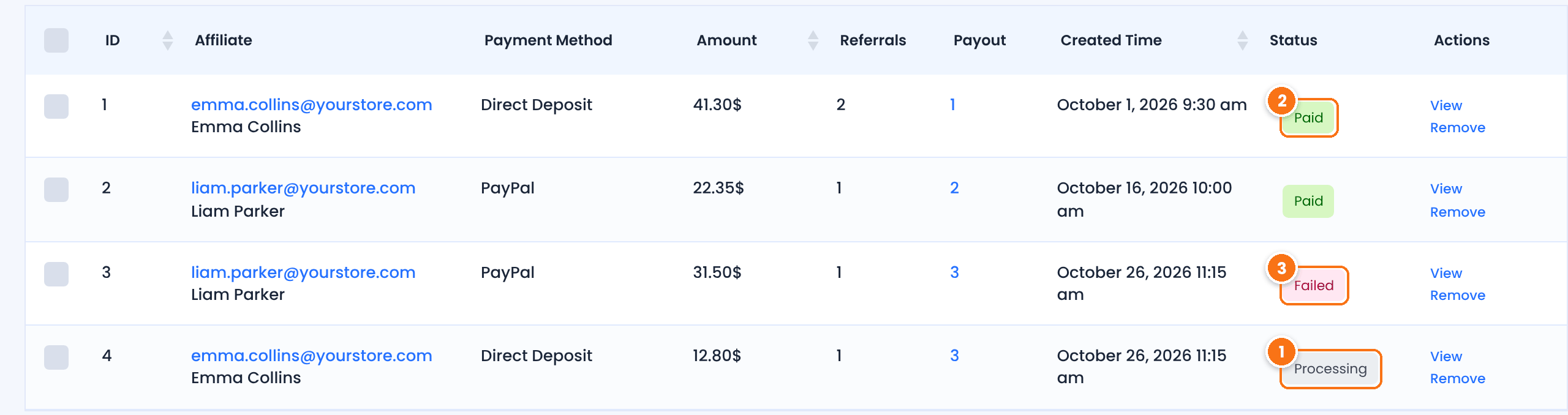
The payment was created. Its referrals show Pending in the Payout column.
The money arrived. Its referrals become Paid.
The transfer did not go through. Its referrals become UnPaid, so you can include them in your next payout.
What moves a payment from Processing depends on the payout method:
| Payout method | Paid | Failed |
|---|---|---|
| Direct Deposit (bank transfer) | You click Mark as Paid on the payment, or Mark as Completed on the payout, after you send the money. | Open the payment (View), choose Failed and click Update Status. Its referrals return to UnPaid. |
| PayPal Payouts | PayPal reports the transfer as successful. The plugin checks PayPal at the Update Payment Status Interval in Admin Workflow. | PayPal reports the transfer as denied, failed, returned, blocked, on hold, cancelled or unclaimed. |
| Stripe Payouts | Stripe confirms the transfer to the affiliate’s connected account. | If Stripe refuses the transfer, no payment is created and the referrals stay UnPaid. |
| Store Credit | The affiliate turns approved, unpaid referrals into a store coupon. The payment is created as Paid. | Not used. |
You can also change a payment by hand. In Ultimate Affiliate Pro›Payouts›Payments, click View on any payment, choose Paid, Processing or Failed and click Update Status. When you open a payout in Mass Payouts, Mark as Paid sets one payment to Paid, and Mark as Processing sets a paid payment back to Processing.
Mass Payouts status #
Each payout groups the payments you created together. Go to Ultimate Affiliate Pro›Payouts›Mass Payouts.
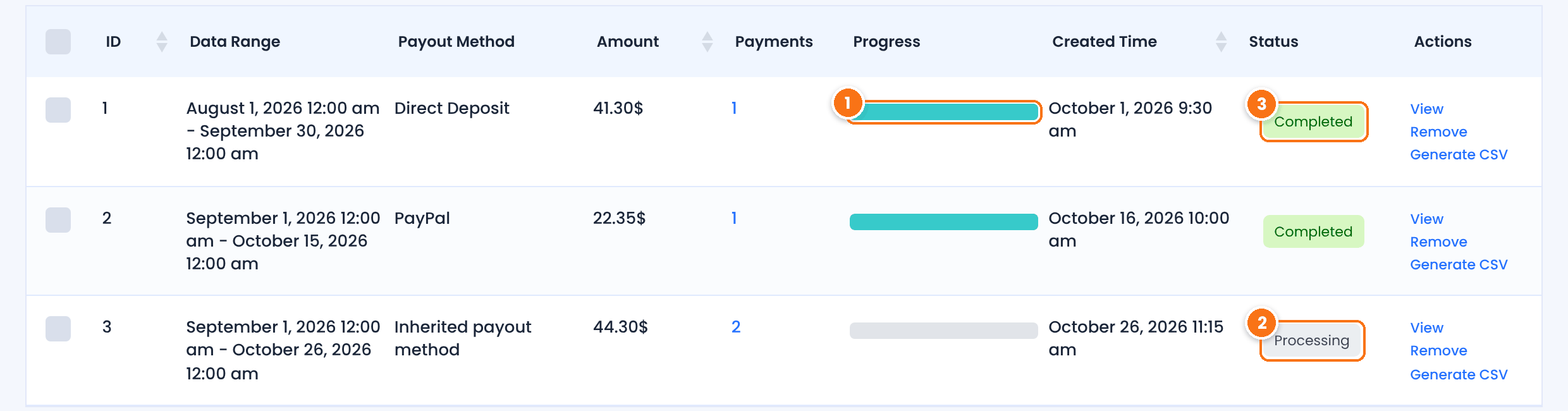
The share of payments in the payout that are Paid.
At least one payment is not Paid yet.
Every payment in the payout is Paid.
With the Payout Request By Affiliate add-on, a request from an affiliate shows Pending until you pay that affiliate, then Completed.
See the statuses affiliates see #
Affiliates see their own referrals and payments in the Affiliate Portal, with the same statuses:
- Referrals: the referrals not paid yet, with their Status, and the totals Approved Referrals Amount and Pending Referrals Amount.
- Reports › Referrals History: every referral, with its Payment and Status.
- Payments: the Withdrawn History, where a payment shows Pending while it is Processing, Completed when it is Paid, or Failed.
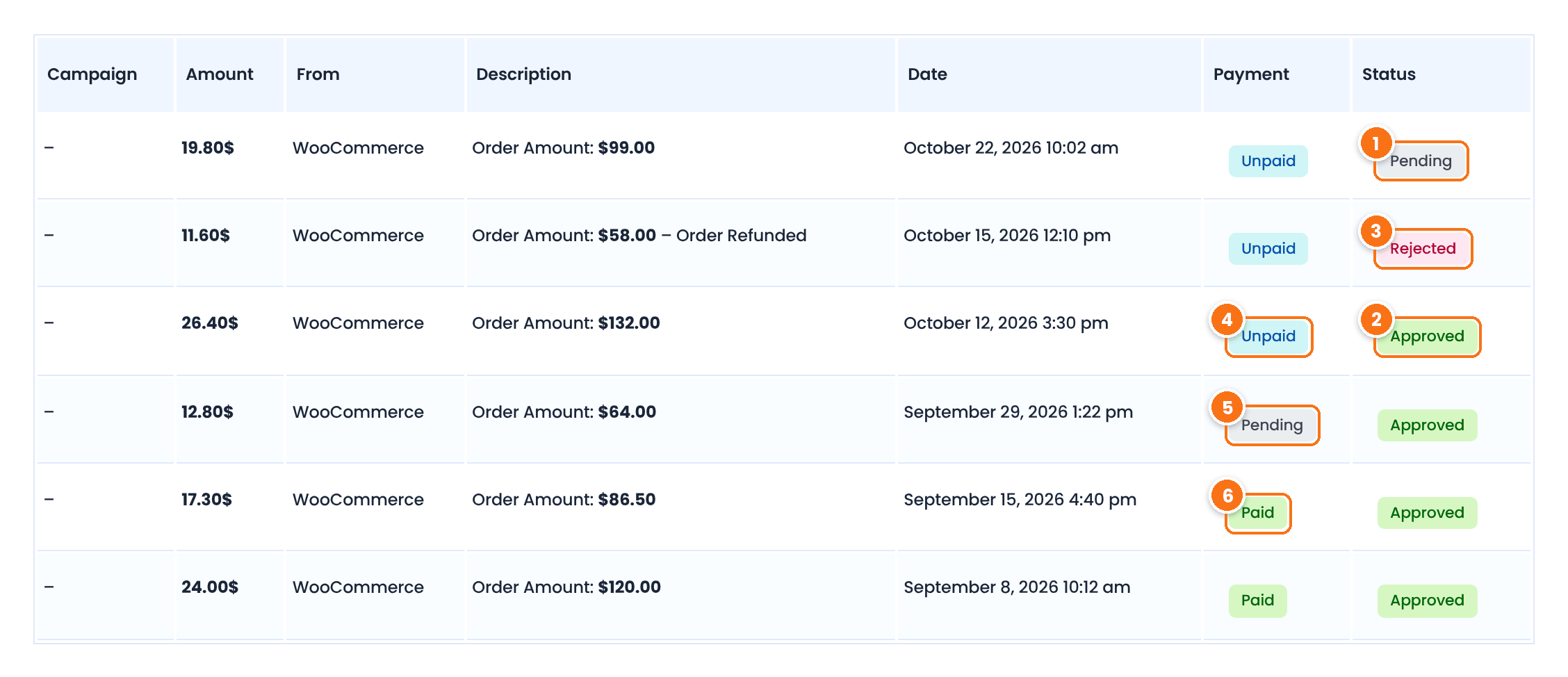
The order is not complete yet, or the referral waits for your approval.
The commission is confirmed.
The commission was cancelled, here because the order was refunded.
Not paid yet.
Included in a payout that is in progress.
Paid to the affiliate.
Affiliates can filter Referrals History by date to find a referral quickly.
Test it #
- Place a test order through an affiliate link and leave it in Processing. In Ultimate Affiliate Pro›Referrals, the referral is Pending and UnPaid.
- Complete the order. The referral becomes Approved.
- Create a payout for the test affiliate with Direct Deposit. The payment is Processing and the referral shows Pending in the Payout column.
- Mark the payment as paid. The referral shows Paid, and the affiliate sees the payment as Completed in the Payments section of the Affiliate Portal.
Frequently asked questions #
Why is a referral still Pending?
The order is not completed yet, or Keep Referral Status as Pending is on in Settings, Admin Workflow. Complete the order or approve the referral with Mark as Approved in Referrals.
What is the difference between the status and the payment status of a referral?
The status says whether the commission is confirmed: Pending, Approved or Rejected. The payment status says whether you paid it: UnPaid, Pending or Paid. Only Approved and UnPaid referrals are included in a payout.
What happens to referrals when a payment fails?
The payment status changes to Failed and its referrals become UnPaid again, so you can include them in your next payout.
Do affiliates see Pending and Rejected referrals?
Yes. Affiliates see every referral with its status in the Affiliate Portal, in Referrals and in Reports, Referrals History.
Can I mark a referral as paid without a payout?
Yes. Edit the referral and set Payment to Paid. Use it only for commissions you paid outside Ultimate Affiliate Pro.


