Affiliate plugin integrations connect Ultimate Affiliate Pro with the plugin that takes your payments or signups, such as WooCommerce, a membership plugin, a course plugin or a form plugin. When a referred visitor buys, joins, books or submits a form, the integration creates a referral for the affiliate.
You manage all integrations on one screen. Four are built into Ultimate Affiliate Pro. The others work with a Pro add-on that you install once. New to the plugin? Start with the quick start.
Before you start
- Ultimate Affiliate Pro installed, with your license active.
- The plugin you want to connect installed and active, for example WooCommerce or LearnDash.
- For an integration that needs a Pro add-on, the add-on installed and active. See Pro Add-ons.
Open the Integrations screen #
Go to Ultimate Affiliate Pro›Integrations. Integrations are grouped in sections: eCommerce, Membership, LMS / Online Courses, Form Integrations, Events & Booking and Fundraising & Donations. Each integration has a card:
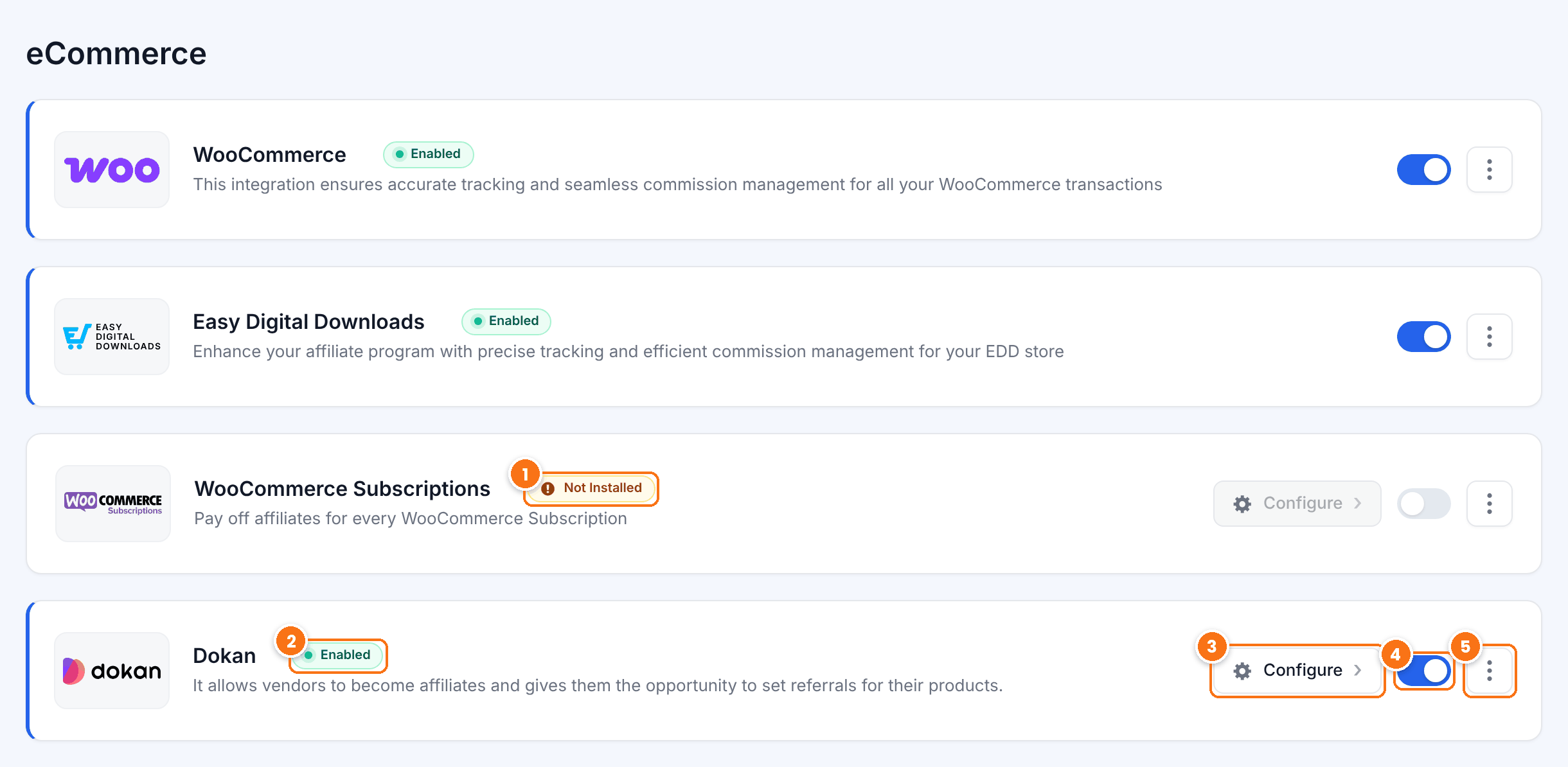
The plugin, or the Pro add-on the integration needs, is not active, so the switch is locked. Install and activate it first.
The status of the integration. Enabled means referrals are created for that plugin.
Opens the settings of the integration, for example the referral amount for each form or course. Only integrations that work with a Pro add-on have this button.
Turns the integration on or off. The change is saved right away.
The More Info link opens the page about that integration on our website.
Turn on an integration #
- Install and activate the plugin you want to connect, for example LearnDash.
- If the integration has a Configure button, install and activate its Pro add-on. See Pro Add-ons: what they are and how to install them.
- On the Integrations screen, turn on the switch of the integration. The badge changes to Enabled.
- Click Configure, if the card has it, and review the settings of the integration.
- Place a test order or submit a test form through an affiliate link. See Test your affiliate program.
Tip
WooCommerce, Easy Digital Downloads, Ultimate Membership Pro and Ultimate Learning Pro are built in and turned on by default. Their switches are active as soon as the plugin is installed.
What affiliate plugin integrations do #
All integrations follow the same rules, so you set your commissions once:
- The affiliate is found from the referral cookie, an affiliate coupon, the affiliate the customer is already linked to (Lifetime Commissions) or the affiliate selected at checkout (Checkout Referrals), when the integration supports them.
- The commission comes from the affiliate’s rank and from Product Rates. How commissions are calculated explains the rules.
- New referrals are saved as Pending. They are approved when the payment is complete and rejected when it fails or, by default, when it is refunded.
- Each referral shows its source, for example WooCommerce or LearnDash, in Ultimate Affiliate Pro›Referrals and in the Affiliate Portal.
Supported integrations #
| Section | Integrations |
|---|---|
| eCommerce | WooCommerce (built in), Easy Digital Downloads (built in), WooCommerce Subscriptions, Dokan |
| Membership | Ultimate Membership Pro (built in), MemberMouse, MemberPress, Paid Memberships Pro, Paid Member Subscriptions, Restrict Content Pro |
| LMS / Online Courses | Ultimate Learning Pro (built in), Tutor LMS, LifterLMS, LearnDash, LearnPress |
| Form Integrations | Contact Form 7, WPForms, Ninja Forms, Fluent Forms, Formidable Forms, Gravity Forms, Forminator |
| Events & Booking | The Events Calendar, Event Tickets, WP Booking Calendar, Amelia |
| Fundraising & Donations | GiveWP |
Other connections #
These add-ons and features are not on the Integrations screen, but connect Ultimate Affiliate Pro with other tools:
- Zapier sends new affiliates, referrals and clicks to thousands of apps.
- myCRED gives affiliates points for clicks and referrals.
- Bitly creates a short link for each affiliate.
- Page builders shows how to add the affiliate forms and portal with Elementor, Divi or the block editor.
- The REST API lets your own apps read and create affiliates and referrals.
Frequently asked questions #
Why is the switch of an integration locked?
The card shows Not Installed because the plugin, or the Pro add-on the integration needs, is not active. Activate it, then reload the Integrations screen.
Why does an integration stay Disabled after I turn it on?
Integrations with a Configure button need both the plugin and its Pro add-on. Activate whichever is missing, then turn the switch on again.
Can I use several integrations at the same time?
Yes. For example, you can track WooCommerce orders and Contact Form 7 leads on the same site. Each referral shows its source.
My plugin is not in the list. Can I still pay affiliates?
Yes. You can add referrals by hand in Referrals, pay per action with Landing commissions, or create referrals from your own code with the REST API.


