A WordPress plugin 500 error, a white screen or a message like Parse error or Fatal error: Cannot redeclare means PHP stopped while loading a page. The cause is almost always on the server: the PHP version, the memory limit, an incomplete upload or two pieces of code that clash. This guide shows you how to find the real error and fix it.
The message in the browser is generic on purpose. The full error, with the file and line, is written to a log. Once you have it, the fix is usually quick. Check first that your server meets the Ultimate Affiliate Pro requirements: WordPress 5.4 or later and PHP 7.4 or later.
Before you start
- A recent backup of your site files and database.
- FTP, SFTP or file manager access to your site, to edit
wp-config.php. - Access to your hosting control panel, or the contact of your host.
Get the full error message #
WordPress can write every PHP error to a file instead of showing it to visitors. Open wp-config.php in the root folder of your site and add these lines above /* That's all, stop editing! */:
define( 'WP_DEBUG', true );
define( 'WP_DEBUG_LOG', true );
define( 'WP_DEBUG_DISPLAY', false );
Load the page with the error again, then open wp-content/debug.log. The last lines show the error type, the file and the line number. You can check that the settings are active in Tools›Site Health, tab Info, section WordPress Constants.
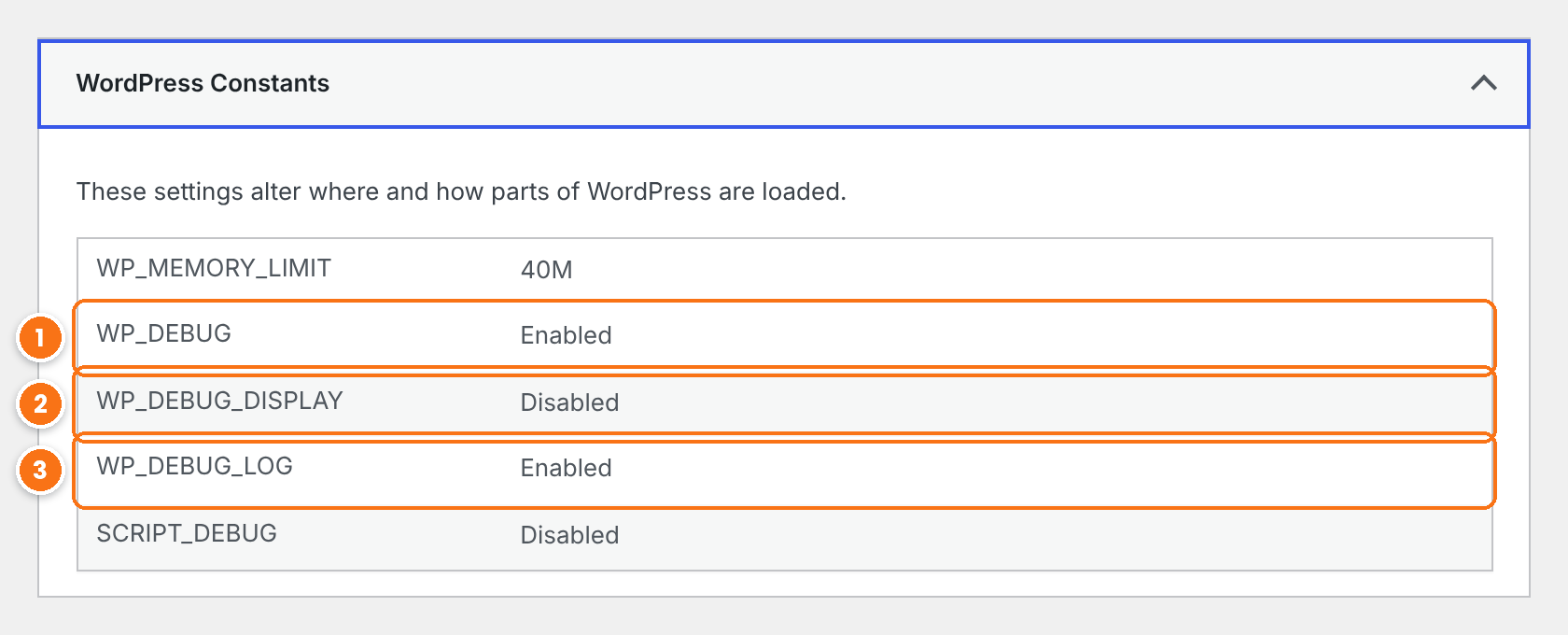
Turns on PHP error reporting in WordPress.
Keep it disabled on a live site, so visitors never see errors.
Writes the errors to wp-content/debug.log.
If WordPress shows There has been a critical error on this website, check the inbox of the admin email. WordPress sends a message with the error and a recovery mode link that lets you log in and deactivate the plugin or theme that failed. Your host can also give you the PHP error log of the server. The WordPress handbook explains all the options in Debugging in WordPress.
Caution
Turn WP_DEBUG off again when you finish, and delete debug.log. The log can grow large and may contain paths of your site.
Fix a WordPress plugin 500 error and other PHP errors #
Find the message from the log in the list below.
The server runs a PHP version older than the plugin needs. Change the PHP version to 7.4 or later from your hosting control panel, or ask your host. PHP 8.x is recommended. Check the current version in Tools › Site Health, tab Info, section Server.
PHP ran out of memory. Raise the limit to at least 256M: add define( 'WP_MEMORY_LIMIT', '256M' ); to wp-config.php, and ask your host to raise memory_limit on the server if it is lower.
Two pieces of code define the same function. The two file paths in the message tell you which ones. Most often, two copies of Ultimate Affiliate Pro are active at the same time, in different plugin folders, for example after you installed a new version next to an older one. Keep one copy active and remove the folder of the other one over FTP. If the second path belongs to another plugin or your theme, see plugin and theme conflicts.
Plugin files are missing, usually after an upload that stopped halfway. Replace the plugin files over FTP or your file manager: delete the ultimate-affiliate-pro folder in wp-content/plugins and upload a fresh copy. Your affiliates, referrals and settings are stored in the database and stay in place. Do not use Delete on the Plugins screen for this: it runs the uninstall routine and removes plugin data. Take a backup first. See update Ultimate Affiliate Pro.
A long task, such as a large export or import, ran out of time. Ask your host to raise max_execution_time, or split the task into smaller parts.
The server blocked the request before PHP ran, for example a firewall rule, a security module or wrong file permissions. Ask your host what the server error log shows at the time of the error.
Fix errors that appear when you save or click #
Some errors happen only when you save a settings screen or use a button in Ultimate Affiliate Pro.
- Settings are not saved on long screens. PHP limits how many fields a form can send with
max_input_vars. Ask your host to raise it to 3000 or more. - Buttons do nothing, or show 403 Forbidden. A firewall or security plugin may block
admin-ajax.phpor the WordPress REST API. Allow them for logged-in administrators. - The error started after an update. Clear your cache plugin, your host cache and your browser cache, so the old scripts are not loaded with the new files.
Test it #
- Load the page or repeat the action that showed the error.
- Check that the page works and that no new lines appear in
wp-content/debug.log. - Turn debug logging off again in
wp-config.php. - If the error is still there, follow the conflict test in plugin and theme conflicts, then contact support with the error message.
Frequently asked questions #
Is it safe to replace the plugin files?
Yes, when you replace the folder over FTP or your file manager. Ultimate Affiliate Pro keeps affiliates, referrals and settings in the database, so new files do not remove them. Deleting the plugin from the Plugins screen is different: it runs the uninstall routine and removes plugin data. Take a backup first, as with any change.
Where do I find debug.log?
In the wp-content folder of your site, after you turn on WP_DEBUG and WP_DEBUG_LOG and load the page with the error again.
Which PHP version should I use?
PHP 7.4 or later is required. PHP 8.x is recommended for speed and security. Your host can change it from the control panel.
The error mentions another plugin. What now?
Deactivate that plugin and check if the error goes away. If both plugins are needed, send the error to the developer of the other plugin and to our support team.


