The Payout Request By Affiliate add-on lets affiliates request a payout from their Affiliate Portal. Each affiliate payout request collects their approved, unpaid earnings above a minimum amount, notifies you by email and appears in a list where you pay or cancel it.
Without the add-on, you decide when to pay affiliates (see How affiliate payouts work). With it, affiliates choose when they want to be paid, within the rules you set: how old referrals must be and the minimum amount for a request.
Before you start
- Ultimate Affiliate Pro installed and active (install guide).
- A payout method for your affiliates, such as PayPal or bank transfer.
- Referrals you approve regularly in Ultimate Affiliate Pro›Referrals.
Install the Payout Request By Affiliate add-on #
- Download the Payout Request By Affiliate zip file from your account on ultimateaffiliate.pro.
- In your WordPress admin, go to Plugins›Add Plugin and click Upload Plugin.
- Choose the zip file, click Install Now, then Activate Plugin.
The add-on now has its own card in Ultimate Affiliate Pro›Modules. See Pro add-ons: what they are and how to install them for the full process.
Set the request rules #
Go to Ultimate Affiliate Pro›Modules›Payout Request by Affiliate.
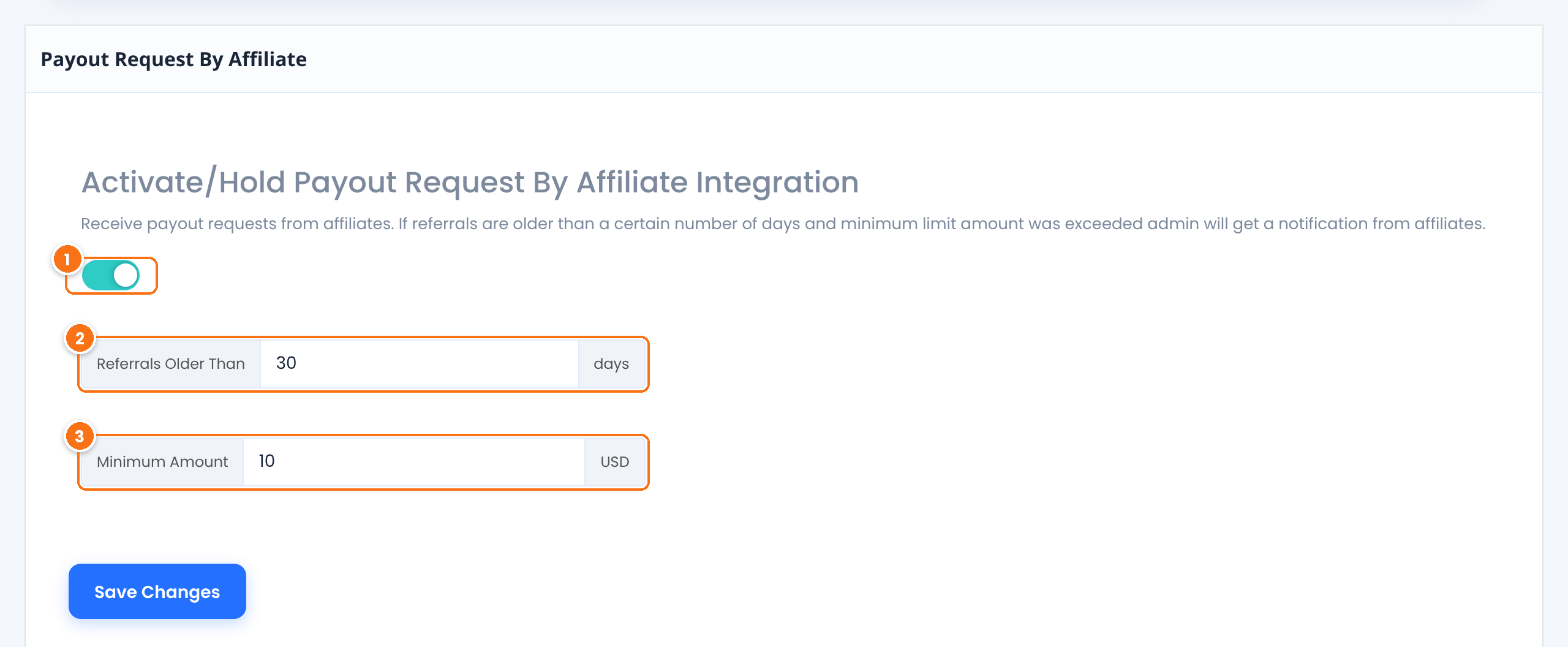
Turns payout requests on or off.
Default: Off
Only approved referrals older than this number of days count toward a request. Match it to your refund period, so you never pay for an order that is refunded later.
Default: 30 days
The smallest amount an affiliate can request, in your Ultimate Affiliate Pro currency.
Default: 10
Click Save Changes. The List of payment request link below these fields opens the requests list.
Show the Payout Request tab #
The add-on adds a Payout Request tab to the Affiliate Portal. Go to Ultimate Affiliate Pro›Showcases›Affiliate Portal and, in the Content Section, turn on the Payout Request tab. Save the page.
Write the admin notification #
In the Notification section of the add-on settings, edit the Subject: and Message: of the email you receive for each new request. The email goes to your site administrator email address. Available placeholders:
{affiliate_first_name},{affiliate_last_name}the affiliate who sent the request{amount},{currency}the requested amount{payout_link}a link to the requests list in your admin{siteurl},{blogname}your site address and name
Click Save Changes under the editor.
The affiliate payout request in the portal #
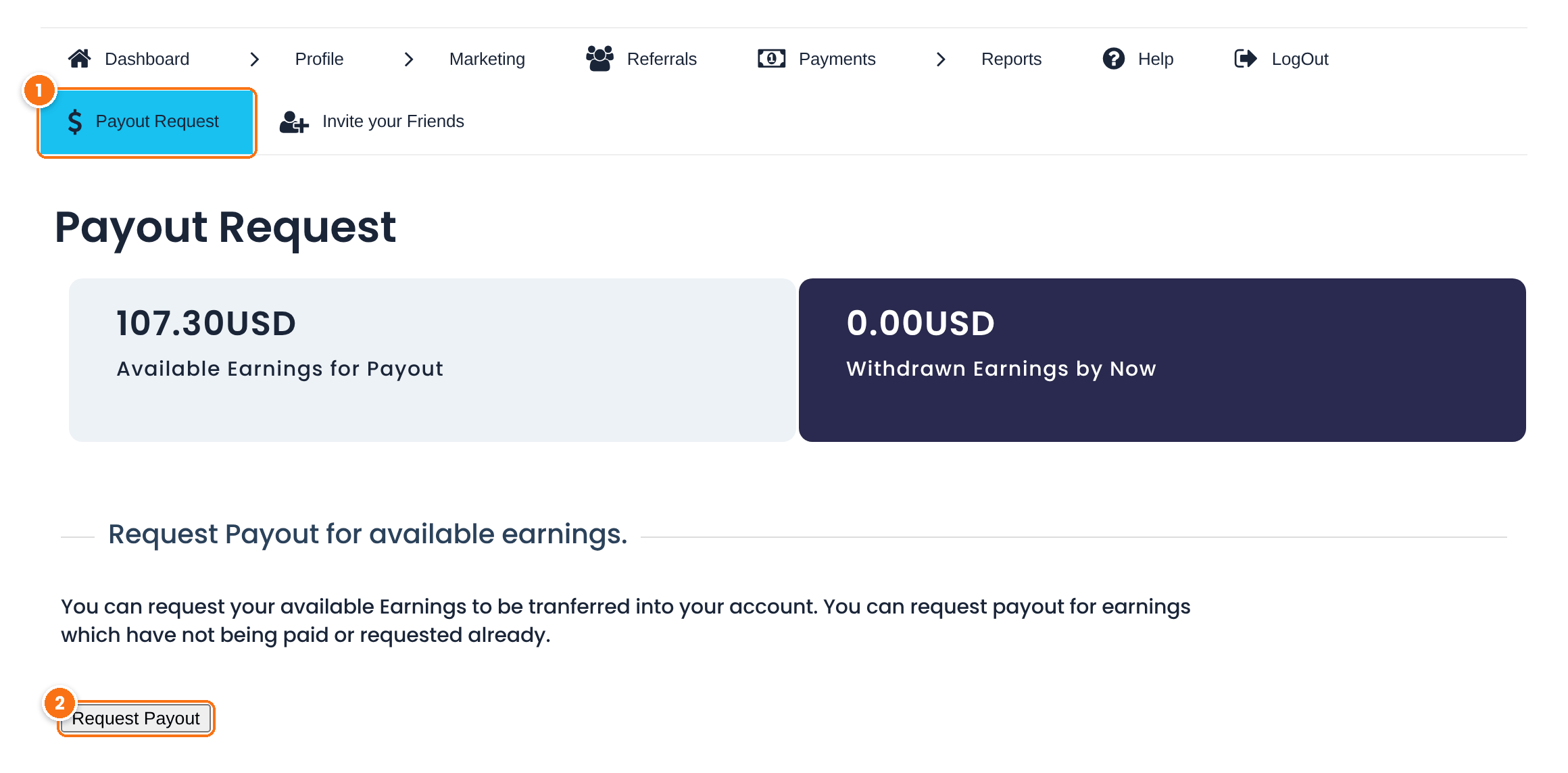
Shows Available Earnings for Payout: the approved, unpaid referrals older than Referrals Older Than. The amount is shown when it reaches the Minimum Amount. Withdrawn Earnings by Now shows what the affiliate has been paid so far.
Sends the request. The affiliate sees Success! Your payout request has been submitted and is being processed. An affiliate can have one pending request at a time.
Pay or cancel requests #
Go to Ultimate Affiliate Pro›Payouts›Payout requests by Affiliates.
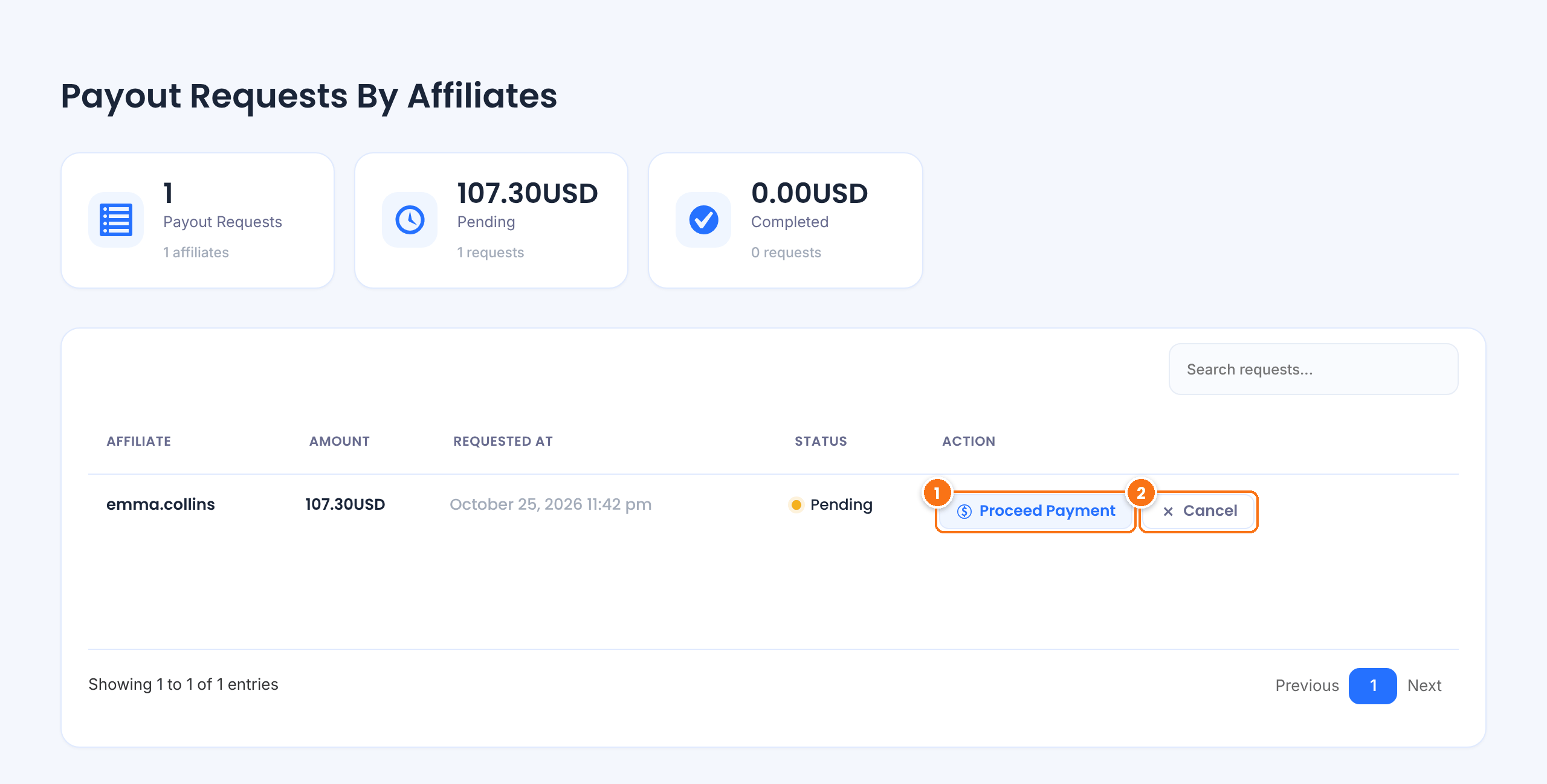
Opens the payout screen for that affiliate with the referrals of the request selected. Complete the payout as usual. When the payout is completed, the request changes to Completed automatically.
Cancels a pending request. Completed requests show Delete instead.
The cards at the top show the number of requests, the pending amount and the completed amount. Use the search box to find a request by affiliate.
Frequently asked questions #
Which earnings can an affiliate request?
Approved referrals that are not paid yet and are older than the Referrals Older Than value. Pending or rejected referrals are not included.
Why does an affiliate see 0.00 as available?
Their eligible earnings are below the Minimum Amount, or their approved referrals are newer than the Referrals Older Than value.
Can an affiliate send several requests?
An affiliate can have one pending request at a time. After you pay or cancel it, they can request again.
Who receives the notification email?
The site administrator email address set in WordPress Settings › General.
Does a request pay the affiliate automatically?
No. You review each request and pay it with Proceed Payment, using the payout method you prefer.


