The Invite Your Friends add-on adds a refer a friend affiliate form to the Affiliate Portal. Affiliates enter a friend’s name and email, and Ultimate Affiliate Pro sends an invitation with the affiliate’s link to your registration page.
It is a simple way to grow your program through your best affiliates. The invitation link carries the affiliate’s referral parameter, so the visit is tracked like any affiliate referral link. If you use MLM, a friend who registers through the link can join the inviting affiliate’s team.
Before you start
- Ultimate Affiliate Pro installed and active (install guide).
- The Affiliate Portal and registration pages set up (see Set up the Affiliate Account Page).
- Working email delivery on your site (see Email notifications).
Install the Invite Your Friends add-on #
- Download the Invite Your Friends zip file from your account on ultimateaffiliate.pro.
- In your WordPress admin, go to Plugins›Add Plugin and click Upload Plugin.
- Choose the zip file, click Install Now, then Activate Plugin.
The add-on now has its own card in Ultimate Affiliate Pro›Modules. See Pro add-ons: what they are and how to install them for the full process. WordPress covers the upload steps in its guide to managing plugins.
Turn it on and set the limit #
Go to Ultimate Affiliate Pro›Modules›Invite Your Friends.
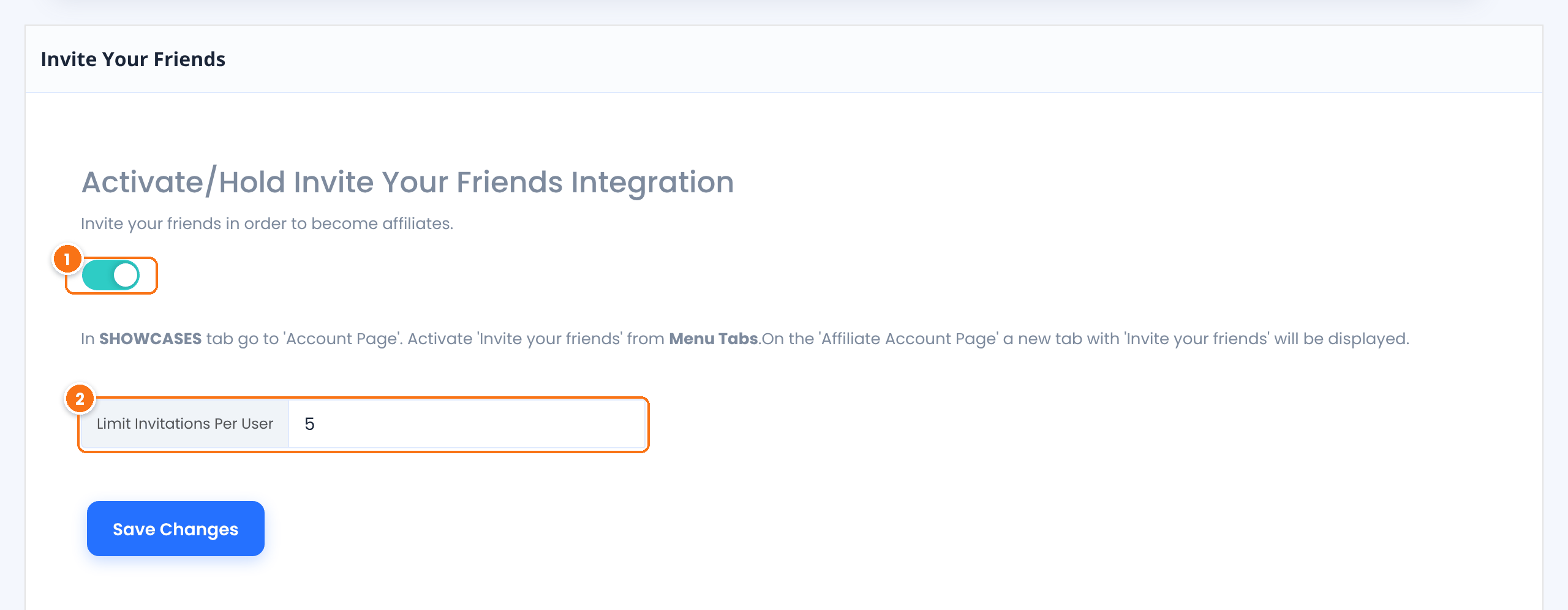
Turns the add-on on. Saving it on also adds an Invite your Friends tab to the Affiliate Portal and activates it. Saving it off removes the tab.
Default: Off
How many friends each affiliate can invite. When an affiliate reaches the limit, the portal shows You have reached the invitations limit. instead of the form.
Default: 5
Click Save Changes.
Write the invitation email #
Scroll down to Invitation Template on the same screen.
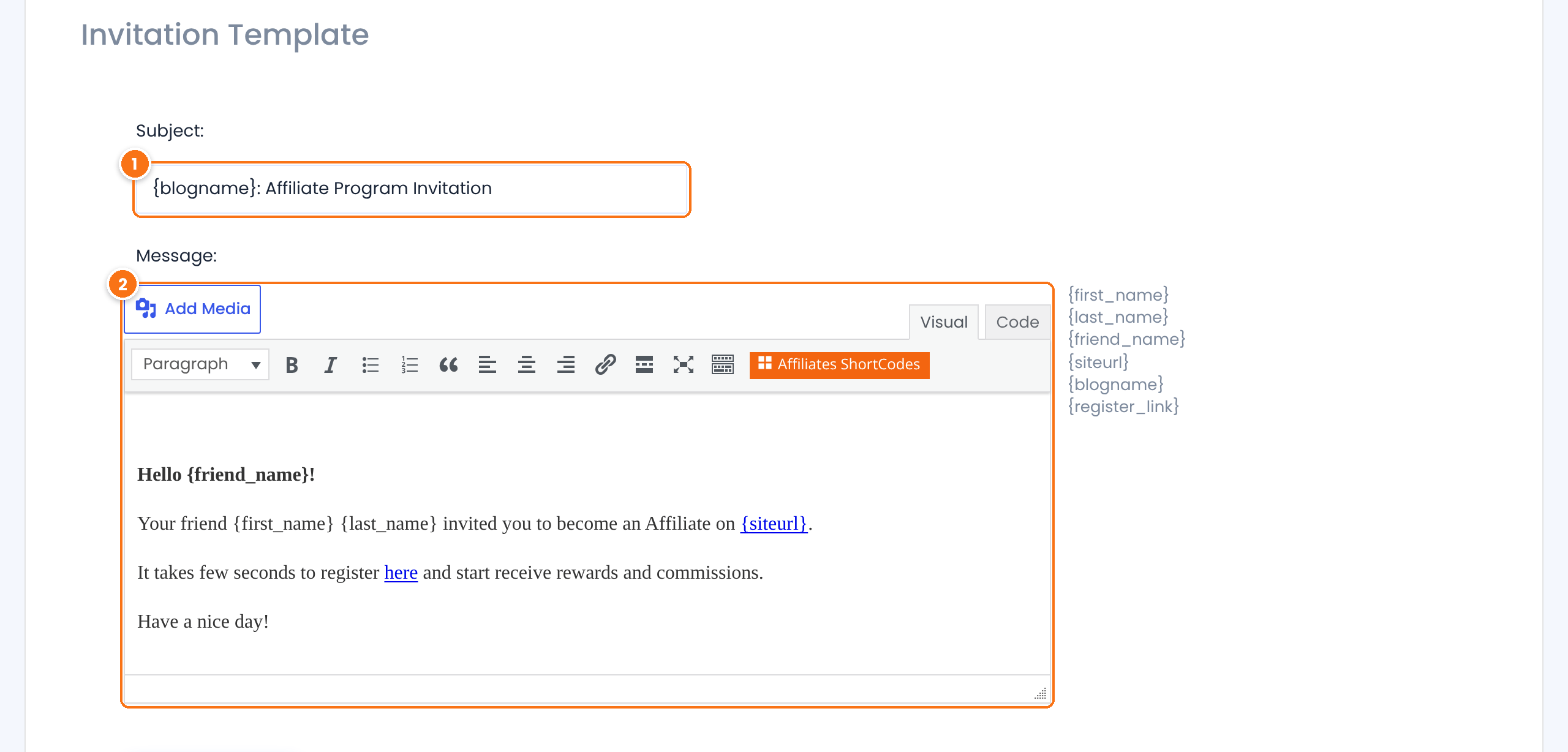
The email subject.
Default: {blogname}: Affiliate Program Invitation
The email body. Use the placeholders listed next to the editor:
{friend_name}the name the affiliate entered{first_name},{last_name}the inviting affiliate{register_link}your registration page with the affiliate’s referral parameter{siteurl},{blogname}your site address and name
Click Save Changes under the editor. The email is sent from the sender name and address set in Ultimate Affiliate Pro›Settings›Notifications Settings.
Keep the register link
Always keep {register_link} in the message. It is the link that connects the friend to the affiliate who invited them.
The refer a friend affiliate form in the portal #
Affiliates open the Invite your Friends tab in their Affiliate Portal.
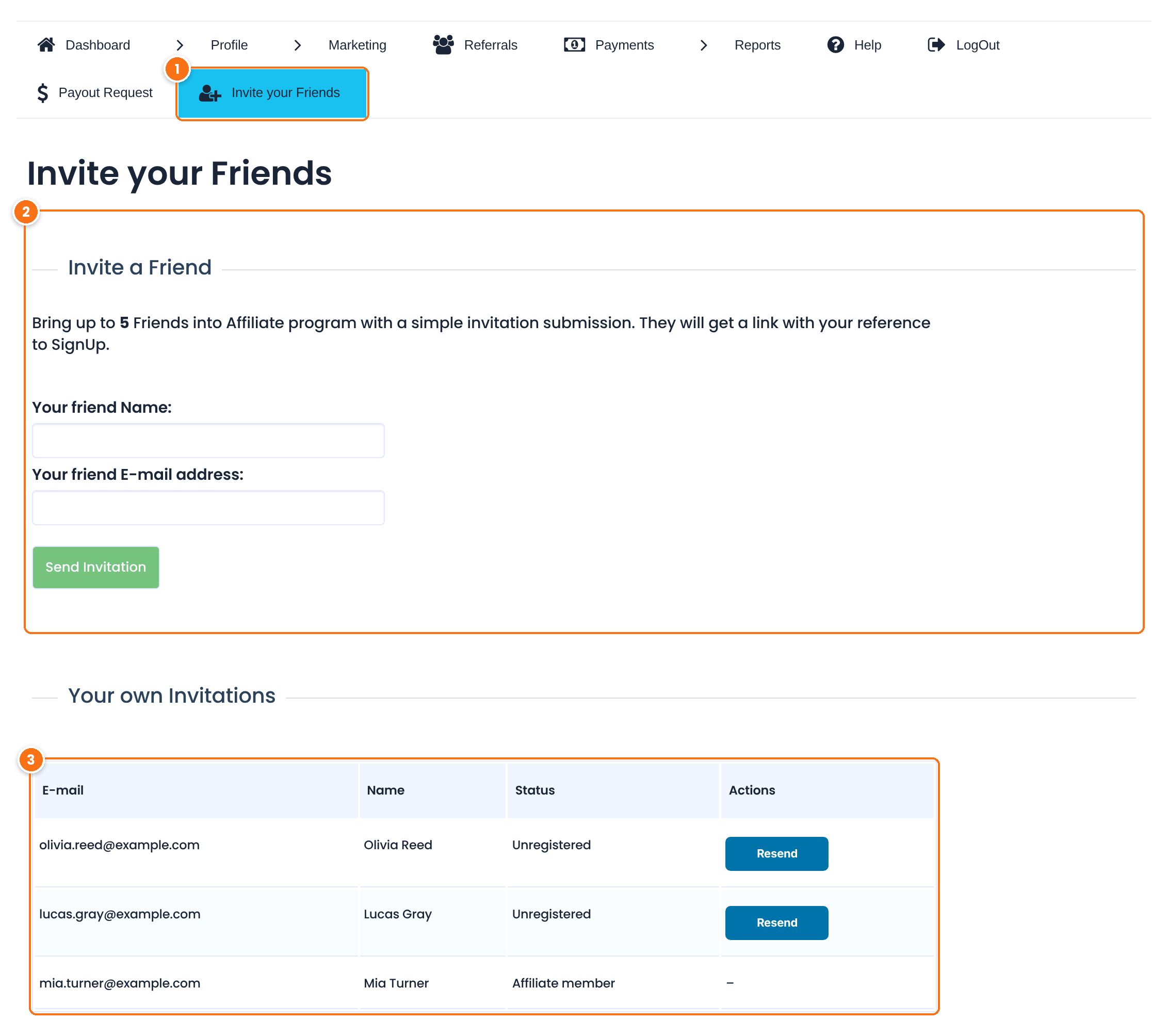
The tab added by the add-on. You can rename it or add an intro text in Ultimate Affiliate Pro›Showcases›Affiliate Portal, in the Content Section.
The affiliate enters Your friend Name: and Your friend E-mail address:, then clicks Send Invitation. The text above the form shows how many friends they can invite.
Every invitation sent, with its status: Affiliate member when that email already belongs to an affiliate, Unregistered otherwise. Resend sends the email again to friends who have not joined yet.
Test it #
- Log in to the Affiliate Portal as an affiliate and open Invite your Friends.
- Invite an email address you can check.
- Open the email and click the registration link. The registration page opens with the affiliate’s referral parameter in the URL.
Frequently asked questions #
Where do invited friends sign up?
On your affiliate registration page. The link in the email is your registration page with the inviting affiliate’s referral parameter added.
Can I change the invitation email?
Yes. Edit the Subject and Message in the Invitation Template section of the add-on settings. The template is kept on that screen, next to the other add-on settings.
How many friends can an affiliate invite?
As many as Limit Invitations Per User allows, 5 by default. Resending an invitation does not count as a new one.
The tab does not appear in the Affiliate Portal. What should I check?
Save the add-on settings with the switch on, then check that the Invite your Friends tab is active in Ultimate Affiliate Pro › Showcases › Affiliate Portal, in the Content Section.
The invitation email does not arrive. What should I check?
Check the sender details in Settings › Notifications Settings and make sure your site can send email. An SMTP plugin usually solves delivery problems.


