PayPal affiliate payouts let you send commissions from your PayPal Business account to each affiliate’s PayPal email, straight from the WordPress admin. Ultimate Affiliate Pro connects to the PayPal Payouts API, sends one payment per affiliate in a payout and updates each payment’s status for you.
This guide covers the PayPal side, the PayPal Payouts module and what affiliates need to do. For the full payout flow, from approved referrals to paid payments, read How affiliate payouts work.
Before you start
- A PayPal Business account with access to the Payouts feature.
- Access to the PayPal Developer dashboard with the same PayPal account. See the PayPal Payouts docs for what Payouts requires.
- Your store currency set to a currency PayPal supports, in Ultimate Affiliate Pro General Settings.
Create a PayPal app with Payouts #
The app gives Ultimate Affiliate Pro the Client ID and Client Secret it needs to send payments for you.
- Log in to the PayPal Developer dashboard and open Apps & Credentials.
- Choose Sandbox to test first, or Live for real payments. Sandbox and Live have separate apps and credentials.
- Click Create App, give it a name such as “Your Store Payouts” and create it.
- In the app settings, make sure the Payouts feature is checked. If you don’t see it for Live, ask PayPal to enable Payouts on your account.
- Copy the Client ID and the Secret.
Tip
For sandbox tests, PayPal creates test accounts for you under Sandbox accounts. Use a sandbox Business account with enough balance to send the payments, and sandbox Personal account emails for your test affiliates.
Turn on PayPal Payouts in Ultimate Affiliate Pro #
Go to Ultimate Affiliate Pro›Settings›Payout Settings and click Configure on PayPal Payouts. You can also open it from Ultimate Affiliate Pro›Modules.
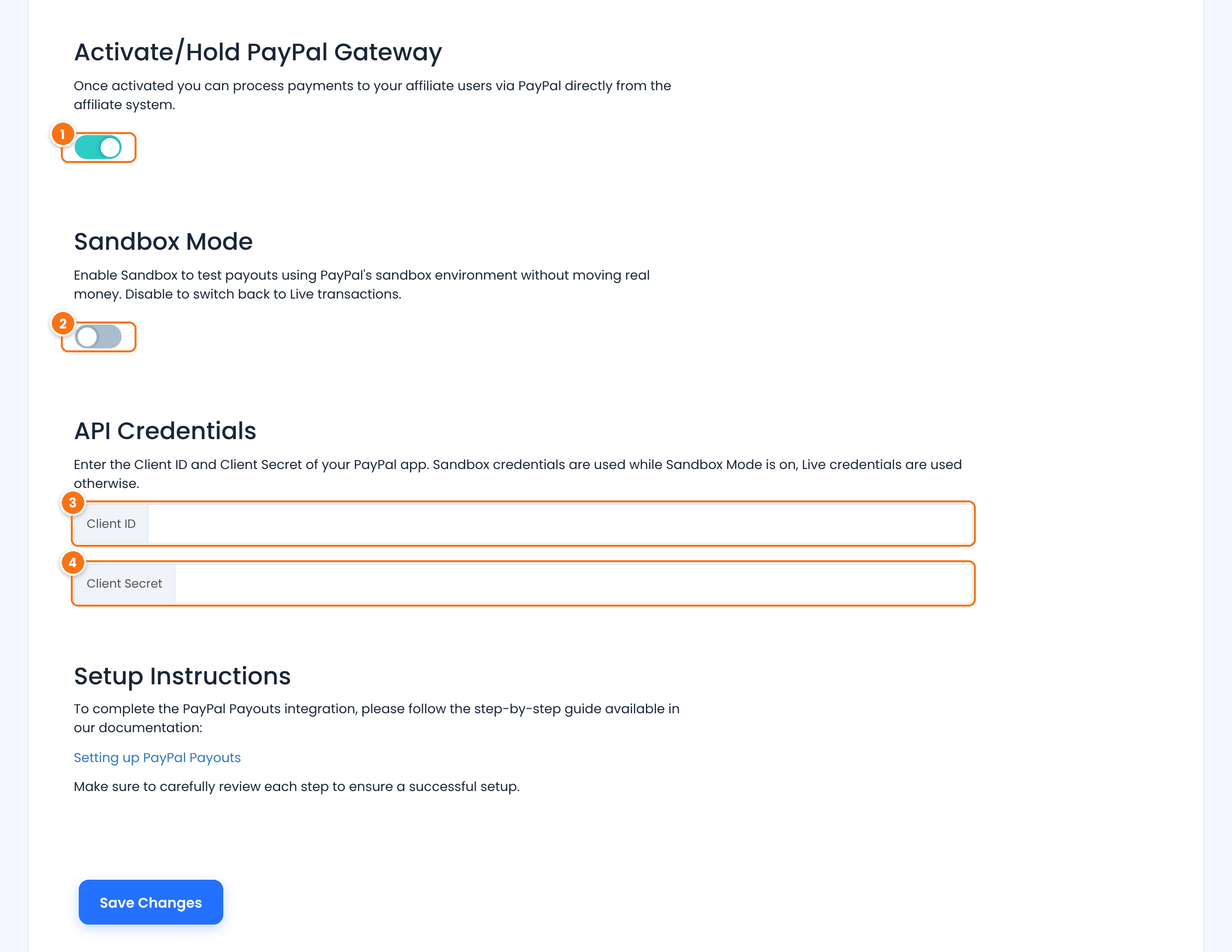
Turns PayPal payouts on. PayPal then appears as a payout method for affiliates and in the Pay Affiliates screen.
Default: Off
Sends payouts through PayPal’s sandbox, without moving real money. When it is on, the fields change to Sandbox Client ID and Sandbox Client Secret. Turn it off to pay with your Live credentials.
Default: Off
The Client ID of your Live PayPal app. In Sandbox Mode, paste the sandbox app’s Client ID in Sandbox Client ID.
The Secret of the same app. In Sandbox Mode, use Sandbox Client Secret.
Click Save Changes.
Ask affiliates for their PayPal email #
Each affiliate saves their PayPal email in the Affiliate Portal, under Profile›Payout Details.
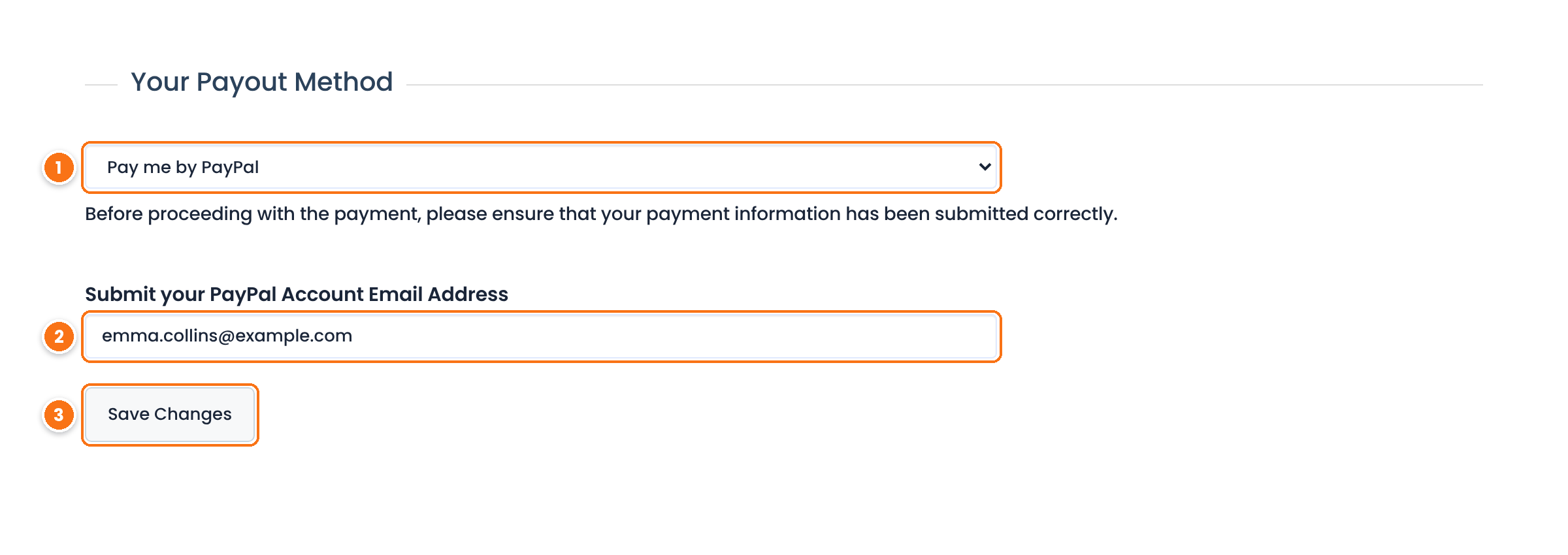
- The affiliate selects Pay me by PayPal in Your Payout Method.
- They type the email of their PayPal account in Submit your PayPal Account Email Address.
- They click Save Changes.
To make PayPal the method of every new affiliate, set Default Payment System to PayPal in Settings›Payout Settings.
Send a PayPal payout #
Go to Ultimate Affiliate Pro›Payouts›Pay Affiliates, choose the referrals and affiliates, then pick one of these in 04 – Choose Payout Method:
Pays only the affiliates whose payout method is PayPal, all in one batch.
Pays every affiliate with their own method. Affiliates who chose PayPal are paid through PayPal; the others follow their own method.
Click Preview Payout, check the summary and click Create Payout. Ultimate Affiliate Pro sends one PayPal payment per affiliate, with the note “Affiliate Payment”, and creates the payments with the status Processing.
Follow the payment status #
PayPal processes each payment on its side. Ultimate Affiliate Pro asks PayPal for the status of every Processing payment on a schedule and updates it:
PayPal reports the payment as successful. The referrals in it become Paid.
PayPal is still processing the payment, for example while it is pending.
PayPal denied, returned, blocked, held or canceled the payment, or the affiliate didn’t claim it. A payment to an email with no PayPal account stays unclaimed and is marked Failed.
Set how often the status is checked in Update Payment Status Interval, in Settings›Admin Workflow: Hourly, Every 12 hours (default) or Daily. See every PayPal payment in Payouts›Payments.
Test it #
- Turn on Sandbox Mode and save your sandbox app credentials.
- Log in to the Affiliate Portal as a test affiliate and save a sandbox Personal account email in Payout Details.
- Approve a referral for that affiliate, then create a payout with PayPal Bulk Payout.
- Log in to the sandbox Personal account at sandbox.paypal.com and check that the payment arrived. After the next status check, the payment shows Paid in Payouts›Payments.
- Turn off Sandbox Mode and save your Live credentials when you are ready to pay real affiliates.
Frequently asked questions #
PayPal Bulk Payout is grayed out. Why?
The PayPal Payouts module must be turned on and the Client ID and Client Secret for the current mode must be saved. In Sandbox Mode, Ultimate Affiliate Pro uses the sandbox credentials; otherwise it uses the Live ones.
Who pays the PayPal fees?
PayPal charges its Payouts fees to your PayPal Business account, the sender. Check your PayPal account for the fees that apply in your country.
Which currency are affiliates paid in?
The currency set in Ultimate Affiliate Pro, as a three-letter code such as USD or EUR. Your PayPal account needs a balance in that currency, or PayPal converts it.
An affiliate didn’t receive the money. What do I check?
Open the payment in Payouts, Payments. If it is Failed, its referrals are already back to unpaid. Check the PayPal email in the affiliate’s Payout Details, then include the referrals in a new payout.
Can I pay one affiliate through PayPal and others by bank transfer?
Yes. Each affiliate picks their own method in Payout Details. Create the payout with Inherited Payout Method and each affiliate is paid with the method they chose.


