Use Ultimate Membership Pro to run a membership affiliate program: every membership bought through an affiliate becomes a referral, and renewals can pay the affiliate again. The integration is built into Ultimate Affiliate Pro and turns on by itself when Ultimate Membership Pro is active.
Both plugins are made by our team, so they share coupons, checkout fields and recurring payments. For all supported plugins, see the integrations overview. To learn more about the membership plugin, visit Ultimate Membership Pro.
Before you start
- Ultimate Membership Pro installed and active, with at least one paid membership and a payment gateway.
- At least one rank in Ultimate Affiliate Pro, to set the default commission. See Ranks.
- At least one approved affiliate, so you can test a signup.
Check that the integration is on #
Go to Ultimate Affiliate Pro›Integrations. In the Membership section, find Ultimate Membership Pro.

Turns the integration on or off. The change is saved right away.
Default: On (when Ultimate Membership Pro is active)
How the membership affiliate program tracks orders #
When a referred visitor buys a membership, Ultimate Membership Pro creates an order and Ultimate Affiliate Pro creates the referral. The affiliate is found from an affiliate coupon, the referral cookie, the customer’s linked affiliate (Lifetime Commissions) or the affiliate selected on the form (Checkout Referrals).
| Membership order | Referral status |
|---|---|
| Order created, payment pending | Pending |
| Order Completed | Approved |
| Order with another final status, such as failed | Rejected |
| Payment refunded | Rejected, when Reject Commissions on Refund is on (default) |
The commission is calculated from the order amount. Taxes are left out while Exclude Taxes from Calculations is on (default) in Ultimate Affiliate Pro›Settings›General Settings. The rate comes from the affiliate’s rank, or from a Product Rate set for that membership.
Pay commissions on renewals #
Recurring memberships renew automatically through the payment gateway. To pay the affiliate on every renewal, turn on the Recurring Commissions module in Ultimate Affiliate Pro›Modules. It also turns on Lifetime Commissions, which links the member to the affiliate, so renewals are credited even when the cookie has expired.
In the module settings you can set a different amount for renewals for each rank, for example 30% on the first payment and 10% on renewals. Leave the renewal amount empty to use the rank amount. See Recurring commissions for subscriptions.
- First payment
- $49.00: commission $14.70
- Each renewal
- $49.00: commission $4.90
Set a rate for one membership #
Go to Ultimate Affiliate Pro›Product Rates and create a Product Rate with Ultimate Membership Pro as the source, then select the memberships. When the rank rate and the Product Rate both apply, Which Rate should be used? in Ultimate Affiliate Pro›Settings›General Settings decides. See Commission rates per product.
Link a membership coupon to an affiliate #
Create the coupon in Ultimate Membership Pro first. Then turn on the Static Coupons module in Ultimate Affiliate Pro›Modules, click Add new Coupon, choose Ultimate Membership Pro as the integration and select the coupon and the affiliate. Every order with that coupon credits the affiliate, even without a referral link. See Affiliate coupon tracking.
Make a membership the way to join your affiliate program #
With the Pay to become Affiliate module, only members who bought a membership can become affiliates. Go to Ultimate Affiliate Pro›Modules and open the module settings.
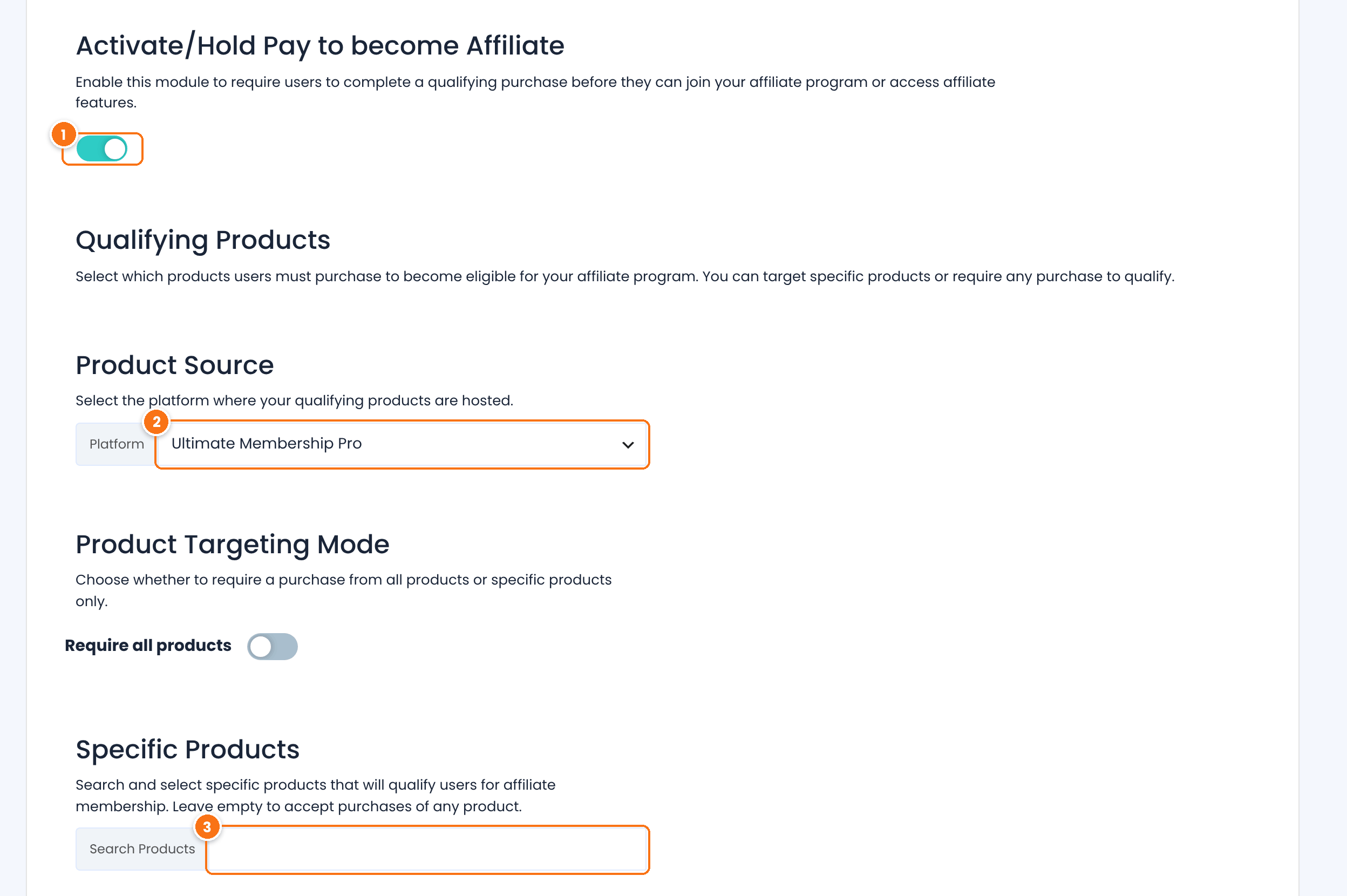
Turns the module on.
Default: Off
Select Ultimate Membership Pro.
Select the memberships that qualify. Leave it empty, or turn on Require all products, to accept any membership.
Click Save Changes. Members without a qualifying membership no longer see the Become an Affiliate button. See Charge affiliates to join your program.
Test it #
- Open an affiliate link, for example
yourstore.com/?ref=liam.parker, in a private browser window. - Sign up for a paid membership with a new account. Use the test mode of your payment gateway.
- Go to Ultimate Affiliate Pro›Referrals. The referral shows the source Ultimate Membership Pro and the order number.
- When the order is Completed in Ultimate Membership Pro, the referral changes to Approved.
Frequently asked questions #
Do affiliates earn on membership renewals?
Yes, when the Recurring Commissions module is on. Each renewal payment creates a new referral for the affiliate who referred the member.
Can I pay less on renewals than on the first payment?
Yes. In the Recurring Commissions settings, set a renewal amount for each rank. Empty fields use the rank amount.
Does a membership coupon credit the affiliate without a link?
Yes. A coupon linked to an affiliate in Static Coupons credits that affiliate on every order that uses it.
Are taxes included in the commission?
No, by default. Taxes are taken out of the order amount while Exclude Taxes from Calculations is on in Settings, General Settings.
Can members become affiliates from their membership account?
Yes. Add the Become an Affiliate button with the [uap-user-become-affiliate] shortcode on any page members see, or let members register on your affiliate registration page.


