The MemberPress affiliate integration pays your affiliates when a visitor they referred buys a MemberPress membership. Ultimate Affiliate Pro creates the referral when the payment is recorded and keeps its status in sync with the MemberPress transaction.
The visitor is linked to the affiliate through an affiliate referral link. The commission comes from the affiliate’s rank, applied to the amount paid.
Before you start
- MemberPress is installed and active, with at least one membership.
- The MemberPress Tracking add-on is installed and active. See Pro Add-ons.
- Your affiliates have a rank with a commission rate.
What creates and updates a referral #
The add-on follows MemberPress transactions. The amount of each transaction is the base for the commission.
| MemberPress event | Referral |
|---|---|
| A transaction is recorded for a member who came through an affiliate link | Created as Pending, or Approved right away when the transaction is already complete |
| Transaction status changes to Complete | Approved |
| Transaction status changes to Failed or Refunded | Rejected |
| Transaction status changes back to Pending | Pending |
Rejected referrals are not paid. If you prefer to approve every referral yourself, turn on Keep Referral Status as Pending in Ultimate Affiliate Pro›Settings›Admin Workflow: automatic approval is turned off, and you approve referrals yourself.
Turn on the MemberPress affiliate integration #
Go to Ultimate Affiliate Pro›Integrations and find the MemberPress card in the Membership group.

Turns tracking for MemberPress on or off. The card shows Enabled while it is on.
Opens the MemberPress Tracking settings.
Name the referral source #
The settings screen explains how the add-on works. Its only option is the name shown for these referrals.
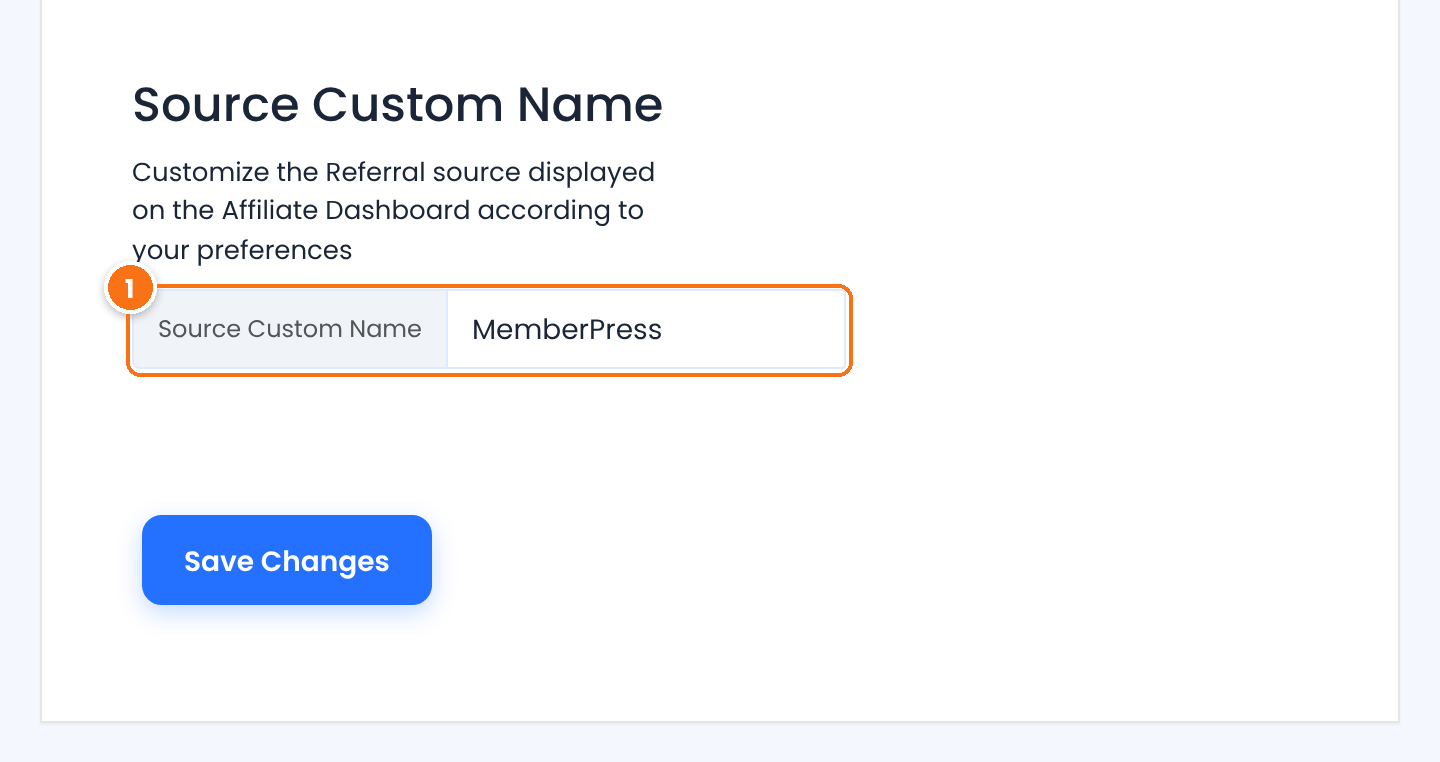
The source name of MemberPress referrals, shown in the Referrals list and in the affiliate’s Affiliate Portal.
Default: MemberPress
Click Save Changes.
Pay commissions on renewals #
Recurring memberships create a new MemberPress transaction for every renewal. To pay the affiliate for those renewals, turn on the Recurring Commissions module.
- Go to Ultimate Affiliate Pro›Modules.
- Open Recurring Commissions and turn on Activate/Hold Recurring Commissions.
- Save the module settings.
With the module on, each renewal payment creates a new referral for the affiliate who referred the member, even after the referral cookie has expired. See Recurring commissions for subscriptions.
Review the referrals #
Go to Ultimate Affiliate Pro›Referrals. MemberPress referrals show MemberPress in the Source column.
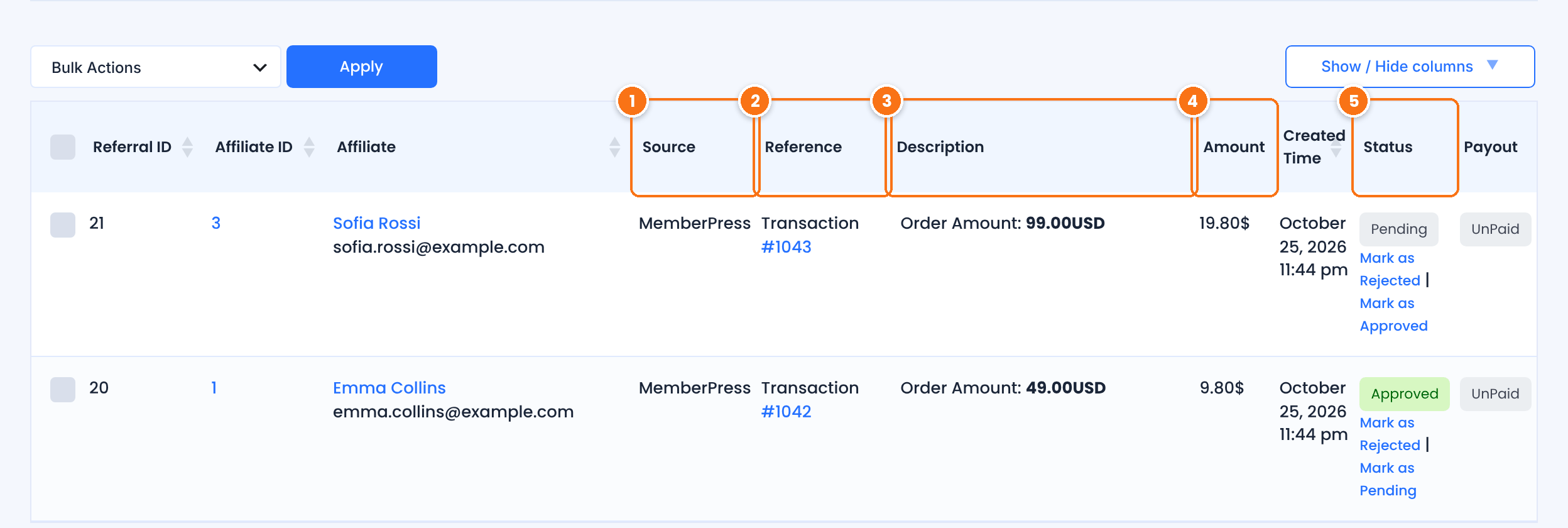
The Source Custom Name, MemberPress by default.
The MemberPress transaction number, for example Transaction #1042, with a link to the transaction.
The amount the member paid, for example Order Amount: 49.00USD.
The commission: the affiliate’s rank rate applied to the amount paid. With a 20% rank, a $49 payment earns $9.80.
Test it #
- Open a private browser window and visit your site through an affiliate link, for example
yourstore.com/?ref=emma.collins. - In the same window, sign up for a MemberPress membership with a new customer account. Use a test payment method.
- In Ultimate Affiliate Pro›Referrals, check that a referral with source MemberPress was created for the affiliate, and that it is Approved once the payment is complete.
For a full test routine, see Test your affiliate program. The MemberPress documentation explains memberships and transactions.
Frequently asked questions #
Do affiliates earn on MemberPress renewals?
Yes, when the Recurring Commissions module is on. Each renewal transaction creates a new referral for the affiliate who referred the member.
What happens when I refund a MemberPress transaction?
The referral of that transaction changes to Rejected, so it is not paid.
How is the MemberPress commission calculated?
The affiliate’s rank rate is applied to the transaction amount. A 20% rank on a $99 transaction gives a $19.80 referral.
Can I approve MemberPress referrals manually?
Yes. Turn on Keep Referral Status as Pending in Ultimate Affiliate Pro›Settings›Admin Workflow: automatic approval is turned off, and you approve referrals yourself in the Referrals list.
A MemberPress signup did not create a referral. What should I check?
Check that the MemberPress card is enabled in Integrations, that the member opened the affiliate link in the same browser before checkout, and that the affiliate account is active. See Referrals or clicks are not recorded.


