Ultimate Affiliate Pro shortcodes add affiliate features to any page: the registration and login forms, the Affiliate Portal, affiliate details such as name or rank, and content shown only to affiliates or to referred visitors. This page lists the shortcodes and what each one shows.
Most sites need only the main shortcodes, and the setup wizard already places them on the default pages. Use the others to personalize pages or to build your own affiliate area. See Set up the registration, login and password pages for the default pages.
Before you start
- Ultimate Affiliate Pro active, with the default pages set. See Settings overview.
- An editor that accepts shortcodes: the Shortcode block in the block editor, or the shortcode widget of your page builder.
Copy a shortcode #
Go to Ultimate Affiliate Pro›Shortcodes. Click any shortcode to copy it, then paste it into a page.
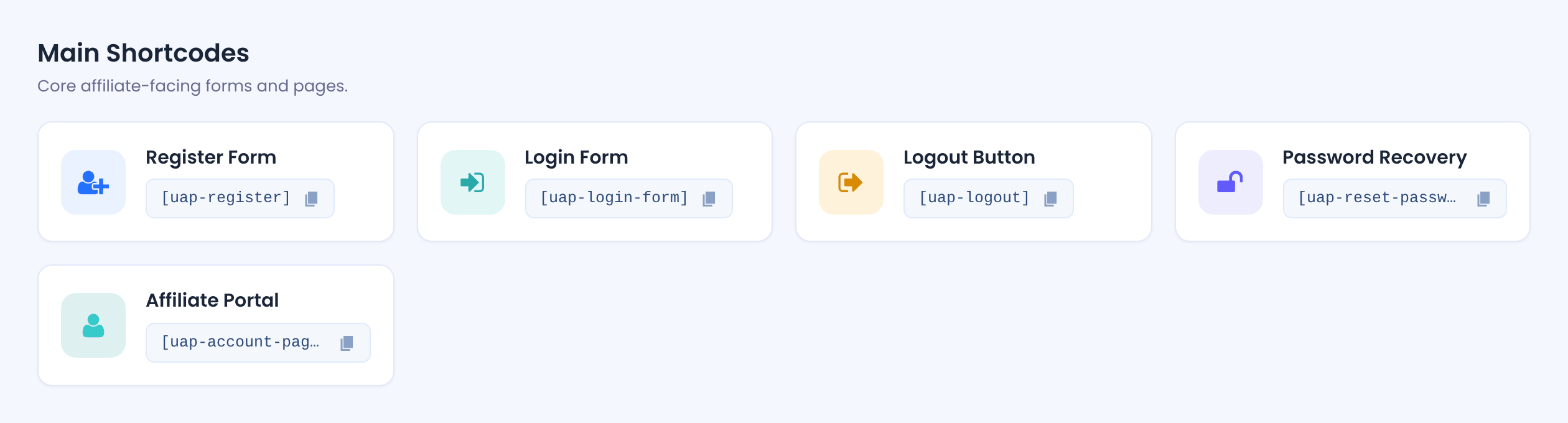
In the block editor, add a Shortcode block and paste the shortcode. In Elementor, Divi and other builders, use their shortcode element. See Page builders.
Main Ultimate Affiliate Pro shortcodes #
| Shortcode | What it shows |
|---|---|
[uap-register] | The affiliate registration form. Customize it in Showcases›Registration Form. |
[uap-login-form] | The affiliate login form. Customize it in Showcases›Login Form. |
[uap-logout] | A Log Out link, shown only to logged-in users. |
[uap-reset-password] | The lost password form. See How password reset works. |
[uap-account-page] | The Affiliate Portal, shown to logged-in affiliates. See Set up the Affiliate Account Page. |
Check the forms in a private window
When you are logged in as administrator, the pages with the registration and login forms show a short note instead of the form. Open them in a private browser window to see what visitors see.
Show affiliate details #
Affiliate data shortcodes print one field of an affiliate. Each field has two versions.
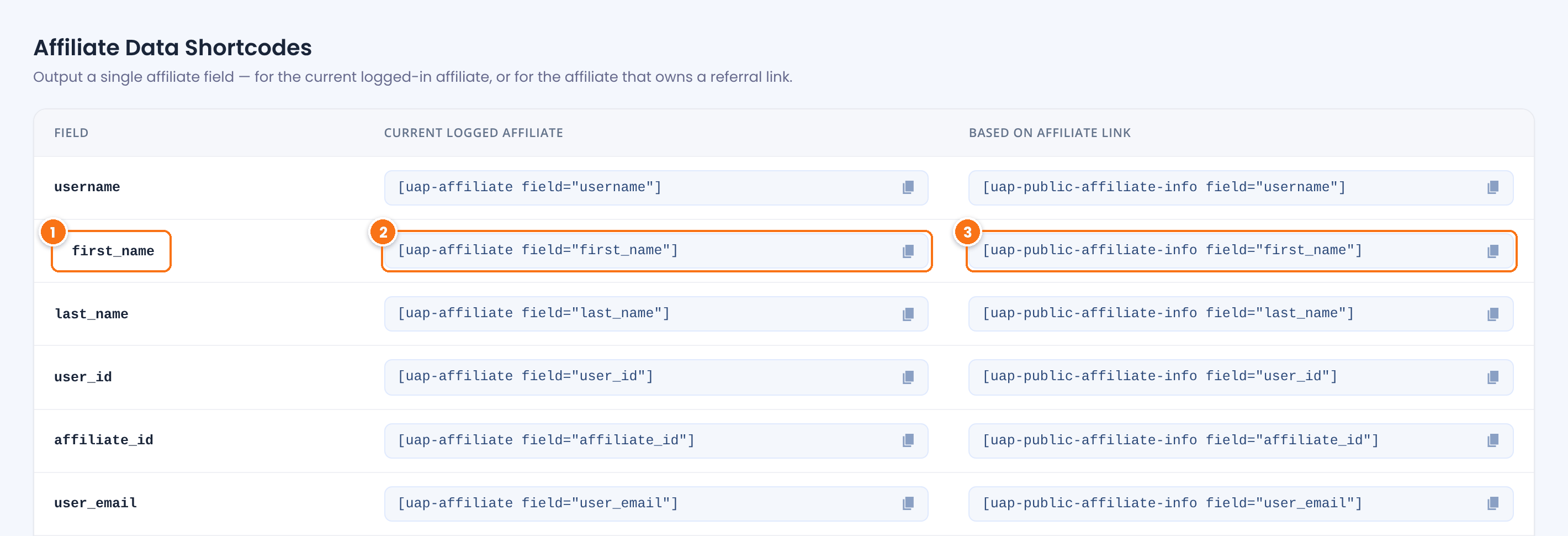
The detail to print. Custom fields from your registration form are listed at the end of the table.
[uap-affiliate field="first_name"] shows the detail of the affiliate who is logged in. Use it in the Affiliate Portal or on welcome pages for affiliates.[uap-public-affiliate-info field="first_name"] shows the detail of the affiliate who referred the visitor, read from the referral cookie. Use it on landing pages, for example “You were invited by Emma”.| Field | Prints |
|---|---|
username | WordPress username. |
first_name, last_name | First and last name. |
user_id | WordPress user ID. |
affiliate_id | Affiliate ID. |
user_email | Email address. |
user_url | Website from the profile. |
rank_id, rank_name | Rank ID and rank name, such as Gold. |
uap_avatar | Profile picture, as an image. |
account_page, login_page | URL of the Affiliate Portal and of the login page. |
blogname, blogurl, siteurl | Site title and site URL. |
When there is no logged-in affiliate, or no referral cookie, these shortcodes print nothing.
Show content to some visitors only #
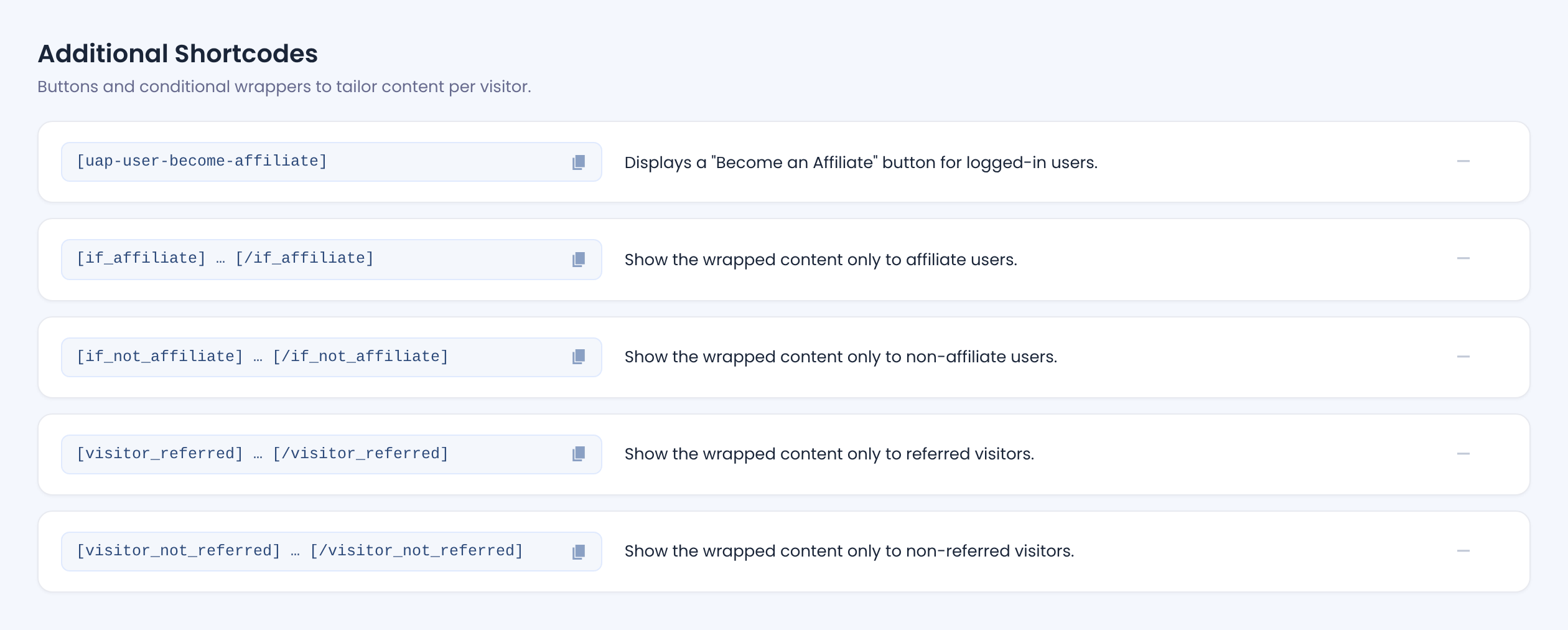
The Additional Shortcodes section has a button and four wrappers. Put text, images or links between the opening and closing tag; they show only to the visitors that match.
| Shortcode | Shows the content to |
|---|---|
[uap-user-become-affiliate] | Logged-in users who are not affiliates yet: a Become an Affiliate button. See Turn existing users and customers into affiliates. |
[if_affiliate] … [/if_affiliate] | Logged-in, active affiliates. |
[if_not_affiliate] … [/if_not_affiliate] | Visitors who are not logged in and users who are not affiliates. |
[visitor_referred] … [/visitor_referred] | Visitors who arrived through an affiliate link and have the referral cookie. |
[visitor_not_referred] … [/visitor_not_referred] | Visitors without a referral cookie. |
Example
[if_affiliate]
Welcome back! Your new banners are ready in the Affiliate Portal.
[/if_affiliate]

[if_not_affiliate]
Earn 20% on every sale. Join our affiliate program today.
[/if_not_affiliate]
Put affiliate data shortcodes, such as [uap-affiliate field="first_name"], directly on the page, outside the wrappers.
Pages with referral content and caching
Shortcodes that read the referral cookie change the page for each visitor. If you use a page cache, exclude those pages from it. See Cache plugins and host caching.
Other shortcodes #
| Shortcode | What it does |
|---|---|
[uap-listing-affiliates …] | A leaderboard of your top affiliates by earnings, referrals or clicks. Build it in Showcases›Top Affiliates with the Shortcode Generator and click Copy ShortCode, because it needs several attributes. |
[uap-landing-commission slug="…"] | Gives a landing commission when a referred visitor reaches the page. Nothing is shown. See Landing commissions. |
[uap-product-links] | The Product Links tool, where affiliates search products and copy their links. Turn on the Product Links module first; it also adds the tool to the Affiliate Portal. |
The Extended Shortcodes add-on adds more shortcodes, such as content for logged-in affiliates and visitors, and links to the login page.
Test it #
- Create a test page with
[uap-affiliate field="first_name"],[if_affiliate]You are an affiliate[/if_affiliate]and[if_not_affiliate]Join us[/if_not_affiliate]. - Open the page while logged in as an affiliate, for example
emma.collins. You see “Emma” and “You are an affiliate”. - Open the page in a private window. You see “Join us”.
Frequently asked questions #
Where do I find all Ultimate Affiliate Pro shortcodes?
Go to Ultimate Affiliate Pro, Shortcodes. Click a shortcode to copy it.
Which shortcode shows the affiliate dashboard?
[uap-account-page]. It shows the Affiliate Portal to logged-in affiliates. Select that page in the plugin settings as the Affiliate Portal page.
Why does the registration form not show when I am logged in?
Administrators see a short note instead of the registration and login forms. Open the page in a private browser window.
How do I show the name of the affiliate who referred a visitor?
Use [uap-public-affiliate-info field=”first_name”]. It reads the referral cookie, so it works after the visitor arrives through an affiliate link.
Can I use the shortcodes in Elementor or Divi?
Yes. Paste them into the shortcode element of your page builder.
How do I show content only to affiliates?
Wrap it in [if_affiliate] and [/if_affiliate]. Use [if_not_affiliate] for everyone else.


