Most WooCommerce stores that struggle to scale their affiliate program aren’t failing at marketing. They’re failing at the setup stage: launching with vague commissions, no clear recruitment process, and tracking that breaks the moment a customer uses a coupon or completes a subscription renewal. Fixing that starts before you recruit affiliates for WooCommerce.
If you’re ready to build a program that attracts the right partners and runs without constant maintenance, Ultimate Affiliate Pro gives you the tools to do it inside WordPress without switching platforms or paying recurring SaaS fees.
Define the Offer to Recruit Affiliates for WooCommerce
Your commission structure is your pitch. Before you write a single outreach email, your offer needs to answer three questions: how much do affiliates earn, when do they get paid, and what counts as a valid referral? Getting these wrong upfront means you will struggle to recruit affiliates for WooCommerce who actually stay active.
Choose Commission Structures That Fit Your Margins
Flat-rate commissions work well for single-product stores with predictable margins. Percentage-based commissions scale better for stores with varying price points. If your store sells subscriptions or memberships, recurring commissions are the most compelling offer you can make because affiliates earn on every renewal, not just the first sale.
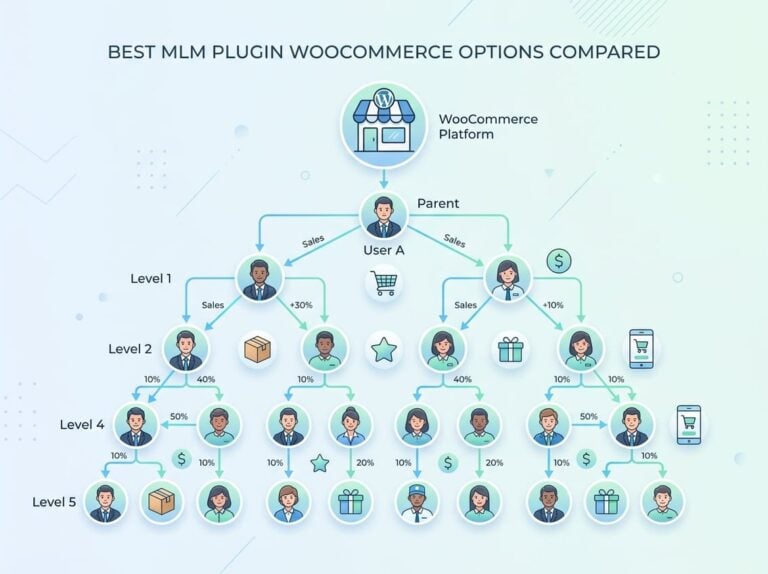
Tiered commissions add motivation over time. An affiliate who drives 10 sales per month earns a base rate; one who drives 50 earns more. Multi-tier commissions let top affiliates earn a percentage on the affiliates they recruit, which works well for communities and niche networks.
Set Clear Commission Rules, Cookie Terms, and Payout Timing
State your referral cookie duration explicitly. A 30-day cookie is standard. A 60 or 90-day cookie is a strong differentiator for affiliates promoting high-consideration purchases. Define whether the first-click or last-click wins, and document which products are excluded from commissions (e.g., sale items, gift cards).
Payout timing matters too. Monthly payouts with a 30-day hold are common. State this in writing before affiliates sign up, not after.
Create an Affiliate Agreement Before You Open Registration
An affiliate agreement protects your store and sets expectations. It should cover commission rates, payment schedule, prohibited promotional methods (e.g., no coupon site spam, no paid search on your brand name), and termination terms. Keep it readable, not 20 pages of legal boilerplate.
Build a Funnel to Recruit Affiliates for WooCommerce inside WordPress
The best way to recruit affiliates for WooCommerce is to treat the recruitment process like a sales funnel. The registration flow, landing page, and dashboard experience all affect whether a qualified affiliate signs up or closes the tab. Each of these components needs to work cleanly inside your WordPress setup.
Set Up Affiliate Registration Without Adding Friction
Your affiliate registration form should ask for the essentials: name, email, website or social profile, and a brief description of how they plan to promote. Avoid forms that require 15 fields before approval. Long forms filter out serious affiliates along with bad ones.
Use manual approval to recruit affiliates for WooCommerce with higher quality standards. Auto-approval is convenient but it invites fraud and low-quality partners early on.
Create Landing Pages, Referral Links, and Coupon Codes for Outreach
A dedicated landing page is the most effective way to recruit affiliates for WooCommerce. Include your commission rate, cookie duration, payout schedule, and a short list of what you provide (banners, product links, coupon codes).
Coupon code tracking is useful for affiliates who promote through social media or email newsletters where clickable links are less practical. Affiliate for WooCommerce supports coupon-based tracking natively, and Ultimate Affiliate Pro does too, with the added flexibility of custom commission rules per affiliate.
Use the Affiliate Portal and Dashboard to Improve Sign-Ups
A clean affiliate dashboard reduces support tickets. Affiliates should be able to generate their own referral links, check their earnings, view click and conversion data, and update their payment details without emailing you. A modern portal makes it easier to recruit affiliates for WooCommerce and keep them engaged.
How to Recruit Affiliates for WooCommerce by Finding the Right Partners
Volume-first recruitment is a common mistake. Fifty low-quality affiliates generate more fraud and support overhead than five focused partners with real audiences. Your first recruitment push should target people who already know your niche.
Recruit Affiliates for WooCommerce from Customers and Creators
Your existing customers are your most credible affiliates. They have real experience with your product and audiences that trust them. Add an affiliate program invite to your post-purchase email sequence or WooCommerce account page. According to a WPBeginner guide on turning customers into affiliates, when you recruit affiliates for WooCommerce, you should start with your own customer base.
Niche bloggers, YouTube creators, and newsletter writers with small but engaged audiences often outperform large influencers because their recommendations carry more weight.
Decide When to Use Affiliate Networks Versus a Self-Hosted Program
Affiliate networks like Awin and ShareASale give you immediate access to a pool of affiliates but come with fees, less control over quality, and commission structures that may not fit a WooCommerce store. A self-hosted program costs less per transaction and keeps affiliate data on your own server.
For most WooCommerce stores, starting self-hosted and adding a network later is the practical approach. Networks make more sense once your program is proven and you need volume.
Run Focused Marketing Campaigns to Attract Better Applicants
To recruit affiliates for WooCommerce, promote your program where niche experts and ideal partners gather. A targeted blog post explaining your commission structure, a mention in your email newsletter, or a post in a relevant Facebook group or subreddit will reach more qualified applicants than a generic listing on an affiliate directory.
Use UTM parameters on your affiliate signup page links so you can see which promotion channels actually convert.
Track Performance Accurately From the First Click
Referral tracking in WooCommerce breaks in predictable ways: coupon codes override link attribution, returning customers skip the referral cookie, and subscription renewals don’t fire a new commission. Knowing where your setup is vulnerable lets you fix it before it costs affiliates money they earned.
Set Up Referral Tracking, Cookies, and Visit Logging
Your tracking setup should log the first visit, store the referral cookie, and attribute the commission at the point of purchase. Time-gated visit registration prevents inflated click counts from bots and repeat visits from the same session.
Set your cookie to persist across sessions. If a user clicks an affiliate link on Monday and buys on Friday, the commission should still fire.
Measure Conversions, Conversion Rate, and Affiliate Performance
Track conversion rate per affiliate, not just total sales. An affiliate sending 1,000 clicks with 2 conversions is less valuable than one sending 100 clicks with 15 conversions. Your plugin should surface this data clearly so you can act on it.
Monthly performance reports, either exported or automatically emailed, help you spot top performers and identify affiliates who need support or should be removed.
Prevent Fraud, Self-Referrals, and Attribution Errors
Self-referrals are the most common form of affiliate fraud on WooCommerce stores. A customer signs up as an affiliate, uses their own link to purchase, and earns a commission on money they were already going to spend. Block self-referrals at the plugin level, not just through policy.
Also watch for cookie stuffing and affiliates promoting through paid search on your brand name. Both inflate attributed sales without adding real value.
Pay Affiliates Reliably and Keep Administration Lean
Delayed or inconsistent payouts are the fastest way to lose your best affiliates. Once trust breaks, they move on. Your payout system should be predictable, accurate, and easy to run without manual spreadsheet work.
Use Automated Payouts Where They Save Time
Automated payouts trigger on a schedule (weekly, bi-weekly, monthly) and release commissions that have passed your hold period. This removes the manual work of reviewing and paying each affiliate individually. Ultimate Affiliate Pro’s pricing page includes payout automation as part of the core feature set, which keeps administration practical as your program scales.
Set a minimum payout threshold to avoid processing fees on small amounts. A $25 or $50 minimum is standard.
Support PayPal Payouts, Bank Transfers, and Payment Gateway Integration
PayPal is the most commonly requested payout method and the easiest to set up for international affiliates. Stripe works well for affiliates in regions where PayPal is limited. Direct bank transfer (ACH or wire) is appropriate for high-volume affiliates.
Give affiliates the ability to enter their preferred payment method inside their dashboard rather than requiring them to email you banking details.
Review Pending Commissions Before Payout Automation Runs
Automated payouts should not bypass a review window. A 14 to 30-day hold on commissions lets you catch refunds, chargebacks, and flagged fraud before money goes out. Review the pending queue before each payout cycle and clear commissions manually if needed.
Most plugins surface this as a “pending commissions” list in the admin. If yours doesn’t, that’s a gap worth addressing before you scale.
Choose a Plugin That Supports Growth Without Rebuilding Later
Switching affiliate plugins mid-program is painful. Referral histories, affiliate accounts, and commission records rarely migrate cleanly. Pick a plugin that handles your current needs and has room to grow.
Compare Core Needs: Registration, Tracking, Commissions, and Payouts
Every plugin you evaluate should cover four core areas: affiliate registration with approval workflow, accurate referral tracking across link and coupon methods, flexible commission structures (flat, percentage, tiered, recurring), and at least PayPal payout support. If any of these are missing or require a paid add-on, factor that into the total cost.
Check WooCommerce Compatibility, HPOS Support, and Integrations
WooCommerce’s High-Performance Order Storage (HPOS) replaces the old post-based order system. Plugins that haven’t updated for HPOS compatibility will have tracking and commission issues on stores that have enabled it. Confirm HPOS support before installing.
Check integration support for any other plugins you use: membership plugins, LMS platforms, form builders, and email marketing tools. The more your affiliate program integrates with your existing stack, the less manual work you’ll have.
Assess Alternatives Such as AffiliateWP, SliceWP, and YITH WooCommerce Affiliates
AffiliateWP has strong WooCommerce integration and a large add-on library, but many core features cost extra through paid add-ons. SliceWP is lightweight and straightforward, which suits smaller programs but limits flexibility as you scale. YITH WooCommerce Affiliates covers the basics but lacks multi-tier commissions and advanced payout automation in its free version.
Ultimate Affiliate Pro includes tiered commissions, multi-level marketing support, custom coupon tracking, recurring commissions, and PayPal and Stripe payouts in a single plugin with no per-feature add-on fees. For WooCommerce stores that expect to grow, that bundled feature set reduces long-term cost and rebuilding risk.
Frequently Asked Questions
Which plugin is the best choice to recruit affiliates for WooCommerce with reliable tracking?
Ultimate Affiliate Pro is a strong choice for stores that need flexible commission structures and accurate tracking without purchasing multiple add-ons. For very simple programs with no multi-tier or recurring commission needs, lighter options like SliceWP also work. Your decision should come down to which features you need on day one versus which you’ll need in six months.
How do you set up an affiliate program in WooCommerce without breaking checkout or performance?
Use a plugin that integrates at the order completion hook rather than modifying the checkout process itself. Tracking should fire after payment confirmation, not during the checkout flow. Test your checkout speed before and after installing any affiliate plugin to confirm there’s no measurable impact.
Can you run a WooCommerce affiliate program for free, and what features will you realistically miss?
Free plugins like the Affiliates for WooCommerce plugin on WordPress.org cover basic referral tracking and flat commissions. You’ll typically miss recurring commissions, tiered structures, multi-level support, automated payouts, and advanced fraud prevention. Those gaps matter as soon as your program has more than a handful of active affiliates.
How do you recruit affiliates for WooCommerce who are actually trusted partners?
Use manual approval with a short application form that asks for a website or social profile. Set new affiliate accounts to “pending” by default so you can review each one before granting dashboard access. Remove affiliates who go inactive or violate your agreement to keep your program clean.
How do you pay affiliates (PayPal, store credit, bank transfer) and keep commissions and refunds in sync?
Configure a commission hold period that matches your refund window. If you offer 30-day refunds, hold commissions for at least 30 days before releasing payment. When a refund occurs within the hold window, the commission should reverse automatically. Most quality affiliate plugins handle this, but confirm the behavior in your specific setup before launching.
What’s the practical difference between YITH WooCommerce Affiliates and other affiliate plugins for WooCommerce?
YITH WooCommerce Affiliates is a solid entry-level option with a familiar admin interface for WooCommerce users. Its free version covers basic tracking and flat commissions, but recurring commissions, tiered rates, and PayPal mass payouts require the premium version. Compared to Ultimate Affiliate Pro, YITH’s feature depth at scale is more limited, particularly around multi-tier commissions and payout automation.