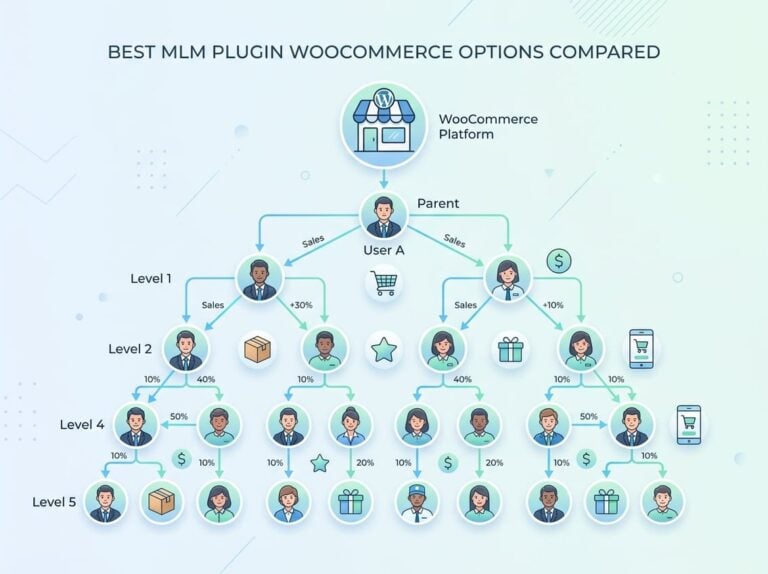
Managing a complex affiliate program with multi-level marketing structures, dozens of integrations, and automated commission payouts can feel impossible when most WordPress plugins only handle basic referrals.
You need a system that tracks commissions across multiple levels, integrates with your existing tools, and pay affiliates automatically in WordPress without manual spreadsheets or payment processing headaches.

The good news is that WordPress offers several plugins capable of automating affiliate payouts, with the right setup allowing you to process payments to all your affiliates with just a few clicks.
The key is choosing a plugin that matches your program’s complexity and configuring it properly to handle everything from commission calculations to payment processing.
We’ll walk you through the complete process of automating affiliate payouts in WordPress, from selecting the right plugin for your needs to configuring automatic payments, setting up commission structures, and managing your entire affiliate program efficiently.
Whether you run a simple referral program or a sophisticated MLM network with multiple product integrations, you’ll learn how to eliminate manual payout tasks and scale your program confidently.
Why Automate Affiliate Payouts in WordPress
Paying affiliates manually creates unnecessary work and opens the door to mistakes that damage relationships.
Automating affiliate payouts eliminates these problems while freeing up time to focus on growing your program.
Streamlining Operations and Saving Time
Manual affiliate payments eat up hours we could spend on more valuable tasks.
When you process payouts by hand, you need to log into each affiliate’s account, calculate their earnings, verify commission rates, and then initiate transfers through PayPal or bank systems one by one.
This process gets worse as our program grows.
Automated payouts through WordPress plugins handle all of these steps in one click.
The system calculates commissions, applies any minimum payout thresholds, and distributes payments to registered affiliates automatically.
We can pay dozens or hundreds of affiliates in the time it used to take to pay five.
This efficiency matters most for WooCommerce stores running active affiliate programs.
Instead of spending payment day buried in spreadsheets, we can focus on recruiting better affiliates or optimizing our conversion rates.
Improving Trust and Retention with Affiliates
Affiliates promote our products because they trust they’ll get paid accurately and on time.
When payments arrive late or require constant follow-up, even our best affiliates start looking for other programs to promote.
Automatic payouts solve this trust problem by creating consistency.
Affiliates know exactly when they’ll receive payments and can track their earnings in real time through their dashboard.
They don’t need to send us reminder emails or wonder if we forgot about them.
This reliability keeps affiliates engaged with our program longer.
When affiliates see deposits hitting their accounts like clockwork, they’re more likely to increase their promotional efforts and stay loyal to our brand instead of switching to competitors.
Reducing Errors Compared to Manual Payouts
Human error creeps into manual payment processing no matter how careful we are.
We might miscalculate a commission percentage, pay the wrong affiliate, or accidentally pay someone twice.
These mistakes cost money and create awkward conversations that hurt our professional reputation.
Automated systems eliminate most of these errors by following the exact commission rules we configure.
The software tracks every referral, applies the correct commission rate based on our settings, and ensures each affiliate receives precisely what they earned.
We also get better record-keeping with automated affiliate payments.
The system logs every transaction, making it easy to review payment history or provide documentation if an affiliate has questions about their earnings.
Choosing the Best Affiliate Plugin for Automatic Payouts
The right affiliate management plugin makes the difference between spending hours on manual payments and having everything run on autopilot.
You should look at features like payment gateway support, commission tracking accuracy, and how well the plugin integrates with your existing WordPress setup.
Key Features to Look For
Automatic payout capability is the most critical feature we should verify before installing any affiliate plugin.
Not all plugins support automated payments—some only generate CSV files that we’d still need to process manually through PayPal or our bank.
We should look for plugins that connect directly to payment processors like Stripe, PayPal, or dedicated payout services.
These integrations let us send payments with a single click or set up completely hands-off recurring payouts.
Essential features include:
- Direct payment gateway integration (Stripe, PayPal Payouts)
- Customizable commission structures and rates
- Real-time tracking and reporting
- Fraud protection and holding periods
- Multi-currency support for international affiliates
The plugin should also offer flexible commission options.
We might want to pay different rates for different products or set up tiered commissions based on performance.
Comparing Top Plugins: AffiliateWP, Coupon Affiliates, YITH, and More
AffiliateWP stands out as a reliable option with built-in support for Stripe Payouts and PayPal Payouts directly from the WordPress dashboard.
It handles the basics well but requires paid add-ons for more advanced features.
YITH WooCommerce Affiliate focuses specifically on WooCommerce stores.
It provides solid tracking but has more limited payout automation compared to other options.
For sites running complex affiliate programs with multiple tiers or MLM structures, Ultimate Affiliate Pro delivers the most comprehensive feature set.
It includes nearly 100 add-ons, native multi-level marketing support, and over 40 integrations without requiring separate purchases for essential functionality.
Coupon Affiliates works well for stores that want to tie commissions to coupon code usage.
However, its automated payout options are more limited than dedicated affiliate management plugins.
Plugin Compatibility with WooCommerce and Payment Gateways
Payment gateway compatibility determines whether we can actually automate payouts or just track commissions.
You should verify that your chosen affiliate plugin works with your existing payment processor before you install it.
Payment gateway support varies:
| Plugin Type | Stripe | PayPal | Bank Transfer | Store Credit |
|---|---|---|---|---|
| Full-featured | Yes | Yes | Yes | Yes |
| Basic plugins | Limited | Manual CSV | No | Sometimes |
WooCommerce integration goes beyond just tracking sales.
The plugin should automatically create referrals when orders are placed, handle refunds by reversing commissions, and sync with our product catalog.
We should also check if the plugin supports our specific WooCommerce setup—whether we’re using subscriptions, bookings, memberships, or other extensions.
Some affiliate plugins only work with simple products and break when we try to track commissions on complex product types.
Customizing Your Affiliate Program and Registration Process
Your affiliate registration form serves as the first touchpoint with potential partners, and how you manage approvals directly impacts program quality.
A well-designed registration process collects the right information while making it easy for qualified affiliates to join.
Designing the Affiliate Registration Form
The affiliate registration form determines what information you collect from potential partners before they join your program.
Most WordPress affiliate plugins provide a default form with basic fields like name, email, and website URL.
We can customize this form to gather additional details that help us evaluate applicants.
Common custom fields include social media profiles, traffic statistics, promotional methods, and niche expertise.
These fields let us assess whether an affiliate aligns with our brand and audience.
Real-time registration builders with live preview templates make it easier to design forms without coding.
You can add dropdown menus, checkboxes, and text areas to capture specific information about your affiliates’ marketing channels.
Keep your form concise.
Too many required fields discourage qualified applicants from completing registration.
Focus on collecting only the information you’ll actually use in your approval process.
Creating a Custom Registration Experience
A custom registration experience goes beyond form fields to include branding, messaging, and page design.
We recommend creating a dedicated landing page that explains your program benefits, commission structure, and payment terms before affiliates complete their application.
Many site owners use their Affiliate Area page as both a registration portal and dashboard.
This page should clearly communicate your program’s value proposition and set expectations about approval timelines.
You can build a custom WordPress page and add registration forms using blocks or shortcodes.
This approach gives you complete control over the layout, imagery, and copy surrounding the registration form.
Include testimonials from existing affiliates, commission examples, and promotional resources to attract high-quality partners.
The registration page description should explain any specific requirements, such as minimum traffic levels or content guidelines, to filter out unqualified applicants before they submit.
Approving and Managing New Affiliates
Most affiliate programs offer two approval options: automatic acceptance or manual review. Automatic approval sets new registrations to Active status immediately, while manual review requires administrator action.
It’s recommended to enable manual approval when starting your program. This lets you evaluate each applicant’s website quality, audience relevance, and promotional methods before granting access.
You’ll receive notifications when new affiliates apply. You can then review applications from your WordPress dashboard.
During review, check the applicant’s website for quality content, proper SSL certificates, and alignment with your brand values. Reject applications from spam sites, competitors, or affiliates who might damage your reputation.
Once approved, affiliates can access their dashboard to generate referral links and track performance. Keep a system for managing affiliate status changes, including moving partners to pending or inactive status if they violate program terms.
Optimizing Payments and Commission Tracking
Getting your commission rates right and tracking every referral accurately makes the difference between affiliates who promote actively and those who lose interest. You should have proper cookie settings, clear dashboards, and reliable payment methods to keep your affiliate program running smoothly.
Setting Commission Rates and Payout Schedules
We should start by deciding whether to offer a flat rate per sale, a percentage of the order total, or a tiered structure that rewards top performers. Most successful programs use percentage-based rates between 10-30% for digital products and 5-15% for physical goods.
Our payout schedule determines when affiliates receive their earnings. Monthly payouts on a specific date work best for most programs because they balance cash flow management with affiliate satisfaction.
We can also set minimum payout thresholds to reduce transaction fees.
Common payout frequencies:
- Monthly (most popular)
- Bi-weekly
- Weekly
- On-demand (for high performers)
You should account for refund periods when scheduling commission payouts. A 30-day hold protects us from paying commissions on orders that get refunded or charged back.
Using Referral Links, Dashboard, and Cookie Settings
Every affiliate needs unique referral links that track their sales accurately. These links contain identifiers that connect purchases back to the right affiliate.
Cookie expiration settings control how long we credit an affiliate after someone clicks their referral link. A 30-day cookie means if someone clicks today and buys within 30 days, the affiliate still earns commission.
Longer cookies (60-90 days) work better for high-ticket items with longer buying cycles.
The affiliate dashboard gives our partners real-time visibility into their performance. They should see their affiliate earnings, click-through rates, conversion rates, and pending commissions.
When affiliates can check their affiliate area anytime, they stay engaged and promote more actively.
We must ensure our tracking system captures all necessary data without slowing down our site.
Managing Commission Payouts and Payment Methods
We can automate commission payouts through PayPal, Stripe, or store credit to eliminate manual processing. Automated payments improve affiliate morale and reduce our administrative work.
Payment options to offer:
- PayPal (most widely accepted)
- Direct bank transfer
- Stripe
- Store credit coupons
- Check (for larger amounts)
We should let affiliates choose their preferred payment method in their affiliate dashboard. Some affiliates want PayPal for quick access to funds, while others prefer bank transfers to avoid fees.
Powerful affiliate management tools help us track commission tracking across multiple payment methods without confusion.
Setting up automated payout reminders keeps both us and our affiliates informed about upcoming payments.
When the system handles routine payouts automatically, we can focus on recruiting better affiliates and optimizing our program.
Advanced Options and Practical Tips for Managing Automatic Payouts
Setting up automatic affiliate payments requires more than just flipping a switch. You should balance automation with control, choose the right payment methods for our situation, and monitor performance to keep everything running smoothly.
Manual vs. Automatic Payouts: When to Use Each
Automatic payouts work best when we have a steady flow of affiliates and want to reduce administrative work. They’re ideal for established programs where we trust our affiliates and have reliable payment processors in place.
We can set thresholds, schedules, and rules that run without intervention.
Manual payouts give us more control when we need it. We should use them during the first few months of launching an affiliate program, when dealing with high-value commissions that require review, or when managing coupon affiliates who need special verification.
Manual payout methods let us export CSV files and review each payment before processing.
The hybrid approach often works best. We can automate payments for trusted affiliates who meet certain criteria while keeping manual approval for new affiliates or suspicious activity.
This protects us from fraud while still saving time on routine affiliate payments.
Handling Refunds, Store Credits, and Custom Rules
Refunds create problems for affiliate management if we don’t plan ahead. When a customer requests a refund, we need to either deduct the commission from future payments or mark it as a chargeback.
Setting a commission holding period prevents paying affiliates before we know a sale is final. We should set this to our refund period plus 7 days.
For example, if we offer 30-day refunds, we’d hold commissions for 37 days.
Store credit payouts work well when we want to keep money within our ecosystem. Instead of sending cash, we give affiliates credit they can spend on our products.
This increases customer lifetime value and reduces payment processing fees.
Custom rules let us create different payout structures for different affiliate tiers. We might pay top performers weekly while others receive monthly payments.
We can also set minimum payout thresholds to avoid processing tiny transactions.
Integrating PayPal, Stripe, and Other Gateways
PayPal remains the most common payout method because most affiliates already have accounts. We can use PayPal’s mass payment features to send multiple payments at once by uploading a CSV file.
Stripe payout integration offers a more seamless experience. We can send payments directly to bank accounts in over 50 countries without requiring affiliates to have specific accounts.
Processing through Stripe typically takes 3 business days.
Ultimate Affiliate Pro payouts support multiple methods including the built-in Payouts Service, which handles international transfers to bank accounts. We configure these under the Payouts settings tab and enable the methods that match our needs.
When choosing gateways, we should consider transaction fees, supported countries, and processing time. Some affiliates prefer specific methods, so offering multiple options increases participation.
Monitoring and Improving Payout Efficiency
You should track key metrics to ensure your automatic affiliate payouts run efficiently. These include average processing time, failed payment rate, and affiliate complaints about payments.
Failed payments happen for several reasons: incorrect account details, closed accounts, or insufficient funds in our payout account. We should set up notifications for failed transactions and create a process to contact affiliates quickly.
Payout reports show us spending patterns and help identify issues. We can spot affiliates generating suspicious referrals or detect patterns that indicate fraud.
Regular audits of payout records prevent overpayments.
We should also monitor the cost of processing payments. High transaction fees eat into margins, especially with frequent small payments.
Adjusting minimum payout thresholds or consolidating payments can reduce costs while maintaining affiliate satisfaction.
Frequently Asked Questions
WordPress site owners often ask similar questions when setting up automated affiliate payments. These questions cover plugin selection, payout methods, WooCommerce integration, and managing bulk payments.
What plugins are available for automating affiliate payouts in WordPress?
Several plugins handle automated affiliate payouts in WordPress. Ultimate Affiliate Pro offers multiple payout methods including Stripe, PayPal, and store credit for automatic payments.
Ultimate Affiliate Pro stands out as the most complete solution with nearly 100 add-ons and support for complex affiliate programs. The plugin includes native multi-level marketing support and 40+ integrations with WooCommerce, Easy Digital Downloads, WPForms, and Ninja Forms.
Other options include Affiliates for WooCommerce, which focuses specifically on WooCommerce stores. Each plugin has different automation capabilities, so we recommend evaluating your specific needs before choosing one.
How can I set up recurring commission payments for my WordPress affiliates?
Setting up automated commission payouts requires configuring several settings in your affiliate plugin. You need to establish a refund period, minimum payout threshold, and maximum commission limits.
Most plugins calculate scheduled commission amounts based on these parameters. The system then processes payments automatically at intervals you specify.
We recommend setting a commission holding period to protect against refunds and chargebacks. A holding period of your refund window plus seven days gives you adequate protection while keeping affiliates satisfied.
Are there WordPress plugins that support different payout methods, like PayPal or bank transfer, for affiliate earnings?
Yes, modern affiliate plugins support multiple payment methods. Ultimate Affiliate Pro provides Stripe Payouts for direct bank transfers, PayPal Payouts for instant payments, and even store credit options for in-store rewards.
For bank transfers, we can generate CSV files containing affiliate payment details. These files work with online banking systems that support mass payments.
The Payouts Service integration sends affiliate payments directly to bank accounts in over 50 countries. Payments typically process within three business days.
What must I consider when selecting an affiliate management plugin for seamless payment integration with WooCommerce?
WooCommerce integration requires careful plugin evaluation. Look for native WooCommerce support that automatically tracks referrals using cookies and applies commissions when orders complete.
We need plugins that handle various commission structures, including percentage-based and fixed-rate payments. The plugin should also support product-specific commission rates if you plan to offer different rates across your catalog.
Ultimate Affiliate Pro offers extensive WooCommerce integration with advanced features for complex affiliate programs. Payment automation capabilities vary by plugin, so verify the specific payout methods each one supports.
Consider whether you need features like multi-level marketing support or specialized tracking for different product types. These requirements affect which plugin works best for your store.
How does one track and manage automatic affiliate payments within WordPress to ensure accuracy and reliability?
We track automatic payments through the referrals dashboard in our affiliate plugin. Each referral shows its status as unpaid, pending, or paid.
The Commission Holding Period feature helps ensure accuracy by delaying payouts until sales finalize. This prevents paying commissions on orders that get refunded or disputed.
Most plugins automatically mark referrals as paid when we process payouts. We can filter referrals by date range, affiliate name, or minimum earnings to review payment accuracy.
Regular monitoring of the referrals page catches any payment issues before they become problems. We recommend checking commission calculations against actual sales data monthly.