If you’re running a WordPress affiliate program with more than one level of commissions, basic affiliate plugins will start causing real problems fast. Tracking who recruited whom, calculating commissions across parent and child affiliates, and keeping reports clean across multiple tiers is genuinely complex work that most lightweight plugins were never built to handle.
Affiliate downline tracking is the system that maps those relationships, records which affiliate sits at which level, and ensures commissions flow correctly up the chain whenever a sale happens.
This article covers how multi-level commission attribution works inside WordPress, what your setup actually needs to track revenue correctly, and how Ultimate Affiliate Pro handles the downline tracking problem better than the basic alternatives.
How Referral Chains And Multi-Level Credit Actually Work
The mechanics behind multi-level affiliate programs are straightforward in theory but get messy without the right tracking infrastructure. You need clean genealogy mapping, reliable attribution across the entire chain, and consistent handling of attribution windows.
Tracking Links, Referral Links, And Unique Tracking Links
Every affiliate gets a unique tracking link tied to their account. When a visitor clicks that link, the software records the click, drops a cookie or uses server-side tracking, and stores the affiliate’s ID. If the visitor converts, the system knows exactly which affiliate to credit.
In a flat one-tier program, that is enough. In a multi-level program, unique tracking links must also carry parent-child relationship data so the system knows to credit both the direct affiliate and any upline affiliates according to their tier rates.
Genealogy Trees And Downline Relationships
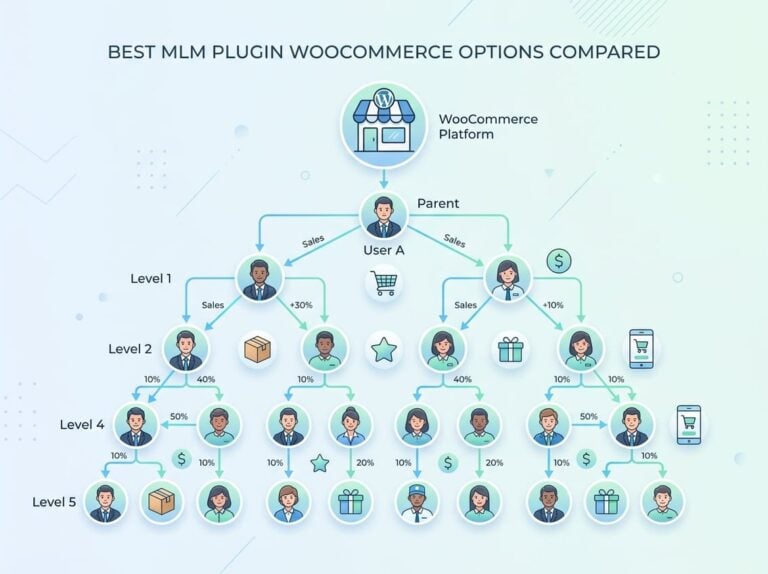
A genealogy tree is the visual and data structure that shows who recruited whom. Affiliate A recruits Affiliate B, who recruits Affiliate C. When Affiliate C drives a sale, the genealogy tree tells the system that Affiliate B sits at tier two and Affiliate A sits at tier three, each eligible for their respective commission percentages.
Without a proper genealogy tree stored in your database, you cannot do accurate referral attribution across levels. Many basic plugins only store direct referral data, which breaks reporting as soon as you go past one tier.
Click-To-Conversion Attribution Across Parent And Child Affiliates
Click-to-conversion attribution means tracking the full journey from the first click on a referral link to the moment a conversion event fires. In a multi-level setup, that attribution must be applied not just to the direct affiliate but also to every ancestor in the genealogy tree.
The software fires separate commission records for each level simultaneously when a conversion event triggers. A clean affiliate tracking setup handles this in a single transaction rather than as a chain of dependent calculations.
Last-Click Attribution, Attribution Windows, And Partner Attribution
Last-click attribution gives credit to the final affiliate link clicked before conversion. This is the default model for most affiliate programs and works fine for simple setups. Attribution windows define how long after a click a conversion still counts. A 30-day window is common, but for subscription products or high-consideration purchases, 60 or 90 days is more realistic.
Partner attribution gets complicated in downlines because the window must apply consistently across all tiers. If the direct affiliate’s cookie expires but an upline affiliate’s does not, your commission logic can produce inconsistent results. Well-built downline tracking software handles this by anchoring the attribution window to the original click event rather than recalculating per affiliate.
What Your WordPress Setup Needs To Track Revenue Correctly
Getting tracking right on WordPress requires more than just installing a plugin. Recurring products, subscription billing, upsells, and server-side conversion data each create specific requirements. Your tracking configuration needs to handle all of them cleanly.
WooCommerce, Memberships, Subscriptions, And Upsells
WooCommerce is the base layer for most WordPress stores, but the complexity jumps significantly when you add subscriptions or memberships. Recurring billing products generate multiple conversion events for a single customer, and your affiliate plugin must handle each renewal as a separate trackable event with its own commission logic.
Order bumps and upsells add another layer. If a customer enters through Affiliate B’s link and adds an upsell at checkout, the commission logic should apply to the full order value, not just the base product, unless you configure product-specific rates.
Tracking Configuration For Recurring And One-Time Commissions
One of the most common gaps in basic plugins is the failure to track recurring commissions past the first transaction. If a customer subscribes and renews monthly, you want that affiliate to earn a commission on each renewal for as long as the subscription is active.
Setting this up properly means your tracking configuration must link each renewal order back to the original affiliate referral. This requires persistent affiliate assignment at the customer level, not just at the order level. Ultimate Affiliate Pro handles this through lifetime commissions and recurring commission settings that tie the customer to the affiliate permanently.
Server-To-Server Tracking, Postback Conversion Tracking, And API Support
Cookie-based tracking has become less reliable as browsers tighten privacy rules. Server-to-server tracking, also called postback-based conversion tracking, solves this by sending conversion data directly between servers without relying on the visitor’s browser or cookies.
For WordPress programs with significant traffic, postback conversion tracking eliminates the conversion data gaps that cookie deletion or browser restrictions cause. API support matters when you want to sync affiliate data with external CRMs, payment processors, or reporting tools.
Integrations, Ecommerce Integrations, And Integration Needs
Your affiliate tracking software needs direct integrations with the tools you already use. For most WordPress programs that means WooCommerce, a membership plugin like MemberPress or Paid Memberships Pro, and possibly a payment gateway like Stripe or PayPal.
Integration needs vary by setup. If you sell digital downloads, courses, or physical products under the same program, you need an affiliate plugin that tracks all order types without requiring separate configurations for each product category.
Why Ultimate Affiliate Pro Fits This Use Case Better Than Basic Plugins
Most basic affiliate plugins handle flat, one-tier programs well enough. The moment you add a second commission tier, recurring products, or a structured partner onboarding flow, they start creating more administrative work than they save. That is the gap Ultimate Affiliate Pro was built to fill.
Using The Downline Tracking Dashboard In A Real Program
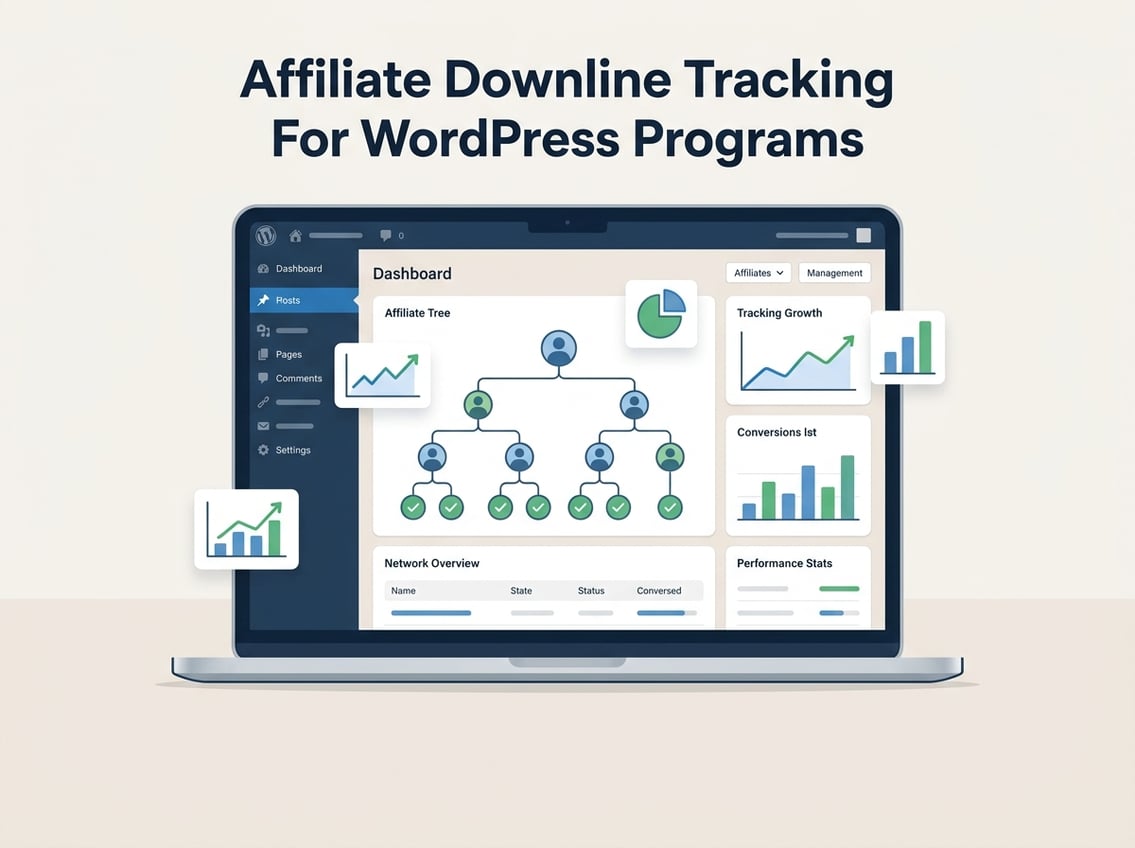
The downline tracking dashboard inside Ultimate Affiliate Pro gives you a visual representation of your entire affiliate genealogy tree. You can see each affiliate’s position in the hierarchy, who they recruited, and how commissions are flowing across tiers in real time.
In practice, this means when a dispute arises about a commission calculation, you can trace the full referral chain in seconds rather than exporting CSV files and cross-referencing manually. That alone saves meaningful time in programs with dozens of active affiliates.
Multi-Level Commission Logic Without Spreadsheet Workarounds
Ultimate Affiliate Pro supports multi-level affiliate structures with configurable commission rates per tier. You set tier one at a percentage, tier two at a different percentage, and the plugin handles the rest automatically at conversion time.
You do not need spreadsheets or manual overrides to calculate what each upline affiliate earned on a given sale. The commission automation runs at checkout and logs each tier’s earnings as a separate record, which makes reconciliation and payouts straightforward.
Partner Onboarding, Affiliate Portal, And Commission Workflows
New affiliates register through a customizable onboarding form. Once approved, they get access to an affiliate portal where they can view their downline, track their own referrals, monitor earnings by tier, and access their unique referral links.
Commission workflows can be set to require manual approval or trigger automatically. For programs with high-volume automated payouts, the automation reduces administrative overhead significantly. You can review the full features list to see exactly which commission models and workflow options are included.
If you are evaluating cost versus functionality, the pricing page shows a single license that includes MLM and downline tracking without purchasing separate add-ons.
When Basic Affiliate Plugins Start Breaking Down
Basic affiliate plugins like free-tier options typically cap you at one commission tier, have no genealogy tree, and cannot assign commissions at the customer level for recurring billing. You can sometimes patch around these limits with third-party integrations, but the maintenance burden grows quickly.
When your program scales past a small handful of affiliates, you need commission automation, structured reporting by tier, and fraud controls that basic plugins simply do not include. Trying to manage affiliate downline tracking in a plugin not built for it means your reports become unreliable and disputes become frequent.
Reporting That Helps You Grow Instead Of Just Audit Payouts
Reporting inside an affiliate downline program should tell you where growth is coming from, not just confirm what you already paid out. Good reporting separates performance by tier, highlights underperforming branches, and gives you traffic data you can act on.
Commission Reporting And Conversion Reporting By Level
Commission reporting broken down by tier shows you exactly how much each level of your downline generated in a given period. This is different from a flat affiliate commission report because it lets you see whether your tier-two and tier-three affiliates are active or dormant.
Conversion reporting by level is the actionable version of that data. If tier-one affiliates are converting well but tier-two affiliates show almost no activity, that points to a recruitment problem or an onboarding gap rather than a traffic problem.
Performance Reporting For Traffic Sources And Campaign Performance
Traffic source data shows you which channels your affiliates are using to send visitors. Campaign performance reporting goes deeper, linking specific promotional materials or landing pages to conversion outcomes.
For WooCommerce programs, this data helps you identify which product pages affiliates are promoting most effectively and where conversion rates drop. You can use that insight to update creative assets or adjust commission rates for specific products.
Real-Time Analytics, Reporting Dashboards, And ROI Visibility
Real-time analytics let you catch problems before they become expensive. If a downline branch suddenly spikes in clicks with no corresponding conversions, that is a signal worth investigating immediately rather than discovering it at the end of the month.
Reporting dashboards should give you ROI visibility at the program level and at the individual affiliate level. Knowing the revenue-to-commission ratio per affiliate helps you decide where to invest in recruitment and where to restructure rates.
Attribution Accuracy, Tracking Accuracy, And Conversion Analytics
Attribution accuracy is the foundation of trustworthy reports. If your tracking has gaps, your commission data is wrong, your affiliates lose confidence in the program, and disputes increase. Conversion analytics that include attribution data by level give you a complete picture of how value flows through your downline. Investing in tracking accuracy upfront is cheaper than resolving payout disputes later.
Fraud Controls, Edge Cases, And Scaling Limits
Multi-level programs create more surface area for fraud than flat programs. Self-referrals, duplicate account creation, and manufactured clicks are all more common when commission income can flow up multiple tiers.
Fraud Detection And Fraud Prevention In Multi-Level Programs
The most common fraud types in downline programs are self-referrals, where an affiliate purchases through their own link, and account stacking, where one person creates multiple affiliate accounts to collect commissions at multiple levels.
Solid fraud detection flags suspicious patterns automatically. IP matching, email domain checks, and referral velocity limits are the baseline controls worth enabling. Fraud prevention in affiliate programs also includes setting minimum payout thresholds that make micro-fraud economically unattractive.
Cross-Device Tracking And Duplicate Referral Problems
Cross-device tracking is an unsolved problem for cookie-based systems. A visitor who clicks an affiliate link on their phone and converts on their laptop may not be attributed correctly unless you use server-side or account-based tracking.
Duplicate referral problems in downline programs often come from customers clicking multiple affiliates’ links across a session. Your tracking configuration needs a clear rule for which affiliate gets credit, whether that is first click, last click, or a custom model.
Commission Automation, Automated Payouts, And Global Payouts
Commission automation triggers payouts based on rules you define: minimum balance thresholds, payment schedules, or manual approval gates. Automated payouts reduce administrative time significantly in programs with many affiliates earning commissions frequently.
Global payouts require currency handling and payment gateway support that not all affiliate plugins include. If you have international affiliates, your setup needs to handle multi-currency commissions without requiring manual conversion steps.
Scalability For Large Affiliate Networks And Partner Programs
As your affiliate network grows, database query performance becomes a real concern. A genealogy tree with hundreds of nodes, all queried on every page load or checkout, creates server load that poorly optimized plugins cannot handle.
Purpose-built affiliate tracking software is designed to scale. Basic WordPress plugins often are not. For partner management at scale, the combination of efficient database structures, caching, and asynchronous commission processing is what separates tools that grow with you from tools that slow you down.
How Other Platforms Approach Similar Tracking Models
Several platforms offer downline tracking or multi-tier commission features outside of WordPress. Knowing what exists outside the WordPress ecosystem helps you understand what is realistic to expect from any affiliate tracking tool.
Post Affiliate Pro, Refersion, And LeadDyno
Post Affiliate Pro supports multi-tier commissions and has been a long-standing option for businesses needing structured downline management. It runs as a hosted SaaS or self-hosted solution but is not a native WordPress plugin, which adds integration complexity for WooCommerce stores.
Refersion and LeadDyno are both popular for ecommerce affiliate programs. Neither offers deep multi-tier downline tracking out of the box. They work well for flat programs but require significant customization or third-party tools to manage hierarchical commission structures.
PartnerStack, impact.com, And Partnerize
PartnerStack is built for SaaS partner programs and handles multi-tiered partner relationships, though its pricing and structure are aimed at larger businesses with dedicated partner teams. It is not a WordPress-native tool.
impact.com and Partnerize are enterprise-level partner program management platforms. Both offer sophisticated tracking and attribution but at a price point and complexity level that puts them well outside the range of most WordPress store owners.
Everflow, TUNE, CAKE, HasOffers, And Affise
Everflow, TUNE, CAKE, and Affise are performance marketing platforms with strong tracking infrastructure. HasOffers is the network version of TUNE. All of these are designed for affiliate networks and performance agencies, not individual WordPress site owners managing a brand affiliate program.
They handle complex attribution and postback tracking well, but require technical setup and ongoing management that goes well beyond installing a plugin.
Voluum, Tapfiliate, ShareASale, Awin, Trackier, Referral Rock, And FirstPromoter
Voluum is primarily a media buying tracker, not an affiliate program management tool. Tapfiliate supports multi-level commissions and integrates with WooCommerce, though its tier depth is limited compared to a dedicated MLM-capable plugin.
ShareASale and Awin are affiliate networks where you list your program and affiliates apply to join. They provide tracking infrastructure but no control over your WordPress installation or direct integration with your product database.
Trackier and Referral Rock are flexible platforms for different referral use cases. FirstPromoter targets SaaS businesses specifically. None of these are WordPress-native, which means added integration steps for any WooCommerce program. For a WordPress-first setup with genuine downline tracking needs, Ultimate Affiliate Pro remains the more practical and cost-effective starting point.
Frequently Asked Questions
How can you see which affiliates recruited other affiliates inside your WordPress or WooCommerce program?
In Ultimate Affiliate Pro, the downline tracking dashboard shows the full genealogy tree with each affiliate’s position relative to the affiliates they recruited. You can drill into individual branches to see recruitment history, commission activity, and tier assignments without exporting any data manually.
What’s the simplest way to map a multi-level referral tree and keep commissions accurate?
Assign tier-specific commission rates inside your plugin’s settings and let the software map relationships automatically at registration. Every time a new affiliate joins through an existing affiliate’s referral link, the system records the parent-child relationship and applies the correct rate at checkout.
Which WordPress affiliate plugins actually support multi-tier commissions without breaking reporting?
Ultimate Affiliate Pro supports multi-tier commissions natively with built-in downline tracking and genealogy reporting. Most free or entry-level plugins only support one commission tier and do not store the parent-child relationship data needed for accurate multi-level reports.
How do you track downline sales across multiple WooCommerce products and coupon codes?
Your affiliate plugin needs to track both link-based referrals and coupon-based referrals and link both back to the affiliate’s account. Ultimate Affiliate Pro supports coupon tracking as part of its add-ons, so sales made with a coupon code are attributed correctly even when no tracking link was used.
What should you look for in downline reports to catch self-referrals, fraud, or duplicated accounts?
Watch for affiliates whose customer conversions share the same IP address, billing email, or device fingerprint as their affiliate account. A clean downline report should let you filter by affiliate ID and cross-reference order data so these patterns are visible before payout is processed.
Can you track downline activity from external networks like Amazon, or is it limited to on-site sales?
WordPress affiliate plugins track on-site conversions only. If you manage an Amazon affiliate or external network account, those sales happen outside your WordPress environment and cannot be pulled into your downline tracking system automatically. Downline tracking with tools like Ultimate Affiliate Pro applies to your own products, memberships, and WooCommerce orders.