Most WooCommerce store owners either skip affiliate programs entirely or bolt one on with a basic plugin that breaks down the moment they try to track subscriptions, run tiered commissions, or pay affiliates automatically. Getting your woocommerce affiliate program setup right from the start saves you months of rework and missed revenue. The decisions you make in the first hour, specifically which plugin you install and how you wire it to your order flow, determine everything else.
This guide covers the full setup process: plugin selection, WooCommerce integration, commission rules, tracking configuration, and payouts. The focus is on doing it once and doing it well, with practical guidance for stores selling physical products, memberships, courses, or subscriptions.
Pick The Right Plugin Before You Configure Anything
Your plugin choice shapes every other decision in your woocommerce affiliate program setup. Picking the wrong one means rebuilding everything once your program outgrows basic referral tracking.
Why Ultimate Affiliate Pro Fits Stores That Need More Than Basic Referral Tracking
Ultimate Affiliate Pro is the most flexible option for WooCommerce stores that need more than a flat-rate commission setup. It supports multi-tier commissions, recurring commissions on subscriptions, product-specific commission rules, PayPal and Stripe payouts, and a built-in affiliate portal, all with no transaction fees on commissions paid.
That last point matters more than it sounds. Many plugins charge a percentage of each commission payout, which quietly reduces what your affiliates actually earn. Ultimate Affiliate Pro does not take a cut of your payouts.
It also includes built-in WooCommerce integration without requiring a separate add-on. You connect it directly to your store, set commission rules per product or category, and track referrals through the same admin dashboard you already use.
When A WooCommerce Native Option Makes Sense
The Affiliate for WooCommerce plugin, built by Woo, is a solid pick if your program is straightforward. It handles registration, commission plans, and PayPal payouts with a clean interface that feels native to WooCommerce.
The trade-off is ceiling. It handles flat and percentage commissions well but lacks deep multi-tier support and has limited flexibility for stores running complex membership or subscription models.
How AffiliateWP, Easy Affiliate, Solid Affiliate, AWIN, And ShareASale Compare At A High Level
AffiliateWP is the most widely installed wordpress affiliate plugin and offers strong WooCommerce integration through an add-on. Easy Affiliate focuses on simplicity and is better suited for smaller programs. Solid Affiliate is lightweight and developer-friendly.
AWIN and ShareASale are affiliate networks rather than self-hosted plugins. They bring existing affiliates but add network fees, require external tracking setup, and give you less control over your commission structure and payout flow. For most self-hosted WooCommerce stores, a native woocommerce affiliate plugin like Ultimate Affiliate Pro gives you more control at a lower total cost.
Install The Plugin And Connect It To Your Store Logic
Once you choose your woocommerce affiliate plugin, installation takes under ten minutes. The real setup work happens in how you configure the defaults before any affiliate registers.
Run The Setup Wizard And Set Core Program Defaults
Most affiliate plugins for WooCommerce include a setup wizard that walks you through the basics: your program name, default commission rate, email templates, and affiliate registration settings. Do not skip the wizard even if you plan to customize everything manually later. It sets baseline values that affect tracking from the first referral.
During setup, configure:
- Default commission type (flat or percentage)
- Whether affiliates are auto-approved or require manual approval
- The email sent when someone registers or gets approved
- Password and login settings for the affiliate portal
The admin dashboard should show pending affiliates, active commissions, and payout status once the wizard finishes.
Match Commission Tracking To WooCommerce Order Statuses
This step is skipped most often, and it causes the most support headaches. Your commission tracking needs to know which WooCommerce order statuses should trigger a commission and which should cancel one.
A typical setup looks like this:
- Processing or Completed: triggers commission
- Refunded or Cancelled: reverses commission
- On Hold: holds commission until status changes
If you leave these at default without checking them against your actual order flow, you may pay out commissions on refunded orders or miss commissions on legitimate sales. Check this setting immediately after connecting the plugin to WooCommerce.
Create The Affiliate Dashboard And Registration Flow
Your affiliate registration page and affiliate dashboard need to be live before you recruit anyone. Create a dedicated registration page using the shortcode or block provided by your plugin, then link it from your footer or a dedicated affiliate landing page.
The affiliate portal should let affiliates see their tracking links, commission totals, referral history, and payout status without needing to contact you. If affiliates have to email you for their stats, you have a retention problem before the program even starts.
Enable manual approval in the approval workflow if you want to vet affiliates before they get access to tracking links. For open programs, auto-approval speeds things up but removes your quality filter.
Set Up Commissions That Match How You Actually Sell
Commission structures often get set once and never revisited. That approach works until you add a premium product, launch a subscription, or run a promotion where the margin doesn’t support your default rate.
Choose Between Flat, Percentage, And Global Rates
A global commission rate is the simplest starting point. You set one percentage or flat dollar amount that applies to every sale. It is easy to communicate to affiliates and easy to manage.
Percentage-based commissions scale with order value, which rewards affiliates more when they send high-value customers. Flat commissions are predictable for your margins. Use a global commission rate as the default, then layer product-specific rules on top where needed.
Add Product-Specific Rules For Memberships, Courses, And Upsells
Not every product should earn the same commission. A low-margin physical product might support a 5% rate while a digital course with 80% margins can support 30% or more.
With Ultimate Affiliate Pro, you can set commission rules at the product or category level. This means a membership product pays one rate, a core product pays another, and an upsell offer can have its own commission calculation entirely. You can also create commission plans that apply to specific affiliates rather than all affiliates.
Use Recurring, Lifetime, Tiered, And Multi-Tier Models Carefully
Recurring commissions pay affiliates on every renewal of a subscription, not just the first sale. This is the right model for SaaS products, membership sites, or any store running WooCommerce Subscriptions.
Lifetime commissions assign a customer to an affiliate permanently. Every future purchase from that customer earns a commission for the original referrer, which rewards affiliates who bring in loyal buyers.
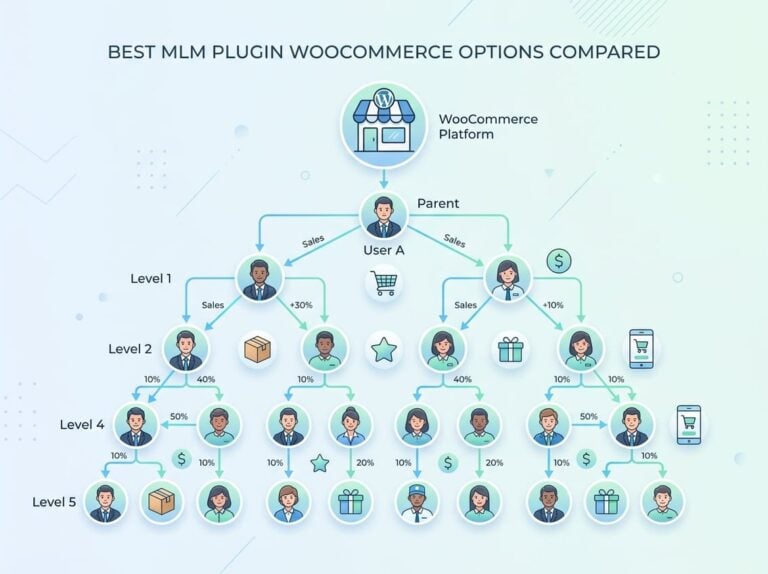
Tiered commissions increase the rate based on performance milestones. Multi-tier commissions pay affiliates for recruiting other affiliates into the program. Both models increase complexity, so only add them if your program can support the higher payout load. Ultimate Affiliate Pro supports all of these models natively, which is one reason it fits stores with advanced needs better than most basic affiliate plugins.
Configure Tracking So Referrals Are Credited Correctly
Tracking is where many woocommerce affiliate program setups fall apart. Missed referrals frustrate affiliates and cost you credibility fast.
Use Affiliate Links, Coupons, And Landing Pages Together
Affiliate links are the default tracking method. Each affiliate gets a unique URL that sets a tracking cookie when a visitor clicks it. That cookie ties the eventual purchase back to the affiliate.
Coupon tracking is a strong complement, especially for affiliates who promote on social media or podcasts where direct link clicks are harder to track. You assign coupons to affiliates individually, and any order using that coupon credits the right affiliate even without a cookie.
Landing pages with pre-embedded affiliate tracking give you a third option. You can build a dedicated affiliate landing page for high-volume affiliates and bake their referral ID into the URL by default. This reduces friction and increases the affiliate link generator accuracy for campaigns.
Set Cookie Duration And Attribution Rules
Cookie duration controls how long after a click an affiliate gets credit for a sale. A 30-day cookie is a common starting point for most stores. Longer cookies, 60 or 90 days, make sense for higher-consideration purchases where buyers research before converting.
Decide on a first-click or last-click attribution model early. Last-click is simpler and the default in most plugins. First-click rewards the affiliate who first introduced the customer, which matters more in programs where multiple affiliates might promote the same product.
Handle Subscriptions, Renewals, And Repeat Buyers
If you sell subscriptions, configure your plugin to fire a commission event on every renewal, not just the initial purchase. Most plugins require you to explicitly enable recurring commissions; they do not default to it.
For repeat buyers, lifetime commissions ensure the original referring affiliate earns on every return visit. Without this setting, a returning customer who clears their cookies gets attributed to no one, or worse, to the wrong affiliate.
Set Payouts, Approvals, And Affiliate Access Without Extra Admin Work
Running affiliate payouts manually at scale is unsustainable. Setting up the right workflow early means less admin work as your program grows.
Choose PayPal, Stripe, Or Bank Transfer For Payouts
PayPal payouts are the fastest and most familiar option for most affiliates. Many plugins, including Ultimate Affiliate Pro, support one-click payout to affiliates via PayPal.
Stripe works well if your affiliates are set up to receive Stripe transfers. Bank transfer is better for international affiliates where PayPal fees are high or for programs paying large amounts where a direct transfer is cleaner.
Whatever payment gateway you choose, document your payout schedule and communicate it clearly in the affiliate portal. Affiliates who know when to expect payment are less likely to flood your inbox with questions.
Use Thresholds, Pending Reviews, And One-Click Payment Workflows
Payout thresholds prevent you from processing dozens of micro-payments. Setting a minimum, for example $50 before a payout triggers, keeps your payout process manageable. Affiliates accumulate commissions until they hit the threshold, then get paid in a single transaction.
The pending payouts dashboard lets you review commissions before they go out. This gives you a checkpoint to catch reversed orders, suspected fraud, or data entry errors before money leaves your account. With a one-click payout feature, you can approve and pay a batch of affiliates in seconds rather than processing each one manually.
Automated payouts go one step further. As explained in WooCommerce’s documentation, automated payouts remove manual intervention entirely once you set the schedule and conditions.
Give Affiliates The Assets They Need To Promote Better
A well-stocked affiliate dashboard reduces the back-and-forth between you and your affiliates. Include:
- Pre-written social media templates
- Banner images in standard ad sizes
- Product descriptions they can adapt
- Your affiliate program terms
Affiliates who have ready-made promotional assets launch faster and convert better. This is one area where affiliate management pays off in program performance, not just admin efficiency. If your plugin supports unlimited affiliates, growth will not create a bottleneck as long as the dashboard is self-serve.
Launch, Test, And Improve Program Performance
Before you announce the program, run through every step yourself as if you were a new affiliate.
Test Registration, Tracking, And Payout Flows Before Launch
Create a test affiliate account, go through the affiliate registration page, and complete a test purchase using your own affiliate link. Then check that the commission appears in both the affiliate dashboard and the admin dashboard.
Test the approval workflow too. Submit a registration, approve it, and verify the new affiliate gets the right email. Check that tracking links work on your actual product pages, not just your homepage.
Run a test payout to confirm your PayPal or Stripe connection is live before you have real affiliates waiting on payment.
Watch Top Affiliates, Conversion Paths, And Missed Attributions
Once your program is live, your top affiliates will tell you more than any report. Look at which affiliates drive the highest conversion rate, not just the most clicks. High-click, low-conversion affiliates may be sending low-intent traffic or misrepresenting your offer.
Missed attributions show up when sales come in but no affiliate gets credited. This usually points to a tracking conflict, a caching issue, or a checkout flow that breaks the cookie. Fix these early before affiliates notice commissions disappearing.
Use the affiliate portal and admin dashboard data together. If affiliates report clicks that do not show up in your affiliate tracking, dig into your cookie settings and any page caching rules that might be stripping tracking parameters.
Use The Article Body To Add A Pricing CTA At The Right Moment
If you are still deciding which plugin to use before setting all of this up, the Ultimate Affiliate Pro pricing page breaks down exactly what each plan includes, including the multi-tier, recurring commission, and WooCommerce integration features covered in this guide. It is worth checking before you commit to a plugin that will require paid add-ons to reach the same feature set.
Frequently Asked Questions
Which plugin should you install to run an affiliate program on a WooCommerce store?
Ultimate Affiliate Pro is the strongest option for stores that need multi-tier commissions, recurring commissions, and WooCommerce integration without transaction fees. For simpler programs, the native Affiliate for WooCommerce plugin from Woo works well. The right choice depends on how complex your commission structure is and whether you need recurring or lifetime commissions.
How do you set commission rates per product, category, or affiliate without breaking your margins?
Start with a global commission rate as the base, then override it at the product or category level for items with different margins. Most advanced plugins let you assign commission plans per affiliate as well, so high-performing partners can get a different rate than new signups. Always calculate your net margin after commissions before setting any rate.
What’s the cleanest way to create and track unique referral links and coupon-based referrals in WooCommerce?
Use both methods together. Assign each affiliate a unique referral link through the affiliate link generator, then also give them a personal coupon code. This covers tracking across channels where cookies are unreliable, like podcast promotions or Instagram stories, while link-based tracking handles search and content traffic.
How do you approve affiliates, manage applications, and prevent low-quality signups from getting in?
Enable manual approval in your approval workflow so every application goes through a pending review before the affiliate gets access. Add a short application form that asks about their promotion channels and audience size. This filters out low-quality signups and gives you context when making decisions about who to approve.
How do you handle payouts (PayPal, bank transfer, store credit) and keep payout records for accounting?
Set a minimum payout threshold to batch payments instead of processing small amounts constantly. Use the pending payouts dashboard to review commissions before each payout cycle. Export payout records from your admin dashboard monthly and store them with your accounting records; most affiliate plugins generate CSV exports that include commission amounts, dates, and affiliate details.
What setup steps help stop affiliate fraud like self-referrals, coupon poaching, and fake orders?
Block self-referrals by preventing logged-in users from earning commissions on their own purchases. Restrict coupon usage so each code can only be used once per customer. Enable a holding period on commissions so payouts do not go out until after your refund window closes. Reviewing the pending payouts dashboard before every payout cycle catches most fraud patterns before they cost you money.