An MLM affiliate program rewards affiliates for the sales of the affiliates they recruit. With the Multi-Level Marketing module of Ultimate Affiliate Pro, when an affiliate earns a referral, the affiliates above them in the network, their upline, also earn a commission, for as many levels as you choose.
MLM, also called multi-tier or two-tier affiliate marketing, turns your best affiliates into recruiters: they bring new affiliates and earn on their results. This guide sets up the module. To choose between unilevel, binary and matrix structures, read MLM structures. To learn how regular commissions are calculated first, see How commissions are calculated.
Before you start
- Ultimate Affiliate Pro installed, with your license active.
- Affiliate commissions set up, for example a rank with a percentage rate. MLM commissions are calculated from them.
- A registration page for new affiliates. See Set up the registration, login and password pages.
How MLM commissions work #
Every affiliate can have one parent, the affiliate who recruited them. When an affiliate earns a referral, Ultimate Affiliate Pro walks up the network and creates an MLM referral for each parent, level by level, up to the depth you set.
- Network
- Emma recruited Liam, Liam recruited Noah, Noah recruited Mia
- Mia’s referral
- 100.00$, from her own commission rate
- Noah (level 1, Mia’s parent)
- 20% of 100.00$ = 20.00$
- Liam (level 2)
- 10% of 100.00$ = 10.00$
- Emma (level 3)
- 5% of 100.00$ = 5.00$
Each level is calculated from the referral amount of the affiliate who made the sale, not from the order total. Mia keeps her full 100.00$.
Turn on the Multi-Level Marketing module #
Go to Ultimate Affiliate Pro›Modules and open Multi-Level Marketing.
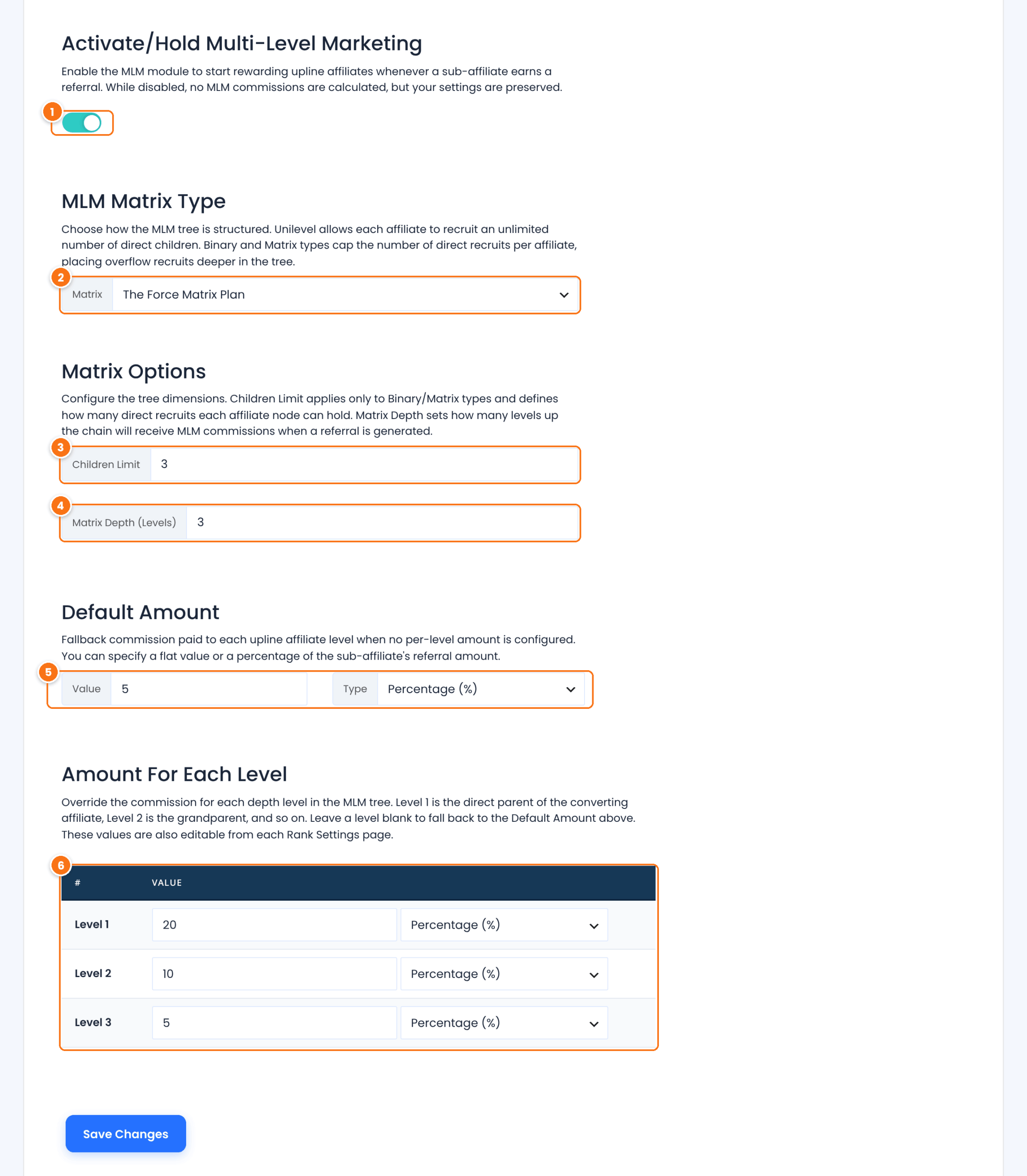
Turns MLM commissions on and adds the Multi-Level Marketing tab to the Affiliate Portal. When you turn it off, no new MLM referrals are created and your settings are kept.
Default: Off
How the network is built:
- The Unilevel Plan: each affiliate can recruit any number of direct sub-affiliates.
- The Force Matrix Plan: each affiliate has up to Children Limit direct sub-affiliates; new recruits fill the next free spot lower in the network.
- Binary Plan: like a force matrix with two sub-affiliates per affiliate.
Read MLM structures to compare them.
Default: Binary Plan
How many direct sub-affiliates one affiliate can have. Shown for The Force Matrix Plan and Binary Plan. When you choose Binary Plan, it is set to 2.
Default: 2
How many levels up the network earn on a referral. With 3, the parent, grandparent and great-grandparent of the affiliate earn. The table below gets one row per level.
Default: 3
The commission for any level left empty in the table, as a Value and a Type: Percentage (%) of the sub-affiliate’s referral, or Flat Rate in your store currency.
The commission for each level. Level 1 is the direct parent of the affiliate who made the sale, Level 2 the grandparent, and so on. Leave a level empty to use the Default Amount.
Click Save Changes.
Tip
Start with a short network, 2 or 3 levels, and decreasing rates such as 20%, 10%, 5%. Deep networks with high rates can cost more than the sale brings in.
Set different MLM rates per rank #
If you use ranks, each rank can have its own MLM amount for every level. Go to Ultimate Affiliate Pro›Ranks, edit a rank and fill in the amounts in its MLM Referrals section. The rank of the affiliate who receives the MLM commission decides the rate, so you can reward your top recruiters more. See Ranks.
Build the network #
Affiliates join a network in these ways:
When a visitor opens Emma’s affiliate link and then registers as an affiliate, Emma becomes their parent automatically. Ask affiliates to share their link with people who may want to join your program. The same happens when an existing user becomes an affiliate after visiting the link.
Set or change the parent of any affiliate from their profile. See Assign or change an MLM parent.
With The Force Matrix Plan or Binary Plan, if the recruiting affiliate already has all the sub-affiliates allowed, the new affiliate is placed in the first free spot below them.
Check MLM referrals #
MLM referrals appear in Ultimate Affiliate Pro›Referrals with the source Multi-Level Marketing and the description “Generated based on the Main Referral from” followed by the username of the affiliate who made the sale.
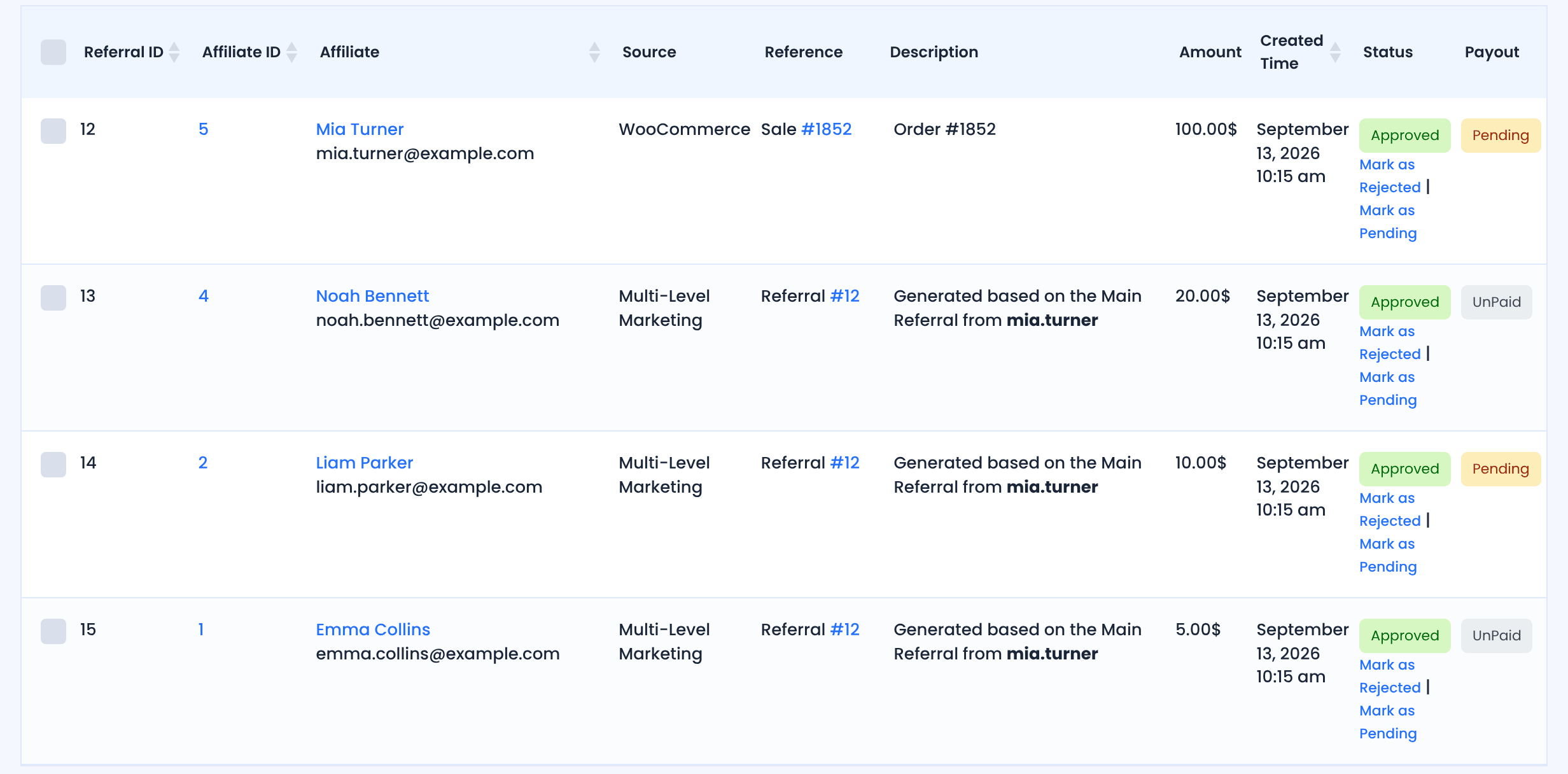
MLM referrals follow the referral they come from: they start as Pending, and when you approve or reject the main referral, its MLM referrals change with it. They are paid like any other referral. See How affiliate payouts work.
Test it #
- Set Matrix Depth to 2 and give Level 1 and Level 2 a percentage.
- Edit a test affiliate and set another affiliate as their parent, as described in Assign or change an MLM parent.
- Open the child affiliate’s link in a private window and place a test order.
- In Referrals, check the main referral and the MLM referral for the parent, with the right amount.
Frequently asked questions #
Does the affiliate who made the sale earn less with MLM?
No. The MLM commissions are added on top of the main referral. The selling affiliate keeps their full commission.
Can I pay a fixed amount per level instead of a percentage?
Yes. Set the level’s type to Flat Rate. Each parent at that level earns the same amount for every referral in their downline.
Can I calculate MLM commissions from the product price?
Yes, with the MLM Based On Product Price Pro add-on, which adds a Base Amount On option to the module.
What happens to existing affiliates when I turn MLM on?
They have no parent yet. Assign parents to existing affiliates from their profile; new affiliates who sign up through an affiliate link get a parent automatically.
Can affiliates see their network?
Yes. The Multi-Level Marketing tab of the Affiliate Portal shows their sub-affiliates, levels and rates. See Show the MLM tree to affiliates.


