The EDD affiliate integration connects Ultimate Affiliate Pro with Easy Digital Downloads, so every download sale that comes from an affiliate becomes a referral. It is built into the plugin: activate Easy Digital Downloads and referrals are tracked right away.
Affiliates are credited through their referral link, an affiliate discount code or the affiliate the customer picks at checkout. To see how all integrations work, read the integrations overview. Selling physical products? See WooCommerce.
Before you start
- Easy Digital Downloads installed and active, with at least one download. See the Easy Digital Downloads getting started guide.
- At least one rank, to set the default commission. See Ranks.
- At least one approved affiliate, so you can test a purchase.
Check that the integration is on #
Go to Ultimate Affiliate Pro›Integrations. In the eCommerce section, find Easy Digital Downloads.

Turns the integration on or off. The change is saved right away.
Default: On (when Easy Digital Downloads is active)
How EDD affiliate referrals are created #
When a customer starts a purchase, Ultimate Affiliate Pro looks for the affiliate: first an affiliate discount code, then the referral cookie, then the customer’s linked affiliate (Lifetime Commissions), then the affiliate selected at checkout (Checkout Referrals). The referral is saved as Pending, with the order number as reference and the order total in the description.
| Easy Digital Downloads event | Referral status |
|---|---|
| Order created, payment not complete yet | Pending |
| Payment complete | Approved |
| Order refunded | Rejected, when Reject Commissions on Refund is on (default) |
| Order deleted | Rejected |
The commission is calculated for each download in the cart, from the price the customer paid after discounts. Taxes are left out while Exclude Taxes from Calculations is on (default), and fees such as shipping are left out while Exclude Shipping from Calculations is on (default). Both are in Ultimate Affiliate Pro›Settings›General Settings.
- Cart
- Lightroom Presets Pack $29.00
- Discount
- SOFIA15, 15% off: customer pays $24.65
- Commission
- 30% of $24.65 = $7.40, credited to Sofia
Set commission rates for downloads #
The affiliate’s rank sets the default rate for every download. To pay a different rate for some downloads, create a Product Rate in Ultimate Affiliate Pro›Product Rates, choose Easy Digital Downloads as the source and select the downloads. See Commission rates per product.
When the rank rate and a Product Rate both apply, Which Rate should be used? in Ultimate Affiliate Pro›Settings›General Settings decides: Biggest Amount (default) or Lowest Amount.
Link an EDD discount code to an affiliate #
Create the discount code in Downloads›Discounts first. Then turn on the Static Coupons module in Ultimate Affiliate Pro›Modules, open its settings and click Add new Coupon.
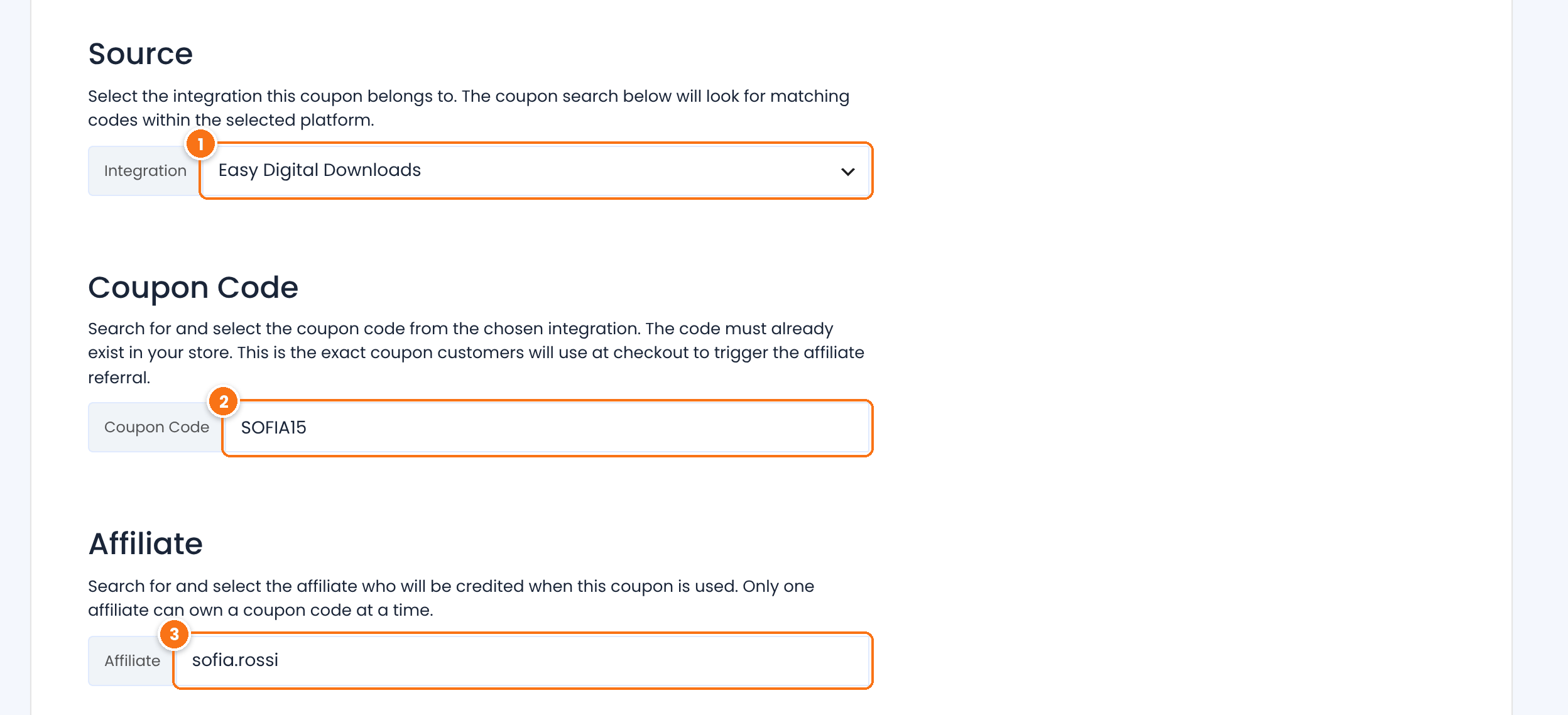
Select Easy Digital Downloads.
Start typing and select the discount code, for example SOFIA15. The code must already exist in Easy Digital Downloads.
Search and select the affiliate who gets the referrals. One affiliate per code.
Below these fields, Referral Amount (Optional) sets a commission just for this code: a percentage or a flat rate. Leave Value empty to use the affiliate’s rank. Click Save Changes. See Affiliate coupon tracking.
Let customers choose an affiliate at checkout #
With the Checkout Referrals module, the Easy Digital Downloads checkout shows a field where the customer selects or types the affiliate who referred them. Turn it on in Ultimate Affiliate Pro›Modules. See Fair checkout reward.
Test it #
- Open an affiliate link, for example
yourstore.com/?ref=sofia.rossi, in a private browser window. - Buy a download as a customer who is not the affiliate. For a free test, use a 100% discount code or the Easy Digital Downloads Store Gateway in test mode.
- Go to Ultimate Affiliate Pro›Referrals. The referral shows the order number and the status Approved once the payment is complete.
With a 100% discount the commission is zero. Zero value referrals are saved while Save Zero Value Referrals is on (default) in Ultimate Affiliate Pro›Settings›General Settings.
Frequently asked questions #
Does a discount code credit the affiliate without a referral link?
Yes. When the code is linked to an affiliate in Static Coupons, every order with that code creates a referral for the affiliate, even if the customer never clicked a link.
Is the commission calculated on the price before or after the discount?
After. Ultimate Affiliate Pro uses the price the customer paid for each download.
What happens when I refund an EDD order?
The referral is rejected while Reject Commissions on Refund is on in Settings, General Settings. It is on by default.
Can I pay commissions only on a customer’s first purchase?
Yes. Turn on New Customer Commissions Only in Settings, General Settings. Customers with earlier Easy Digital Downloads orders do not generate referrals.
Can affiliates link straight to a download?
Yes. With the referral link generator in the Affiliate Portal, affiliates create a link to any page of your site, including a download page.


