Gravity Forms affiliate tracking creates a commission for an affiliate each time a visitor they referred submits a Gravity Forms form on your site. Every form has its own reference value, and the affiliate earns their rank rate on that value.
This turns Gravity Forms into a pay-per-lead channel: demo requests, applications or quote forms count as conversions, with or without a purchase. Visitors are linked to affiliates through affiliate referral links. A cookie remembers the affiliate, so the visitor can come back and submit the form later.
Before you start
- Gravity Forms is installed and active, with at least one form.
- The Gravity Forms Tracking add-on is installed and active. See Pro Add-ons.
- Your affiliates have a rank with a commission rate. See Ranks.
How the commission is calculated #
The value you set for a form is the base for the affiliate’s rank rate, the same way an order total is the base for a sale commission:
- Reference Commission value
- $30
- Affiliate rank
- Standard, 20%
- Referral for each submission
- $6
If the rank uses a flat rate instead of a percentage, the affiliate receives that flat amount for every submission.
Turn on Gravity Forms affiliate tracking #
Go to Ultimate Affiliate Pro›Integrations and find the Gravity Forms card in the Form Integrations group.

Turns tracking for Gravity Forms on or off. The card shows Enabled while it is on.
Default: Off
Opens the Gravity Forms Tracking settings, where you set the value of each form.
Set a value for each form #
Click Configure on the card.
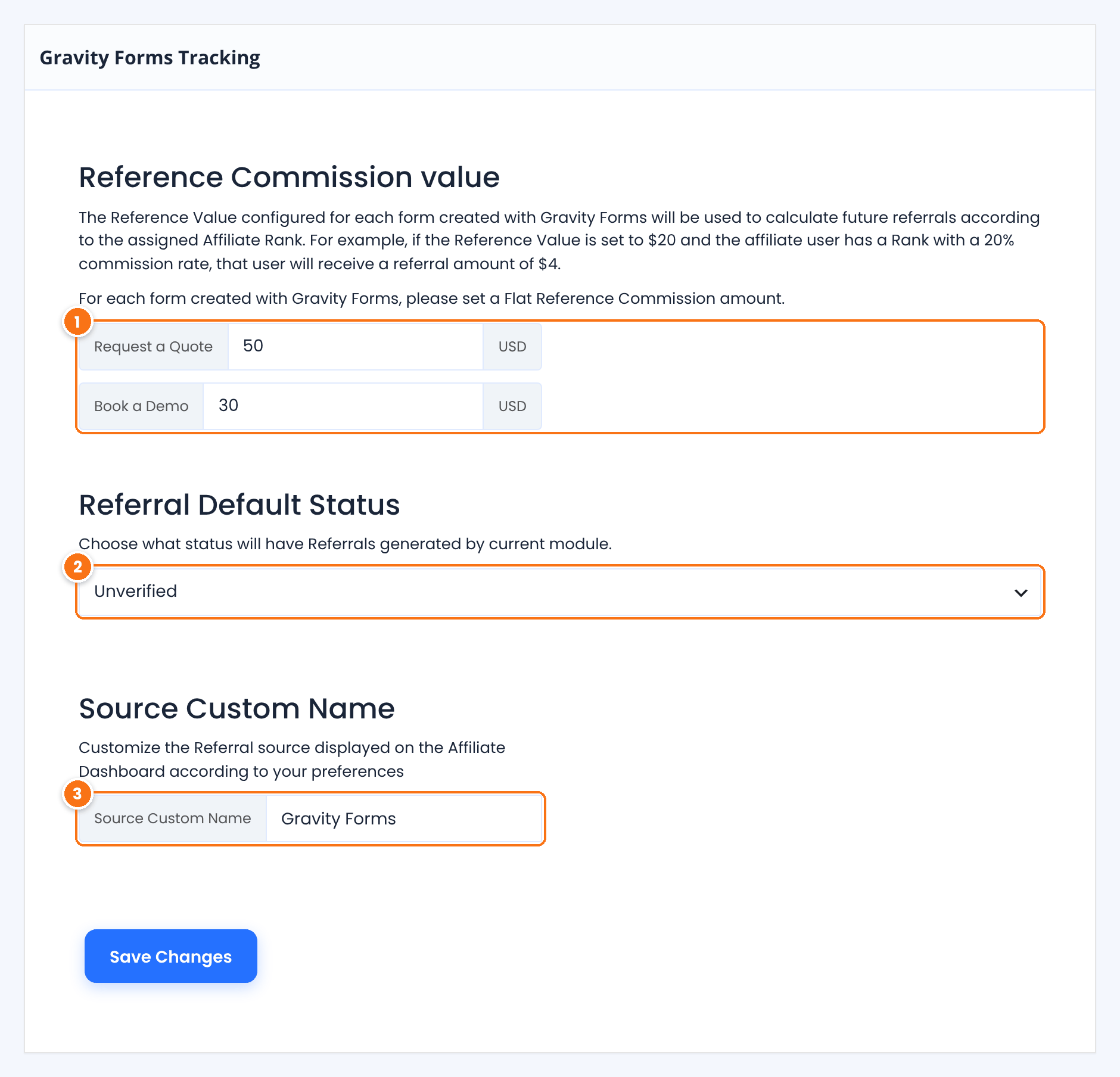
One field for each Gravity Forms form, labeled with the form name. Enter the base amount for that form, in your affiliate currency. A demo request is usually worth more to you than a newsletter form, so give it a higher value.
The status of new referrals from form submissions.
- Unverified: the referral is saved as Pending and you approve it yourself. Use it when you want to check each lead first.
- Verified: the referral is approved as soon as the form is submitted.
Default: Unverified
The source name of these referrals, shown in the Referrals list and in the affiliate’s Affiliate Portal.
Default: Gravity Forms
Click Save Changes.
New forms
A form you create later in Gravity Forms appears on this screen automatically. Open the settings again and give it a value.
Review the referrals #
Each submission from a referred visitor creates a separate referral. Go to Ultimate Affiliate Pro›Referrals to see them.
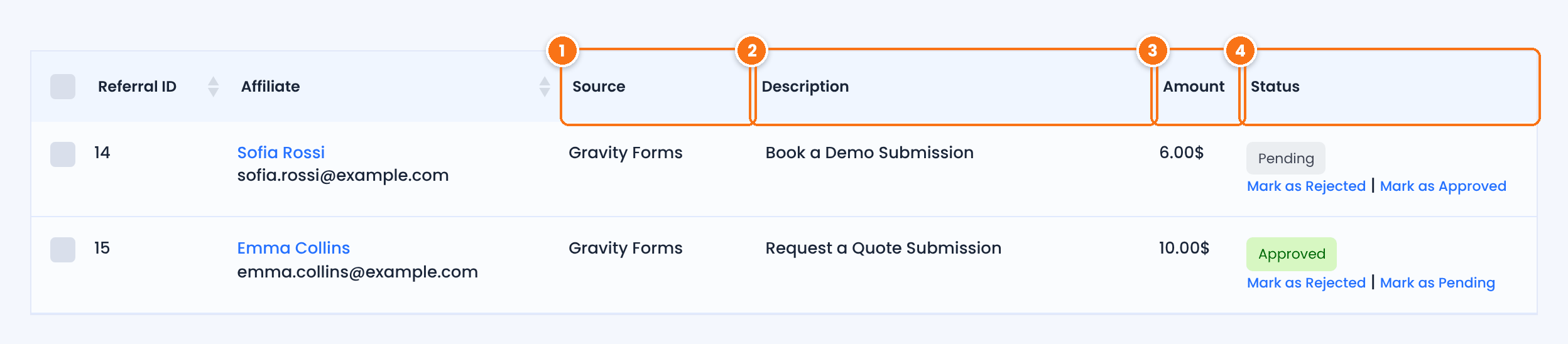
The Source Custom Name you set, Gravity Forms by default.
The form name followed by “Submission”, so you know which form the lead came from.
The commission: the form’s reference value multiplied by the affiliate’s rank rate.
Approved referrals are paid like any other commission. See How affiliate payouts work.
Test it #
- Open a private browser window and visit your site through an affiliate link, for example
yourstore.com/?ref=emma.collins. - In the same window, open the page with your Gravity Forms form, fill it in and submit it.
- In Ultimate Affiliate Pro›Referrals, check that a new referral with the form name in the description was created for the affiliate.
For a full test routine, see Test your affiliate program. The Gravity Forms documentation explains how to create forms and add them to a page.
Frequently asked questions #
Can I pay a different amount for each Gravity Forms form?
Yes. Each form has its own Reference Commission value. The affiliate’s rank rate is applied to the value of the form that was submitted.
Does every submission create a referral?
Yes. Each Gravity Forms submission from a visitor who arrived through an affiliate link creates a new referral, for every form with a value. Choose Unverified if you want to review the leads before you approve them.
What does the affiliate see in the Affiliate Portal?
Each referral is listed in the affiliate’s Affiliate Portal with the amount, the Source Custom Name as the source, the form name in the description and the status, Pending or Approved.
Do I need WooCommerce for Gravity Forms tracking?
No. Gravity Forms tracking works on its own. The visitor only needs to arrive through an affiliate link before submitting the form.
A submission did not create a referral. What should I check?
Check that the Gravity Forms card is enabled in Integrations and that the visitor opened the affiliate link in the same browser before submitting. See Referrals or clicks are not recorded.


