Ultimate Affiliate Pro add-ons are separate WordPress plugins that add features and integrations to your affiliate program. You install each one like any plugin, then turn it on and set it up in Ultimate Affiliate Pro.
Ultimate Affiliate Pro already includes the core affiliate features: tracking, commissions, ranks, payouts and the affiliate portal (see How Ultimate Affiliate Pro works). Pro add-ons cover more specific needs, such as fraud limits, payout requests, product discounts for affiliates or tracking for a membership or LMS plugin. Install only the ones you need.
Before you start
- Ultimate Affiliate Pro installed and active (install guide).
- Your account on ultimateaffiliate.pro, where you download the add-ons.
- An administrator account on your WordPress site.
Feature add-ons and integration add-ons #
There are two kinds of add-ons:
- Feature add-ons add new options to Ultimate Affiliate Pro, for example Fraud Protection or Payout Request By Affiliate. Most of them have an Activate/Hold switch on their own settings screen.
- Integration add-ons track referrals from another plugin, such as WooCommerce Subscriptions, LearnDash, MemberPress or WPForms, or connect a service such as Zapier or Bitly. Tracking integrations are switched on in Ultimate Affiliate Pro›Integrations.
Download the add-on #
- Log in to your account at ultimateaffiliate.pro/login.
- Download the zip file of the add-on you want to install.
Keep the file zipped
Some browsers, such as Safari, unzip downloads automatically. If you get a folder instead of a .zip file, compress the folder again before you upload it.
Upload and activate it in WordPress #
- In your WordPress admin, go to Plugins›Add Plugin and click Upload Plugin.
- Click Choose File and select the add-on zip file.
- Click Install Now, then Activate Plugin.
You can also upload the unzipped folder to wp-content/plugins/ with FTP and activate it in Plugins›Installed Plugins. The WordPress guide to managing plugins explains each method.
Turn it on in Modules #
Go to Ultimate Affiliate Pro›Modules. Every add-on has a card here, grouped in the same categories as the core modules.
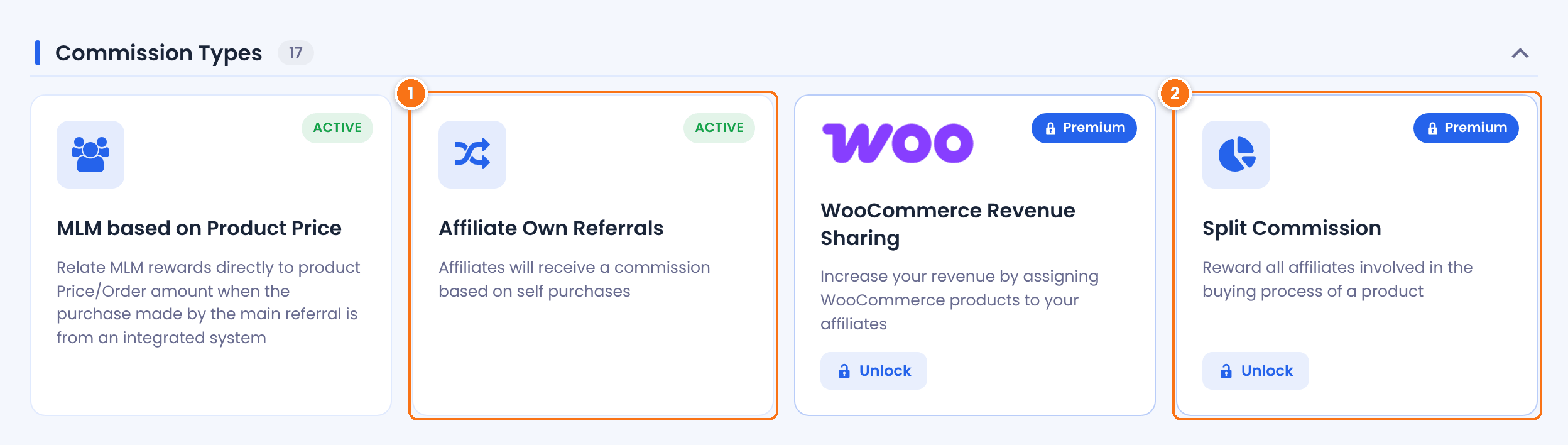
After activation, the add-on card shows Active or Inactive, like a core module. Click the card to open the add-on settings.
Add-ons that are not installed on your site show a Premium badge. Clicking the card opens the add-on page on ultimateaffiliate.pro in a new tab.
- Click the add-on card to open its settings screen.
- Turn on its Activate/Hold switch and click Save Changes.
- Set the other options on the same screen. Each add-on has its own guide, listed below.
Use the search box and the Active filter at the top of Ultimate Affiliate Pro›Modules to find an add-on quickly.
Update an add-on #
Pro add-ons are updated the same way you install them: download the latest version from your account, upload it in Plugins›Add Plugin and click Replace current with uploaded. Your settings stay in place. See Update Ultimate Affiliate Pro.
Turn off or remove an add-on #
To pause an add-on, turn off its Activate/Hold switch and save. To remove it completely, deactivate it in Plugins›Installed Plugins and click Delete.
Ultimate Affiliate Pro add-ons list #
Feature add-ons and their guides:
| Add-on | What it does |
|---|---|
| Affiliate Own Referrals | Pays affiliates a commission on their own purchases while they are logged in. |
| Fraud Protection | Limits clicks and referrals from the same IP address in a time interval. |
| Invite Your Friends | Lets affiliates email invitations to join your program from their portal. |
| IP Restrictions | Hides the affiliate registration form from IP addresses you block. |
| MLM Based On Product Price | Calculates MLM upline rewards from the product price instead of the child referral. |
| Payout Request By Affiliate | Adds a Payout Request tab where affiliates ask to be paid. |
| Remove Dummy Data | Clears test affiliates, clicks, referrals and other data before launch. |
| WooCommerce Product Discounts For Affiliates | Gives logged-in affiliates special WooCommerce prices by rank. |
| WooCommerce Product Discounts For Referred Buyers | Gives visitors referred by an affiliate a discount on WooCommerce products. |
| Exchange Rate | Converts referral amounts when your store and Ultimate Affiliate Pro use different currencies. |
| Random Affiliate ID | Gives new affiliates a random ID instead of the next number. |
| WooCommerce Revenue Sharing | Links WooCommerce products to an affiliate who earns on every sale of them. |
| Split Commission | Splits one commission among all affiliates who referred the buyer. |
| One Time Reward | Rewards an affiliate only once for each customer. |
| Import Referrals | Imports referrals from a CSV file. |
| Extended Shortcodes | Adds shortcodes that show content only to affiliates, visitors or specific ranks. |
| WooCommerce Redirect | Sends affiliates to your affiliate page after they log in through WooCommerce. |
| Manage Reset Password | Uses your own page for the affiliate password reset link. |
| Dynamic Coupons | Creates a personal WooCommerce coupon for each affiliate. |
| Manual Affiliate Order Assignment | Assigns a WooCommerce order to an affiliate from the order screen. |
| Rank Achievement – Network Growth | Promotes affiliates to a new rank by the number of sub-affiliates they bring. |
| Affiliate Manager | Adds a manager role with access to selected Ultimate Affiliate Pro screens. |
| Mass Affiliate Conversion | Turns all users of selected WordPress roles into affiliates. |
| Extension Kit | A starter template for developers who build their own add-on. |
Integration add-ons connect Ultimate Affiliate Pro with Dokan, Zapier, myCRED, Bitly, Tutor LMS, LearnPress, LearnDash, LifterLMS, MemberPress, Paid Memberships Pro, Paid Member Subscriptions, Restrict Content Pro, MemberMouse, Contact Form 7, WPForms, Ninja Forms, Gravity Forms, Formidable Forms, Fluent Forms, Forminator, Amelia, WP Booking Calendar, Event Tickets, The Events Calendar, GiveWP, WooCommerce Subscriptions and Polylang. Each one has its own guide in the Integrations category.
Frequently asked questions #
Do add-ons work without Ultimate Affiliate Pro?
No. Every add-on needs Ultimate Affiliate Pro installed and active on the same site. If the main plugin is older than the version an add-on needs, the add-on shows a notice with the required version and waits until you update.
Where are the add-on settings?
In Ultimate Affiliate Pro › Modules. Click the add-on card to open its settings screen. Tracking integrations are also switched on in Ultimate Affiliate Pro › Integrations.
The add-on card still shows Premium. What should I check?
The add-on is not active on this site. Go to Plugins › Installed Plugins and make sure the add-on plugin is installed and activated.
Do I need to install every add-on?
No. Each add-on is independent. Install only the ones you need; fewer plugins keep your site lighter.
Do I lose my settings when I update an add-on?
No. Settings are saved in your WordPress database, so uploading a new version of the add-on keeps them.


