Dynamic affiliate coupons are WooCommerce coupons that Ultimate Affiliate Pro creates for each affiliate automatically, from a template coupon you choose. With the Dynamic Coupons add-on, every new affiliate gets a personal coupon code such as emma.collins-10, already linked to them for tracking.
Coupons let affiliates promote you where links do not work, such as podcasts, videos and events. With the Static Coupons module you link each coupon by hand. See Affiliate coupon tracking. Dynamic Coupons does this for you: one template, one code format, and a coupon for every affiliate.
Before you start
- Ultimate Affiliate Pro and WooCommerce installed and active.
- The Dynamic Coupons add-on installed and active. See Pro Add-ons: what they are and how to install them.
- Coupons enabled in WooCommerce. See the WooCommerce guide to coupon management.
Create the template coupon #
Go to WooCommerce›Coupons and click Add coupon. Create the coupon that every affiliate coupon will copy, for example:
- Coupon code
partner-template(only used as a template)- Discount type
- Percentage discount
- Coupon amount
- 10
- Usage limit per user
- 1
Each affiliate coupon copies the discount type, the amount, the usage limit per coupon and the usage limit per user of the template. When the add-on is activated, it also creates a ready-made template, uap_dynamic_coupon_template (3%, once per customer), that you can edit or replace.
Set up Dynamic Coupons #
Go to Ultimate Affiliate Pro›Modules and open the Dynamic Coupons card.
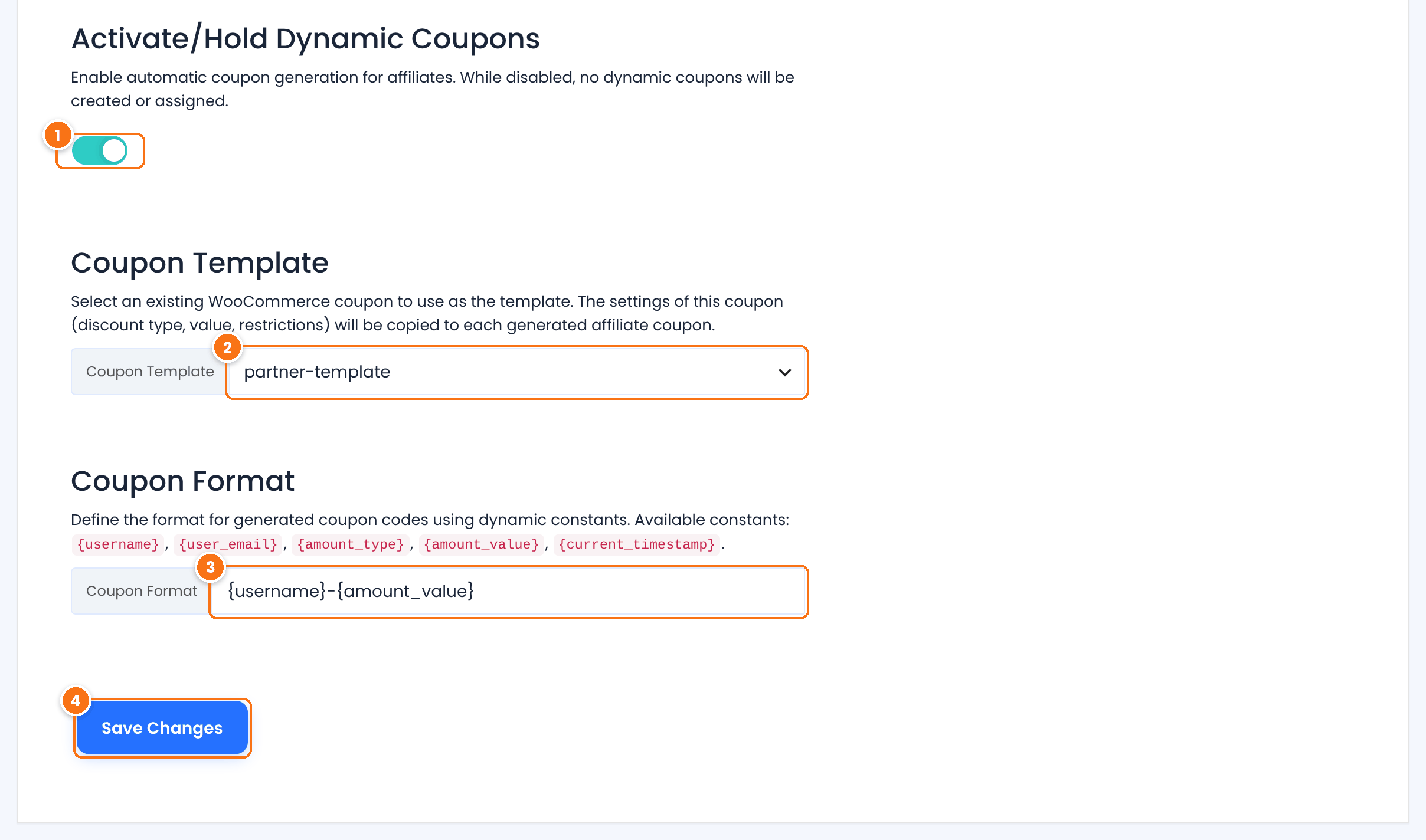
Turns automatic coupon generation on. While it is off, no dynamic coupons are created.
Default: Off
The WooCommerce coupon to copy. The list shows your WooCommerce coupons, without the coupons generated for affiliates.
Default: uap_dynamic_coupon_template
How the code of each coupon is built. Combine text with these constants:
{username}: the affiliate’s username, for exampleemma.collins.{user_email}: the affiliate’s email address.{amount_type}: the discount type of the template, for examplepercent.{amount_value}: the amount of the template, for example10.{current_timestamp}: the time the coupon is created, as a number.
Default: {username}
Saves the settings. New affiliates get a coupon from now on.
Keep codes unique and easy to say
Always include {username}, so every affiliate gets a different code. Short formats such as {username}-{amount_value} are easy to read out in a video or a podcast.
Generate coupons for existing affiliates #
New affiliates get their coupon as soon as their affiliate account is created. For the affiliates you already have, use Bulk Coupon Generation below the settings.
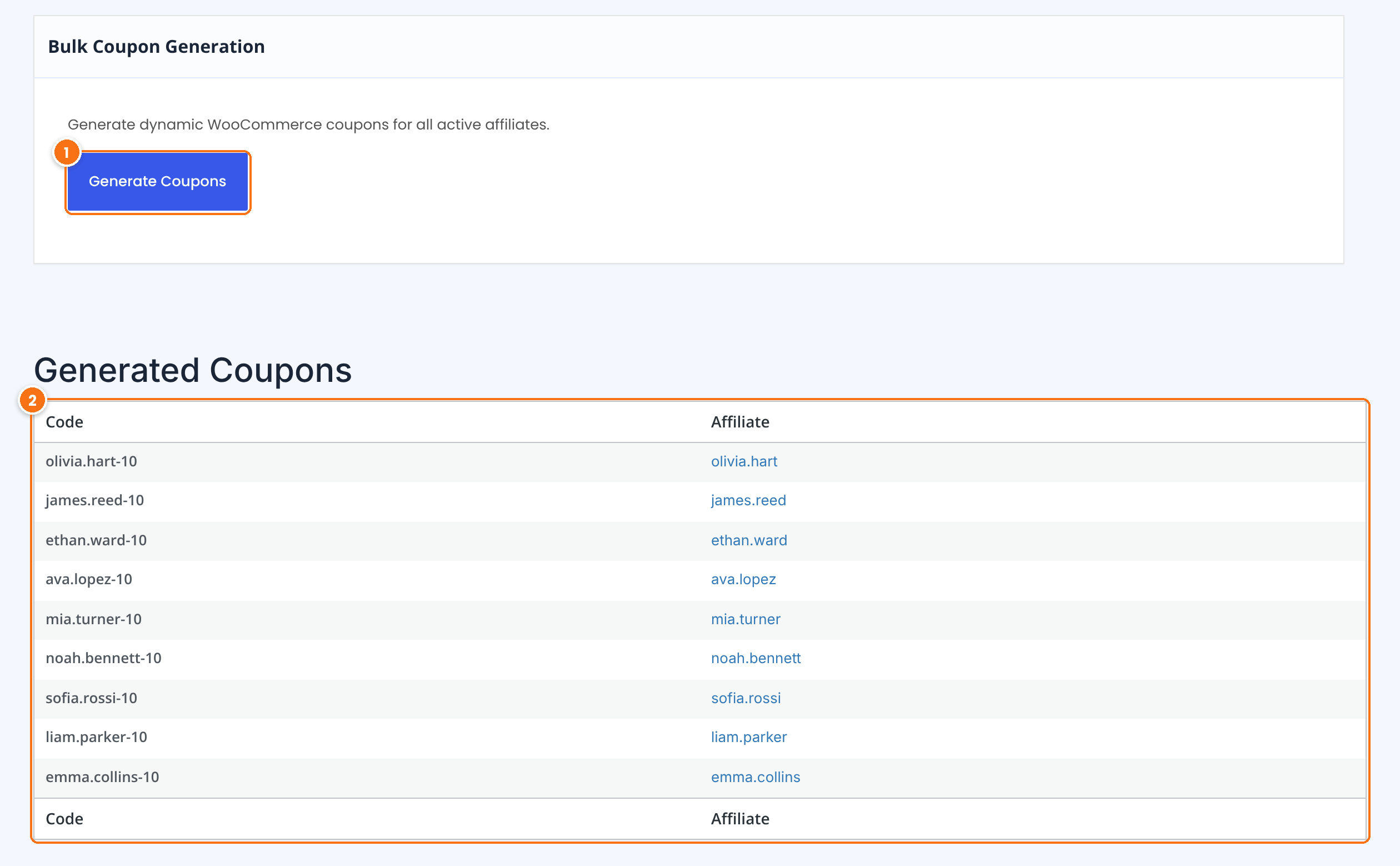
Creates a coupon for every affiliate who does not have a dynamic coupon yet. Confirm the message, and the list updates.
Each generated code with its affiliate. Click the affiliate to open their profile.
Generated coupons are WooCommerce coupons, but they are kept out of the WooCommerce›Coupons list, so your own coupons stay easy to find.
How the coupons are tracked #
- Each generated coupon is linked to its affiliate, the same way as a coupon assigned with the Static Coupons module.
- When a customer uses the code at checkout, the order is credited to that affiliate, with or without a referral link.
- The commission is the affiliate’s usual rate, from their rank or your Product Rates. See How commissions are calculated.
- The customer gets the discount of the template, for example 10%.
To let affiliates see and copy their code, turn on the Static Coupons module. It adds the Coupons tab to the Affiliate Portal, where each affiliate sees their own coupons.
Test it #
- Create a test affiliate, or click Generate Coupons, and note the affiliate’s code in Generated Coupons.
- In a private browser window, add a product to the cart and apply the code at checkout. The discount from the template is applied.
- Place the order and check the new referral for that affiliate in Ultimate Affiliate Pro›Referrals.
Frequently asked questions #
When does an affiliate get a dynamic coupon?
As soon as their affiliate account is created, while Dynamic Coupons is on. For existing affiliates, click Generate Coupons in Bulk Coupon Generation.
What does the generated coupon copy from the template?
The discount type, the amount, the usage limit per coupon and the usage limit per user of the template coupon.
Which constants can I use in the coupon code?
{username}, {user_email}, {amount_type}, {amount_value} and {current_timestamp}, combined with your own text.
Do customers need an affiliate link to use the coupon?
No. The coupon alone credits the affiliate, so it works in podcasts, videos, print and anywhere a link cannot be clicked.
Where can affiliates see their coupon?
In the Coupons tab of the Affiliate Portal, when the Static Coupons module is on.
Why are the generated coupons not in the WooCommerce coupons list?
They are hidden from that list to keep it clean. See them in the Generated Coupons table of the Dynamic Coupons page.


