Convert users to affiliates in bulk with the Mass Affiliate Conversion add-on: pick one or more WordPress roles, such as Customer or Subscriber, and every user with that role becomes an affiliate in one click. Users who are already affiliates are skipped, so nobody gets a second affiliate account.
Use it when you launch your affiliate program on a store that already has customers or members. Each user keeps their WordPress account, email and password, and gets an affiliate account on top. For the other ways to enroll users, one at a time or automatically for new users, see Turn existing users and customers into affiliates.
Before you start
- The Mass Affiliate Conversion add-on installed and active. See Pro Add-ons: what they are and how to install them.
- A default rank for new affiliates, so converted users start with a commission rate. See Ranks: commission tiers for affiliates.
- The New Affiliate account Registered emails checked in Ultimate Affiliate Pro›Email Notifications, if you use them.
- A recent backup of your site database.
Choose the roles to convert #
Go to Ultimate Affiliate Pro›Modules and open the Mass Affiliate Conversion card.
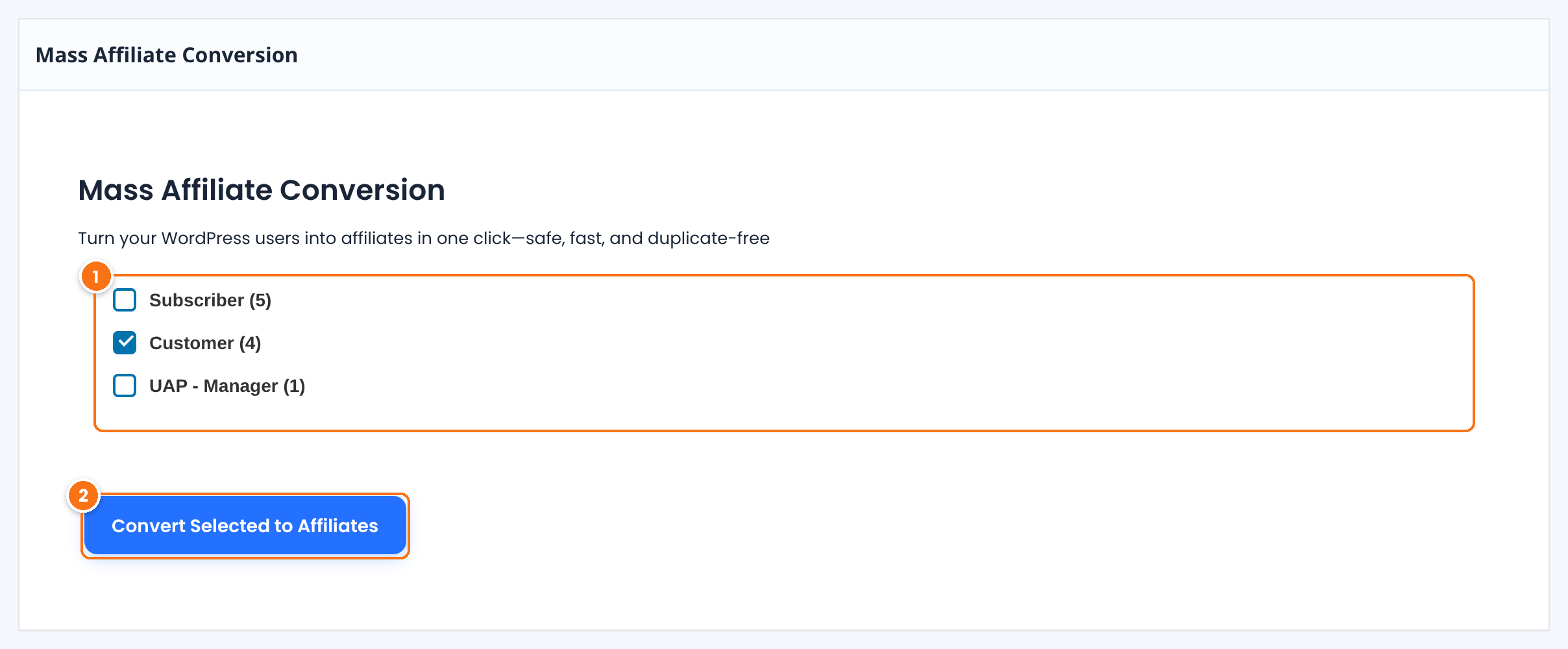
Every WordPress role that has users, with the number of users in brackets, for example Customer (4). Administrators are not listed, so they are never converted. Select one or more roles.
Converts all the users of the selected roles. The page shows a success message when it is done.
What happens to each user #
- Users who are already affiliates are skipped.
- Every other user of the selected roles gets an active affiliate account, with the default rank for new affiliates.
- The user receives the New Affiliate account Registered email, and you receive the admin email about the new affiliate, if those notifications are set up.
- The user keeps their WordPress role, account and password. They log in as before and find their links in the Affiliate Portal.
When the conversion is done, the page shows: Success: The operation has been completed successfully. All eligible user accounts have been processed in accordance with system rules. The new affiliates appear in Ultimate Affiliate Pro›Affiliates.
Emails go out right away
If the New Affiliate account Registered email is set up, each converted user gets it at once. Before you convert a large role, check the text of the email in Ultimate Affiliate Pro›Email Notifications, and make sure it explains your program and links to the Affiliate Portal. See Email notifications.
Pair it with Dynamic Coupons
With the Dynamic Coupons add-on on, every converted user also gets a personal coupon code, ready to share.
Mass conversion or automatic enrollment #
| Mass Affiliate Conversion | Auto-Enroll Users as Affiliates | |
|---|---|---|
| Who | Users who already exist, by role | Users who register from now on |
| When | Once, when you click the button | Automatically, at each registration |
| Where | Modules, Mass Affiliate Conversion | Settings, General Settings, Affiliate Registration |
Use both together to cover everyone: convert your existing customers once, and enroll new customers automatically.
Test it #
- Create a test role or pick a small role, for example a role with two test users.
- Select it and click Convert Selected to Affiliates.
- Open Ultimate Affiliate Pro›Affiliates and check the new affiliates and their rank.
- Log in as one of the users and open the Affiliate Portal.
Frequently asked questions #
How do I convert all my customers into affiliates?
Go to Ultimate Affiliate Pro, Modules, Mass Affiliate Conversion, select the Customer role and click Convert Selected to Affiliates.
Will users who are already affiliates be duplicated?
No. Existing affiliates are skipped, so each user has only one affiliate account.
Can I convert administrators?
No. The Administrator role is not listed on the conversion page.
Which rank do converted users get?
The default rank for new affiliates, set in your ranks.
Do converted users get an email?
Yes, if the New Affiliate account Registered notification is set up. They receive it, and you receive the admin notification for each new affiliate, if those emails are set up.
Does the conversion change the user’s role or password?
No. Users keep their WordPress role, account and password. The affiliate account is added to their existing account.


