To install Ultimate Affiliate Pro, download the plugin zip from your account on ultimateaffiliate.pro, upload it in your WordPress admin and activate it. Then enter your license key in Ultimate Affiliate Pro›Licensing to turn on automatic updates and every premium feature.
The whole process takes about five minutes. When it is done, the setup wizard helps you choose your first settings; the quick start guide walks you through the rest of the launch.
Before you start
- A WordPress site that meets the requirements: WordPress 5.4 or later and PHP 7.4 or later.
- An administrator account on that site.
- Your account on ultimateaffiliate.pro, where you download the plugin and find your license key.
Download the plugin #
- Log in to your account at ultimateaffiliate.pro/login.
- Download the latest Ultimate Affiliate Pro zip file from your account dashboard.
- Keep the file zipped. Some browsers, such as Safari, unzip downloads automatically. If you get a folder instead of a
.zipfile, compress the folder again before you upload it.
Upload and activate it in WordPress #
In your WordPress admin, go to Plugins›Add Plugin and click Upload Plugin at the top of the page.
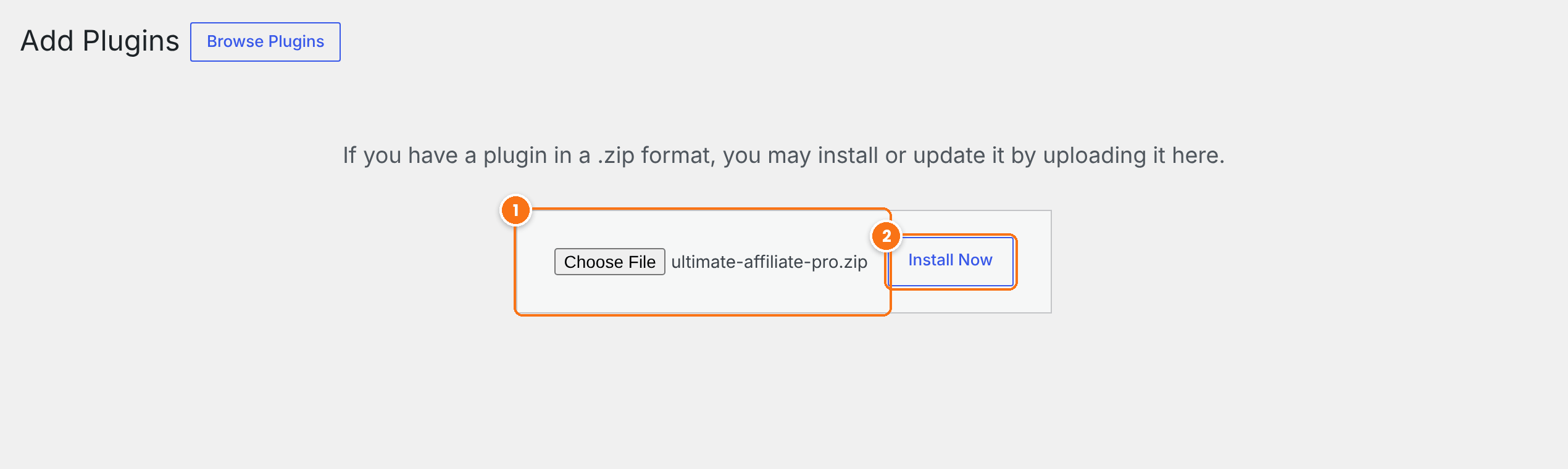
- Click Choose File and select the
ultimate-affiliate-pro.zipfile you downloaded. - Click Install Now. WordPress uploads and installs the plugin.
- Click Activate Plugin on the next screen.
After activation, a new Ultimate Affiliate Pro menu appears in your admin. The plugin also creates the pages your affiliates use: Become an Affiliate, Affiliate Login, Affiliate Portal, Affiliate Reset Password and Affiliate Program Terms. On a new site, the setup wizard opens the first time you visit the plugin.
Install with FTP instead
If your host limits upload size, unzip the file on your computer and upload the ultimate-affiliate-pro folder to wp-content/plugins/ with FTP or your host’s file manager. Then activate the plugin in Plugins›Installed Plugins. The WordPress guide to managing plugins explains each method.
Find your license key #
Your license key is in your account on ultimateaffiliate.pro.
- Log in at ultimateaffiliate.pro/login.
- Open the Licenses tab of your account dashboard.
- Copy the license key shown for Ultimate Affiliate Pro. The same card shows the license status and how many sites use it.
Keep your key private
Your license key is linked to your account. Do not share it in public forums or support threads that other people can read.
Activate your license #
Go to Ultimate Affiliate Pro›Licensing.
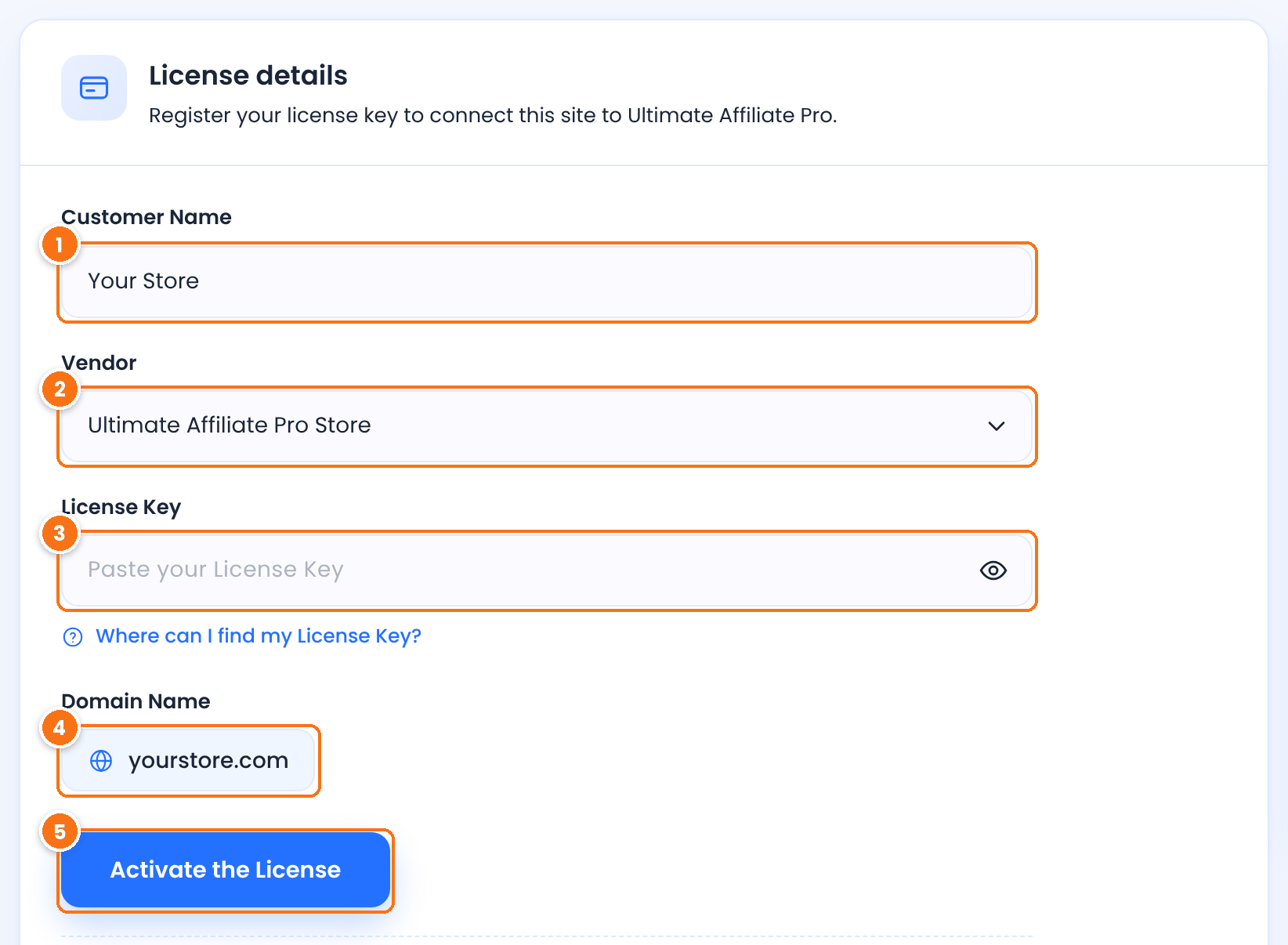
Your name or your company name.
Where your license comes from. Leave it on Ultimate Affiliate Pro Store.
Paste the key you copied from your account. After activation, the key is saved and hidden for security.
The domain the license is activated for. It is filled in automatically with your site address.
Click it to connect this site to your license.
Ultimate Affiliate Pro checks the key and returns you to the Licensing screen. The status at the top changes to License active and the message Your license is currently Active confirms the activation.
Activating from the setup wizard
The first step of the setup wizard asks for the same Customer Name, Vendor and License Key. If you activate the license there, you do not need to do it again on the Licensing screen.
What activation turns on #
All modules and unlimited ranks. Without an active license, advanced modules are not available.
New versions appear in Dashboard›Updates and you can install them with one click. See Update Ultimate Affiliate Pro.
Help from our support team when you need it.
Each site where you activate the key uses one activation of your license. The Licenses tab of your account shows how many activations are in use. To move the license to another site, revoke it on the current site first. See Manage your license.
Install Pro add-ons #
Pro add-ons are separate plugins. Download them from your account and install each one like the main plugin, in Plugins›Add Plugin. After activation, each add-on appears in Ultimate Affiliate Pro›Modules, where you turn it on and set it up.
Frequently asked questions #
Where do I find my license key?
In your account on ultimateaffiliate.pro: log in and open the Licenses tab. The key is listed with the license status and the number of sites that use it.
The license does not activate. What should I check?
Make sure you pasted the whole key, without spaces, and that the license is active in your account. Your server must also be able to connect to ultimateaffiliate.pro: the PHP cURL extension must be enabled and the firewall must allow outgoing connections. If the Licensing screen says cURL is disabled, ask your host to enable it. See License activation problems.
The upload fails or the page says the link has expired. What do I do?
Your host limits the size of uploaded files. Install the plugin with FTP or your host’s file manager instead, or ask your host to raise the upload limit.
Can I activate my license on a staging site?
Yes. The staging site uses one activation of your license. Revoke the license on the staging site when you no longer need it there, or before you move the activation to your live site.
I have a legacy license. How do I activate it?
Connect your legacy license to an account on ultimateaffiliate.pro first, on the license migration page. Your license then appears in your account dashboard, with a key you can activate.


