Recurring affiliate commissions reward an affiliate on every subscription payment of a customer they referred, not only on the first one. In Ultimate Affiliate Pro you turn them on with the Recurring Commissions module and can give renewals their own rate for each rank.
Without the module, the affiliate earns on the first payment only. With it, each renewal creates a new referral for the same affiliate, even when the customer comes back months later from another device. It suits memberships, online courses, software and any product billed monthly or yearly.
Before you start
- Ultimate Affiliate Pro installed, with your license active.
- A subscription plugin connected to Ultimate Affiliate Pro. See the list below.
- Ranks with rates. See Ranks: commission tiers for affiliates.
Supported subscription plugins #
- Plugin
- Ultimate Membership Pro
- What renews
- Membership levels with recurring payments
- Plugins
- WooCommerce Subscriptions, MemberPress, Paid Memberships Pro, Paid Member Subscriptions, Restrict Content Pro, MemberMouse
- Add-on
- The matching tracking add-on from Pro Add-ons
For WooCommerce Subscriptions, install the WooCommerce Subscriptions Tracking add-on. Its settings screen shows whether the LifeTime Commissions and Recurring Commissions modules are on, with a button to turn on the missing one. See all supported plugins on the integrations page.
How recurring commissions work #
- A visitor arrives through Emma’s referral link and buys a subscription. Emma earns the normal commission on the first payment.
- Ultimate Affiliate Pro links the customer’s account to Emma.
- At each renewal, the subscription plugin records a new payment. Ultimate Affiliate Pro finds the affiliate linked to the customer and creates a referral for Emma. The rate it uses depends on your subscription plugin, as explained in Connect your subscription plugin.
- The renewal referral follows the payment status: approved when the payment completes, rejected when it is refunded or cancelled.
- First payment
- 20% of $30 = $6.00
- Each renewal
- 15% of $30 = $4.50
- After one year
- $6.00 + 11 × $4.50 = $55.50
Turn on Recurring Commissions #
Go to Ultimate Affiliate Pro›Modules and open Recurring Commissions.
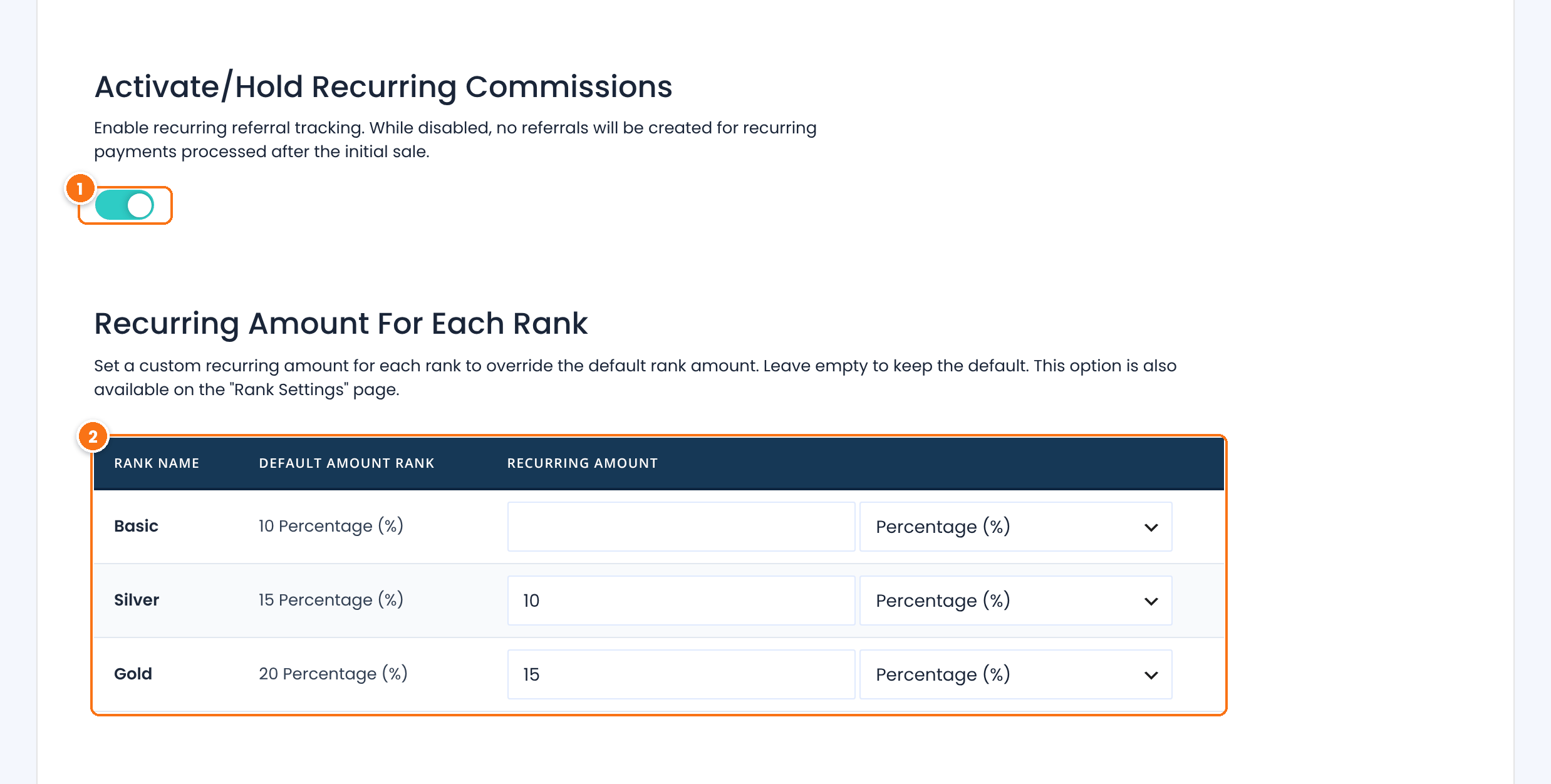
Creates a referral for every recurring payment of a referred customer. When it is off, only the first payment earns.
Default: Off
For each rank, the rate paid on Ultimate Membership Pro renewals and GiveWP recurring donations, and its type, Percentage (%) or Flat Rate. The Default Amount Rank column shows the rank’s normal rate for comparison.
Leave a rank empty to pay renewals at its normal rate. You can also set this value in the rank editor, in the Recurring Referrals card.
Click Save Changes.
Note
When you save Recurring Commissions turned on, Ultimate Affiliate Pro also turns on LifeTime Commissions. That module keeps each customer linked to the affiliate who referred them, which is how renewals find their affiliate. It also credits that affiliate for the customer’s future one-time orders. See Commissions on every future order of a referred customer.
Connect your subscription plugin #
- Ultimate Membership Pro: no extra step. Renewals of levels with recurring payments are tracked automatically and pay the Recurring Amount of the affiliate’s rank.
- WooCommerce Subscriptions and the other plugins: install and activate the tracking add-on, then turn it on in Ultimate Affiliate Pro›Modules.
WooCommerce Subscriptions renewals pay the Woo Subscription Amount set for each rank in the WooCommerce Subscriptions Tracking settings, or the rank’s normal rate when it is empty. Renewals from MemberPress, Paid Memberships Pro, Paid Member Subscriptions, Restrict Content Pro and MemberMouse pay the rank’s normal rate. Renewal rates follow the same rules as other commissions: product rates still apply and are compared with the renewal rate, as described in How commissions are calculated.
Test it #
- Open a referral link of a test affiliate in a private browser window and buy a subscription with a short billing period.
- Check the first referral in Ultimate Affiliate Pro›Referrals.
- Process a renewal. In WooCommerce Subscriptions, you can use Process renewal in the subscription’s actions.
- Check that a second referral appears for the same affiliate, with the recurring amount.
Frequently asked questions #
Why was no commission recorded for a renewal?
Check four things: the Recurring Commissions module is on, the tracking add-on for your subscription plugin is active, the first payment was referred by an affiliate, and the renewal payment was completed. Renewal referrals start as Pending until the payment completes.
Can renewals pay a different rate than the first payment?
Yes. For Ultimate Membership Pro, set a Recurring Amount for each rank: the first payment uses the rank’s normal rate and every renewal uses the Recurring Amount. For WooCommerce Subscriptions, set the Woo Subscription Amount for each rank in the WooCommerce Subscriptions Tracking settings.
Does the customer need the referral cookie at renewal time?
No. Renewals are matched through the customer’s account, which stays linked to the affiliate who referred the first purchase.
Do subscriptions created before I turned on the module earn recurring commissions?
Yes, when the original purchase was referred by an affiliate, because the customer is already linked to that affiliate. Renewals processed after you turn on the module create referrals.
Does New Customer Commissions Only block renewals?
No. That option stops commissions on a customer’s later orders, but subscription renewals keep earning.


