Skip to content
  • Try Now
  • Features
    • MLM Affiliate Program
    • Smart Affiliate Tracking
    • Advanced Commission Rules
    • Simplified Affiliate Payouts
    • Ultimate Affiliate Pro vs AffiliateWP vs EasyAffiliate
    • See all Features
  • Integrations
    • WooCommerce
    • Easy Digital Downloads
    • WPForms
    • Ninja Forms
    • See all Integrations
  • Pricing
  • Support
    • Documentation
    • Open a Ticket
  • AddOns
    • Standard Add-Ons
    • Pro Add-Ons
  • Demo
  • Blog
Login
Ultimate Affiliate Pro
  • Try Now
  • Features
    • MLM Affiliate Program
    • Smart Affiliate Tracking
    • Advanced Commission Rules
    • Simplified Affiliate Payouts
    • Ultimate Affiliate Pro vs AffiliateWP vs EasyAffiliate
    • See all Features
  • Integrations
    • WooCommerce
    • Easy Digital Downloads
    • WPForms
    • Ninja Forms
    • See all Integrations
  • Pricing
  • Support
    • Documentation
    • Open a Ticket
  • AddOns
    • Standard Add-Ons
    • Pro Add-Ons
  • Demo
  • Blog
Login
Buy Now
Ultimate Affiliate Pro

Getting Started

12
  • Update Ultimate Affiliate Pro
  • Translate Ultimate Affiliate Pro (WPML, Polylang)
  • Install and activate Ultimate Affiliate Pro
  • How Ultimate Affiliate Pro works
  • Test your affiliate program
  • Requirements and compatibility
  • Manage your license: move, revoke and migrate
  • Affiliate marketing glossary
  • Quick start: launch your affiliate program
  • Settings overview
  • Migrate from AffiliateWP, SliceWP and other affiliate plugins
  • WordPress Multisite and subdomains

Affiliates & Affiliate Portal

10
  • Change texts, labels and messages
  • Affiliate profile picture (avatar)
  • Set up the Affiliate Account Page
  • Manage affiliates: add, approve and edit
  • Affiliate area in WooCommerce and BuddyPress accounts
  • Redirects and wp-admin access for affiliates
  • Customize templates and styles
  • What affiliates see: stats and earnings
  • Affiliate Bar
  • Delete affiliates and referrals, personal data and GDPR

Registration & Login

9
  • Collect opt-in subscribers (Mailchimp and more)
  • Add reCAPTCHA to affiliate forms
  • Set up the registration, login and password pages
  • Approve affiliates and verify their email
  • Turn existing users and customers into affiliates
  • How password reset works for affiliates
  • Customize the affiliate registration form
  • Charge affiliates to join your program
  • Affiliate program terms and conditions

Tracking & Referral Links

10
  • Affiliate referral links
  • Affiliate coupon tracking
  • Friendly affiliate links and custom slugs
  • Direct link tracking: credit affiliates by their website
  • Visits and source details
  • Landing commissions (pay per action)
  • Campaigns
  • How affiliate tracking works
  • Cookie consent and affiliate tracking
  • Affiliate Landing Pages

Commissions & Referrals

16
  • Ranks: commission tiers for affiliates
  • Signup referrals (pay per lead)
  • Commissions on every future order of a referred customer
  • Recurring commissions for subscriptions
  • Own referrals
  • Manage referrals: status, reassign and limits
  • Fair checkout reward
  • Currencies and multi-currency stores
  • Commission rates per product
  • How commissions are calculated
  • Include or exclude products from commissions
  • Affiliate reports and statistics
  • Pay Per Click (CPC) and CPM commissions
  • Refunds and cancelled orders: what happens to referrals
  • Referral and payout statuses explained
  • Prevent affiliate fraud and spam signups

MLM (Multi-Level Marketing)

4
  • Show the MLM tree to affiliates
  • Assign or change an MLM parent
  • Set up an MLM affiliate program
  • MLM structures: unilevel, binary and matrix

Creatives & Promotion

5
  • Social share buttons
  • QR codes for affiliate links
  • Creatives: banners and text links
  • Product Links for affiliates
  • Top Affiliates leaderboard

Payouts

5
  • Store Credit
  • How affiliate payouts work
  • Stripe payouts
  • PayPal payouts
  • Bank transfer and manual payouts

Emails & Notifications

4
  • Email notifications
  • Periodical reports for affiliates
  • Pushover push notifications
  • Contact your affiliates

Integrations

31
  • Dokan
  • WPForms affiliate tracking
  • Contact Form 7 affiliate tracking
  • Ninja Forms affiliate tracking
  • Bitly affiliate links
  • Zapier
  • myCRED
  • LearnPress affiliate integration
  • LifterLMS affiliate integration
  • Tutor LMS affiliate integration
  • Amelia affiliate integration
  • WP Booking Calendar affiliate integration
  • The Events Calendar affiliate integration
  • Integrations overview
  • WooCommerce
  • Easy Digital Downloads
  • Ultimate Membership Pro
  • Page builders (Elementor, Divi, blocks)
  • MemberPress affiliate integration
  • Paid Memberships Pro affiliate integration
  • Restrict Content Pro affiliate integration
  • MemberMouse affiliate integration
  • Gravity Forms affiliate tracking
  • Fluent Forms affiliate tracking
  • Forminator affiliate tracking
  • LearnDash affiliate integration
  • WooCommerce Subscriptions affiliate tracking
  • Paid Member Subscriptions affiliate integration
  • Formidable Forms affiliate tracking
  • Event Tickets affiliate integration
  • GiveWP affiliate integration

Pro Add-ons

27
  • WooCommerce discounts for referred buyers
  • One Time Reward: one referral per customer
  • Split Commission between affiliates
  • Extended Shortcodes: show content to affiliates and visitors
  • Import referrals via CSV
  • WooCommerce Revenue Sharing
  • Manage Reset Password: a custom reset password page
  • WooCommerce Redirect for affiliates
  • Extension Kit
  • Anchor Link
  • Random Affiliate ID
  • Exchange Rate
  • External Referral Links
  • WooCommerce Product Discounts
  • Remove Dummy Data
  • Payout Request By Affiliate
  • MLM Based On Product Price
  • IP Restrictions
  • Invite Your Friends
  • Fraud Protection
  • Affiliate Own Referrals
  • Pro add-ons: what they are and how to install them
  • Dynamic Coupons: automatic affiliate coupons
  • Rank Achievement – Network Growth
  • Affiliate Manager role
  • Mass Affiliate Conversion
  • Manual Affiliate Order Assignment

Developers

6
  • Import and export data
  • REST API
  • Hooks and filters
  • Shortcodes reference
  • Add a custom tab to the Affiliate Portal
  • Code snippets: ready-to-use examples

Troubleshooting

10
  • Emails are not sent
  • Plugin and theme conflicts
  • PHP errors: 500, parse error, cannot redeclare
  • Referrals or clicks are not recorded
  • Affiliate link opens a 404 page
  • Registration and login problems
  • Referral dates and time zone
  • License activation problems
  • Cache plugins and host caching
  • Before you contact support
  • Home
  • Docs
  • Registration & Login
  • How password reset works for affiliates

How password reset works for affiliates

3 min read

5 minBeginnerUltimate Affiliate Pro 9.7+

The affiliate password reset in Ultimate Affiliate Pro works in two emails: first the affiliate confirms the request with a link, then they receive a new password and log in with it. Affiliates never need access to the WordPress login screen.

The confirmation step makes sure that only the owner of the email address can reset the password. This guide shows the full flow, the emails to set up and how affiliates change the new password afterwards. The reset page itself is one of your default pages; see Set up the registration, login and password pages.

Before you start

  • A Lost Password Page with the [uap-reset-password] shortcode, selected in Settings›Pages Setup.
  • Display Lost your password link on in Showcases›Login Form (on by default).
  • Your site can send email. See Email notifications.

How the reset works #

Example: Emma forgot her passwordTwo emails, one link
1. Request
Emma clicks Lost your password? on the login form and enters emma.collins or her email address.
2. Confirm
She receives the Step 1 email and clicks its link. The link works for one hour.
3. New password
She receives the Step 2 email with a new password of 10 characters.
4. Log in
She logs in with it and sets a password of her own in the Affiliate Portal.

The affiliate requests a reset #

The Lost your password? link on the login form opens your Lost Password Page. Its look follows the login form template.
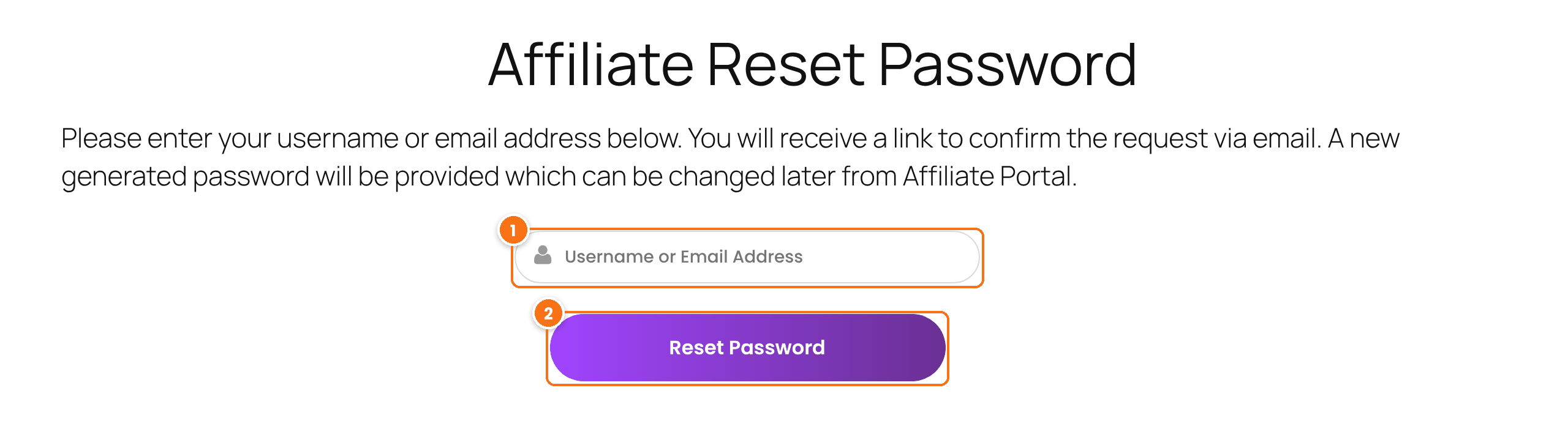
Affiliate Reset Password page with the Username or Email Address field and the Reset Password button
The Lost Password Page, as visitors see it.
  1. The affiliate enters their username or the email address of their account.
  2. They click Reset Password. The page shows a success message and the confirmation email is sent.

Both messages are in Showcases›Login Form›Custom Messages, in the Reset Password Messages card: Successfully Message and Error Message, shown when no account matches what was typed.

Set up the reset emails #

Go to Ultimate Affiliate Pro›Email Notifications. Create or edit a notification for each step, and pick the step in When should this notification be sent?.
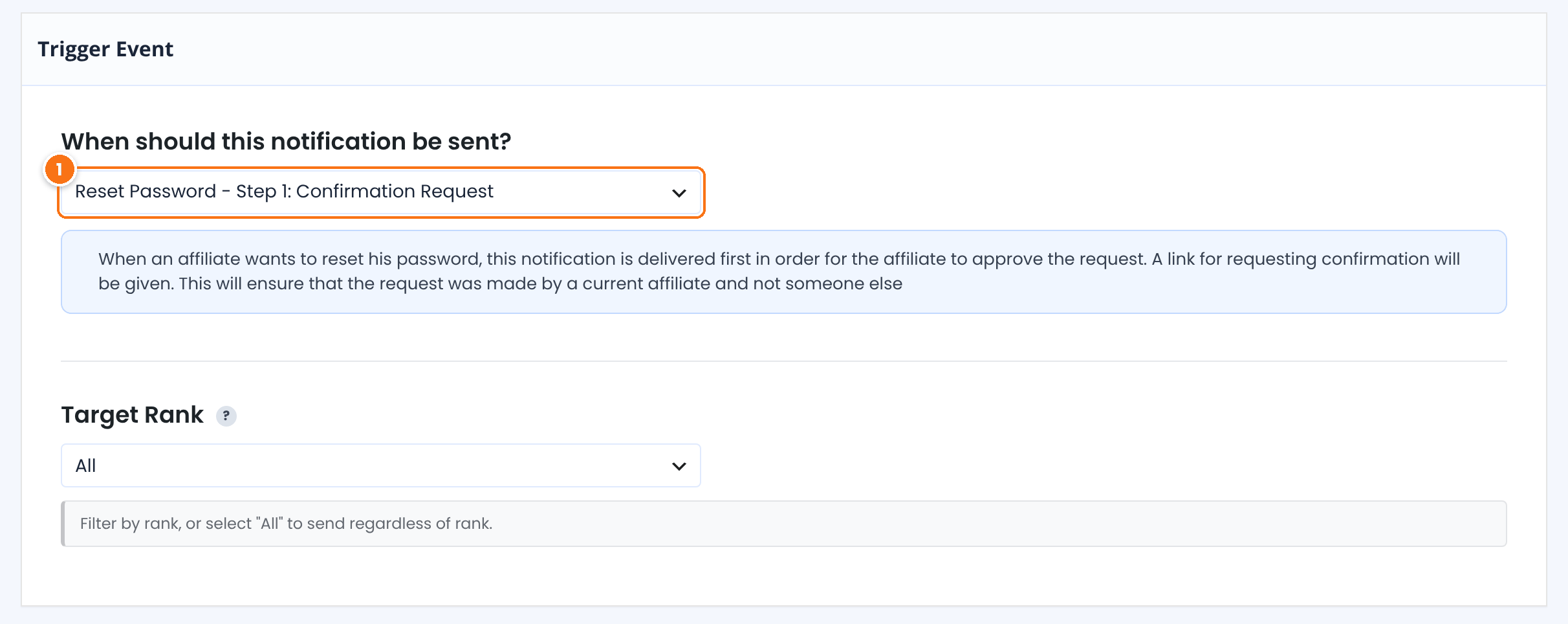
Trigger Event of a new email notification in Ultimate Affiliate Pro with Reset Password - Step 1: Confirmation Request selected
Choosing the Step 1 trigger for a new notification.
1Reset Password – Step 1: Confirmation Request

Sent after the affiliate submits the reset form. It must contain the {password_reset_link} tag; the ready-made template has a Reset My Password button with it.

Reset Password – Step 2: Send Generated Password

Sent after the affiliate clicks the confirmation link. It must contain the {NEW_PASSWORD} tag with the new password.

Reset Password – Step 3: Password Changed Notification

Optional. Sent instead of the standard WordPress “password changed” email when an affiliate’s password is changed from a WordPress profile screen.

Choosing a trigger loads a ready-made subject and message that you can edit. Click Create Notification and use Send Test Email to check the result. If a Step 1 or Step 2 notification is not set up, Ultimate Affiliate Pro still sends a plain email with the link or the new password.

Choose where the confirmation link leads #

After the affiliate clicks the confirmation link, they go to your homepage. To send them to your login page instead, go to Ultimate Affiliate Pro›Settings›Redirects Setup, select the page in After Reset Password and click Save Changes. Add a short note on that page, such as “Check your inbox for your new password”.

The affiliate changes the new password #

After logging in with the generated password, the affiliate opens Change Your Password in the Affiliate Portal profile menu. They type the current password (the one from the email), the new password twice, and save.

Tip

You can also reset a password for an affiliate yourself. In Users›All Users, open the user and use Set New Password or Send Reset Link in the Account Management section. For more about this screen, see the WordPress profile documentation.

Test it #

  1. In a private browser window, open the login page and click Lost your password?.
  2. Enter the email of a test affiliate whose inbox you can read and click Reset Password.
  3. Click the link in the first email within one hour, then log in with the password from the second email.

Want the reset link to open a page of your site with a Change your password form? Use the Manage Reset Password add-on.

Frequently asked questions #

How can an affiliate reset their password?

They click Lost your password? on the affiliate login form, enter their username or email, confirm the request from the email they receive, and then log in with the new password sent in a second email.

How long is the reset link valid?

One hour. After that, the affiliate submits the reset form again to get a new link.

The affiliate did not receive the reset email. What should I check?

Check the spam folder, then send a test email from Email Notifications. If test emails do not arrive either, set up an SMTP plugin. See Emails are not sent.

Can affiliates choose their new password directly?

They receive a generated password first, then set their own in Change Your Password in the Affiliate Portal.

Can I change the texts of the reset page?

Yes. Edit the page content around the shortcode for the introduction, and the Reset Password Messages in Showcases, Login Form, Custom Messages for the success and error messages.

What’s next #

Registration and login pagesPages, shortcodes and redirects.Email notificationsEdit every email affiliates get.Emails are not sentFix email delivery.

What are your feelings

  • Happy
  • Normal
  • Sad
Share This Article :
  • Facebook
  • X
  • LinkedIn
  • Pinterest
Charge affiliates to join your programCollect opt-in subscribers (Mailchimp and more)

#1 Affiliate WordPress Plugin

Boost Sales with Ultimate
Affiliate Pro

~100 Built-in Add-Ons included with every plan
30+ Seamless Integrations WooCommerce, EDD, Stripe & more
Multi-tier Commissions
Get Ultimate Affiliate Pro →

Ultimate Affiliate Pro

Build & manage an affiliate program with one easy-to-use & most-favored WordPress affiliate & referral marketing plugin

Company

  • About
  • Features
  • Integrations
  • Envato Portfolio
  • We’re Hiring
  • Hosting Partners
  • Affiliate Program

Resources

  • Documentation
  • Support
  • Ultimate Affiliate Pro Nulled
  • AffiliateWP Alternative
  • Ultimate Affiliate Pro Comparison
  • Pro vs Standard
  • Testimonials
  • ChangeLog

Meet Our Family

  • Ultimate Membership Pro
  • Ultimate Learning Pro
  • Social Share & Locker Pro
  • Privacy Policy
  • Terms and Conditions
  • Refund Policy
  • Ultimate Affiliate Pro Coupon Code

Copyright © 2026 - WPIndeed Net Solutions LLC. All rights reserved