The Fraud Protection add-on adds affiliate fraud protection to Ultimate Affiliate Pro: it limits how many clicks and referrals Ultimate Affiliate Pro stores for the same affiliate from the same IP address in a time interval. It stops click flooding and repeated self-made orders from inflating your affiliates’ stats and commissions.
Fraud Protection works together with the security features already in Ultimate Affiliate Pro: own purchases are not credited unless you allow them (Own referrals), reCAPTCHA protects your affiliate forms, IP Restrictions blocks known addresses from registering, and the Affiliate Link URL Blacklist in Ultimate Affiliate Pro›Settings›General Settings stops specific websites from generating referrals.
Before you start
- Ultimate Affiliate Pro installed and active (install guide).
- Referral tracking that records clicks (see How affiliate tracking works).
How affiliate fraud protection works #
Each time a visitor opens an affiliate link, Ultimate Affiliate Pro records a click with the visitor IP address. Fraud Protection checks two limits before anything is stored:
- Counts
- Clicks already stored for the same affiliate and the same IP address in the last Time Interval seconds.
- When the limit is reached
- New clicks from that IP for that affiliate are not stored until the interval passes.
- Counts
- Referrals of the same affiliate, from the same source (for example WooCommerce), whose click came from the current visitor IP in the last Time interval seconds.
- When the limit is reached
- The new referral is not created, so no commission is recorded.
Clicks and referrals that pass the checks are stored as usual. Blocked ones are not stored at all, so they never appear in reports or payouts.
Install the Fraud Protection add-on #
- Download the Fraud Protection zip file from your account on ultimateaffiliate.pro.
- In your WordPress admin, go to Plugins›Add Plugin and click Upload Plugin.
- Choose the zip file, click Install Now, then Activate Plugin.
The add-on now has its own card in Ultimate Affiliate Pro›Modules. See Pro add-ons: what they are and how to install them for the full process.
Set the limits #
Go to Ultimate Affiliate Pro›Modules›Fraud Protection.
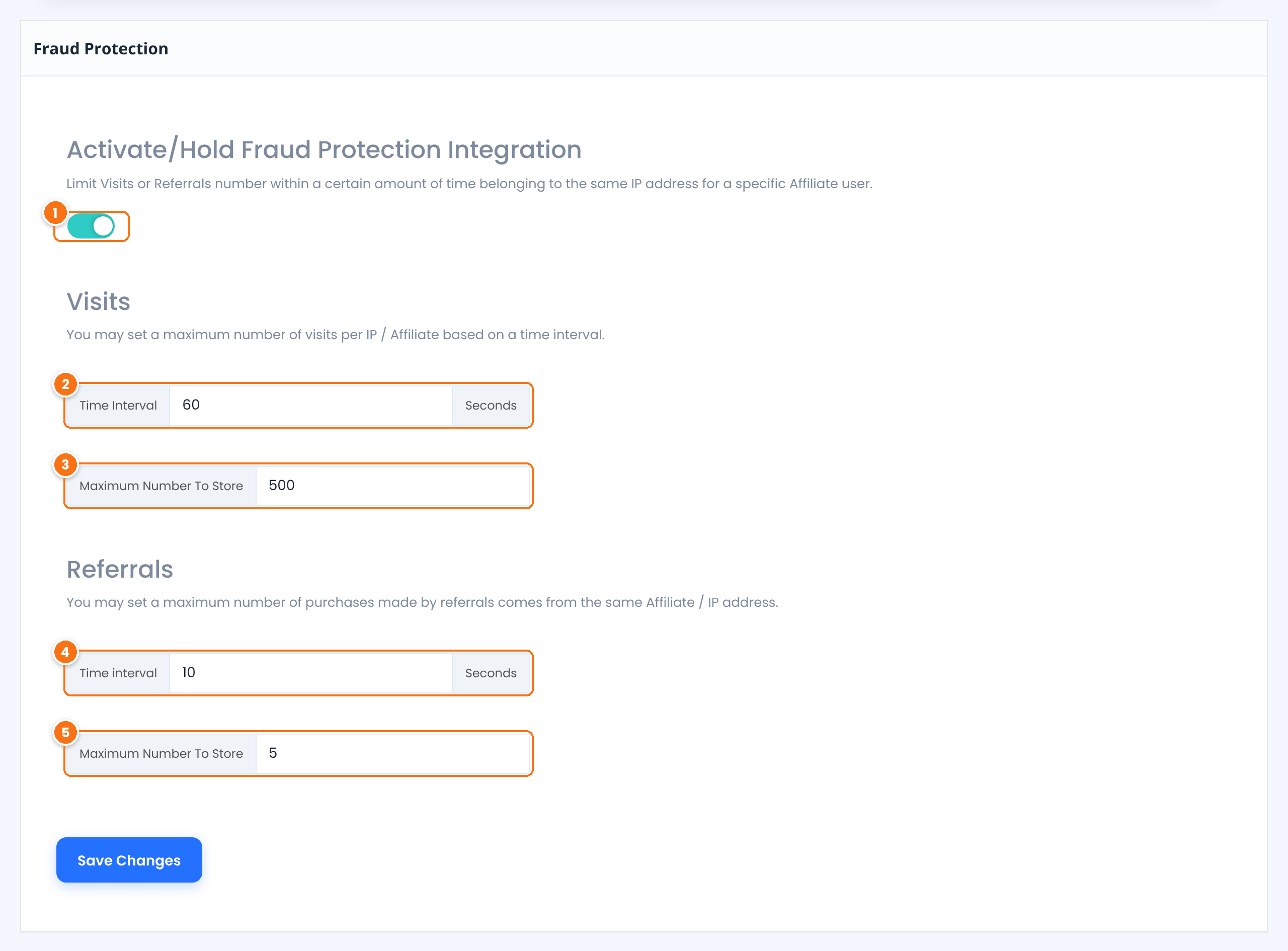
Turns both limits on or off.
Default: Off
The time window, in seconds, in which clicks from the same IP for the same affiliate are counted.
Default: 60
How many clicks are stored in that window. Further clicks are ignored until the window passes.
Default: 500
The time window, in seconds, in which referrals from the same IP for the same affiliate are counted.
Default: 10
How many referrals are created in that window. Further referrals are not created.
Default: 5
Click Save Changes.
Recommended values #
The defaults are permissive, so they do not block real customers. Tighten them to match your traffic:
| Program type | Visits | Referrals |
|---|---|---|
| Online store with repeat buyers | 3600 seconds, 10 clicks | 3600 seconds, 3 referrals |
| Software or digital products | 3600 seconds, 5 clicks | 86400 seconds, 1 referral |
| High-traffic content sites | 600 seconds, 20 clicks | 3600 seconds, 5 referrals |
Shared networks
Offices, schools and mobile carriers can share one public IP address between many people. If several real customers come from the same network, a very low limit can skip some of their clicks or referrals. Start with moderate values and lower them if you see abuse.
Test it #
- Set Visits › Maximum Number To Store to 2 and save.
- Open an affiliate referral link in three new private browser windows within the time interval.
- Go to Ultimate Affiliate Pro›Clicks. Only two new clicks are listed for that affiliate.
- Set the values you want to keep and save again.
Spot suspicious activity #
Fraud Protection limits volume. To review the quality of the traffic, check Visits and source details, where you can see the IP address and referring URL of each click, and review new referrals in Ultimate Affiliate Pro›Referrals before you approve them. You can reject any referral you do not want to pay.
Fraud Protection works best together with reCAPTCHA, affiliate approval and referral review. For an overview of every setting, see Prevent affiliate fraud and spam signups.
Frequently asked questions #
What happens to a click or referral that is blocked?
It is not stored. It does not appear in Clicks, Referrals or reports, and no commission is recorded for it.
Does Fraud Protection block the visitor from my site?
No. Visitors can browse and buy as usual. Only the click or referral record for the affiliate is skipped.
Are the limits per affiliate or for the whole site?
Per affiliate and IP address. Clicks and referrals of other affiliates from the same IP are counted separately.
Which time units do the fields use?
Both Time Interval fields use seconds. For example, 3600 is one hour and 86400 is one day.
Does it stop affiliates from buying through their own link?
Own purchases are already blocked by default unless you turn on Allow Self Referrals or the Affiliate Own Referrals add-on. Fraud Protection adds a limit on repeated clicks and referrals on top of that.


