When a customer gets a refund or an order is cancelled, the referral for that order changes too. This article explains the affiliate commission refund rules for every integration: what happens to the referral on a full or partial refund, a cancelled or failed order, and an order that is completed again, and what to do when you already paid the commission.
Every referral has a status (Pending, Approved or Rejected) and a payout status (UnPaid, Pending or Paid). Only Approved, unpaid referrals are paid to affiliates, so a Rejected referral never reaches a payout. For the meaning of each status, see Referral and payout statuses. To change a referral by hand, see Manage referrals.
Before you start
- An integration turned on in Ultimate Affiliate Pro›Integrations, for example WooCommerce or Easy Digital Downloads.
- Your store’s refund policy, so you can match the payout waiting period to it.
Turn on Reject Commissions on Refund #
Go to Ultimate Affiliate Pro›Settings›General Settings and scroll to the Referral Calculation Exclusions card.
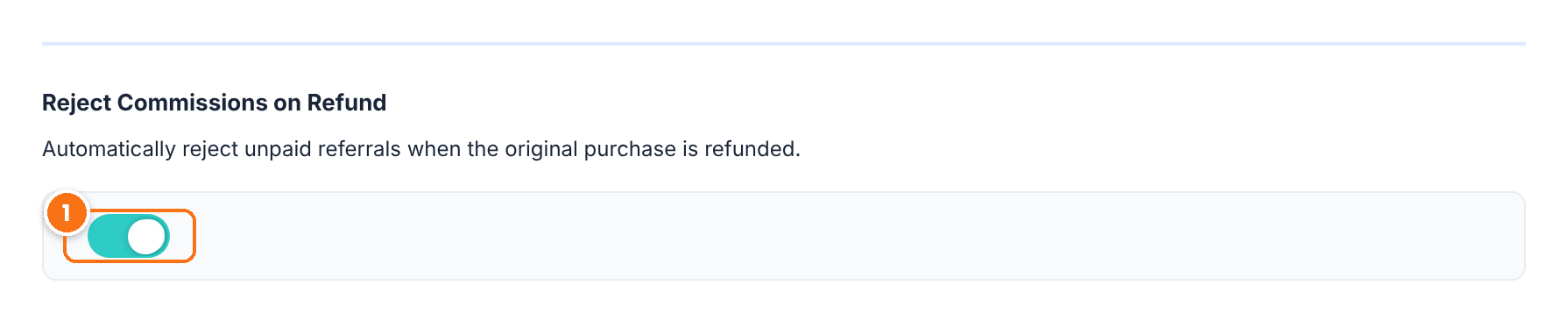
When a WooCommerce order changes to Refunded, or an Easy Digital Downloads order gets a refund, the referral changes to Rejected. It also applies to refunds that PayPal reports for Ultimate Membership Pro. Turn it off if you prefer to review refunded orders yourself. Cancelled and failed orders reject the referral whether this switch is on or off.
Default: On
Click Save Changes.
Approve referrals yourself
In Ultimate Affiliate Pro›Settings›Admin Workflow, the Keep Referral Status as Pending switch stops orders from approving referrals automatically. Refunds and cancellations still reject them.
Affiliate commission refund rules for WooCommerce #
For WooCommerce orders, the referral follows the order status. These rules are the same with the classic checkout and the Checkout block, and with both WooCommerce order storage types. Setup steps are in the WooCommerce integration article.
| What happens to the order | What happens to the referral |
|---|---|
| Full refund (the order status becomes Refunded) | Status changes to Rejected, when Reject Commissions on Refund is on. The amount stays the same. |
| Partial refund (the order keeps its status) | No change. The referral keeps its status and its full amount. Lower the amount by hand if needed (see below). When the rest of the order is refunded too, WooCommerce marks it Refunded and the referral is rejected. |
| Order Cancelled | Status changes to Rejected. |
| Order Failed | Status changes to Rejected. |
| Order back to Pending payment, On hold or Processing | Status changes to Pending. |
| Order Completed again, for example after a refund was reversed | Status changes to Approved, unless Keep Referral Status as Pending is on. |
| Order moved to the Trash or deleted | Open the referral in Ultimate Affiliate Pro›Referrals and click Mark as Rejected. |
Here is how the Referrals list looks after one full and one partial refund:
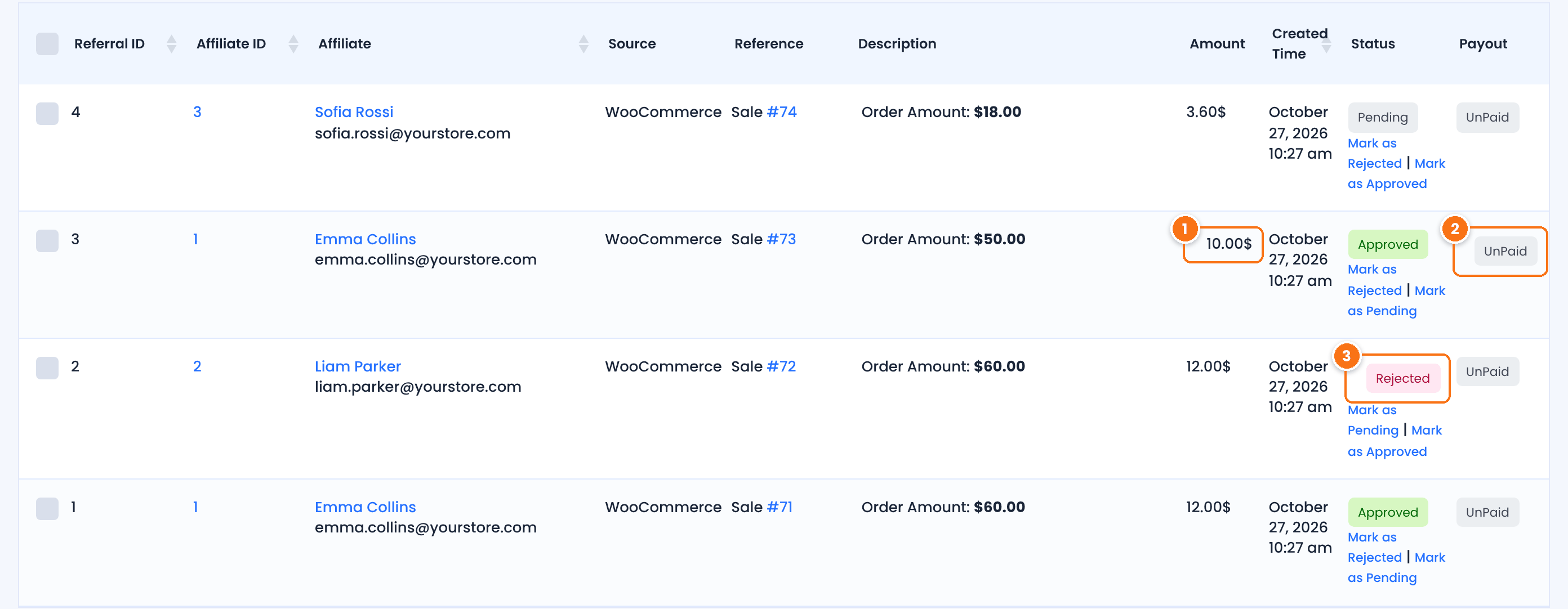
After a partial refund the amount does not change: the commission is still calculated on the full $50 order.
Refunds and cancellations never change the payout status. A referral that was already paid stays Paid.
The referral for the fully refunded order. It is no longer counted in Approved Earnings and is never included in a payout.
MLM and subscription renewals #
- MLM commissions. When MLM is on, the referrals of the parent affiliates are linked to the main referral. When the main referral is rejected, approved or set back to pending, the parent referrals change with it. See Set up an MLM affiliate program.
- Renewals. Each renewal payment is a separate order with its own referral. Refunding or cancelling a renewal order rejects only that renewal’s referral. The referrals for earlier payments keep their status. See Recurring commissions for subscriptions.
Cancelled order referral rules for each integration #
Each integration reads the payment or order status of its own plugin. The table lists what changes the referral automatically. For anything not listed, change the referral yourself in Ultimate Affiliate Pro›Referrals.
| Integration | Referral becomes Rejected when | Referral becomes Pending when | Update by hand in Referrals |
|---|---|---|---|
| WooCommerce | Refunded (with Reject Commissions on Refund), Cancelled, Failed | Pending payment, On hold, Processing | Partial refund, order deleted |
| Easy Digital Downloads | Any refund, full or partial (with Reject Commissions on Refund), order deleted | — | Failed or revoked orders |
| Ultimate Membership Pro | The order changes to any status other than Completed or pending; PayPal refund (with Reject Commissions on Refund) | — | Refunds made outside PayPal |
| Ultimate Learning Pro | The order changes to any status other than completed | — | — |
| Paid Memberships Pro | Cancelled, Refunded | Pending | Other order statuses |
| MemberPress | Failed, Refunded | Pending | — |
| Restrict Content Pro | Failed, Refunded | Pending | Abandoned payments |
| Tutor LMS | Refunded, Cancelled, Trash | Partially refunded, Incomplete | — |
| LearnPress | Cancelled, Failed, Trash | — | Refunds |
| LearnDash | Transaction moved to the Trash | Transaction set to Draft or Pending | Refunds |
| Amelia | Refunded | Pending, Partially paid | — |
| Event Tickets | Failed, Refunded, Trash, Voided, Reversed, Denied | Pending | — |
| GiveWP | Failed, Cancelled, Revoked | Pending | Refunded donations |
| Paid Member Subscriptions | Failed | Pending | Refunded payments |
| LifterLMS, MemberMouse | — | — | Refunds and cancellations |
| WP Booking Calendar | — | Booking set back to pending | Refunds and cancellations |
A completed, paid or approved order approves the referral, unless Keep Referral Status as Pending is on. Reject Commissions on Refund applies to WooCommerce, Easy Digital Downloads and Ultimate Membership Pro. The add-on integrations in the table reject refunded orders whenever their plugin reports a refunded status. Integrations that reward form submissions or event interactions, such as WPForms, Gravity Forms or The Events Calendar, have no payment, so refunds do not apply to them.
Reject a referral by hand #
Go to Ultimate Affiliate Pro›Referrals, find the referral by its order ID in the Reference column, and click Mark as Rejected under its status. Affiliates see the new status in the Referrals tab of their Affiliate Portal.
Handle partial refunds #
A partial refund leaves the referral with its full amount. To pay commission only on what the customer kept:
- In Ultimate Affiliate Pro›Referrals, hover over the referral and click Edit.
- In the Referral Amount card, lower Amount. For example, a 20% commission on a $50 order is $10.00. After a $25 refund, enter
5.00. - Optionally add a note in Description, then click Save Changes.
If you already paid the commission #
Ultimate Affiliate Pro never takes money back from an affiliate on its own. What you can do depends on how far the payout went:
- The referral was not paid yet. Nothing to do: the refund rejected it, so it is left out of the next payout.
- The payment was created but you have not sent the money yet. Go to Ultimate Affiliate Pro›Payouts›Payments, find the affiliate’s payment and click Remove. Its referrals go back to UnPaid. Then pay the affiliate again from Ultimate Affiliate Pro›Payouts›Pay Affiliates: the rejected referral is no longer included.
- The commission was already paid. The referral stays Paid. Recover the amount from the affiliate’s next payout: open one of their Approved, UnPaid referrals and lower its Amount by the refunded commission, with a note in Description. Tell the affiliate why, for example with the email tools in Contact your affiliates.
- The affiliate converted the commission into Store Credit. The credit is a store coupon (in WooCommerce, under Marketing›Coupons). If the affiliate has not used it yet, you can lower the coupon amount there. See Store Credit.
Avoid paying commissions on refunded orders
Set Referral Grace Period Days in Ultimate Affiliate Pro›Settings›Payout Settings to the length of your refund policy, for example 30 days. In Ultimate Affiliate Pro›Payouts›Pay Affiliates, the default selection then pays only referrals older than that, so most refunds happen before you pay. See How affiliate payouts work.
Test it #
- Visit your store through an affiliate link, for example
yourstore.com/?ref=emma.collins, and place a test order. - In WooCommerce›Orders, complete the order. The referral in Ultimate Affiliate Pro›Referrals shows Approved.
- Open the order, click Refund and refund the full amount. The order status changes to Refunded.
- Reload Ultimate Affiliate Pro›Referrals. The referral shows Rejected.
WooCommerce explains full and partial refunds in its refunds guide.
Frequently asked questions #
What happens to the affiliate commission when an order is refunded?
With Reject Commissions on Refund turned on (the default), the referral for a refunded WooCommerce order changes to Rejected and is never paid. The same happens for Easy Digital Downloads refunds and for refunds reported by PayPal for Ultimate Membership Pro.
Does a partial refund lower the commission?
No. In WooCommerce a partial refund leaves the referral and its amount unchanged. Open the referral in Ultimate Affiliate Pro, Referrals, and lower the Amount by hand. In Easy Digital Downloads, any refund, partial or full, rejects the referral.
What happens to the referral when an order is cancelled?
A cancelled or failed WooCommerce order rejects its referral, whether or not Reject Commissions on Refund is on. If the order is later set to Processing the referral goes back to Pending, and Completed approves it again.
What if I already paid the affiliate?
A refund never changes the payout status, so the referral stays Paid and no money is taken back automatically. Lower the amount of one of the affiliate’s next unpaid referrals, or remove a payment you have not sent yet in Ultimate Affiliate Pro, Payouts, Payments.
Are MLM commissions rejected too?
Yes. When the main referral is rejected, the referrals of the parent affiliates linked to it are rejected with it.
Can affiliates see that a referral was rejected?
Yes. The Referrals tab of the Affiliate Portal shows the status of each referral, including Rejected.


