Affiliate landing pages are pages or posts on your site that belong to one affiliate. Every visitor who opens the page is credited to that affiliate, without a referral link. The Affiliate Landing Pages module of Ultimate Affiliate Pro links a page to an affiliate in a few clicks, from the page editor.
A landing page for affiliates works well for partners who promote you with their own audience: an influencer, a podcast host or a reseller. You build a page such as yourstore.com/emma-home-picks/, assign it to Emma, and she shares a short, clean URL. Visits and sales from that page count for her exactly like visits from her referral link. To understand the cookie behind it, see How affiliate tracking works.
Landing pages or landing commissions?
Affiliate landing pages decide who gets credit for a visitor. Landing commissions decide when an affiliate is paid for an action, such as a form submission or a signup. You can use both together.
Before you start
- At least one active affiliate.
- The page or post you want to give to the affiliate, published on your site.
Turn on Affiliate Landing Pages #
Go to Ultimate Affiliate Pro›Modules and open the Affiliate Landing Pages card.
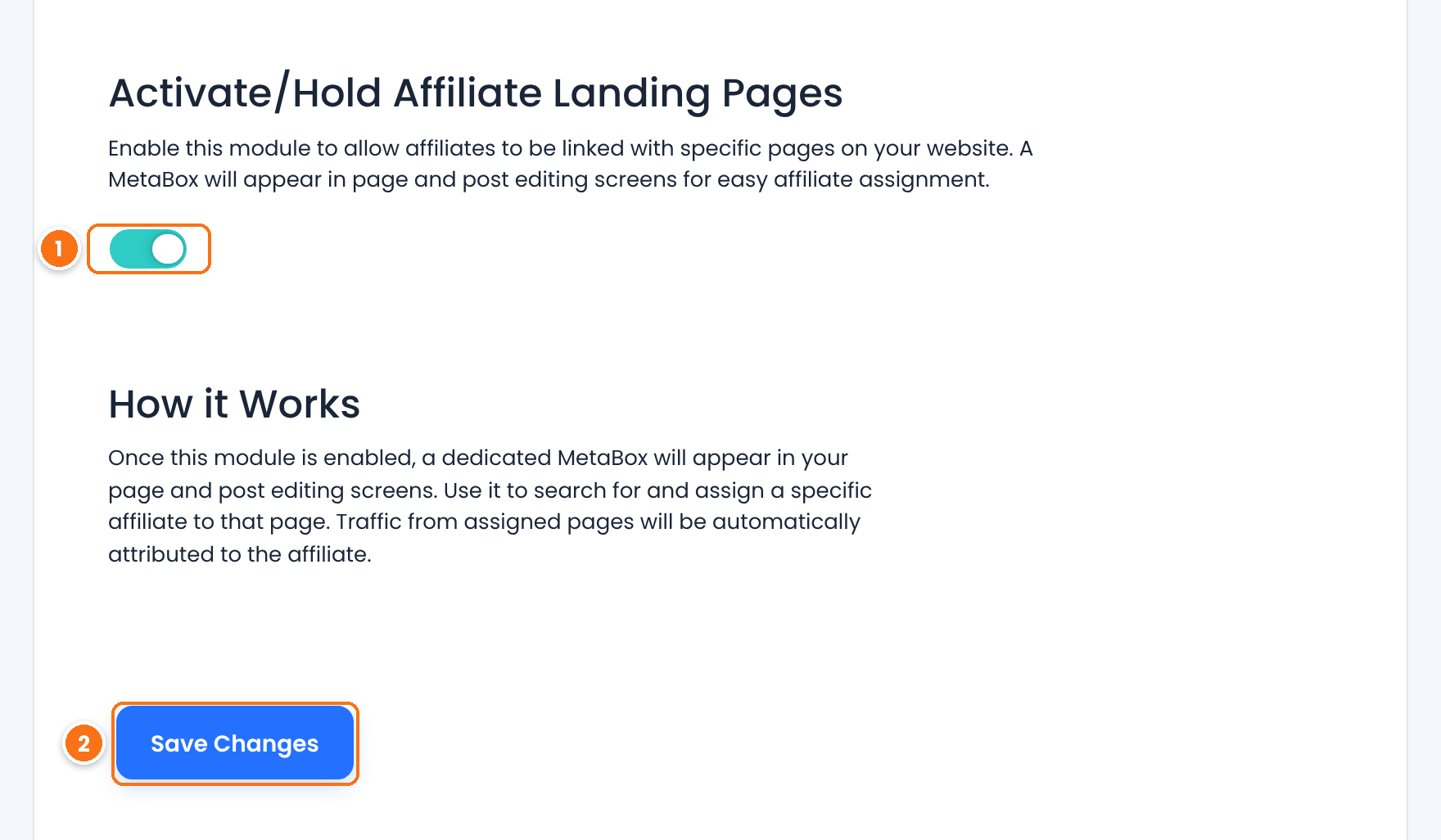
Turns the module on. Visits to assigned pages are credited only while it is on. It also adds the Landing page tab to the Affiliate Portal.
Default: Off
Saves the setting.
Assign a page or post to an affiliate #
Open the page or post in the WordPress editor. In the sidebar, find the Affiliates Pro – Affiliate Landing Pages box. It is available for pages, posts, WooCommerce products and other post types.
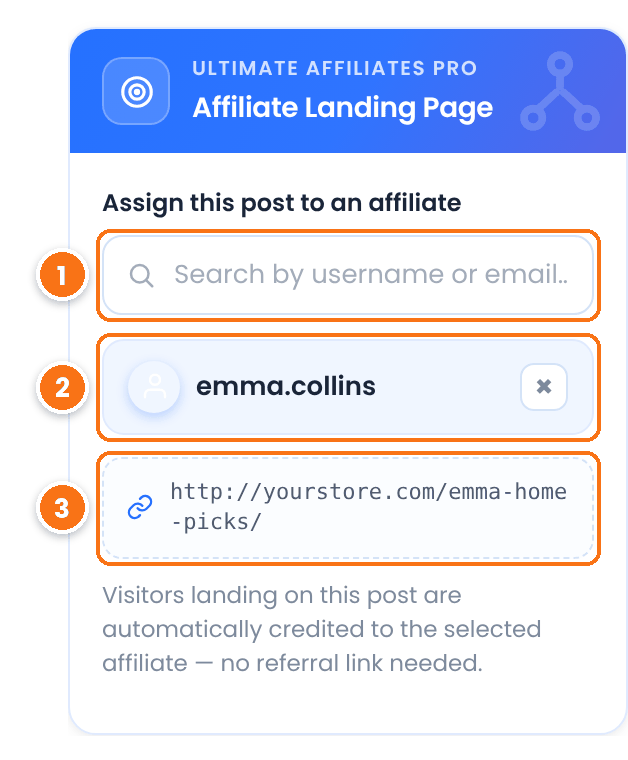
Type a username or email and pick the affiliate from the list.
The affiliate who gets credit for visitors to this page. Click × to remove the affiliate. Each page has one affiliate.
The address the affiliate shares. It appears after you save.
Click Save or Update in the editor to store the assignment. You can give one affiliate several pages, for example a gift guide and a product review.
How visits to a landing page are credited #
When a visitor opens an assigned page, Ultimate Affiliate Pro treats the visit like a click on the affiliate’s link:
- It records a visit for the affiliate in Ultimate Affiliate Pro›Clicks.
- It saves the
uap_referralcookie with the affiliate ID. The cookie lasts as long as your Cookie Expiration (Days) setting, 360 days by default. - The visitor can browse other pages and buy later. The order creates a referral for the affiliate, with the affiliate’s normal commission rate.
These rules decide who gets credit when more than one affiliate is involved:
| Situation | Who gets credit |
|---|---|
The visitor opens the landing page through another affiliate’s referral link, for example yourstore.com/emma-home-picks/?ref=liam.parker | The affiliate in the referral link (Liam). A referral link always wins over the landing page. |
| The visitor already has a cookie from another affiliate, then opens the landing page | The first affiliate keeps the visitor. With the Credit Last Affiliate module on, the landing page affiliate takes over. |
| The visitor has no cookie | The landing page affiliate. |
Only active affiliates are credited. If you remove the affiliate from the page, new visitors are no longer credited, and the visits and referrals already recorded stay in place.
Manage assigned landing pages #
All assignments appear at the bottom of the module page, in Ultimate Affiliate Pro›Modules›Affiliate Landing Pages, under Associated Landing pages with Affiliates.
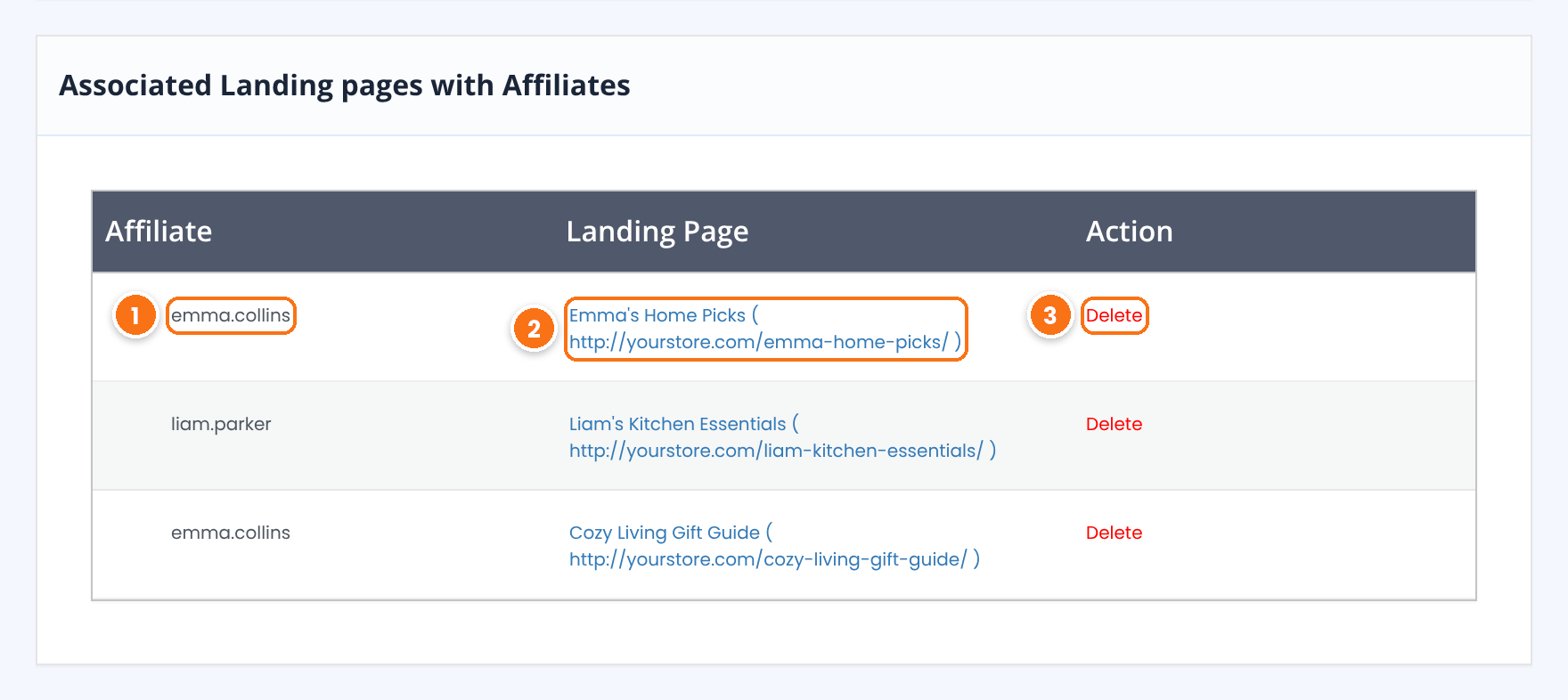
Username of the affiliate who owns the page.
Page title and URL. Click it to open the page in a new tab.
The Delete link in the Action column removes the assignment right away. The page itself stays published; only the link to the affiliate is removed.
The same pages are listed on the affiliate’s profile, in the Landing Pages card, with Edit and Delete links.
What the affiliate sees in the Affiliate Portal #
The affiliate finds the assigned pages in the Affiliate Portal, under Marketing›Landing page. The tab is turned on together with the module. You can rename it or hide it in Ultimate Affiliate Pro›Showcases›Affiliate Portal. See Set up the Affiliate Account Page.
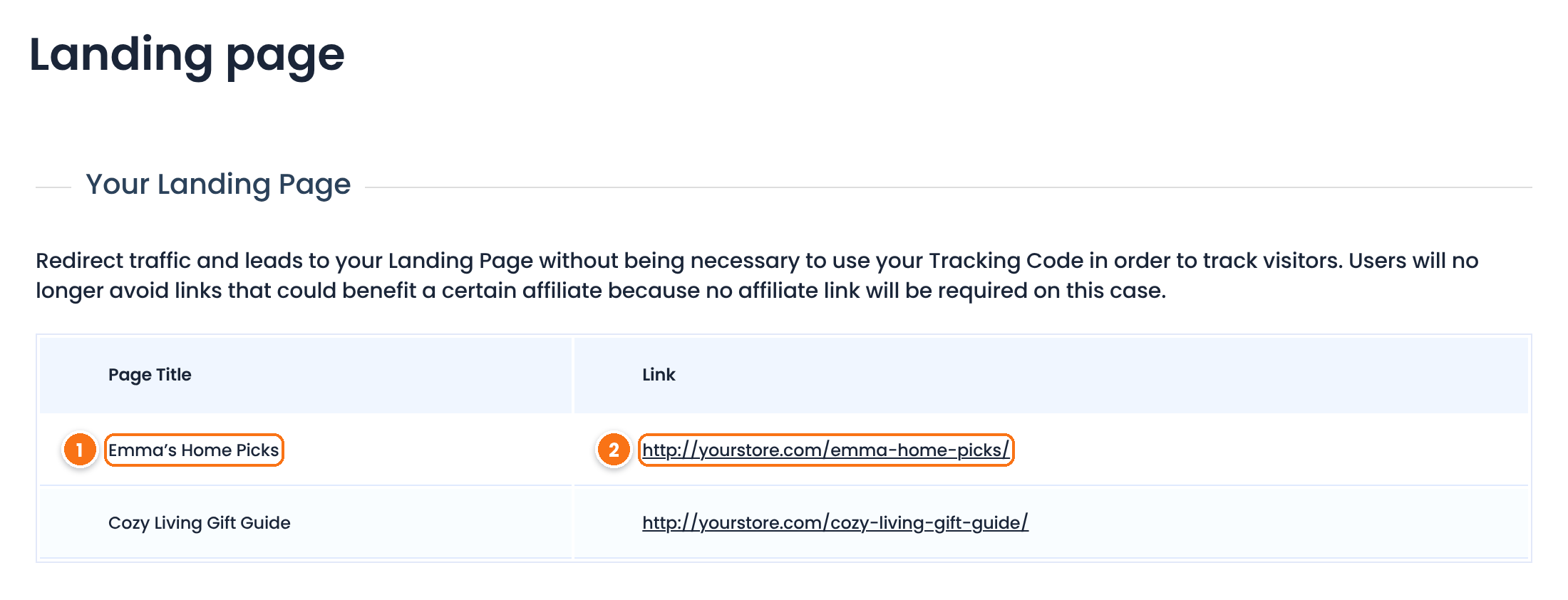
Name of the page assigned to the affiliate.
The URL to share. The affiliate copies it as it is, with no referral parameter.
Make the most of affiliate landing pages
- Put the affiliate’s name, photo or quote on the page, so visitors know who recommends the products.
- Use a short, readable slug, such as
/emma-home-picks/, that works well in podcasts and printed material. - Give the same affiliate a coupon, so they are also credited for buyers who never open the page. See Affiliate coupon tracking.
- Learn more about editing pages in the WordPress page and post settings sidebar.
Test it #
- Assign a test page to an affiliate and save the page.
- Open a private browser window and visit the page URL, with no
?ref=. - In Ultimate Affiliate Pro›Clicks, check the new visit for the affiliate.
- In the same window, place a test order. In Ultimate Affiliate Pro›Referrals, check the referral for the affiliate.
- Log in as the affiliate and open Marketing›Landing page in the Affiliate Portal. The page is listed.
Frequently asked questions #
What is an affiliate landing page?
It is a page or post on your site that is assigned to one affiliate. Every visitor who opens it is credited to that affiliate, without a referral link in the URL.
Can one page belong to several affiliates?
No. Each page or post has one affiliate. You can give one affiliate as many pages as you want.
Which affiliate gets credit if the visitor uses a referral link to reach the landing page?
The affiliate in the referral link. A referral link always takes priority over the landing page assignment.
What happens if the visitor was already referred by another affiliate?
The first affiliate keeps the visitor until the cookie expires. If the Credit Last Affiliate module is on, the landing page affiliate takes over.
Do landing pages work with products and custom post types?
Yes. The Affiliates Pro – Affiliate Landing Pages box appears in the editor of pages, posts, WooCommerce products and other post types.
What is the difference between affiliate landing pages and landing commissions?
Affiliate landing pages decide which affiliate gets credit for a visitor. Landing commissions pay an affiliate a fixed amount when a referred visitor completes an action, such as submitting a form.


