Affiliate product links let your affiliates find any product in your store and get a ready-to-share referral link for it in one click. The Product Links module of Ultimate Affiliate Pro adds a searchable product list to the Affiliate Portal, with prices and the commission the affiliate earns for each product.
Affiliates who promote single products, for example in a review or a social post, need a link that opens that exact product page. Instead of copying URLs and adding ?ref= by hand, they search the catalog, pick the product and copy the link. The link works like any other affiliate link. See Affiliate referral links.
Before you start
- WooCommerce, Easy Digital Downloads or Ultimate Learning Pro active, with published products or courses.
- The matching card turned on in Ultimate Affiliate Pro›Integrations.
- Ranks with commission rates, so the list can show rewards.
Turn on Product Links #
Go to Ultimate Affiliate Pro›Modules and open the Product Links card.
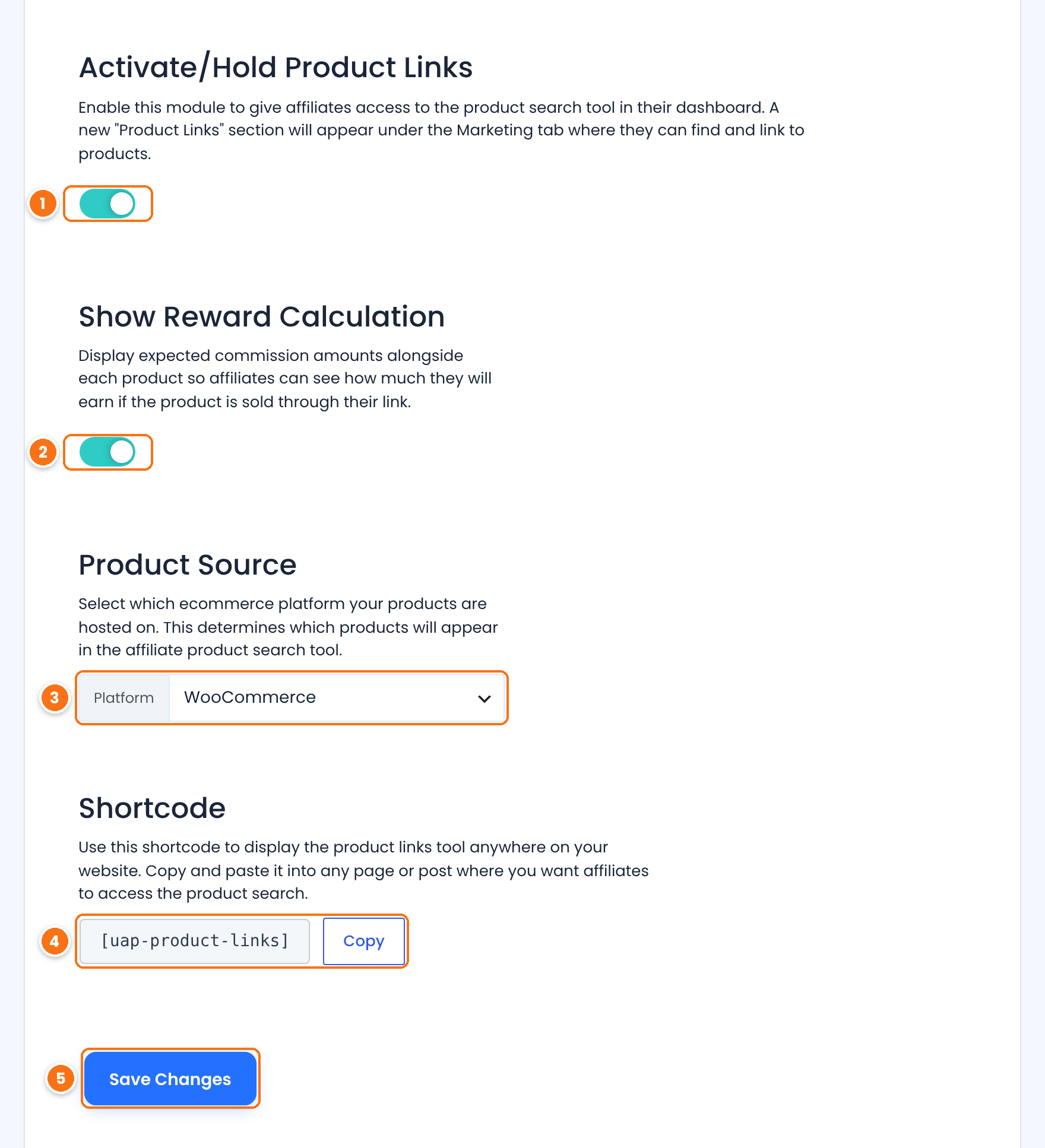
Turns the product affiliate link generator on.
Default: Off
Shows a Rewards column with the commission the affiliate earns for one sale of each product.
Default: On
Where the products come from: WooCommerce, Easy Digital Downloads or Ultimate Learning Pro (courses). Only active platforms are listed. The list stays empty until you choose one.
[uap-product-links] shows the same tool on any page. Click Copy to copy it.Saves the settings.
The reward uses the same rules as a real referral: the affiliate’s rank rate and any product rate that applies to the product. The sale price is used when the product is on sale.
Add the Product Links tab to the Affiliate Portal #
Go to Ultimate Affiliate Pro›Showcases›Affiliate Portal. In Content Section, find Product Links in the list of tabs, under the Marketing group, and turn its switch on. Click Save Changes at the bottom of the page.

Shows the Product Links tab under Marketing in the Affiliate Portal.
Click the arrow next to the switch to change the menu label or the tab title. The tab shows the [uap-product-links] tool. For all portal tab options, see Set up the Affiliate Account Page.
Show the tool on another page #
You can also paste [uap-product-links] into any page, for example a “Promote our products” page in your affiliate area. The tool appears only for logged-in, active affiliates. Other visitors see nothing in its place.
Generate affiliate product links in the portal #
The affiliate opens Marketing›Product Links in the Affiliate Portal.
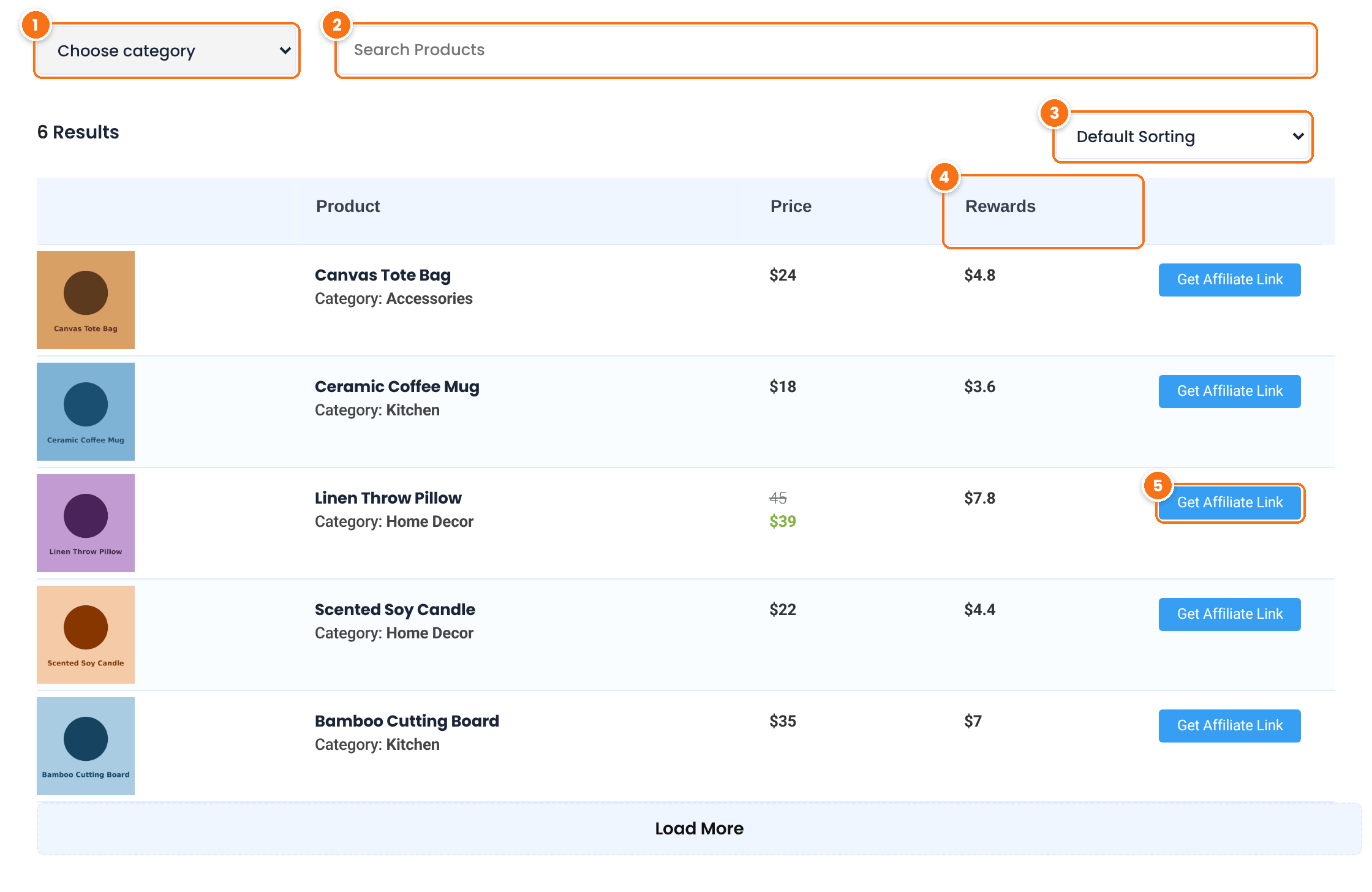
Shows only the products of one category.
Filters the list by product name as the affiliate types.
The commission for one sale. Products with variations show a range.
Opens the link for the product.
The list shows five products at a time. Load More at the bottom adds the next five. The product name opens the product page in a new tab.
After a click on Get Affiliate Link, the Product Link window shows the affiliate link to the product page.
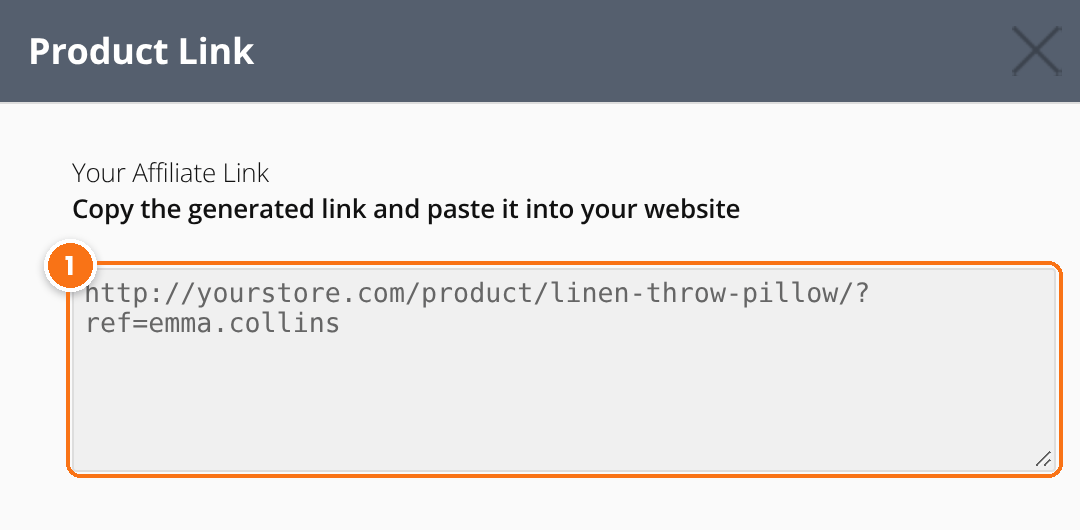
Click the field to select the link, then copy it. The link uses the format from your affiliate link settings, such as ?ref=emma.collins.
When the Friendly Affiliate Links module is on, the window also has a Friendly Links selector, so the affiliate can get a link such as yourstore.com/product/linen-throw-pillow/ref/emma.collins.
Help affiliates choose what to promote
- Keep Show Reward Calculation on. Affiliates promote products more when they see what they earn.
- Organize products in clear categories, so the category filter is useful. See Managing product categories, tags and attributes on woocommerce.com.
- Give featured products a higher product rate, and they show a higher reward in the list.
Test it #
- In Ultimate Affiliate Pro›Showcases›Affiliate Portal, check that Product Links is on.
- Log in as an affiliate and open Marketing›Product Links in the Affiliate Portal.
- Search for a product, click Get Affiliate Link and copy the link.
- Open the link in a private browser window. The product page opens.
- In Ultimate Affiliate Pro›Clicks, check the new visit for the affiliate.
- Buy the product in the same window. In Ultimate Affiliate Pro›Referrals, check the referral and compare the amount with the reward in the list.
Frequently asked questions #
What is the Product Links module?
It is a product affiliate link generator in the Affiliate Portal. Affiliates search your products, see the commission for each one and get a referral link to the product page in one click.
Which stores does Product Links support?
WooCommerce, Easy Digital Downloads and Ultimate Learning Pro. Choose the source in the Platform setting of the module.
How is the reward in the list calculated?
It uses the affiliate’s rank rate and any product rate that applies, on the product price. The sale price is used when the product is on sale.
Can I show the product links tool outside the Affiliate Portal?
Yes. Add the [uap-product-links] shortcode to any page. Only logged-in, active affiliates see the tool.
Can I hide the commission amounts from affiliates?
Yes. Turn off Show Reward Calculation in the module settings. The Rewards column disappears.
Do product links track like normal affiliate links?
Yes. A product link is a normal affiliate link to the product page, so it records a visit, sets the tracking cookie and credits the affiliate for the order.


