These Ultimate Affiliate Pro code snippets change how your affiliate program works without editing the plugin: double commissions for a campaign, approve trusted affiliates’ referrals, react when a referral or an affiliate is approved, keep some customers out of the program and more. Each snippet is short, uses a hook that exists in the plugin and was tested on Ultimate Affiliate Pro 9.7.
For the full list of actions and filters, and how to read their parameters, see Hooks and filters. To add a whole new page to the Affiliate Portal, see Add a custom tab to the Affiliate Portal.
Before you start
- Ultimate Affiliate Pro active on your site.
- A staging copy of your site to test snippets before you add them to the live site.
- FTP or file manager access, so you can remove a snippet if it causes an error.
Where to add Ultimate Affiliate Pro code snippets #
Never put snippets in the Ultimate Affiliate Pro files: updates replace them. Use one of these places instead:
- Child theme. Paste the snippet at the end of
functions.phpin your child theme. - Code snippets plugin. Create one PHP snippet per customization, set to run everywhere, so you can turn each one on and off from the dashboard.
- Must-use plugin. Save the snippet in a PHP file in
wp-content/mu-plugins/, starting with<?php. It runs on every request and stays active when you change themes.
Snippets attach your code to Ultimate Affiliate Pro with add_action() and add_filter(). If you are new to hooks, read Hooks in the WordPress Plugin Handbook. The hook reference of your installed version is in Ultimate Affiliate Pro›Settings›Developers, under Hooks & Filters.
One snippet at a time
Add snippets one by one and test each one. Change the values marked in the comments, such as affiliate IDs, roles or amounts, to match your site.
Affiliate plugin hooks for commissions and referrals #
1. Double the commission for a campaign #
Doubles the amount of tracked referrals that come from the black-friday campaign. Affiliates choose a campaign when they generate a link on the Affiliate Links tab.
PHP
add_filter( 'uap_public_filter_insert_referral_args', function ( $args ) {
	if ( isset( $args['campaign'] ) && 'black-friday' === $args['campaign'] ) {
		$args['amount'] = round( (float) $args['amount'] * 2, 2 );
	}
	return $args;
} );
The filter uap_public_filter_insert_referral_args runs before a tracked referral (an order or a signup) is saved, so multi-level commissions are calculated from the new amount. Referrals you add by hand in wp-admin are not changed.
2. Approve referrals of trusted affiliates automatically #
New referrals of affiliates 1 and 4 are saved as Approved instead of Pending. Use it for sources such as forms, memberships or signups, where you trust these affiliates’ leads.
PHP
add_filter( 'uap_save_referral_filter', function ( $referral ) {
	$trusted = array( 1, 4 ); // Affiliate IDs from Ultimate Affiliate Pro › Affiliates.
	if ( 'woo' === $referral['source'] ) {
		return $referral; // WooCommerce referrals follow the order status.
	}
	if ( in_array( (int) $referral['affiliate_id'], $trusted, true ) && 1 === (int) $referral['status'] ) {
		$referral['status'] = 2; // 0 = Rejected, 1 = Pending, 2 = Approved.
	}
	return $referral;
} );
uap_save_referral_filter runs just before a new referral is saved, with the full referral data. WooCommerce referrals are left out because their status follows the order: Pending while the order is processing, Approved when it is completed and Rejected when it is cancelled or, by default, refunded. The status values are explained in Referral and payout statuses.
3. Run code when a referral is approved #
Runs your code once for each referral that changes to Approved: in wp-admin, in a bulk action or from an integration such as WooCommerce.
PHP
add_filter( 'uap_update_referral_filter', function ( $referral ) {
	global $indeed_db;
	if ( empty( $referral['id'] ) ) {
		return $referral;
	}
	$old = $indeed_db->get_referral( $referral['id'] ); // Still the saved version.
	if ( 2 === (int) $referral['status'] && $old && 2 !== (int) $old['status'] ) {
		// The referral was just approved. Add your code here.
		error_log( sprintf( 'Referral #%d approved: %s %s', $referral['id'], $referral['amount'], $referral['currency'] ) );
	}
	return $referral;
} );
uap_update_referral_filter runs before a referral is updated. The snippet reads the saved referral to compare the old and the new status, so saving an already approved referral again does not run your code twice. Replace error_log() with your own code, for example a call to your CRM.
4. Email the admin about large referrals #
Sends an email to the site admin when a new referral of 100 or more is saved.
PHP
add_action( 'uap_public_action_save_referral', function ( $referral ) {
	if ( (float) $referral['amount'] < 100 ) {
		return;
	}
	$message = sprintf(
		'Affiliate #%d earned a %s %s referral (#%d) from %s.',
		$referral['affiliate_id'],
		$referral['amount'],
		$referral['currency'],
		$referral['inserted_id'],
		$referral['source']
	);
	wp_mail( get_option( 'admin_email' ), 'New large referral', $message );
} );
uap_public_action_save_referral runs after a new referral is saved. The referral ID is in inserted_id.
Affiliates and registration #
5. Run code when an affiliate is approved #
Saves the approval date in the user’s profile when you approve a pending affiliate.
PHP
add_action( 'set_user_role', function ( $user_id, $role, $old_roles ) {
	if ( in_array( 'pending_user', (array) $old_roles, true ) && 'pending_user' !== $role ) {
		// The affiliate was just approved. Add your code here.
		update_user_meta( $user_id, 'affiliate_approved_on', current_time( 'mysql' ) );
	}
}, 10, 3 );
Pending affiliates have the WordPress role pending_user. When you approve them, Ultimate Affiliate Pro gives them the role set for approved affiliates, and WordPress runs its set_user_role action with the new and the old roles.
6. Keep some user roles out of the program #
Hides the Become an Affiliate button for wholesale customers and shop managers, shows them a message instead, and blocks the request on the server too.
PHP
function mysite_cannot_become_affiliate() {
	$blocked = array( 'wholesale_customer', 'shop_manager' );
	return (bool) array_intersect( $blocked, (array) wp_get_current_user()->roles );
}
add_filter( 'uap_become_affiliate_bttn', function ( $show ) {
	return mysite_cannot_become_affiliate() ? false : $show;
} );
add_filter( 'uap_become_affiliate_warning_message', function ( $message ) {
	return mysite_cannot_become_affiliate() ? esc_html__( 'Wholesale accounts cannot join the affiliate program.' ) : $message;
} );
add_action( 'wp_ajax_uap_make_wp_user_affiliate_from_public', function () {
	if ( mysite_cannot_become_affiliate() ) {
		wp_die( '0' ); // Stop before the user becomes an affiliate.
	}
}, 1 );
The button comes from the [uap-user-become-affiliate] shortcode. uap_become_affiliate_bttn decides whether it shows, and uap_become_affiliate_warning_message sets the text shown in its place. The third part runs before Ultimate Affiliate Pro handles the button click. Change the roles in $blocked to the ones used on your site.
7. Save when an affiliate accepted the terms #
Stores the date and the version of your affiliate terms when someone registers with the terms checkbox checked.
PHP
add_action( 'uap_on_register_action', function ( $user_id ) {
	if ( ! empty( $_POST['tos'] ) ) {
		update_user_meta( $user_id, 'affiliate_terms_accepted_on', current_time( 'mysql' ) );
		update_user_meta( $user_id, 'affiliate_terms_version', '2026-10' );
	}
} );
uap_on_register_action runs after the registration form creates the account and passes the user ID. Update the version each time you change your terms. To add the checkbox to the form, see Affiliate terms and conditions.
Tracking, Affiliate Portal and emails #
8. Do not record clicks from bots #
Skips clicks from search engine crawlers and other bots, and requests without a browser name, so they do not count in the affiliate’s clicks and reports.
PHP
add_filter( 'uap_filter_insert_visit', function ( $stop, $affiliate_id, $referral_id, $url, $ip ) {
	$agent = isset( $_SERVER['HTTP_USER_AGENT'] ) ? strtolower( wp_unslash( $_SERVER['HTTP_USER_AGENT'] ) ) : '';
	if ( '' === $agent || preg_match( '/\bbot\b|bots?\/|crawl|spider|slurp|preview/', $agent ) ) {
		return true; // Do not record this click.
	}
	return $stop;
}, 10, 5 );
Return true from uap_filter_insert_visit to skip saving a click. The filter passes the affiliate ID, the referral ID, the page URL and the IP address, so you can also skip clicks by IP.
9. Add tips to the Affiliate Links tab #
Prints a short list of tips under the default affiliate link, on the Affiliate Links tab of the Affiliate Portal.
PHP
add_action( 'uap_public_action_account_page_affiliate_links_after_content', function () {
	?>
	<div class="uap-ap-wrap">
		<h4><?php esc_html_e( 'Where to share your link' ); ?></h4>
		<ul>
			<li><?php esc_html_e( 'Product reviews and comparison posts on your blog.' ); ?></li>
			<li><?php esc_html_e( 'Your newsletter, with a short personal recommendation.' ); ?></li>
			<li><?php esc_html_e( 'Video descriptions and social media bios.' ); ?></li>
		</ul>
	</div>
	<?php
} );
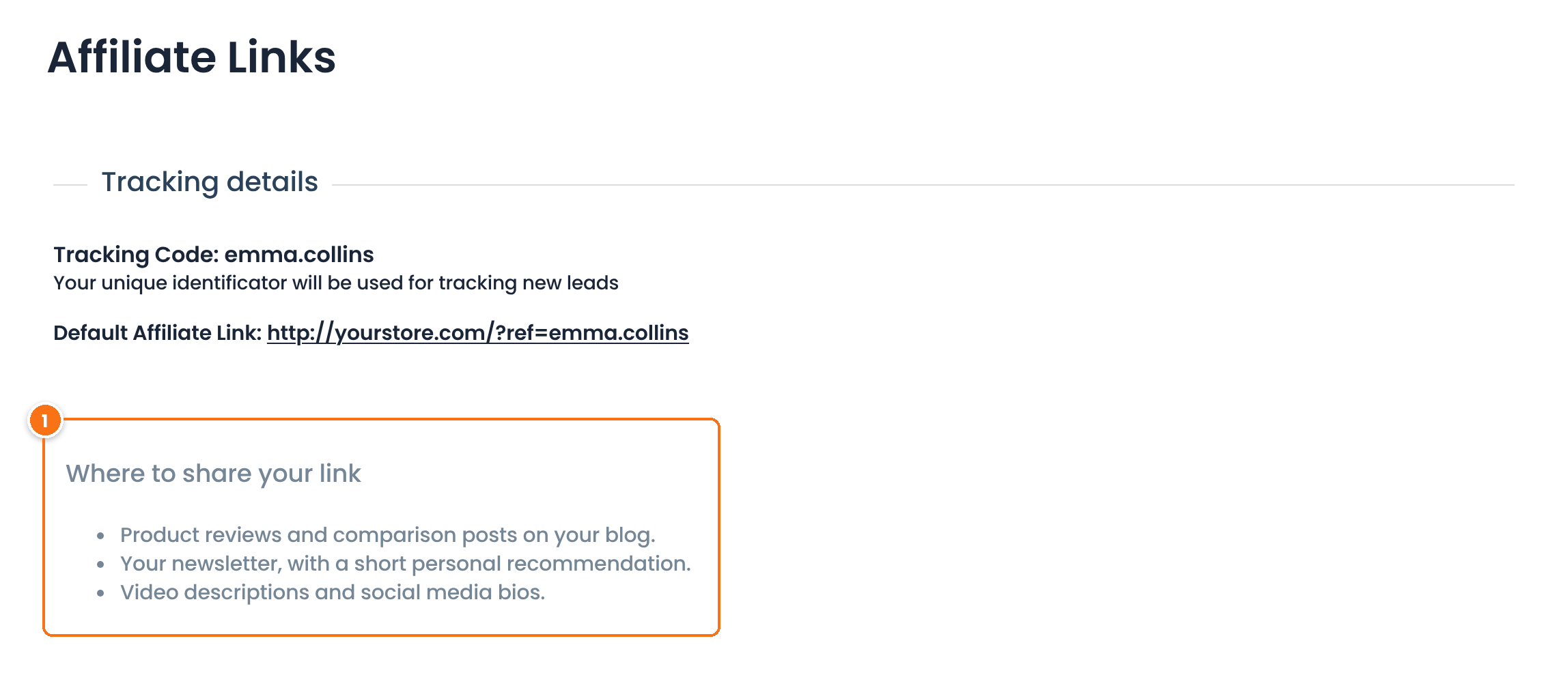
The content printed by the snippet with the uap_public_action_account_page_affiliate_links_after_content action.
10. Add a footer to affiliate emails #
Adds a line at the end of the account and payment notification emails that Ultimate Affiliate Pro sends to affiliates, such as the welcome, account approval, payment and rank change emails. Emails to the admin stay as they are.
PHP
add_filter( 'uap_notification_filter', function ( $message, $user_id, $type ) {
	if ( 0 === strpos( $type, 'admin_' ) ) {
		return $message; // Leave emails sent to the admin as they are.
	}
	return $message . '<p>Questions? Reply to this email or visit yourstore.com/affiliates.</p>';
}, 10, 3 );
uap_notification_filter passes the email body, the user ID and the notification type. The types of admin emails start with admin_. Use the type to change only one email, for example affiliate_account_approve.
Test it #
- Add one snippet on your staging site.
- Do the action it reacts to: place a test order through an affiliate link, approve a referral or an affiliate, or open the Affiliate Portal.
- Check the result in Ultimate Affiliate Pro›Referrals, in the user’s profile or in the email.
- For snippets that use
error_log(), turn onWP_DEBUG_LOGand readwp-content/debug.log. See Debugging in WordPress.
Frequently asked questions #
Where do I paste Ultimate Affiliate Pro code snippets?
In the functions.php file of a child theme, in a code snippets plugin, or in a PHP file in wp-content/mu-plugins. Do not paste them in the plugin files, because updates replace them.
Will the snippets keep working after I update the plugin?
Yes. They use hooks of Ultimate Affiliate Pro and WordPress and live outside the plugin folder, so plugin updates do not remove them.
How do I change the commission amount with code?
Use the uap_public_filter_insert_referral_args filter for tracked referrals. It passes the referral data before it is saved, and you can change the amount key and return the data.
Which hook runs when a referral is approved?
Ultimate Affiliate Pro runs the uap_update_referral_filter filter before it saves a referral change. Compare the new status, 2 for Approved, with the saved referral to run your code only when the status changes.
Can I use these snippets with WooCommerce?
Yes. Snippets 1, 3 and 4 work for WooCommerce referrals too: for example, snippet 3 runs when a WooCommerce order is completed and its referral becomes Approved. Snippet 2 leaves WooCommerce referrals out, because their status follows the order status.


