Affiliate referrals not tracking? The cause is almost always one of a few settings or a page cache that stops the tracking code from running. This guide shows you how to tell where the chain breaks, at the click or at the referral, and how to fix each cause.
Tracking has two parts. A visit through a referral link is saved in Ultimate Affiliate Pro›Clicks and sets the uap_referral cookie. A purchase in the same browser then creates a referral in Ultimate Affiliate Pro›Referrals. For the full flow, read how affiliate tracking works. To learn how browsers store cookies, see the MDN guide to HTTP cookies.
Before you start
- A test affiliate with an approved account, and their referral link from the Affiliate Portal.
- A private browser window where you are not logged in to your site.
- Access to Ultimate Affiliate Pro›Clicks and Ultimate Affiliate Pro›Referrals.
Affiliate referrals not tracking: find where it stops #
Open the affiliate’s link in a private window, then open Ultimate Affiliate Pro›Clicks. The result tells you which section of this guide to read.
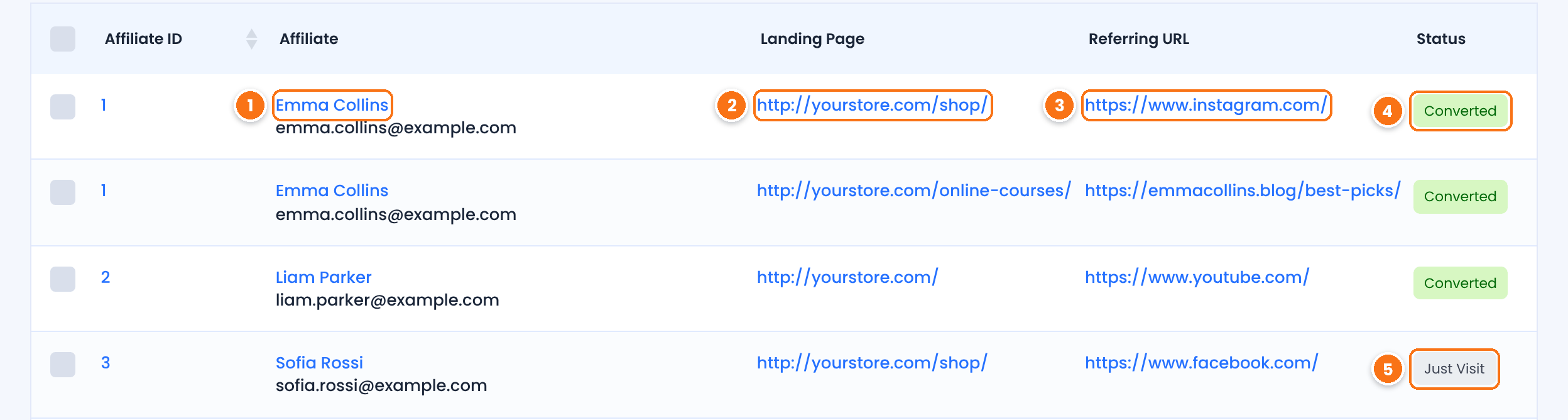
The affiliate the visit was credited to. If the wrong affiliate appears, see the FAQ about first and last affiliate below.
The page the visitor opened, without the tracking code.
The website the visitor came from, when the browser sends it.
The visit led to a referral. The Referral ID column links to it.
The visit was tracked, but no referral was created from it yet.
No new row in Clicks means the click is not tracked: start with the next step. A new row that stays Just Visit after a test order means the click works and the referral does not: go to the referral step below.
Fix clicks that are not recorded #
Check these causes in order. Most sites only need the first three.
The link must use your current URL parameter and the affiliate’s username or ID, for example yourstore.com/?ref=emma.collins, and the username or ID must belong to an existing affiliate. Compare it with Ultimate Affiliate Pro›Settings›General Settings, section Affiliate Links. If you changed URL Parameter Name or Affiliate Link Format, older links stop matching. Turn on Search URL for Both Formats so links with the username and links with the ID both work. See affiliate referral links.
Ultimate Affiliate Pro records the visit on your server when the page loads. A cached copy of the page skips that, so no click is saved and no cookie is set. Exclude links that contain ref= from caching. See cache plugins and host caching.
When the browser already holds a uap_referral cookie, a new link does not record a new click and the first affiliate keeps the credit. This is by design, unless the Credit Last Affiliate module is on. Test each link in a new private window.
Visits from websites listed in Affiliate Link URL Blacklist (General Settings, Affiliate Links) are not tracked. Remove the site from the list if it should send referrals.
Cookie consent plugins and some privacy extensions block or delete cookies. Allow the uap_referral cookie in your consent tool, and test without browser extensions. See cookie consent and affiliate tracking.
Fix referrals that are not created #
A referral is created at checkout, when the order is placed in the same browser that opened the link. If the click shows in Clicks and the order does not create a referral, check these causes.
Go to Ultimate Affiliate Pro›Integrations and check that the switch of your store or membership plugin, such as WooCommerce, is on.
Affiliates do not earn on their own purchases unless the Allow Self Referrals module is on. Test as a guest or with a customer account, never while logged in as the affiliate or as an admin who is also an affiliate. See own referrals.
Referrals come from orders placed through your checkout. An order you add yourself in WooCommerce › Orders does not go through checkout, so it does not create a referral. You can add the referral by hand with Add New Referral in Ultimate Affiliate Pro›Referrals.
The amount comes from the affiliate’s rank and your product rates. An affiliate with no rank and no product rate for the item, or a product excluded from commissions, gives a referral of 0. With Save Zero Value Referrals turned off (General Settings, Referral Calculation Exclusions), these referrals are not saved at all. Check the rank in Ultimate Affiliate Pro›Ranks, and see how commissions are calculated.
When this setting is on, a customer who already has orders on your site does not create a new referral. Test with a new customer account or as a guest.
With the Static Coupons module, an affiliate’s coupon credits that affiliate, even if the visitor came through someone else’s link. Static Coupons links existing coupons from your store to affiliates; it does not create new coupon codes. See affiliate coupon tracking.
Check the referral status #
A referral that exists but looks wrong usually has a status issue. Open Ultimate Affiliate Pro›Referrals.
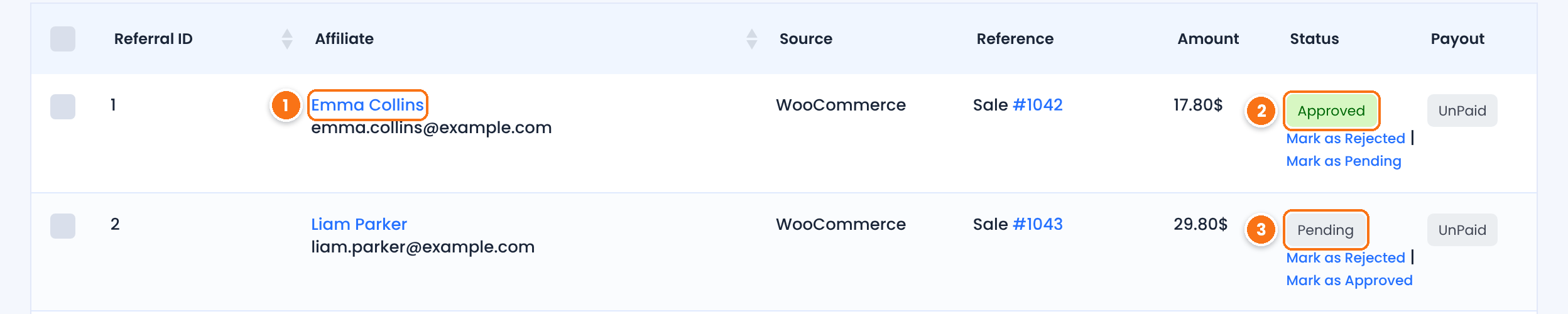
The affiliate who earns the commission.
The order was completed. Approved referrals can be paid.
The order is not completed yet. With WooCommerce, the referral is approved when the order status changes to Completed. Orders that are cancelled or failed set the referral to Rejected, and so do refunded orders while Reject Commissions on Refund is on (the default).
Tip
If referrals stay Pending after orders are completed, check Ultimate Affiliate Pro›Settings›Admin Workflow. With Keep Referral Status as Pending on, you approve every referral yourself. You can change a status at any time with the Mark as links in the list.
Test it #
- Open a new private window and paste a referral link of a test affiliate.
- Check that a new row appears in Clicks for that affiliate.
- In the same window, place an order as a guest or as a test customer.
- Check that a referral appears in Referrals and that the click changes to Converted.
- Mark the order as Completed in your store and check that the referral becomes Approved.
If the test still fails, turn on Safe Mode to rule out a conflict with another plugin, as shown in plugin and theme conflicts.
Frequently asked questions #
Why does the first affiliate get the credit when a visitor used two links?
By default, the first affiliate whose link the visitor opened keeps the credit until the cookie expires. Turn on the Credit Last Affiliate module in Ultimate Affiliate Pro, Modules if you want the last affiliate to get it.
How long does a visitor stay linked to an affiliate?
As long as the tracking cookie lasts: 360 days by default. Change it in Cookie Expiration (Days), in the Cookie Settings section of General Settings.
Can I see the tracking cookie in my browser?
Yes. Open your browser developer tools, go to the storage or application panel and look for the uap_referral cookie on your domain. It is set right after you open a valid referral link.
Clicks are recorded but some are missing. Why?
A browser that already has the tracking cookie does not add a new click for the same affiliate. Use a new private window for every test.
Do referrals work for orders paid with a coupon only?
Yes, when the coupon is assigned to an affiliate with the Static Coupons module. The order then credits the affiliate even without a referral link.


