Customer linking commissions pay an affiliate on every future order of a customer they referred, not only on the first one. In Ultimate Affiliate Pro this is the LifeTime Commissions module: once a referred customer buys, their account stays linked to that affiliate.
Referral tracking normally relies on a cookie in the visitor’s browser. When the customer clears cookies, changes device or simply returns months later, the cookie is gone and the next order is not credited. With LifeTime Commissions the link is saved on the customer’s account, so it works wherever the customer logs in. It is how recurring commissions find the affiliate for each renewal, too.
Before you start
- Ultimate Affiliate Pro installed, with your license active.
- Customers who buy with an account on your site, so their orders can be matched to the link.
- Ranks with rates. See Ranks: commission tiers for affiliates.
How customer linking commissions work #
- A visitor arrives through Liam’s referral link and places an order with an account. Liam earns the commission.
- Ultimate Affiliate Pro saves a relation between the customer’s account and Liam.
- Later, the customer comes back without a referral cookie and orders again. The order is credited to Liam through LifeTime Commissions, at the rank’s LifeTime Amount.
If the customer later arrives through another affiliate’s link, the original affiliate keeps the customer. To give the customer to the most recent affiliate instead, turn on the Credit Last Affiliate module. See Fair checkout reward for how first and last affiliate credit work.
Turn on LifeTime Commissions #
Go to Ultimate Affiliate Pro›Modules and open LifeTime Commissions.
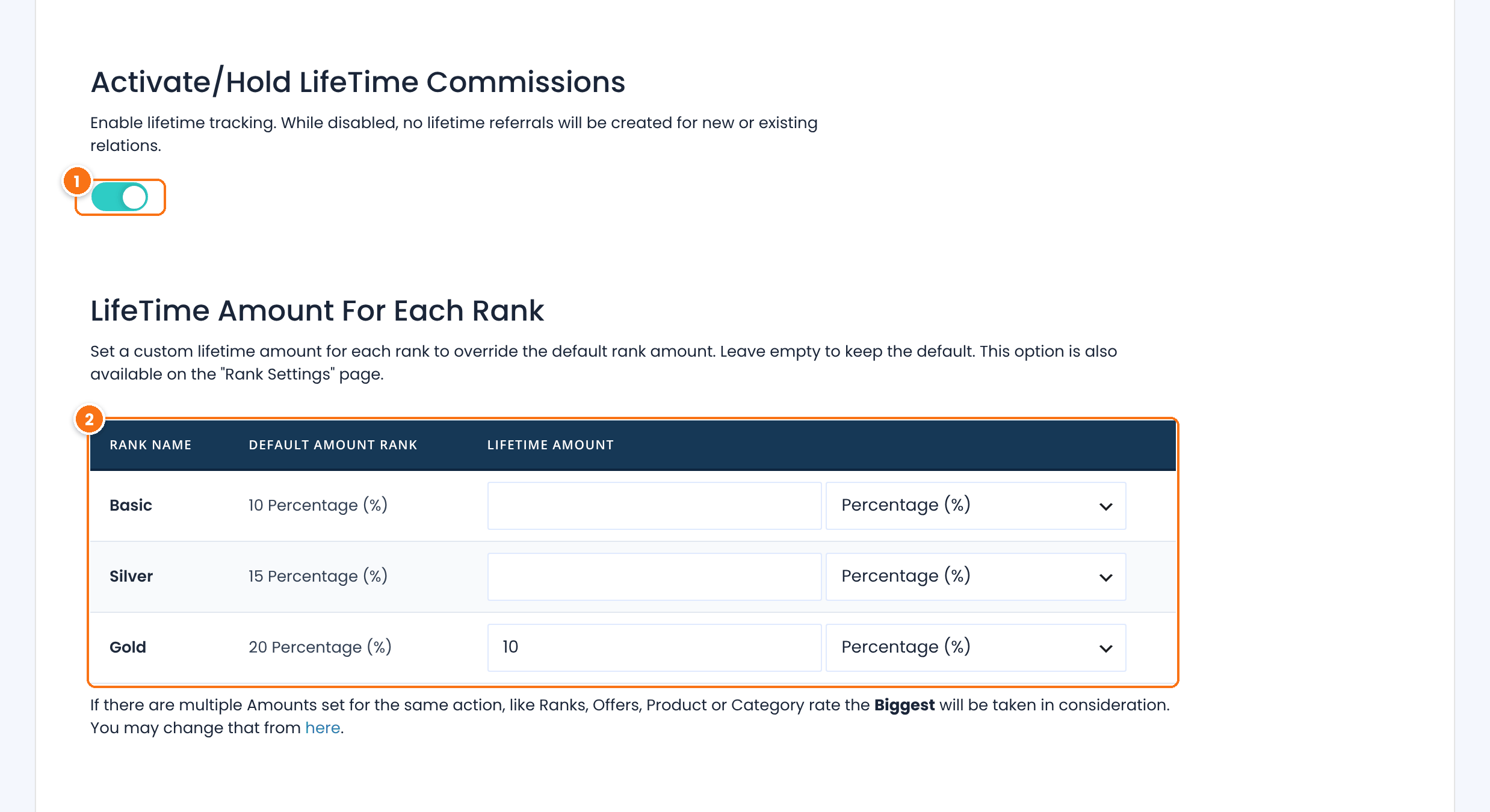
Credits linked customers’ later orders to their affiliate. When it is off, only orders with a referral cookie or another tracking method earn.
Default: Off
The rate for orders credited through the link, and its type, Percentage (%) or Flat Rate. The Default Amount Rank column shows the rank’s normal rate.
Leave a rank empty to pay its normal rate. Use a lower value to reward repeat orders less than new customers. You can also set it in the rank editor.
Click Save Changes. Product rates still apply to these orders and are compared with the LifeTime amount, as explained in How commissions are calculated.
Find, change or remove a link #
Below the settings, the same screen lets you manage the links between customers and affiliates.
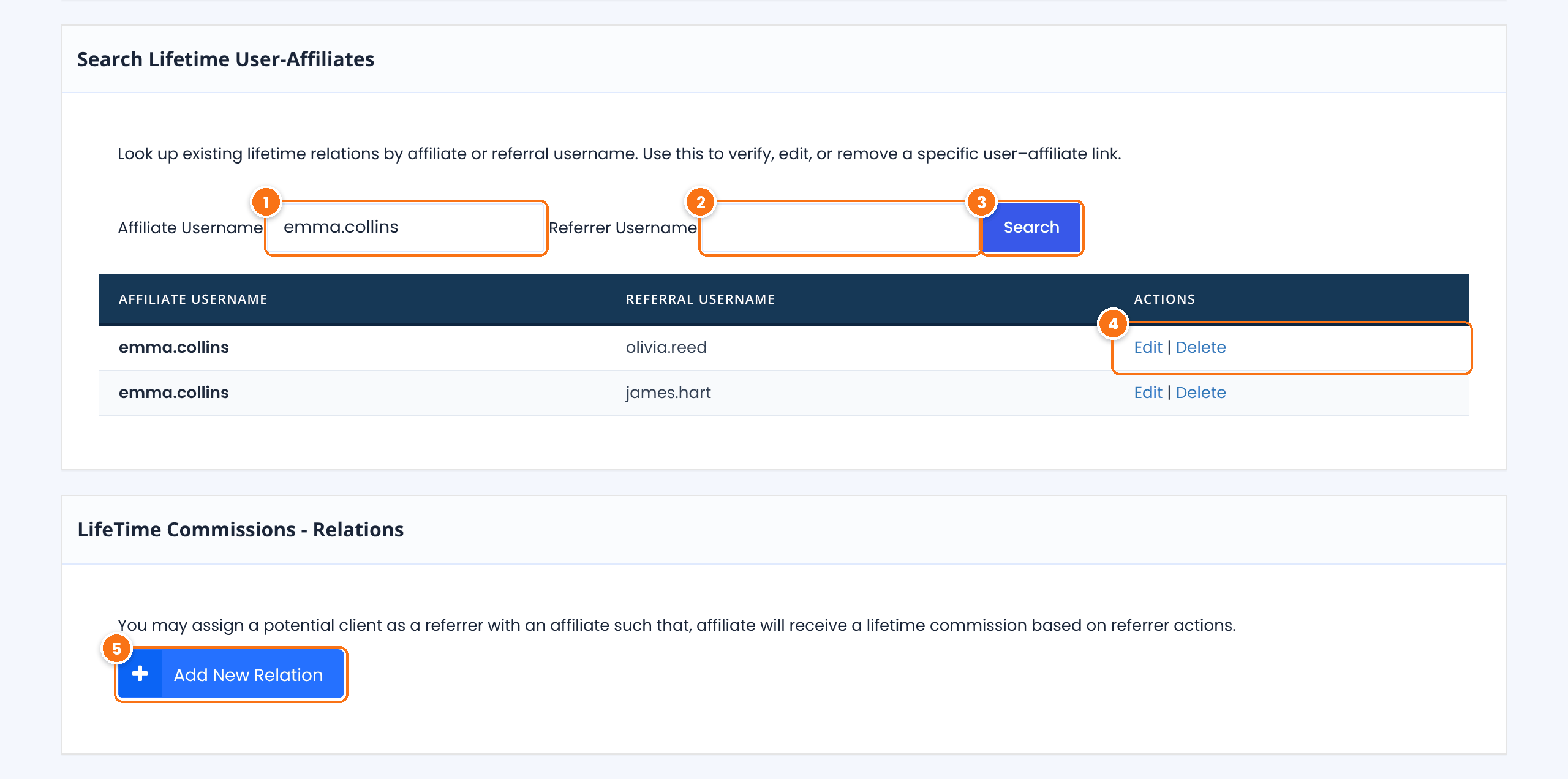
Type an affiliate’s username to list all the customers linked to them.
Type a customer’s username to see which affiliate they are linked to.
Shows the matching links, with the affiliate and the customer (Referral Username).
Edit moves the customer to another affiliate. Delete removes the link, so the customer’s next order is credited only through a new referral.
Links a customer to an affiliate by hand. Pick the customer in Referral Username and the affiliate in Affiliate Username, then click Save Changes. Use it for customers referred by phone, in person or before you installed the plugin.
Tip
Customers who signed up through a referral link are linked too, when the SignUp Referrals module is on. Their first order is then credited even if they buy days later from another device.
Test it #
- In a private browser window, open a referral link of a test affiliate and place an order with a new customer account.
- Search for the affiliate on the LifeTime Commissions screen: the customer appears in the results.
- Close the window, open the shop again without the referral link, log in as the customer and place a second order.
- Check Ultimate Affiliate Pro›Referrals: the second order is credited to the same affiliate.
To pay an affiliate only once for each customer instead, use the One Time Reward add-on.
Frequently asked questions #
How is this different from a long cookie?
A cookie lives in one browser and can be deleted. The link is saved on the customer’s account, so it works on every device where the customer logs in, for as long as the link exists.
Do guest orders count?
The link is stored on a customer account. Ask customers to create an account at checkout, or turn on account creation in your store, so their later orders can be matched.
Can I pay less on repeat orders?
Yes. Set a lower LifeTime Amount for each rank. The first order pays the normal rate, and orders credited through the link pay the LifeTime amount.
What happens if the customer uses another affiliate’s link?
The original affiliate keeps the customer. Turn on Credit Last Affiliate to move the customer to the newest affiliate instead.
How do I move a customer to another affiliate?
Search for the customer on the LifeTime Commissions screen, click Edit and pick the new affiliate.


