Affiliate social share buttons let affiliates post their affiliate link to Facebook, X, LinkedIn, Pinterest, email and other networks in one click, from the Affiliate Portal. The shared link already carries the affiliate’s tracking code, so every visitor who comes from the post is credited to them.
The Social Share module of Ultimate Affiliate Pro works with the Social Share & Locker Pro plugin, which draws the buttons. Affiliates don’t have to copy links or add their code by hand: if Liam shares your shop on Facebook, everyone who clicks the post is tracked as Liam’s visitor. For the links themselves, see Affiliate referral links.
Before you start
- Ultimate Affiliate Pro installed, with your license active.
- The Social Share & Locker Pro plugin installed, activated and licensed. To show share buttons on creatives, use version 7.9 or newer.
- A share buttons shortcode created in Social Share & Locker Pro, with the networks you want.
Create the share buttons shortcode #
In the WordPress menu of Social Share & Locker Pro, open the shortcode generator. Choose the networks (for example Facebook, X, LinkedIn and email) and a template, then copy the shortcode. You will paste it in the next step; Ultimate Affiliate Pro adds the affiliate link to it for each affiliate.
Turn on affiliate social share buttons #
Go to Ultimate Affiliate Pro›Modules and open Social Share.
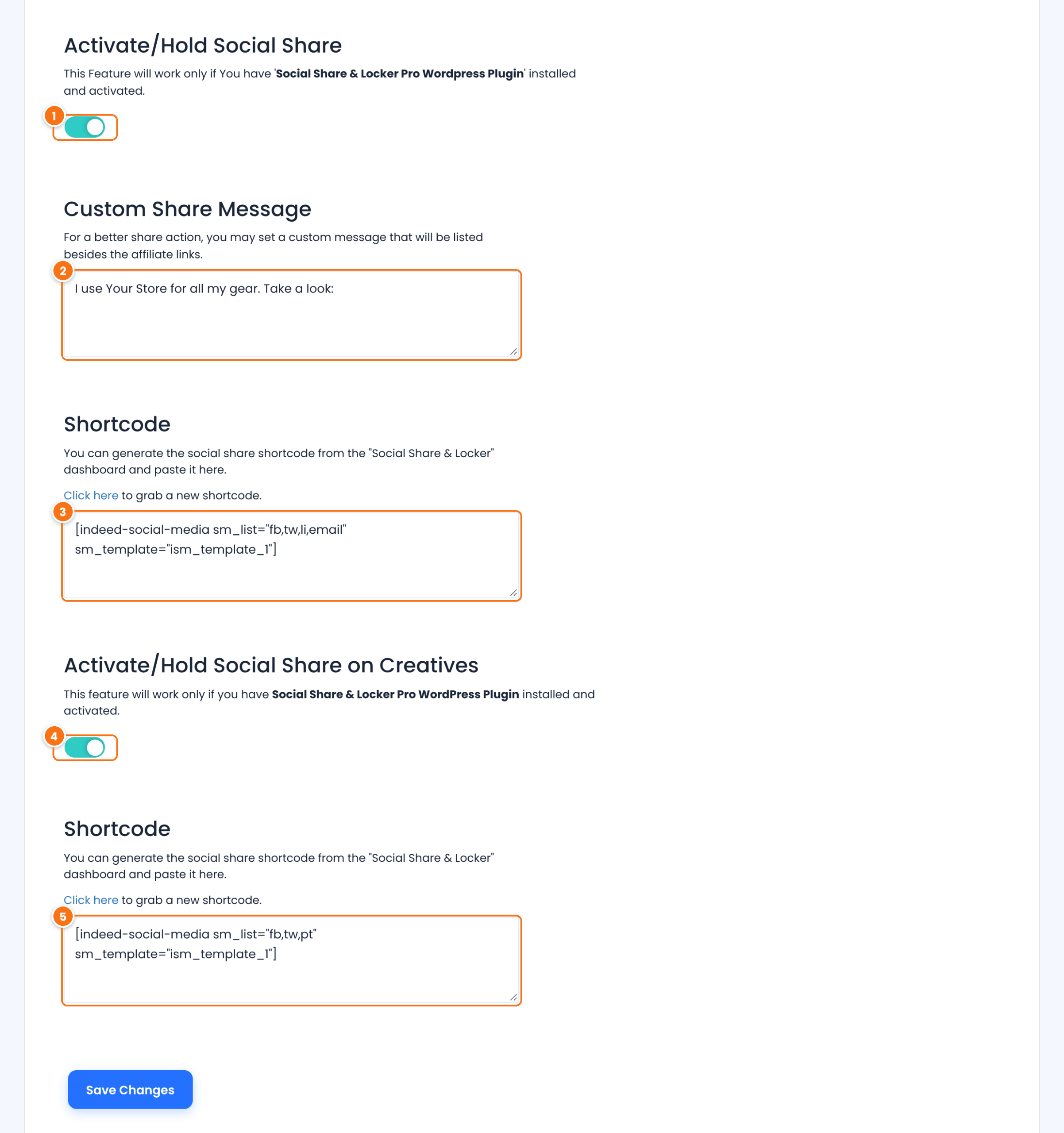
Shows share buttons next to the affiliate links in the Affiliate Portal.
Default: Off
The text shared with the link, for example “I use Your Store for all my gear. Take a look:”.
The shortcode from Social Share & Locker Pro. Use Click here above the box to open the shortcode generator.
Adds share buttons under each banner and text link in the Creatives tab.
Default: Off
The shortcode for the creatives buttons. It can use other networks than the first one, for example Pinterest for image banners.
Click Save Changes.
Where affiliates share #
Under Social Links, share buttons for the affiliate’s default link. Links they create with the Affiliate Link Generator get share buttons too.
When sharing on creatives is on, share buttons under each creative. See Creatives: banners and text links.
Tip
Keep the Custom Share Message short and personal. Posts that sound like a recommendation get more clicks than ads. Remind affiliates to say the post contains an affiliate link, as the FTC endorsement guides explain.
Test it #
- Log in to the Affiliate Portal as a test affiliate and open Marketing›Affiliate Links.
- Click the email share button and send the message to yourself, or share to a private test account.
- Open the shared link in a private window and check the visit in Ultimate Affiliate Pro›Clicks, credited to the test affiliate.
Frequently asked questions #
Do I need another plugin for social sharing?
Yes. The share buttons come from Social Share & Locker Pro. Ultimate Affiliate Pro adds the affiliate’s link and your message to them.
Which networks can affiliates share to?
The ones you include in the Social Share & Locker Pro shortcode, such as Facebook, X, LinkedIn, Pinterest and email.
Is the affiliate credited for visitors from shared posts?
Yes. The shared link is the affiliate link, so every visit from the post is tracked as a click for that affiliate.
Can affiliates share a specific product?
Yes. They create a link to the product with the Affiliate Link Generator; share buttons appear for the new link.


