Affiliate push notifications put your program’s events on your phone. Ultimate Affiliate Pro connects to Pushover, a push notification service with apps for iOS, Android and desktop, so you and your affiliates get an alert the moment something happens, such as a new affiliate or a new referral.
Push alerts are sent together with your email notifications: for each email, you choose whether it also goes out as a push, with a short text of its own.
Before you start
- Ultimate Affiliate Pro installed, with your license active.
- A Pushover account and the Pushover app on your phone.
- The email notifications you want as push alerts, created in Ultimate Affiliate Pro›Email Notifications.
Create a Pushover application #
- Log in to your Pushover account and open the application registration page.
- Give the application a name, such as Your Store Affiliates, set its type to Application and create it.
- Copy the API token Pushover shows for the new application.
- Copy your user key from your Pushover dashboard. This is where your own alerts go.
Connect Pushover to Ultimate Affiliate Pro #
Go to Ultimate Affiliate Pro›Modules and open Pushover – Admin.
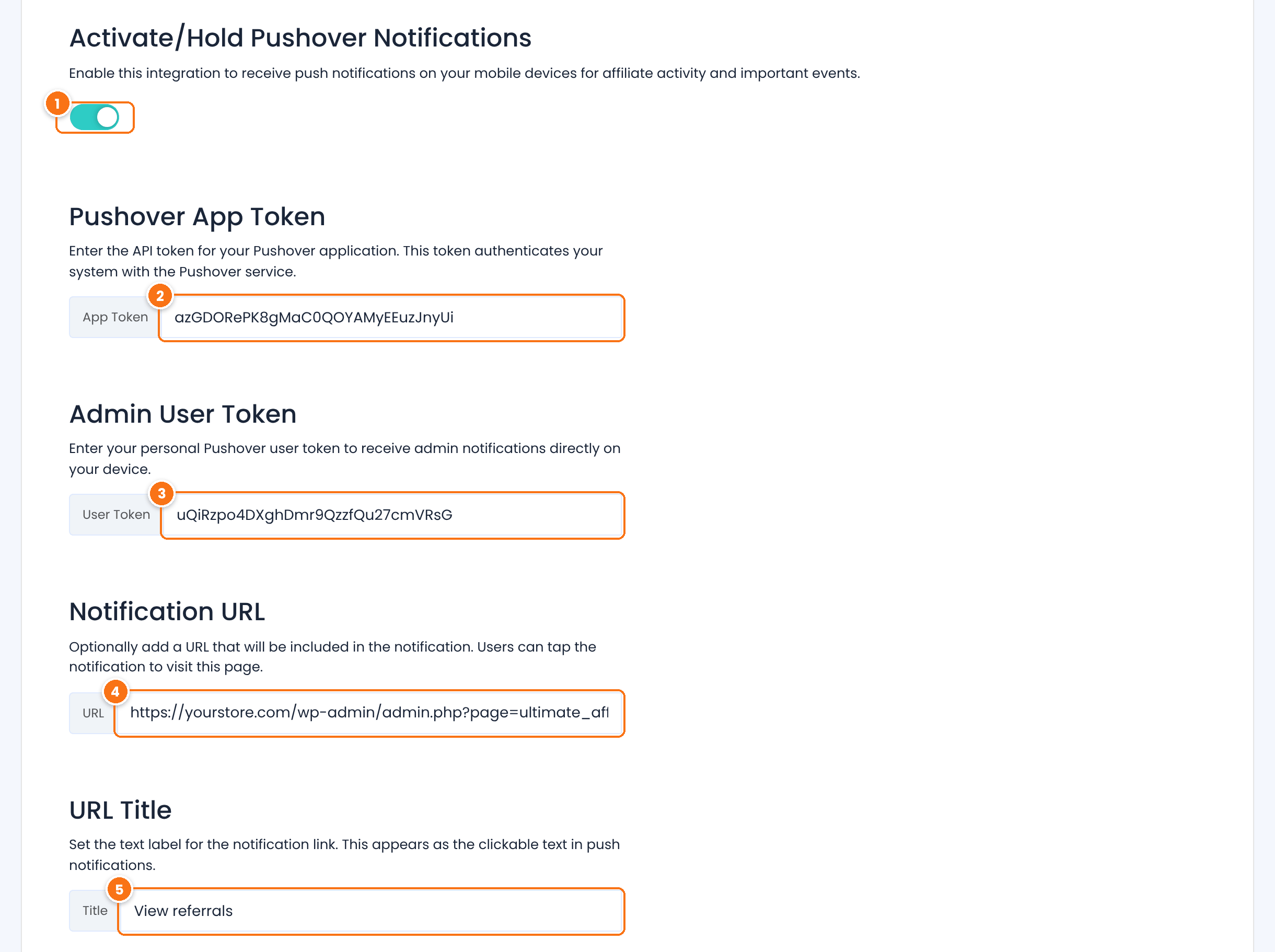
Turns push alerts on for your site.
Default: Off
The API token of the application you created.
Your Pushover user key. Alerts meant for the affiliate manager, such as a new affiliate registration, go to this account.
A link added to every alert, for example your Affiliates or Referrals screen. Optional.
The text of that link in the alert, for example View referrals. Optional.
Click Save Changes. In the Notification Sound box below, choose the sound of the alerts (15 Pushover sounds, such as Bike, Cash Register or Magic) and save it with its own button.
Choose which events send affiliate push notifications #
Go to Ultimate Affiliate Pro›Email Notifications and click Edit on a notification. With Pushover on, the editor has a Pushover Notification section under the email.
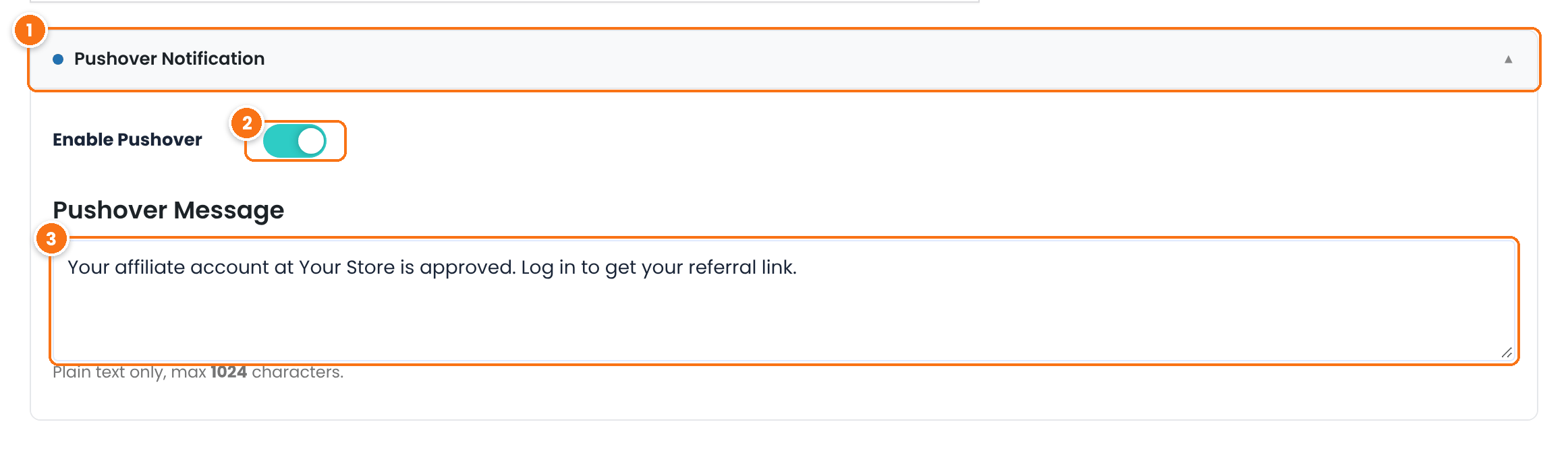
Click the bar to open the section.
Sends this notification as a push alert too, to the same person who receives the email.
Default: Off
The alert text: plain text, up to 1024 characters. Tags such as {first_name} work here. The email subject is used as the alert title.
Click Save Changes. Repeat for every notification you want on your phone, for example New Affiliate account Registered for you, and Payment Confirmation – Payout Completed for affiliates.
Send push alerts to affiliates #
Affiliates can receive push alerts on their own phones. Turn on the Pushover Notifications tab in Showcases›Affiliate Portal. In the Affiliate Portal, each affiliate pastes their own Pushover user key:
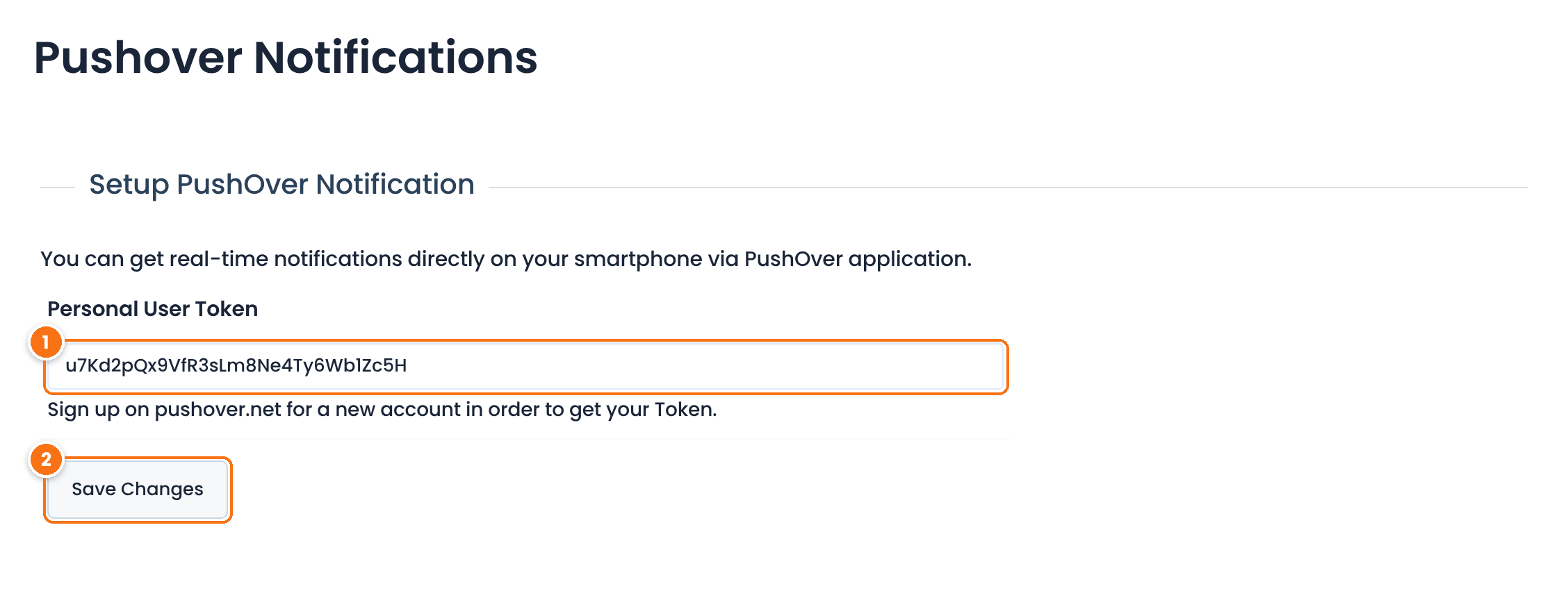
The affiliate’s own User Key from their Pushover account.
Saves the key. From now on, the affiliate gets an alert for every affiliate notification with Enable Pushover on.
To also send affiliates an alert for each new referral they earn, go to Ultimate Affiliate Pro›Modules, turn on Pushover – Affiliates and click Save Changes. It uses the application you connected in step 2, so keep Pushover – Admin on.
Test it #
- Turn on Enable Pushover for New Affiliate account Registered (the Affiliate Manager version).
- Register a test affiliate on your registration page.
- Check that the alert arrives in the Pushover app on your phone.
Frequently asked questions #
Do I need a Pushover account?
Yes. You need a Pushover account to create the application and to get your user key. Each affiliate who wants alerts needs their own Pushover account and app.
Which events can be sent as push alerts?
Every email notification in Email Notifications, such as new registrations, account approval, rank changes and payouts, plus new referrals for affiliates with the Pushover – Affiliates module.
Why does the alert keep repeating?
Alerts are sent with Pushover’s emergency priority, so the app repeats them every five minutes, for up to one hour, until you acknowledge the alert in the app.
Can I use a different sound?
Yes. Choose it in Notification Sound, in the Pushover – Admin module. The sound applies to all alerts.
An affiliate gets no alerts. What do I check?
Check that Pushover – Admin is on (and Pushover – Affiliates, for new referral alerts), that the affiliate saved the right user key in the Pushover Notifications tab, and that the notification has Enable Pushover on with a Pushover Message.


