You can translate Ultimate Affiliate Pro into any language on your WordPress site, because the plugin is translation-ready. Translate its built-in texts with Loco Translate or Poedit, or run a multilingual affiliate program with WPML or Polylang.
Which method you need depends on your site. For a site in one language other than English, translate the plugin texts. For a site in several languages, use a multilingual plugin. If you only want to reword a few texts, such as a button or a message, change them in the plugin settings instead; see Change texts, labels and messages.
- Use
- Loco Translate or Poedit
- Translates
- All built-in texts of the plugin
- Files
uap-{locale}.poand.mo
- Use
- WPML or Polylang
- Translates
- Built-in texts, your pages and the texts you entered in the plugin
- Visitors see
- The language they choose
How plugin translation works #
All texts of Ultimate Affiliate Pro use the text domain uap.
uap.pot, in the languages folder of the plugin, lists every text you can translate.Named after the text domain and the WordPress locale, for example uap-fr_FR.po and uap-fr_FR.mo for French or uap-de_DE.mo for German. WordPress reads the .mo file.
wp-content/languages/plugins/. Files saved there are not replaced when you update the plugin.Translate Ultimate Affiliate Pro with Loco Translate #
Loco Translate is a free plugin that lets you translate from your WordPress admin, without editing files.
- Install and activate Loco Translate from Plugins›Add Plugin.
- Go to Loco Translate›Plugins and select Ultimate Affiliate Pro.
- Click New language, choose your language and pick a location. Choose Custom or System so updates do not overwrite your work.
- Translate the texts and click Save. Loco Translate creates the
.poand.mofiles for you. - After each plugin update, open the translation again and click Sync to add any new texts.
If Loco Translate does not find all texts
Some plugin files are large. In Loco Translate›Settings, increase Skip PHP files larger than, then sync the translation again.
Or translate with Poedit #
Poedit is a free desktop app for translation files.
- Download
uap.potfrom thewp-content/plugins/ultimate-affiliate-pro/languages/folder of your site. - In Poedit, choose Create new translation, open
uap.potand pick your language. - Translate the texts and save the file as
uap-{locale}.po, for exampleuap-fr_FR.po. Poedit also saves the.mofile. - Upload both files to
wp-content/languages/plugins/with FTP or your host’s file manager. - When a new version adds texts, open your
.pofile in Poedit, update it from the newuap.potand upload it again.
Set the site language #
WordPress loads the translation that matches the site language. Go to Settings›General and pick your language in Site Language. Each user can also choose their own admin language in Users›Profile. The General Settings guide explains the option.
Run a multilingual program with WPML #
Ultimate Affiliate Pro includes a WPML configuration file, so WPML recognizes the texts you enter in the plugin settings.
- Install and activate WPML Multilingual CMS and WPML String Translation, then complete the WPML setup wizard with your languages.
- Translate the affiliate pages, such as Become an Affiliate, Affiliate Login and Affiliate Portal, like any other page.
- Go to WPML›String Translation and search for the texts you want to translate, such as login and registration messages or the Affiliate Portal tab titles. Enter the translations and save.
- Open and save your email notifications, ranks and creatives once after you install WPML. They are then registered for translation, in the
uapdomain.
Ultimate Affiliate Pro saves each affiliate’s language when they register or update their profile, and sends email notifications in that language.
Run a multilingual program with Polylang #
For Polylang, install the Polylang Integration Pro add-on, then go to Ultimate Affiliate Pro›Modules›Polylang Integration.
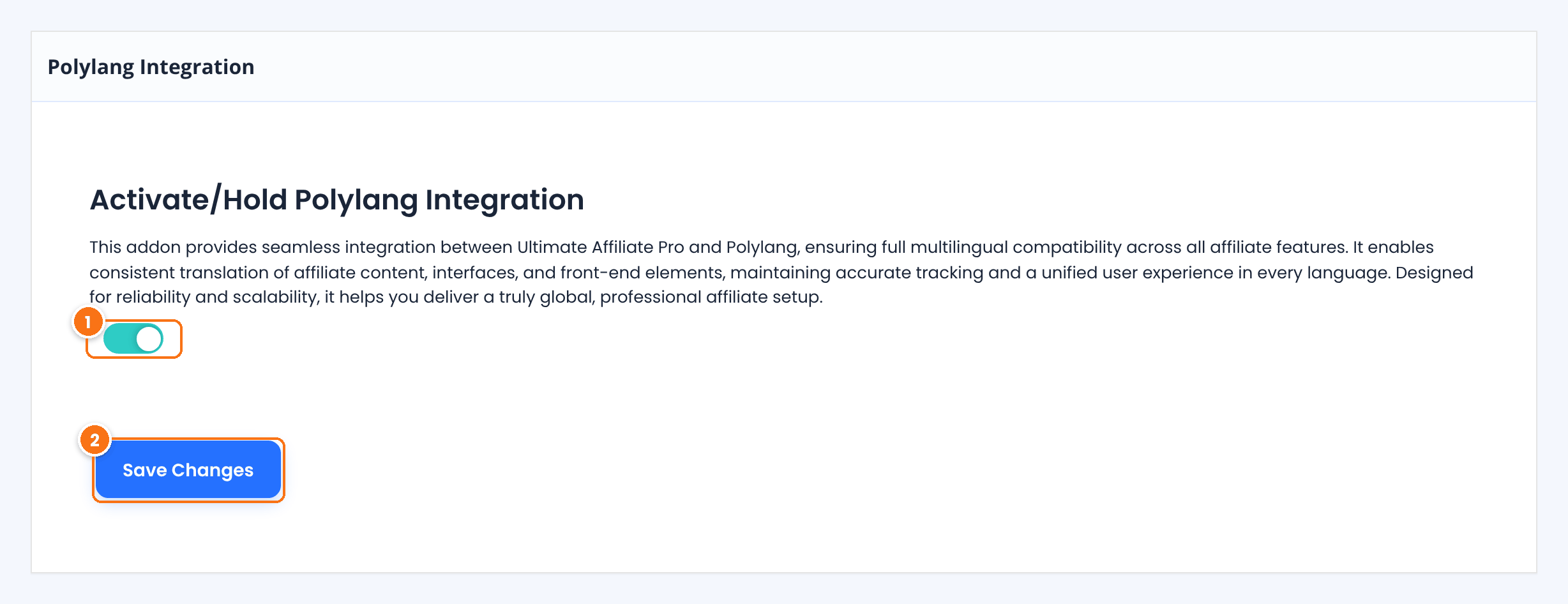
Turns the integration on.
Default: Off
Saves the setting.
With the integration on, rank names and creative names and descriptions are registered as Polylang strings in the uap group when you save them, so open and save your existing ranks and creatives once. Translate the strings in Languages›Translations, and translate the affiliate pages with Polylang like any other page.
Frequently asked questions #
I uploaded my translation but the texts are still in English. Why?
Check that the file name uses the uap- prefix and the exact locale of your site, for example uap-fr_FR.mo, that the .mo file is in wp-content/languages/plugins/, and that the site language is set in Settings, General. Then clear your cache.
Will my translations be lost when I update the plugin?
Not if they are saved in wp-content/languages/plugins/, or in the Custom or System location of Loco Translate. Files inside the plugin folder are replaced during updates.
Some texts do not appear in my translation file. Where are they?
Texts you entered or edited in the plugin settings, such as messages, email notifications and Affiliate Portal tab titles, are stored in your database, not in the translation file. Change them in the plugin settings, or translate them with WPML or Polylang.
Which multilingual plugin should I use?
Use the one your site already runs. WPML works with Ultimate Affiliate Pro directly. Polylang needs the Polylang Integration add-on.
Can I translate the plugin into a language that has no translation yet?
Yes. Create a new translation from uap.pot with Loco Translate or Poedit for any WordPress locale.


